
1. Product Overview
The Audio Pro A10 MKII is a compact yet powerful multiroom wireless speaker designed to deliver astonishing sound with deep bass and clear details. Its rounded design and fabric front seamlessly blend into modern home decor. This speaker supports various connectivity options including Wi-Fi, Bluetooth, and a 3.5 mm auxiliary input, offering versatile playback for your audio needs.

Despite its small footprint, the A10 MKII utilizes a dedicated woofer and BMR (Balanced Mode Radiator) technique to achieve a rich audio experience. It is designed for multiroom flexibility, allowing you to play music across multiple speakers simultaneously or individually, controlled easily via the Audio Pro Control app.

2. Setup and Installation
2.1 Unboxing and Placement
Carefully remove the speaker and all accessories from the packaging. Place the speaker on a stable, flat surface. For optimal sound dispersion, avoid placing the speaker in enclosed spaces or directly against walls, unless utilizing the wall-mounting feature.

2.2 Power Connection
Connect the provided power cable to the '100-240V ~ 50/60Hz' input port on the rear of the speaker. Plug the other end into a wall outlet. The speaker will power on automatically.

2.3 Audio Pro Control App
For full control and multiroom functionality, download the Audio Pro Control app on your smartphone or tablet. The app is available for both iOS and Android devices.
- For iOS: Download on the App Store
- For Android: Get it on Google Play

2.4 Network Connection (Wi-Fi)
Open the Audio Pro Control app and follow the on-screen instructions to connect your A10 MKII to your home Wi-Fi network. Ensure your speaker is within range of your Wi-Fi router. The A10 MKII supports both 2.4GHz and 5GHz Wi-Fi bands.
2.5 Bluetooth Pairing
To pair via Bluetooth, press and hold the Bluetooth button on the top panel of the speaker until the LED indicator starts blinking blue. On your device (smartphone, tablet, or laptop), go to Bluetooth settings and select "Audio Pro A10 MKII" from the list of available devices. Once connected, the LED will turn solid blue.
3. Operating Your Speaker
3.1 Controls and Indicators
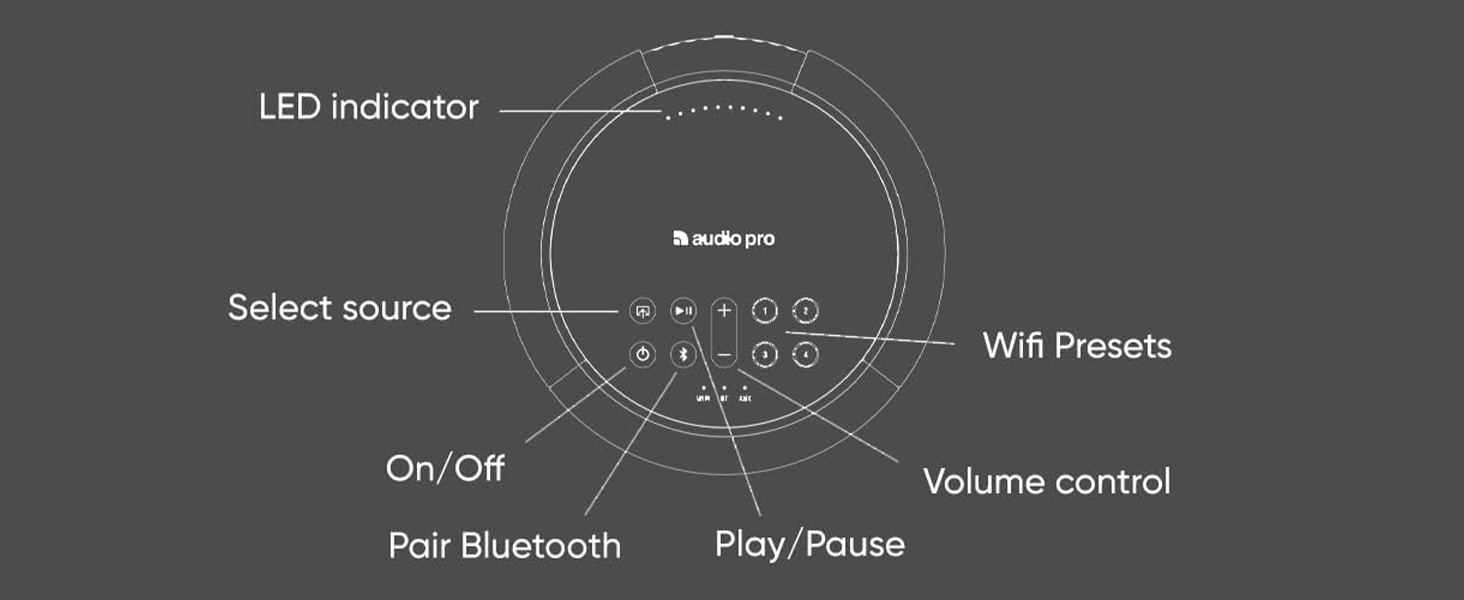
The top panel of the A10 MKII features intuitive controls and an LED indicator for easy operation.
- LED Indicator: Displays connection status and mode.
- On/Off: Power button.
- Select Source: Cycles through Wi-Fi, Bluetooth, and AUX inputs.
- Volume Control (+/-): Adjusts playback volume.
- Pair Bluetooth: Initiates Bluetooth pairing mode.
- Play/Pause: Controls media playback.
- Wi-Fi Presets (1-4): Programmable buttons for quick access to favorite radio stations or playlists.
3.2 Input Selection
The A10 MKII offers multiple ways to play your audio. Use the 'Select Source' button on the top panel or the Audio Pro Control app to switch between inputs.

- Wi-Fi: Connects to your home network for streaming via the Audio Pro Multiroom system, Chromecast built-in, Apple AirPlay 2, Tidal Connect, and Spotify Connect.
- Bluetooth: For direct wireless connection from any Bluetooth-enabled device.
- AUX: Use a 3.5 mm audio cable to connect external audio sources like turntables (RIAA-amp may be needed) or other devices.
3.3 Multiroom Functionality
The A10 MKII is designed for multiroom audio, allowing you to group multiple Audio Pro speakers together for synchronized playback throughout your home. Use the Audio Pro Control app to create speaker groups and manage playback zones.
3.4 Presets
The four preset buttons (1-4) on the top panel allow for quick access to your favorite radio stations or playlists. To save a preset, simply navigate to your desired content in the Audio Pro Control app, then press and hold one of the preset buttons until you hear a confirmation sound. To recall a preset, simply press the corresponding button.

3.5 Streaming Services
The A10 MKII supports direct streaming from popular services like Spotify, Amazon Music, and others through AirPlay 2 and Chromecast built-in when connected via Wi-Fi. Ensure your streaming service accounts are linked within the Audio Pro Control app for seamless playback.
4. Care and Maintenance
To ensure the longevity and optimal performance of your Audio Pro A10 MKII speaker, follow these care guidelines:
- Cleaning: Use a soft, dry cloth to wipe the speaker's surface. Do not use liquid cleaners, aerosols, or abrasive solvents, as these may damage the finish or internal components.
- Dust: Regularly dust the speaker, especially the fabric grille, to prevent accumulation that could affect sound quality.
- Placement: Avoid exposing the speaker to extreme temperatures, direct sunlight, high humidity, or water. Keep it away from heat sources and strong magnetic fields.
- Storage: If storing the speaker for an extended period, disconnect it from power and store it in a cool, dry place, preferably in its original packaging.
5. Troubleshooting
If you encounter issues with your Audio Pro A10 MKII, refer to the table below for common problems and their solutions.
| Problem | Possible Cause | Solution |
|---|---|---|
| No power | Power cable not connected; Power outlet not active | Ensure power cable is securely connected to speaker and wall outlet; Test outlet with another device. |
| No sound | Volume too low; Incorrect input selected; Source device not playing | Increase volume on speaker and source device; Select correct input (Wi-Fi, BT, AUX); Ensure source device is playing audio. |
| Cannot connect to Wi-Fi | Incorrect Wi-Fi password; Speaker out of range; Router issues | Verify Wi-Fi password; Move speaker closer to router; Restart router and speaker. |
| Bluetooth pairing issues | Speaker not in pairing mode; Device already paired; Interference | Press and hold Bluetooth button to enter pairing mode; Disconnect from previously paired devices; Move closer to speaker, reduce interference. |
| Sound distortion | Volume too high; Poor audio source quality; Interference | Lower volume; Use high-quality audio files/streams; Check for sources of interference. |
If the issue persists, try performing a factory reset by pressing the 'Reset' button on the rear panel (refer to Figure 2.2) with a small pointed object. This will restore the speaker to its original factory settings.
6. Technical Specifications
| Feature | Specification |
|---|---|
| Model Name | A10 |
| Speaker Type | Multi Room |
| Special Feature | Multi Room Audio |
| Recommended Uses | For Music Players |
| Compatible Devices | Smartphone, Tablet, Laptop |
| Subwoofer Diameter | 140 Millimeters |
| Controller Type | Button, App Control |
| Surround Sound Channel Configuration | 2.0 |
| Color | A10 MK II Dark Grey |
| Product Dimensions | 8.82"W x 8.7"H |
| Item Weight | 2.5 Kilograms (5.5 pounds) |
| Is Waterproof | FALSE |
| Maximum Range (Bluetooth) | 10 Meters |
| Number of Items | 1 |
| Control Method | App |
| Wireless Communication Technology | Bluetooth, Wi-Fi |
| Speaker Size | 6.7 Inches |
| Power Source | Battery Powered (Note: Product specifications indicate AC power, but this field states Battery Powered. Please refer to power input for accurate information.) |
| Audio Driver Type | Dynamic Driver |
| Connectivity Protocol | Bluetooth, Wi-Fi |
| Includes MP3 player? | No |
| Series Number | 15 |
| Manufacturer | Audio Pro |
| Item model number | 15280 |
| Date First Available | January 22, 2019 |
| Speaker Maximum Output Power | 52 Watts |
| Connectivity Technology | Auxiliary |
| Audio Output Mode | Stereo |
| Mounting Type | Tabletop Mount |
7. Warranty and Support
The Audio Pro A10 MKII comes with a Limited Warranty. For specific details regarding the warranty period and coverage, please refer to the documentation included with your purchase or visit the official Audio Pro website.
For technical support, troubleshooting assistance beyond this manual, or warranty claims, please contact Audio Pro customer service. Contact information can typically be found on the Audio Pro website or within your product packaging.


