
1. Introduction
The CHICIRIS STC-200 Electronic Aquarium Water Chiller and Heater is designed to maintain a stable and optimal water temperature for your aquarium. This device utilizes Peltier (thermoelectric) technology for both cooling and heating functions, ensuring a suitable environment for aquatic life. It features a digital display for precise temperature control and monitoring. Please read this manual thoroughly before installation and operation to ensure proper use and longevity of the product.
2. Safety Instructions
- Always disconnect power before performing any maintenance or installation.
- Ensure the unit is placed on a stable, level surface with adequate ventilation. Do not block air vents.
- Do not immerse the main unit in water. This product is not waterproof.
- Keep all electrical connections dry. Avoid contact with water.
- Ensure the power supply voltage matches the specifications of the unit (100-240V AC).
- Keep out of reach of children and pets.
- Do not operate the unit if any part is damaged or if the power cord is frayed.
- Use only original or approved replacement parts and accessories.
3. Package Contents
Verify that all items are present in the package:
- CHICIRIS STC-200 Chiller/Heater Unit
- Power Adapter
- Power Cord
- Submersible Water Pump
- Water Tubing
- Hose Clamps (2 pcs)
- Temperature Probe

Image: All components included in the package, showing the chiller unit, power adapter, pump, tubing, clamps, and temperature probe.
4. Product Overview
Familiarize yourself with the main components and controls of the STC-200 unit.
Front Panel
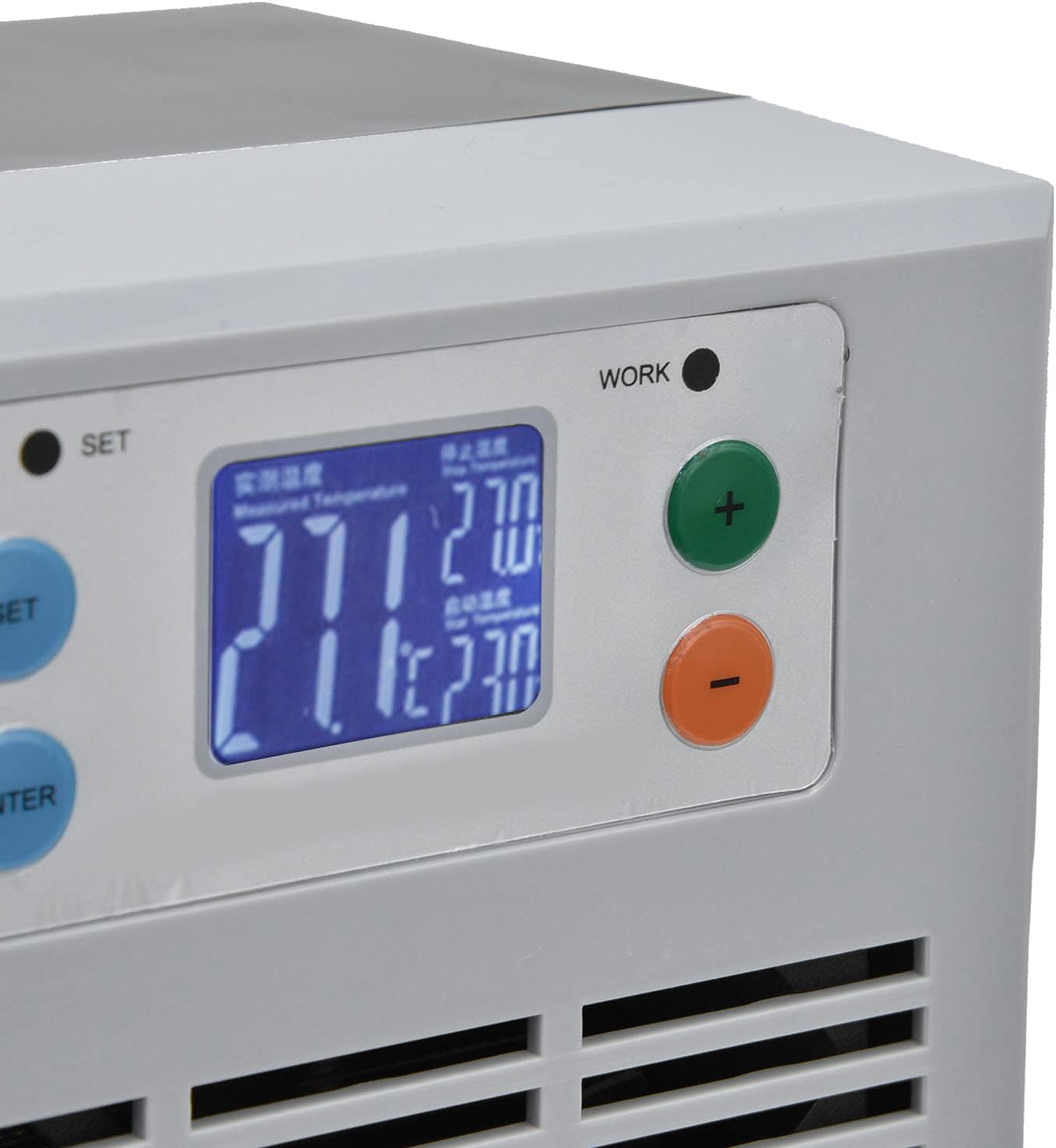
Image: Close-up view of the digital control panel with SET, ENTER, +, and - buttons, and the display showing measured and set temperatures.
- Digital Display: Shows current water temperature and set temperature.
- SET Button: Enters temperature setting mode.
- ENTER Button: Confirms settings.
- + Button: Increases temperature value or navigates menus.
- - Button: Decreases temperature value or navigates menus.
- WORK Indicator: Illuminates when the unit is actively cooling or heating.
Unit Dimensions and Vents

Image: The chiller unit shown with its approximate dimensions: 110mm (4.3in) width, 115mm (4.5in) depth, and 190mm (7.5in) height.

Image: Close-up view of the air vents on the side of the chiller unit, essential for heat dissipation.
The unit features air vents on its sides for proper heat exchange. Ensure these are never obstructed.
5. Setup
- Placement: Place the CHICIRIS STC-200 unit on a flat, stable surface near your aquarium. Ensure there is at least 10-15 cm (4-6 inches) of clear space around all sides for proper ventilation.
- Water Pump Connection: Connect one end of the provided water tubing to the outlet of the submersible water pump. Secure it with a hose clamp.
- Chiller Water Connections: Connect the other end of the tubing from the pump to the water inlet port on the chiller unit. Connect a second piece of tubing to the water outlet port of the chiller. Secure both connections with hose clamps.
- Aquarium Placement: Place the submersible water pump inside your aquarium. Position the free end of the water outlet tubing from the chiller unit back into the aquarium, ensuring it is submerged or directs water flow appropriately.
- Temperature Probe: Place the temperature probe inside the aquarium, away from the direct flow of the pump, to get an accurate water temperature reading. Ensure the probe is fully submerged.
- Power Connection: Connect the power adapter to the chiller unit's power input port. Then, plug the power cord into a standard 100-240V AC electrical outlet.

Image: Front view of the CHICIRIS STC-200 unit, showing the digital display and control buttons, ready for setup.
6. Operation
Powering On
Once all connections are secure and the unit is plugged in, the digital display will illuminate, showing the current water temperature measured by the probe.
Setting the Desired Temperature
- Press the SET button once. The set temperature value on the display will start flashing.
- Use the + and - buttons to adjust the temperature to your desired value.
- Press the ENTER button to confirm your setting. The display will stop flashing and return to showing the current water temperature.
Automatic Temperature Control
The unit will automatically activate its cooling or heating function to reach and maintain the set temperature. The WORK indicator light will illuminate when the unit is actively cooling or heating.
- If the current water temperature is higher than the set temperature, the unit will initiate cooling.
- If the current water temperature is lower than the set temperature, the unit will initiate heating.
7. Maintenance
Regular maintenance ensures optimal performance and extends the lifespan of your unit.
- Cleaning the Unit: Periodically wipe the exterior of the unit with a soft, damp cloth. Do not use harsh chemicals or abrasive cleaners.
- Cleaning Air Vents: Ensure the air vents on the sides of the unit are free from dust and debris. Use a soft brush or a vacuum cleaner with a brush attachment to gently clean the vents. Blocked vents can reduce efficiency and lead to overheating.
- Water Pump Maintenance: Refer to your water pump's manual for specific cleaning instructions. Regularly clean the pump impeller to prevent blockages and ensure consistent water flow.
- Tubing Inspection: Check the water tubing periodically for kinks, blockages, or algae buildup. Clean or replace tubing as necessary to maintain unrestricted water flow.
- Temperature Probe: Ensure the temperature probe remains clean and free of algae or mineral deposits for accurate readings.
8. Troubleshooting
| Problem | Possible Cause | Solution |
|---|---|---|
| Unit does not power on. | No power supply; loose connection. | Check power cord and adapter connections. Ensure the outlet has power. |
| Water temperature not changing. | Incorrect temperature setting; insufficient water flow; blocked air vents; unit capacity exceeded. | Verify set temperature. Check water pump operation and tubing for blockages. Clean air vents. Ensure aquarium volume is within 35L. |
| Water pump not working. | Pump unplugged; impeller blocked. | Check pump's power connection. Clean pump impeller. |
| Unit is noisy. | Fan obstruction; unit not level. | Check for obstructions in fan area. Ensure unit is on a stable, level surface. |
| Display shows erratic readings. | Temperature probe dirty or faulty; probe not fully submerged. | Clean the temperature probe. Ensure it is fully submerged and positioned correctly. |
9. Specifications
| Model: | STC-200 |
| Brand: | CHICIRIS |
| Voltage: | AC 100-240V |
| Power: | 100W |
| Cooling/Heating Method: | Peltier (Thermoelectric) |
| Recommended Aquarium Volume: | Up to 35 Liters |
| Dimensions (L x W x H): | Approx. 115mm x 110mm x 190mm (4.5in x 4.3in x 7.5in) |

Image: Back label of the unit, indicating model, voltage, power, and recommended cooling water volume.
10. Warranty and Support
For warranty information and technical support, please refer to the documentation provided with your purchase or contact your retailer. Keep your proof of purchase for any warranty claims.