
1. Introduction
This manual provides detailed instructions for the installation, operation, and maintenance of the Marsrock 1400W Wind Solar Hybrid Charge Controller. This device is designed to efficiently manage power from both wind generators and solar panels to charge lithium and lead-acid (including gel) batteries in off-grid systems. It features MPPT (Maximum Power Point Tracking) for wind charging and PWM (Pulse Width Modulation) for solar charging, ensuring optimal energy harvesting and battery protection.

Figure 1: Marsrock Wind Solar Hybrid Controller integrated into a wind and solar power system.
2. Safety Instructions
- Read all instructions carefully before installation and operation.
- Ensure all power sources (wind turbine, solar panels, battery) are disconnected before wiring or servicing the controller.
- Use appropriate tools and wear protective equipment during installation.
- Install the controller in a well-ventilated, dry, and cool environment, away from flammable materials.
- Ensure correct polarity when connecting batteries, solar panels, and wind generators to prevent damage.
- Do not disassemble or attempt to repair the controller yourself. Contact qualified personnel for service.
- Keep children away from the controller and electrical connections.
3. Product Features
- Wind generator MPPT boost charging function for optimized power harvesting.
- PWM dump load for wind, utilizing an external dump-load resistance to manage excess power.
- Intelligent disconnection of solar charging to prevent overcharging.
- Dual power supply function: Supports both battery and solar power supply.
- LCD display for real-time monitoring of parameters such as voltage and current for wind, solar, and load.
- High performance and stable chip control for reliable operation.
- Compatible with Lithium and Lead-Acid (Gel) batteries.
4. Product Overview and Components
The Marsrock Wind Solar Hybrid Charge Controller consists of the main controller unit and an external dump load resistor. The controller features an LCD display and control buttons for easy configuration and monitoring.

Figure 2: Main controller unit and external dump load resistor.
The front panel includes an LCD screen and four control buttons: ENTER, UP, DOWN, and ESC. The bottom panel provides terminals for connecting the wind generator, solar panels, battery, and DC load.
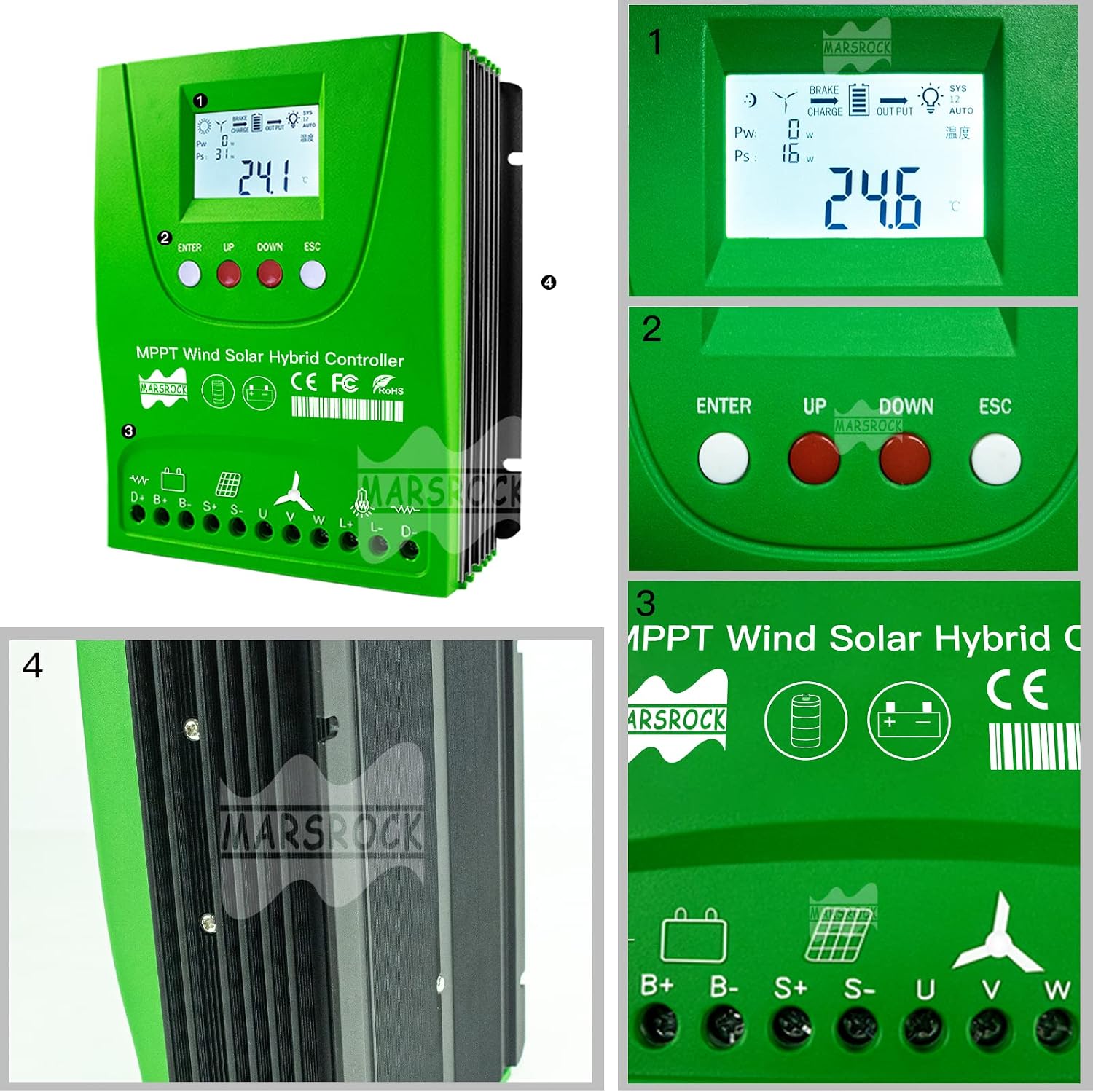
Figure 3: Detailed view of the controller's LCD, control buttons, and connection points.
5. Technical Specifications
| Parameter | Value |
|---|---|
| Model Number | 1400W80GR |
| Rated Wind Power | 0~800W |
| Rated Solar Power | 0~600W |
| System Voltage | 12V / 24V (Auto Recognition) |
| Battery Type | Lithium, Lead-Acid (Gel) |
| Display Type | LCD |
| Color | Green |
| Dimensions (approx.) | 145mm x 171mm x 69mm (5.7in x 6.7in x 2.7in) |

Figure 4: Controller dimensions.
6. Setup and Installation
Proper installation is critical for the safe and efficient operation of the hybrid charge controller. Follow these steps carefully.
6.1 Wiring Diagram
Refer to the following wiring diagram for connecting the wind turbine, solar panels, battery, and DC load to the controller. Ensure all connections are secure and correct polarity is observed.

Figure 5: Comprehensive wiring diagram for the hybrid system.
Important: Connect the battery first, then the wind turbine and solar panels, and finally the DC load. Disconnect in reverse order.
6.2 Connection Steps
- Battery Connection: Connect the positive and negative terminals of your battery bank to the B+ and B- terminals on the controller. Ensure correct polarity. The controller will automatically detect 12V or 24V system voltage.
- Wind Turbine Connection: Connect the three phases of your wind generator to the U, V, W terminals. The controller will manage the wind charging and dump load.
- Solar Panel Connection: Connect the positive and negative leads of your solar panel array to the S+ and S- terminals. Ensure the open-circuit voltage of the solar panels does not exceed the controller's maximum input voltage.
- DC Load Connection (Optional): Connect your DC loads to the L+ and L- terminals. The controller provides intelligent load control.
- External Dump Load Resistor: Connect the provided external dump load resistor to the D+ and D- terminals. This resistor is crucial for dissipating excess energy from the wind turbine when the battery is full or during high wind conditions.
7. Operating Instructions
The controller's LCD display provides real-time system status, and the buttons allow for parameter adjustment.
7.1 LCD Display Overview
The LCD screen shows various parameters including battery voltage, wind power, solar power, load status, and temperature. Icons indicate charging status, dump load activity, and system voltage.

Figure 6: Examples of LCD display screens and information presented.
7.2 Button Functions
- ENTER: Confirms selections or enters a menu.
- UP: Navigates up through menu options or increases a value.
- DOWN: Navigates down through menu options or decreases a value.
- ESC: Exits a menu or cancels an operation.
7.3 Parameter Settings
To access and modify parameters:
- Press the ENTER button to enter the main menu.
- Use the UP and DOWN buttons to navigate through the parameter options (e.g., battery type, overcharge voltage, dump load voltage).
- Press ENTER again to select a parameter for editing.
- Use UP and DOWN to adjust the value.
- Press ENTER to confirm the new value.
- Press ESC to exit the menu.
Consult the specific parameter list in the full manual for detailed descriptions and recommended settings for different battery types.
8. Maintenance
Regular maintenance ensures the longevity and optimal performance of your hybrid charge controller.
- Cleaning: Periodically clean the controller's exterior with a dry cloth. Ensure ventilation openings are free from dust and debris. Do not use liquid cleaners.
- Connection Check: Annually inspect all wiring connections for tightness and corrosion. Loose connections can cause overheating and damage.
- Environmental Inspection: Ensure the installation environment remains dry, cool, and well-ventilated. Check for any signs of moisture ingress or extreme temperatures.
- Battery Health: Monitor battery voltage and health regularly. Ensure battery terminals are clean and free of corrosion.
9. Troubleshooting
This section addresses common issues you might encounter with the Marsrock Wind Solar Hybrid Charge Controller.
| Problem | Possible Cause | Solution |
|---|---|---|
| Controller display is off. | No power from battery or incorrect battery connection. | Check battery voltage and ensure battery connections to the controller are correct and secure. |
| Wind turbine not charging. | Low wind speed, incorrect wind turbine connection, or dump load active. | Verify wind speed. Check U, V, W connections. Monitor dump load status on LCD. |
| Solar panels not charging. | Insufficient sunlight, incorrect solar panel connection, or battery is full. | Check solar panel exposure. Verify S+ and S- connections. Check battery charge level. |
| Battery not charging or overcharging. | Incorrect battery type setting, faulty battery, or incorrect voltage parameters. | Verify battery type setting in the controller menu. Test battery health. Adjust charging parameters if necessary. |
| Dump load resistor overheating. | Excessive power from wind turbine, continuous dump load operation. | Ensure proper ventilation around the resistor. This is normal during high wind/full battery conditions. If persistent and extreme, check system balance. |
If the problem persists after attempting these solutions, please contact Marsrock customer support.
10. Warranty and Support
Marsrock products are designed for reliability and performance. For warranty information, please refer to the documentation provided with your purchase or visit the official Marsrock website. For technical support, troubleshooting assistance beyond this manual, or spare parts, please contact Marsrock customer service through their official channels.
Contact Information: Please refer to your purchase invoice or the Marsrock official website for the most current contact details.
