
1. Product Overview
The Uponor Thermal Actuator (Model 1022244) is designed for precise control of valves in Uponor, Polytherm, and Wirsbo Vario B underfloor heating distributors. This actuator operates on 230V AC and features a Normally Closed (NC) function, meaning the valve is closed when no power is supplied and opens when power is applied.
Key features include:
- Function: Normally Closed (NC) - valve closes without current.
- Nominal Voltage: 230V AC.
- Internal Thread: M28 x 1.5 for secure mounting.
- Indicator: Integrated lift indicator for visual status confirmation.
- Connection: Equipped with a 0.75 mm² x 1m connection cable.
- Protection: Splash-proof design.

Figure 1: Uponor Thermal Actuator (Model 1022244). This image shows the blue housing and grey base of the actuator.
2. Safety Information
Please read all safety instructions carefully before installation and operation. Failure to follow these instructions may result in electric shock, fire, or property damage.
- Qualified Personnel: Installation and electrical connections must only be performed by qualified and authorized personnel.
- Power Disconnection: Always disconnect the main power supply before performing any installation, maintenance, or troubleshooting.
- Voltage: Ensure the supply voltage matches the actuator's nominal voltage (230V AC).
- Environment: Do not install in environments exceeding the specified operating temperature or humidity ranges.
- Modifications: Do not modify the actuator or its components. Unauthorized modifications void the warranty and can be hazardous.
3. Installation and Setup
This section provides instructions for the correct installation of the thermal actuator onto your underfloor heating manifold.
- Power Off: Ensure the main power supply to the underfloor heating system is completely disconnected at the circuit breaker.
- Identify Valve: Locate the specific valve on the Uponor, Polytherm, or Wirsbo Vario B underfloor heating distributor where the actuator is to be installed.
- Mount Actuator: Carefully screw the thermal actuator onto the valve's M28 x 1.5 internal thread. Hand-tighten until secure. Do not overtighten.
- Electrical Connection: Connect the 230V AC electrical cable from the actuator to the appropriate control terminal on your heating system's wiring center. Ensure connections are secure and comply with local electrical codes. The actuator functions as Normally Closed (NC), meaning it will open the valve when power is supplied.
- Verify Indicator: After connection, the lift indicator on the actuator should be visible. Its position will change once power is applied and the actuator begins to operate.
- Restore Power: Once all connections are secure and verified, restore power to the heating system.
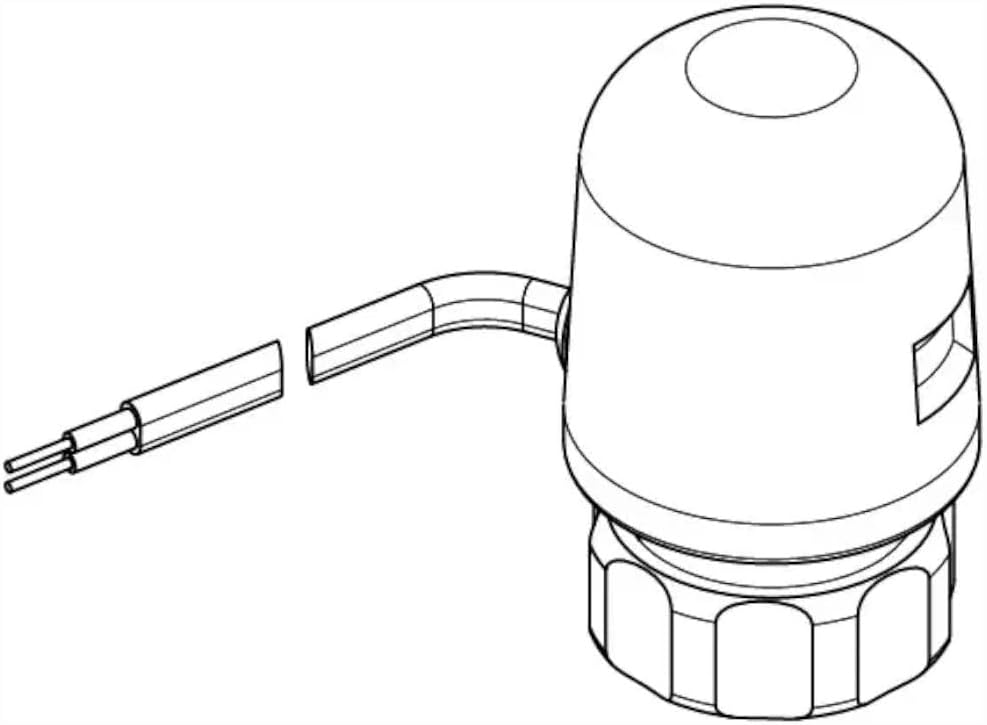
Figure 2: Diagram of the Uponor Thermal Actuator showing its connection cable. This illustrates the electrical connection point.
4. Operation
The Uponor Thermal Actuator operates based on the electrical signal it receives from the heating control system.
- Normally Closed (NC): When no electrical current is supplied to the actuator, the valve remains closed, preventing water flow.
- Valve Opening: When the heating control system sends a 230V AC signal to the actuator, it begins to heat up internally. This causes a wax element to expand, slowly pushing the valve stem open. This process typically takes a few minutes.
- Valve Closing: When the electrical signal is removed, the actuator cools down, and the wax element contracts, allowing the valve to close.
- Lift Indicator: The transparent lift indicator on the side of the actuator provides a visual confirmation of the valve's status. When the valve is open, the indicator will be in a different position compared to when it is closed.
5. Maintenance
The Uponor Thermal Actuator is designed for long-term, maintenance-free operation. However, periodic visual inspections are recommended.
- Visual Inspection: Periodically check the actuator for any signs of physical damage, loose connections, or leaks around the valve.
- Cleaning: If necessary, gently wipe the exterior of the actuator with a dry or slightly damp cloth. Do not use abrasive cleaners or solvents.
- Function Check: Observe the lift indicator during heating cycles to ensure the actuator is opening and closing the valve as expected.
No internal maintenance or lubrication is required for this device.
6. Troubleshooting
If you experience issues with your Uponor Thermal Actuator, consult the following troubleshooting guide:
| Problem | Possible Cause | Solution |
|---|---|---|
| Actuator not opening/closing | No power supply to the actuator. Faulty wiring connection. Actuator failure. | Check if 230V AC is supplied to the actuator when heat is demanded. Verify all electrical connections are secure. If power is present and connections are good, the actuator may need replacement. |
| Lift indicator not moving | No power or insufficient power. Mechanical obstruction. | Confirm 230V AC power supply. Ensure the actuator is correctly seated on the valve and there are no obstructions. |
| Water leakage around valve | Actuator not properly tightened. Faulty valve or manifold. | Ensure the actuator is securely hand-tightened onto the valve. Do not use tools to overtighten. Inspect the valve and manifold for damage. Contact a qualified plumber if the leak persists. |
If troubleshooting steps do not resolve the issue, contact a qualified technician or Uponor customer support.
7. Technical Specifications
Detailed specifications for the Uponor Thermal Actuator (Model 1022244).

Figure 3: Dimensional drawing of the Uponor Thermal Actuator. This diagram provides key measurements for installation planning.
| Specification | Value |
|---|---|
| Manufacturer | Uponor |
| Model Number | 1022244 |
| Nominal Voltage | 230 V AC |
| Max. Current Consumption | 0.14 A |
| Max. Power Consumption | 2 W |
| Function | Normally Closed (NC) |
| Internal Thread | M28 x 1.5 |
| Connection Cable | 0.75 mm² x 1 m |
| Dimensions (L x W x H) | 7.5 x 5 x 5 cm |
| Weight | 120 Grams |
| Color | Blue |
8. Warranty and Support
For warranty information, technical support, or spare parts availability, please contact Uponor customer service or your local distributor. Keep your purchase receipt as proof of purchase.
Uponor GmbH Contact Information:
Industriestraße 5697437 Haßfurt
Germany
Phone: +492221090866
Email: Kundenservice@uponor.com
Website: www.uponor.com/de-de


