
Surtime 3304-brown
Surtime 52-inch Modern Ceiling Fan User Manual
Model: 3304-brown
1. Introduction
Thank you for choosing the Surtime 52-inch Modern Ceiling Fan. This product combines lighting and air circulation, featuring a stylish design with wood grain ABS blades and a white glass lampshade. This manual provides essential information for safe installation, operation, and maintenance of your new ceiling fan.

Image: Surtime 52-inch Modern Ceiling Fan with light, remote control, and three wood-grain blades, installed in a modern living room setting.
2. Safety Information
Please read all instructions carefully before beginning installation. Failure to do so may result in electric shock, fire, or personal injury.
- Ensure power is disconnected at the circuit breaker before installation or servicing.
- All wiring must be in accordance with national and local electrical codes.
- Consult a qualified electrician if you are unsure about wiring or installation.
- The mounting structure must be capable of supporting the fan's weight (approximately 14.57 pounds).
- Do not operate the fan if any part is damaged.
- Keep hands, hair, and clothing clear of the fan blades when in operation.
3. Package Contents
Verify that all components are present before beginning installation:
- Ceiling Fan Motor Assembly
- Fan Blades (3 imitation wood grain ABS blades)
- White Glass Lampshade
- LED Light Source
- Remote Control
- Down-rods (3.9" and 7.8")
- Mounting Bracket
- Hardware Pack (screws, wire nuts, etc.)
- Installation Instructions (refer to the provided PDF or video)
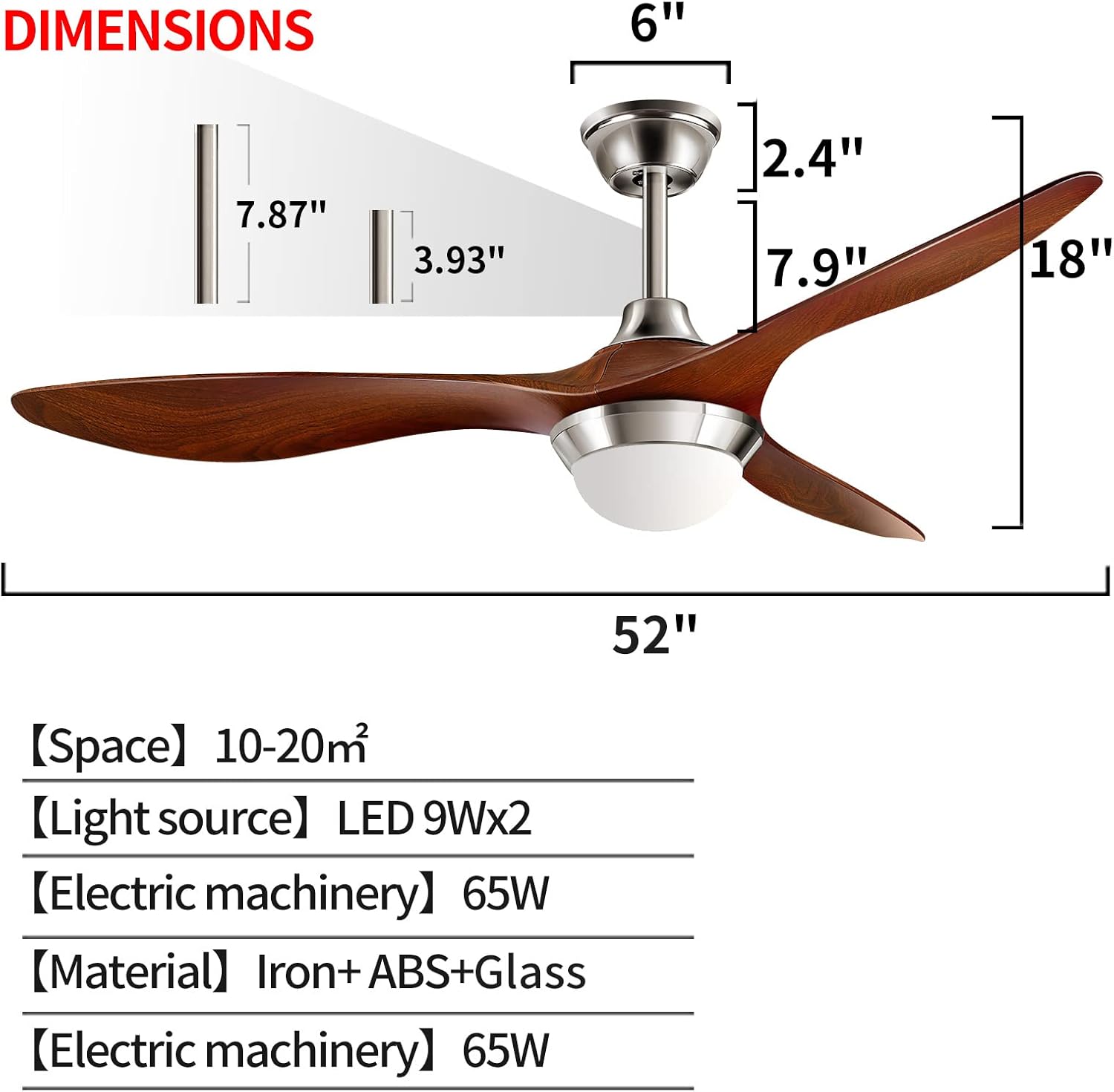
Image: Detailed dimensions of the ceiling fan, including blade span (52 inches) and down-rod lengths (3.93 inches and 7.87 inches).
4. Setup and Installation
Installation of this ceiling fan requires basic electrical knowledge. It is recommended to consult the official installation video or a qualified electrician if you are unfamiliar with the process.
4.1 Pre-Installation Checklist
- Ensure the power is OFF at the circuit breaker.
- Verify the ceiling junction box is securely mounted and capable of supporting the fan.
- Select the appropriate down-rod (3.9" or 7.8") based on your ceiling height.
4.2 Installation Steps (Overview)
- Secure the mounting bracket to the ceiling junction box.
- Assemble the down-rod and canopy to the fan motor.
- Hang the fan assembly onto the mounting bracket.
- Connect the electrical wiring (ensure the cable port is inserted tightly, as the fan will not work otherwise).
- Attach the fan blades.
- Install the LED light source and glass lampshade.
- Restore power and test the fan.
NOTE: The ceiling fan has a cable port. Please insert the port tightly when installing, otherwise the fan cannot work!
Video: Official installation guide for the Surtime Ceiling Fan. This video demonstrates the steps for assembling and mounting the fan, connecting electrical wires, and installing the light kit. It highlights key aspects such as securing the mounting bracket, attaching the down-rod, and ensuring proper cable port connection for functionality.


Images: Details of the down-rod options and canopy connection for installation.
5. Operating Instructions
Your Surtime ceiling fan comes with a convenient handheld remote control for easy operation of all functions.
5.1 Remote Control Functions

Image: Layout of the remote control, showing buttons for power, light control, fan speed, natural wind mode, reversible motor, and timer settings.
- Power Button: Turns the fan and light on/off.
- Light On/Off: Toggles the light.
- Natural Wind: Activates a fluctuating wind mode for a more natural feel.
- Reversible Motor: Changes the direction of the fan blades (see 5.3 for details).
- 6 Wind Speed Settings: Adjust fan speed from 1 (lowest) to 6 (highest).
- Timer Setting: Set the fan to turn off automatically after 1, 2, 4, or 8 hours.
5.2 Light Control
The integrated LED light offers three color temperatures:
- Warm Light (3000K)
- Natural Light (4500K)
- Cool White Light (6000K)
Cycle through the color temperatures by pressing the light button on the remote. The light also has a memory function, recalling the last used setting.

Image: Visual representation of the three adjustable light color temperatures: Warm White (3000K), Natural White (4500K), and Cold White (6000K).
5.3 Reversible Motor Function
The DC reversible copper core motor allows for year-round use:
- Summer Mode (Downdraft): Blades rotate counter-clockwise to create a cooling downdraft.
- Winter Mode (Updraft): Blades rotate clockwise to circulate warm air trapped near the ceiling.
Use the "Reversible Motor" button on the remote to switch between modes.

Image: Visual explanation of the fan's reversible airflow function, showing downdraft for summer and updraft for winter.
5.4 Timer Function
The timer function allows you to set the fan to automatically turn off after a specified duration:
- Press the 1H, 2H, 4H, or 8H button on the remote to activate the corresponding timer.
- The fan will operate for the selected duration and then automatically shut off.

Image: Illustration of the timer settings available on the remote control: 1 hour, 2 hours, 4 hours, and 8 hours.
6. Maintenance
Regular maintenance ensures optimal performance and longevity of your ceiling fan.
- Cleaning: Use a soft, damp cloth to clean the fan blades and motor housing. Do not use abrasive cleaners or solvents.
- Blade Inspection: Periodically check the blade screws for tightness. Loose screws can cause wobbling and noise.
- Light Source: The integrated LED light source is designed for long life. If replacement is ever needed, contact customer support.
- Dusting: Regularly dust the fan to prevent accumulation, which can affect performance and appearance.
7. Troubleshooting
If you experience issues with your fan, refer to the following common problems and solutions:
| Problem | Possible Cause | Solution |
|---|---|---|
| Fan does not operate. |
|
|
| Light does not work or is dim. |
|
|
| Fan wobbles. |
|
|
| Remote control not responding. |
|
|
| Annoying beep sound from receiver. |
|
|
8. Specifications
| Feature | Detail |
|---|---|
| Brand | Surtime |
| Model | 3304-brown |
| Dimensions | 52"L x 52"W x 18"H |
| Material | Acrylonitrile Butadiene Styrene, Glass, Wood |
| Light Source Type | LED (9Wx2) |
| Control Method | Remote Control |
| Wind Speeds | 6 adjustable speeds |
| Motor Type | DC Reversible Copper Core Motor |
| Timer Function | 1/2/4/8 hour options |
| Down-rods Included | 3.9" and 7.8" |
| Item Weight | 14.57 pounds |
| Indoor/Outdoor Usage | Indoor (covered outdoor areas also suitable) |
9. Warranty and Support
For any questions, concerns, or warranty claims regarding your Surtime ceiling fan, please contact our customer support team. We are committed to ensuring your satisfaction and will assist you with any issues you may encounter.
Please refer to your purchase documentation for specific warranty terms and contact information.
Related documents3304-brown


Ask a question about this manual
Ask about setup, troubleshooting, compatibility, parts, safety, or missing instructions. Manuals+ will review the question and use this page’s manual context to help answer it.