
Introduction
Thank you for purchasing the Bell+Howell BH65TWS Bluetooth True Wireless Stereo Link Cinema Speaker. This portable speaker offers high-quality audio with the convenience of wireless connectivity. Featuring Bluetooth and auxiliary input options, a built-in microphone for hands-free calls, and True Wireless Stereo (TWS) technology for pairing two speakers, it provides a versatile listening experience. This manual will guide you through the setup, operation, and maintenance of your new speaker.
Package Contents
Please ensure all items are present in the package:
- BH65TWS Speaker
- USB Charging Cable
- Auxiliary Audio Cable
- Instruction Manual (this document)
- Warranty Card
Product Overview
Familiarize yourself with the various parts and controls of your BH65TWS speaker.

Image: Top view of the Bell+Howell BH65TWS speaker, highlighting the control panel with power, volume, and playback buttons.
The top panel features intuitive controls for power, volume adjustment, and media playback. The rear panel includes ports for charging and auxiliary input.
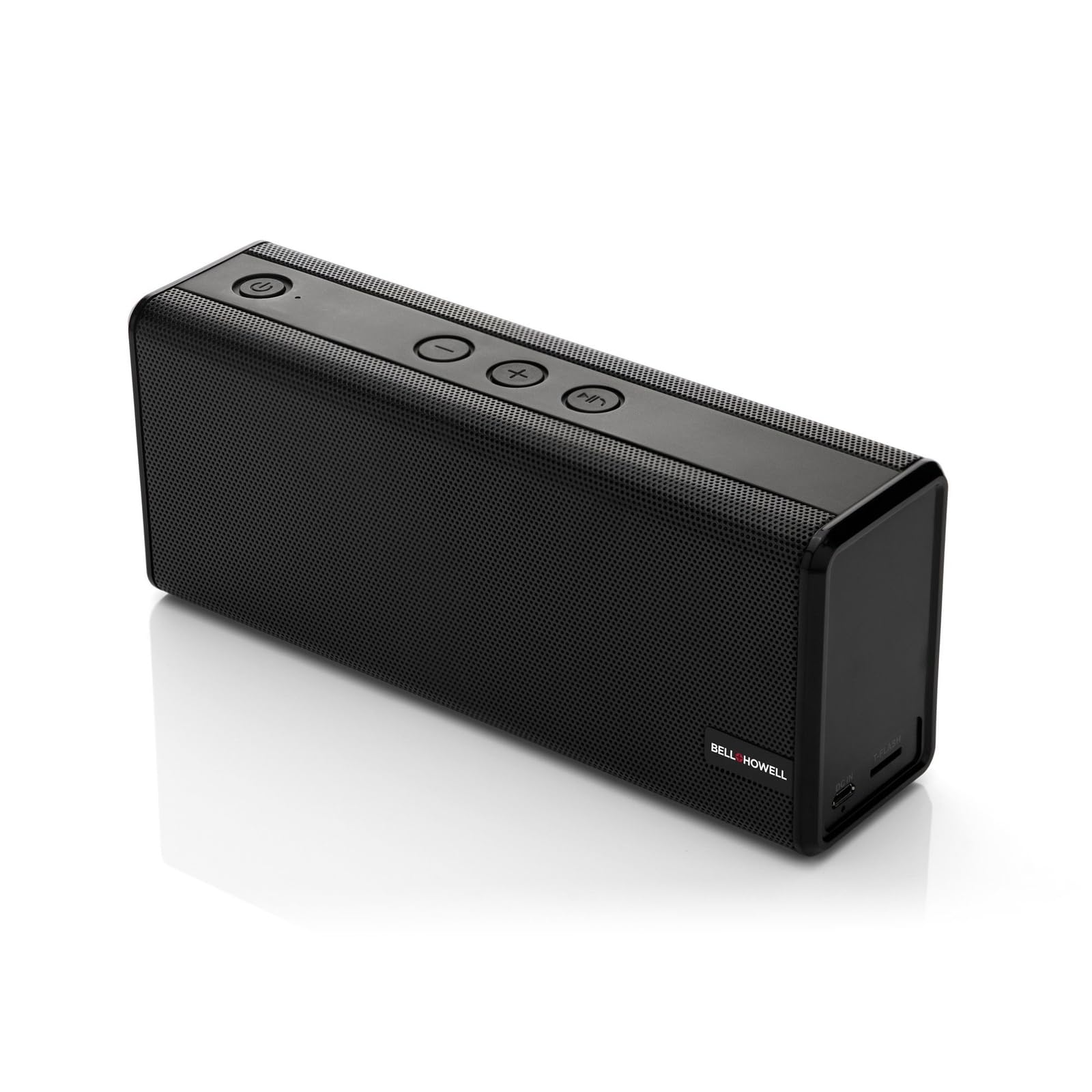
Image: Front view of the Bell+Howell BH65TWS speaker, showcasing its sleek, rectangular design and speaker grille.
Setup
Charging the Speaker
Before first use, fully charge the speaker. A full charge takes approximately 3-4 hours.
- Connect the small end of the provided USB charging cable to the charging port on the speaker.
- Connect the large end of the USB cable to a USB power adapter (not included) or a computer's USB port.
- The charging indicator light will illuminate during charging and turn off when fully charged.

Image: The Bell+Howell BH65TWS speaker with a visual representation of a charging battery, indicating the charging process.
Powering On/Off
- To power on, press and hold the Power button () for approximately 3 seconds until you hear an audible tone and the LED indicator lights up.
- To power off, press and hold the Power button for approximately 3 seconds until you hear an audible tone and the LED indicator turns off.
Operating Instructions
Bluetooth Pairing
Connect your speaker to a Bluetooth-enabled device for wireless audio streaming.
- Ensure the speaker is powered on and within 33 feet (10 meters) of your Bluetooth device.
- The speaker will automatically enter Bluetooth pairing mode, indicated by a flashing LED light.
- On your Bluetooth device, enable Bluetooth and search for available devices.
- Select "BH65TWS" from the list of devices.
- Once paired, the LED indicator will stop flashing and remain solid, and you will hear a confirmation tone.

Image: The Bell+Howell BH65TWS speaker positioned beside a smartphone, illustrating a successful Bluetooth connection for audio playback.
True Wireless Stereo (TWS) Pairing
Pair two BH65TWS speakers together for an immersive stereo sound experience.
- Ensure both BH65TWS speakers are powered on and not connected to any Bluetooth device.
- On one speaker (this will be the primary speaker), press and hold the Play/Pause button for approximately 3 seconds until you hear a tone, indicating it's searching for another TWS speaker.
- The two speakers will automatically connect to each other. You will hear a confirmation tone once TWS pairing is successful.
- Now, connect your Bluetooth device to the primary speaker as described in the Bluetooth Pairing section. Audio will play through both speakers in stereo.

Image: Two Bell+Howell BH65TWS speakers displayed side-by-side with a wireless signal icon between them, illustrating the True Wireless Stereo (TWS) pairing feature.
Auxiliary Input Mode
Use the auxiliary input for devices without Bluetooth capability.
- Connect one end of the provided 3.5mm auxiliary audio cable to the AUX port on the speaker.
- Connect the other end of the cable to the headphone jack or audio output of your device.
- The speaker will automatically switch to auxiliary mode.
- Control playback and volume from your connected device.
Hands-Free Calling
The built-in microphone allows for hands-free phone calls when connected via Bluetooth.
- When a call comes in, the music will pause. Press the Play/Pause button to answer the call.
- To end a call, press the Play/Pause button again.
- To reject an incoming call, press and hold the Play/Pause button for 2 seconds.
Maintenance
Proper care ensures the longevity of your speaker.
- Cleaning: Use a soft, dry cloth to wipe the speaker's surface. Do not use abrasive cleaners or solvents.
- Storage: Store the speaker in a cool, dry place away from direct sunlight and extreme temperatures.
- Water Exposure: This speaker is NOT waterproof. Avoid exposure to water or excessive moisture.
- Battery Care: To maintain battery life, charge the speaker at least once every three months if not in regular use.
Troubleshooting
If you encounter issues, refer to the following common solutions:
| Problem | Possible Solution |
|---|---|
| Speaker does not power on. | Ensure the speaker is fully charged. Connect to a power source and try again. |
| Cannot pair via Bluetooth. | Make sure the speaker is in pairing mode (flashing LED). Turn off and on Bluetooth on your device. Ensure no other devices are connected to the speaker. Move closer to the speaker. |
| No sound in Bluetooth mode. | Check the volume levels on both the speaker and your connected device. Ensure the speaker is successfully paired. |
| TWS pairing fails. | Ensure both speakers are not connected to any other Bluetooth device. Place speakers close to each other during pairing. Repeat the TWS pairing steps carefully. |
| Sound distortion. | Reduce the volume on your device or the speaker. Ensure the speaker is not too far from the Bluetooth source. |
Specifications
Detailed technical specifications for the Bell+Howell BH65TWS speaker:
| Feature | Detail |
|---|---|
| Model Name | BH65TWS-BK |
| Speaker Type | Tweeter |
| Special Features | Built-in Microphone, Stereo Pairing (TWS) |
| Recommended Use | Music |
| Color | Black |
| Item Weight | 1.6 Pounds (0.73 kg) |
| Waterproof | No |
| Wireless Technology | Bluetooth |
| Speaker Size | 3.5 Millimeters |
| Power Source | Battery Powered (1 Lithium Ion battery included) |
| Product Dimensions | 8.7 x 4.7 x 2.8 inches (22.1 x 11.9 x 7.1 cm) |
| Speaker Max Output Power | 6 Watts (Dual 3-watt drivers) |
| Connectivity Technology | Auxiliary, Bluetooth |
| Audio Output Mode | Stereo, Surround (with TWS) |
| Battery Life | Up to 10 hours (2,200mAh battery) |
Safety Information
Please read and follow these safety guidelines for safe operation:
- Do not expose the speaker to extreme temperatures, direct sunlight, or high humidity.
- Avoid dropping or subjecting the speaker to strong impacts.
- Do not disassemble, repair, or modify the speaker yourself. This will void the warranty.
- Keep the speaker away from sources of heat, such as radiators, heat registers, stoves, or other apparatus (including amplifiers) that produce heat.
- Do not use the speaker near water or in wet conditions.
- Use only the provided charging cable or a certified equivalent.
- Dispose of the battery and speaker responsibly according to local regulations.
Warranty and Support
Your Bell+Howell BH65TWS speaker comes with a limited warranty. Please refer to the included Warranty Card for detailed terms and conditions, including coverage period and how to make a claim.
For technical support, troubleshooting assistance, or warranty inquiries, please contact Bell+Howell customer service. Contact information can typically be found on the warranty card or the official Bell+Howell website.