
1. Introduction
The Evertech 32-Channel 1080p HD Surveillance System provides comprehensive security monitoring with 32 cameras and a 10TB hard drive for continuous recording. This manual provides instructions for the installation, operation, and maintenance of your surveillance system.

Image 1.1: Overview of the Evertech 32-Channel Surveillance System, including the DVR, 10TB hard drive, and 32 dome cameras.
2. Package Contents
Verify that all items listed below are included in your package:

Image 2.1: Visual representation of the system's package contents.
- 1x 32-Channel Digital Video Recorder (DVR) with 10TB Hard Disk Drive (HDD) and accessories (Power Adapter, Mouse, User Manual)
- 32x HD 1080p 2.8mm Fixed Lens Indoor/Outdoor Dome Security Cameras
- 2x 18-Port 10A Power Supply Boxes with Male Type DC Jack Power Connectors
- 1x Surveillance Warning Sign
- 16x 100 Ft Video and Power Pre-made CCTV Cables
- 16x 50 Ft Video and Power Pre-made CCTV Cables
3. Product Features
The Evertech Surveillance System is designed with the following key features:
- Real-time Surveillance: Supports 32 channels for simultaneous video viewing and recording.
- High-Definition Cameras: 1080p HD cameras with 3.6mm fixed iris lenses providing approximately a 74° field of view.
- Night Vision: SMD IR LEDs offer up to 50 feet of infrared night vision.
- Durable Design: Weatherproof metal dome cameras suitable for both indoor and outdoor installations.
- Extensive Storage: Equipped with a 10TB hard drive for continuous recording.
- Remote Access: View live and recorded video on smartphones, tablets, or PCs using the free XMeye APP, web browser, or VMS Client Software.
- Motion Detection & Alerts: Customizable motion detection with email alert functionality.
- Video Backup: USB port for easy backup and transfer of video footage.
- Multichannel Playback: Functionality for searching and downloading recorded video.

Image 3.1: Detailed view of an Evertech 1080p HD dome camera, showing its fixed lens, IR LEDs, and durable construction.

Image 3.2: Technical specifications and components of the dome camera.
4. Setup Guide
Follow these steps to set up your Evertech Surveillance System:
- Connect DVR to Network: Connect the DVR to your network router using an Ethernet cable.
- Initial Power-Up: Power on the DVR. Connect a monitor to the DVR via HDMI or VGA. Follow the on-screen startup wizard to configure basic settings and test the network connection.
- Camera Installation: Connect each camera to the DVR using the provided BNC video and power cables. Ensure the power supply boxes are correctly wired to power the cameras.
- Mount Cameras: Mount the cameras in your desired indoor or outdoor locations. Adjust the camera angles for optimal coverage.
- Download Mobile App: Download the XMeye App on your smartphone from the respective app store.
- Add Device to App: Add the DVR device to the XMeye app by scanning the QR Code displayed on the DVR's monitor or by manually entering the device ID.

Image 4.1: Visual guide for initial DVR and remote access setup.
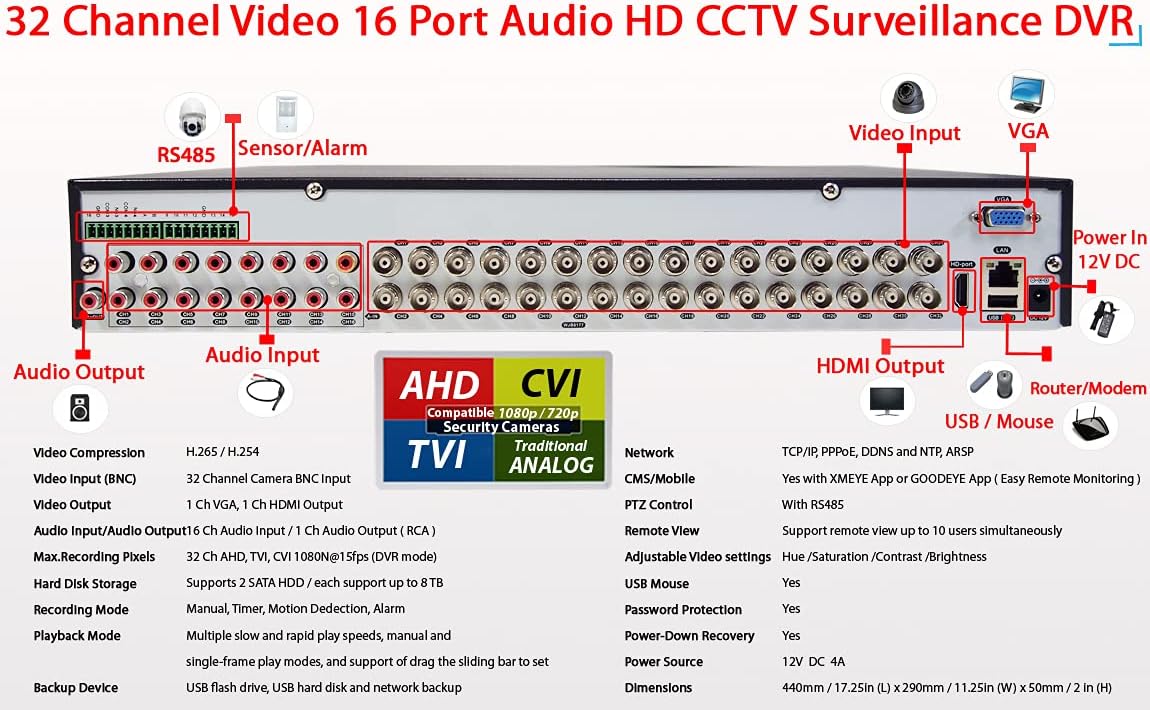
Image 4.2: Detailed view of the DVR's rear panel connections.
5. Operating Instructions
5.1 Remote Viewing and Playback
The system allows for live viewing and playback of recorded video from various devices:
- Smartphone/Tablet: Use the free XMeye APP to view your system remotely.
- PC: Access your security cameras via a web browser or the VMS Client Software.

Image 5.1: Remote viewing of surveillance footage on various devices.

Image 5.2: Software options for remote access on PC and mobile devices.
5.2 Recording and Playback
The system supports 32 channels of simultaneous video viewing and recording. Utilize the multichannel playback function to review recorded footage. The recording mode can be configured for continuous recording or motion detection-triggered recording.
5.3 Video Backup
The DVR features a USB port for convenient backup and transfer of video footage to a USB flash drive. Connect a USB drive to the DVR and follow the on-screen instructions for backup procedures.
5.4 Motion Detection & Email Alerts
Customize motion detection settings within the DVR's menu. When motion is detected, the system can be configured to send email alerts to designated recipients, providing immediate notification of activity.
6. Maintenance
- Camera Cleaning: Regularly check camera lenses for dust, cobwebs, or obstructions. Clean lenses gently with a soft, damp cloth to ensure clear image quality.
- Cable Integrity: Periodically inspect all cable connections (BNC, power, network) to ensure they are secure and free from damage or corrosion.
- System Review: Occasionally review recorded footage to confirm proper system operation and recording quality.
- DVR Ventilation: Ensure the DVR unit is placed in a well-ventilated area, free from obstructions, to prevent overheating.
- Software Updates: Check the manufacturer's website or app for any available firmware or software updates for the DVR and mobile application.
7. Troubleshooting
- No Video Signal:
- Verify power connections to both cameras and the DVR.
- Check all BNC cable connections between cameras and the DVR.
- Ensure the correct video input source is selected on your monitor.
- Remote Access Issues:
- Confirm the DVR is connected to the internet via an Ethernet cable.
- Verify network settings on the DVR (IP address, gateway, DNS).
- Ensure the XMeye app or VMS client is correctly configured and the device is added using the correct ID or QR code.
- Recording Problems:
- Check the hard drive status in the DVR's menu to ensure it is detected and functioning.
- Verify that the recording schedule or motion detection settings are correctly configured.
- Ensure there is sufficient storage space available on the 10TB hard drive.
- Poor Image Quality:
- Clean camera lenses for any dirt or smudges.
- Check cable connections for any damage or loose contacts.
- Ensure cameras are within their effective range for night vision if applicable.
8. Specifications
Technical specifications for the Evertech 32-Channel 1080p HD Surveillance System:
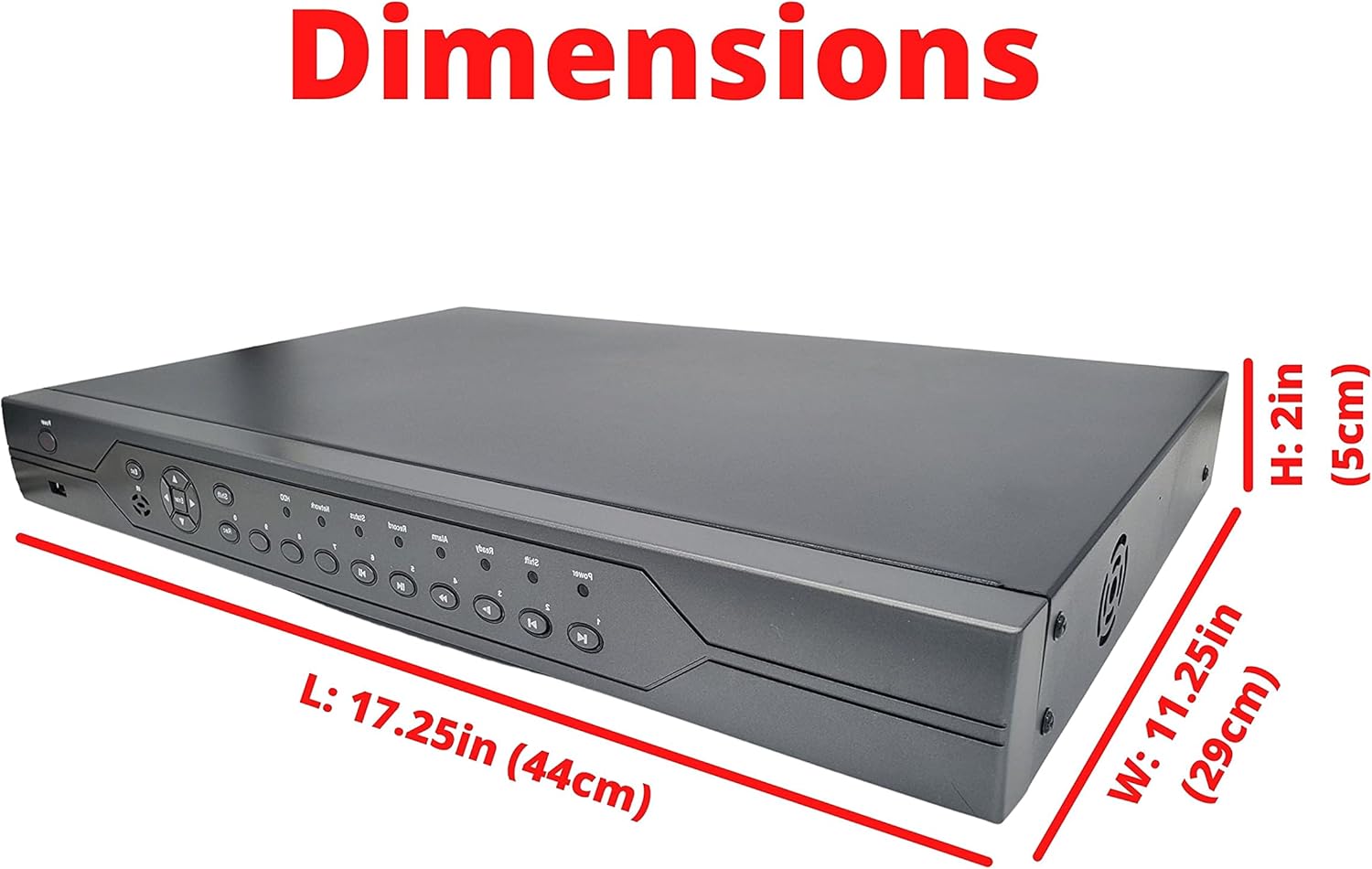
Image 8.1: Dimensions of the DVR unit.
| Feature | Specification |
|---|---|
| Brand | Evertech |
| Model Number | S321XVR0601110 |
| Connectivity Technology | Wired |
| Video Capture Resolution | 1080p |
| Special Features | All Weather camera, Motion Sensor, Night Vision, Remote Access, Smartphone Push Alerts |
| Number of Channels | 32 |
| Memory Storage Capacity | 10 TB |
| Power Source | Corded Electric |
| DVR Dimensions (L x W x H) | 21 x 16 x 7 inches (53.34 x 40.64 x 17.78 cm) |
| Camera Focal Length | 3.6mm |
| Night Vision Range | 50 Feet |
| Recording Mode | Motion detection |
| Hardware Interface | USB |
| Lens Type | Fixed |
| Video Input | BNC |
9. Warranty and Support
The Evertech 32-Channel 1080p HD Surveillance System comes with a one-year warranty provided by Evertech. Free technical support is also available to assist with any setup or operational questions.
For further assistance or to contact support, please visit the Evertech Store on Amazon.