
1. Introduction
The Behringer Octave Divider is a versatile effects pedal designed to generate sub-octave effects for guitar, bass, and synthesizers. This manual provides essential information for the proper setup, operation, and maintenance of your device, ensuring optimal performance and longevity.
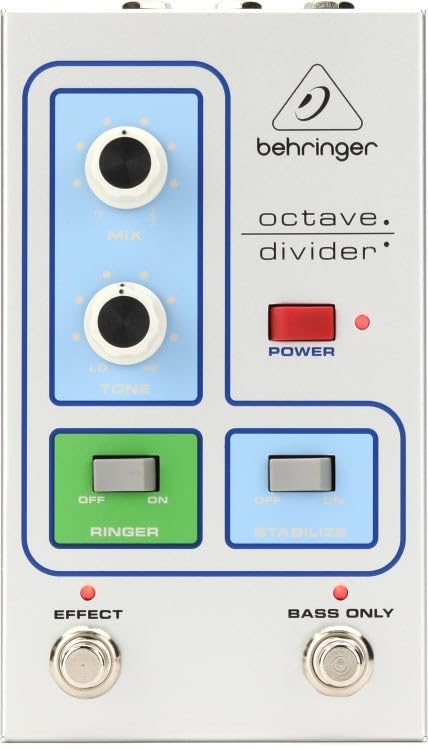
Front view of the Behringer Octave Divider Effects Pedal, showcasing its silver finish and control knobs.
2. Features
- Dedicated Octave Divider effects for guitar, bass, and synthesizers.
- Compact and durable silver chassis.
- Analog signal processing for authentic tone.
- Intuitive knob controls for precise sound shaping.
- Standard 1/4 inch (6.35mm) mono audio jack for input and output.
3. Controls and Connections
Familiarize yourself with the controls and connections on your Octave Divider pedal:
3.1. Controls
- LEVEL Knob: Adjusts the overall output volume of the effect.
- OCTAVE Knob: Controls the blend or intensity of the sub-octave effect.
- TONE Knob: Shapes the tonal characteristics of the octave effect, from dark to bright.
- FOOTSWITCH: Engages or bypasses the effect.
3.2. Connections
- INPUT Jack: Connect your instrument (guitar, bass, synth) here using a 1/4 inch mono cable.
- OUTPUT Jack: Connect this to your amplifier or the next pedal in your signal chain using a 1/4 inch mono cable.
- 9V DC Power Input: Connect the included 9V DC power supply here. Ensure polarity is correct.
4. Setup
Follow these steps to set up your Behringer Octave Divider pedal:
- Ensure your amplifier and other audio equipment are turned off.
- Connect your instrument to the INPUT jack of the Octave Divider pedal using a standard 1/4 inch instrument cable.
- Connect the OUTPUT jack of the Octave Divider pedal to your amplifier's input or the next pedal in your effects chain using another 1/4 inch instrument cable.
- Connect the included 9V DC power supply to the 9V DC Power Input on the pedal. Plug the power supply into a suitable AC outlet.
- Once all connections are secure, you may power on your amplifier and other equipment.
5. Operating
To operate your Behringer Octave Divider pedal:
- Engaging the Effect: Press the footswitch to toggle the effect on or off. An indicator light will illuminate when the effect is active.
- Adjusting Level: Use the LEVEL knob to set the desired output volume. Start with a lower setting and increase gradually to avoid sudden volume spikes.
- Controlling Octave: Rotate the OCTAVE knob to adjust the intensity and blend of the sub-octave effect. Experiment with different settings to find your preferred sound.
- Shaping Tone: The TONE knob allows you to fine-tune the brightness or darkness of the octave effect.
- Experimentation: The Octave Divider responds differently to various instruments and playing styles. Experiment with single notes, chords, and different pickup selections to discover its full potential.
6. Maintenance
Proper care will ensure the longevity of your Octave Divider pedal:
- Cleaning: Use a soft, dry cloth to clean the pedal's exterior. Avoid abrasive cleaners or solvents.
- Power: Always use the specified 9V DC power supply. Disconnect the power supply when the pedal is not in use for extended periods.
- Environment: Protect the pedal from extreme temperatures, humidity, and direct sunlight. Avoid dropping or subjecting the pedal to strong impacts.
- Storage: Store the pedal in a clean, dry place when not in use.
7. Troubleshooting
If you encounter issues with your Octave Divider pedal, refer to the following:
- No Sound:
- Check all cable connections (instrument, amplifier, power).
- Ensure the power supply is correctly connected and functioning.
- Verify that your instrument and amplifier are working correctly.
- Press the footswitch to ensure the effect is engaged (indicator light on).
- Poor Sound Quality / Unwanted Noise:
- Ensure all cables are in good condition and fully inserted.
- Check for proper grounding in your power outlet.
- Adjust the LEVEL and OCTAVE knobs to prevent signal clipping.
- Test with a different power supply if possible.
- Effect Not Engaging:
- Confirm the power supply is connected and providing power.
- Press the footswitch firmly.
8. Specifications
| Brand | Behringer |
| Model Name | P0EAE |
| Style | Compact |
| Color | Silver |
| Item Weight | 2.2 Pounds |
| Voltage | 9 Volts (DC) |
| Audio Output Effects | Modulation, Distortion (Note: Primary function is Octave Division) |
| Controls Type | Knob |
| Power Source | Corded Electric |
| Signal Format | Analog |
| Item Dimensions | 9.9 x 6.25 x 3.5 inches |
| Connector Type | 1/4 inch (6.35mm) mono audio jack |
| Included Components | Power supply |
| UPC | 644216640706 |
9. Warranty and Support
For detailed warranty information and technical support, please refer to the official Behringer website or contact your local Behringer distributor. Keep your purchase receipt as proof of purchase for any warranty claims.
Online Resources: Visit www.behringer.com for product registration, manuals, and support.