
Acekool FT1 (KAFO-1800F-D2)
Acekool FT1 18L Digital Air Fryer Oven
Model: KAFO-1800F-D2
1. Introduction
Thank you for choosing the Acekool FT1 18L Digital Air Fryer Oven. This versatile 1800W appliance is designed to provide a healthier way to cook your favorite meals, utilizing rapid air circulation for crispy results with little to no oil. It functions as an all-in-one machine, capable of air frying, baking, grilling, roasting, toasting, dehydrating, and rotisserie cooking. This manual provides essential information for safe operation, maintenance, and troubleshooting to ensure optimal performance and longevity of your appliance.
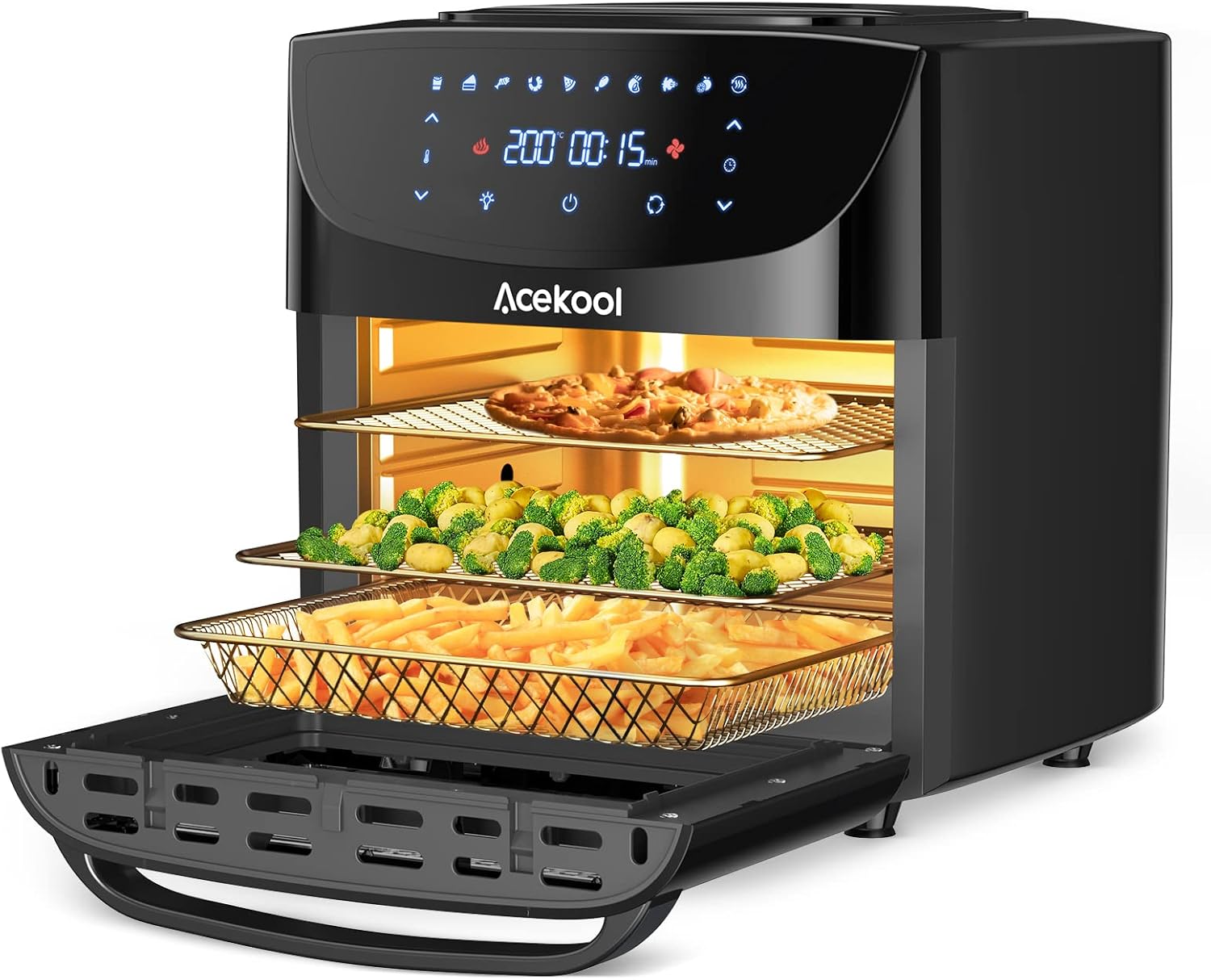
Image: The Acekool FT1 Air Fryer Oven in use, showcasing its multi-level cooking capacity with pizza, broccoli, and fries.
2. Important Safety Instructions
When using electrical appliances, basic safety precautions should always be followed to reduce the risk of fire, electric shock, and injury.
- Read all instructions before operating the appliance.
- Do not touch hot surfaces. Use handles or knobs. Always use oven mitts or heat-resistant gloves when handling hot materials.
- To protect against electrical shock, do not immerse cord, plugs, or the main unit in water or other liquid.
- Close supervision is necessary when any appliance is used by or near children.
- Unplug from outlet when not in use and before cleaning. Allow to cool before putting on or taking off parts.
- Do not operate any appliance with a damaged cord or plug, or after the appliance malfunctions or has been damaged in any manner.
- Do not use attachments not recommended by the appliance manufacturer, as this may cause injuries.
- Do not use outdoors.
- Do not let cord hang over edge of table or counter, or touch hot surfaces.
- Do not place on or near a hot gas or electric burner, or in a heated oven.
- Extreme caution must be used when moving an appliance containing hot oil or other hot liquids.
- Always attach plug to appliance first, then plug cord into the wall outlet. To disconnect, turn any control to "off", then remove plug from wall outlet.
- Do not use appliance for other than intended use.
- Ensure adequate ventilation around the appliance during operation.
- The appliance features an overheating protection system and automatic shut-off for safety.
- The air fryer is constructed with food-grade 304 stainless steel and is PFOA-free and BPA-free.
3. Product Overview
3.1 Components
- Main Unit with Digital Touch Screen Control Panel
- Transparent Glass Window
- Interior Cooking Chamber
- Power Cord
3.2 Included Accessories
Your Acekool FT1 Air Fryer Oven comes with a comprehensive set of accessories to enhance your cooking experience:
- Air Flow Racks (x2): For multi-level cooking and air circulation.
- Fryer Net Basket (x1): Ideal for fries, chicken nuggets, and other smaller items.
- Drip Tray (x1): Collects excess oil and food debris for easy cleaning.
- Skewers (x8): For preparing kebabs and other skewered dishes.
- Rotisserie Shaft, Forks & Set Screws (x1 set): For rotisserie cooking of whole chickens or roasts.
- Rotisserie Fetch Tool (x1): For safely removing the hot rotisserie shaft from the oven.
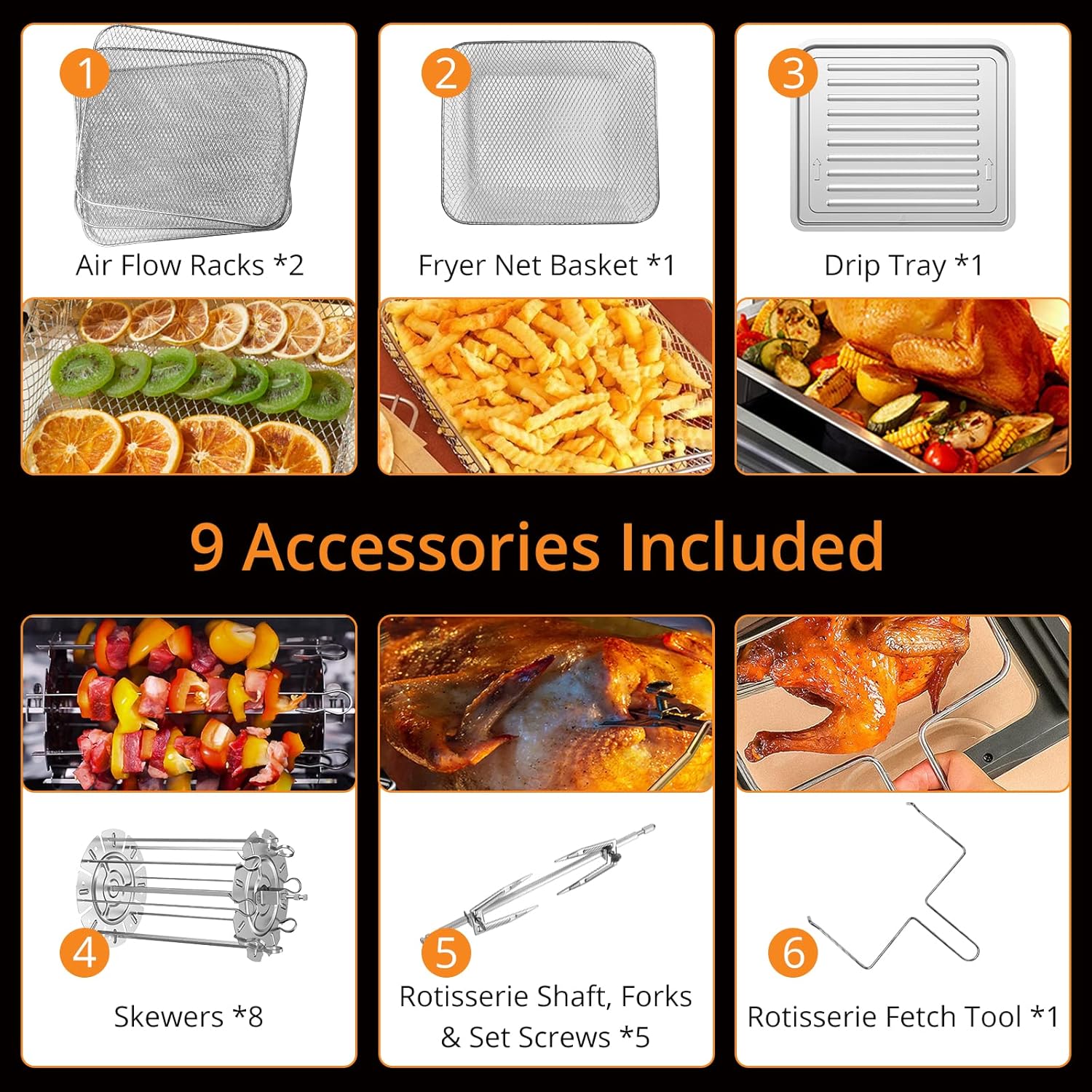
Image: A visual representation of the Air Flow Racks, Fryer Net Basket, Drip Tray, Skewers, Rotisserie Shaft with Forks, and Rotisserie Fetch Tool.
4. Setup
4.1 Unpacking and Initial Placement
- Carefully remove all packaging materials from the appliance and its accessories.
- Place the air fryer oven on a stable, flat, heat-resistant surface. Ensure there is at least 15 cm (6 inches) of clear space on all sides of the appliance for proper air circulation.
- Do not place the appliance directly against a wall or under cabinets, as hot steam may damage surfaces.
4.2 Initial Cleaning
- Before first use, wipe the exterior of the appliance with a damp cloth.
- Wash all removable accessories (Air Flow Racks, Fryer Net Basket, Drip Tray, Skewers, Rotisserie Shaft and Forks) with warm, soapy water. Rinse thoroughly and dry completely. All accessories are dishwasher safe.
- Insert the Drip Tray at the bottom of the cooking chamber.
4.3 Accessory Installation (Rotisserie Example)
The rotisserie function allows for even cooking of larger items like whole chickens. Follow these steps for proper installation:
- Prepare the Food: Force the rotisserie shaft lengthwise through the center of the food (e.g., a whole chicken).
- Attach Forks: Slide the rotisserie forks onto the shaft from either end. Lock them in place with the set screws, ensuring the food is securely held. There are indentations on the shaft for the set screws.
- Insert into Oven: Carefully insert the rotisserie shaft into the designated slots inside the oven. The pointed end of the skewer should go into the left skewer rack, and the clip-end should be squeezed and inserted into the opposite skewer rack slot to secure it.

Image: Detailed steps for installing the rotisserie shaft and skewers, including securing the food and placing it in the oven.
5. Operating Instructions
5.1 Power On/Off and Basic Operation
- Plug the power cord into a grounded wall outlet. The digital display will illuminate.
- Press the Power On/Off button to turn the appliance on.
- Use the temperature and time adjustment buttons (up/down arrows) on the touch screen to set your desired cooking parameters. The maximum temperature is 200°C.
- Press the Start/Pause button to begin cooking.
- To stop cooking, press the Power On/Off button or the Start/Pause button again.

Image: The large smart touch screen display, showing controls for cooking presets, time, temperature, rotation function, internal lighting, and power.
5.2 Cooking Presets
The Acekool FT1 offers 10 pre-programmed cooking modes for convenience:
- French Fries
- Drumsticks
- Steak
- Sandwich
- Fish
- Chicken
- Shrimp
- Fruit Dry (Dehydrate)
- Pizza
- Desserts
To use a preset, simply select the desired icon on the touch screen. The appliance will automatically set the optimal temperature and time for that food type. You can adjust these settings manually if needed.
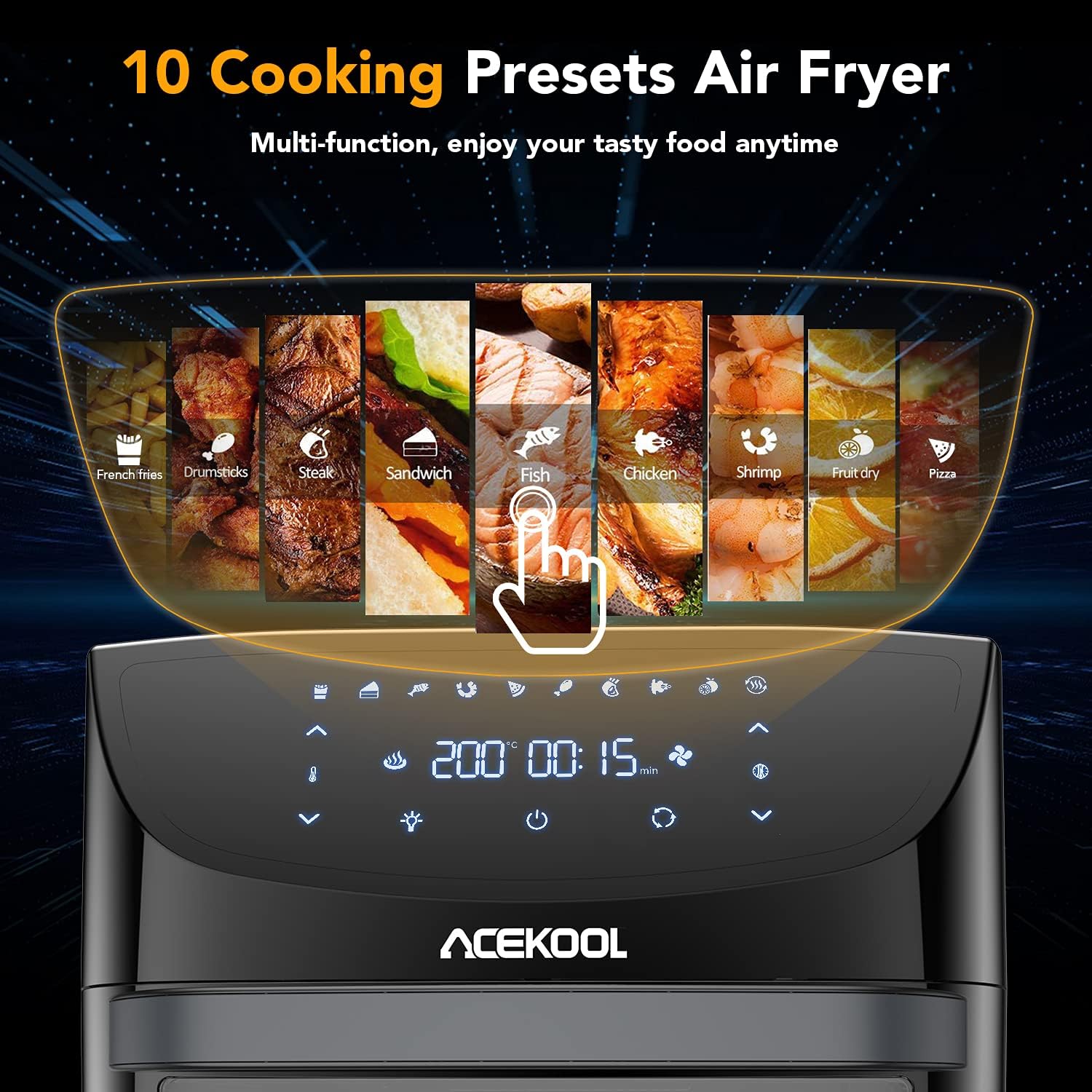
Image: The digital display highlighting the 10 cooking presets available on the Acekool FT1 Air Fryer Oven.
5.3 Rotisserie Function
After installing the rotisserie shaft with your food (as described in Section 4.3), select the rotisserie icon on the touch screen. This will activate the rotation, ensuring even cooking and browning on all sides. The transparent glass window allows you to monitor the cooking process.
5.4 General Cooking Tips
- Preheating: For best results, preheat the air fryer for 3-5 minutes before adding food.
- Oil Usage: While the air fryer requires little to no oil, a light spray or toss with oil can enhance crispiness and flavor for some foods.
- Shaking/Flipping: For even cooking, especially with smaller items in the basket or on racks, shake the basket or flip the food halfway through the cooking time.
- Doneness: Always check food for doneness, especially meats, using a food thermometer to ensure safe internal temperatures.
6. Cleaning and Maintenance
Regular cleaning and maintenance will extend the life of your Acekool FT1 Air Fryer Oven.
- Unplug and Cool: Always unplug the appliance from the power outlet and allow it to cool completely before cleaning.
- Dishwasher Safe Accessories: The Air Flow Racks, Fryer Net Basket, Drip Tray, Skewers, and Rotisserie Shaft/Forks are all dishwasher safe for convenient cleaning.
- Hand Washing: For hand washing, use warm, soapy water and a non-abrasive sponge. Rinse thoroughly and dry completely.
- Drip Tray: Empty and clean the Drip Tray after each use to prevent smoke and odors from accumulated grease.
- Interior: Wipe the interior of the oven with a damp cloth and mild detergent. For stubborn residue, a soft brush can be used. Avoid abrasive cleaners or metal scouring pads.
- Exterior: Clean the exterior of the appliance with a damp cloth. Do not use harsh chemicals or abrasive materials.
- Storage: Ensure the appliance and all accessories are clean and dry before storing. Store in a cool, dry place.
7. Troubleshooting
If you encounter issues with your Acekool FT1 Air Fryer Oven, please refer to the following common problems and solutions:
| Problem | Possible Cause | Solution |
|---|---|---|
| Appliance does not turn on. | Not plugged in; power outlet malfunction; appliance not switched on. | Ensure plug is securely in a working outlet. Press the Power On/Off button. |
| Food is not cooked evenly. | Overcrowding; insufficient shaking/flipping; incorrect temperature/time. | Cook in smaller batches. Shake/flip food halfway through. Adjust temperature and time as needed. |
| White smoke coming from the appliance. | Grease/oil residue from previous use; high-fat food. | Clean the Drip Tray and interior thoroughly. For high-fat foods, ensure proper ventilation and use the Drip Tray. |
| Food is not crispy. | Too much moisture; not enough oil (for certain foods); low temperature. | Pat food dry before cooking. Lightly spray with oil. Increase temperature or cooking time. |
If the problem persists after trying these solutions, please contact customer support.
8. Specifications
| Feature | Specification |
|---|---|
| Brand | Acekool |
| Model Number | KAFO-1800F-D2 |
| Colour | Clear (Black unit with transparent door) |
| Product Dimensions | 45.72 x 46.99 x 45.72 cm |
| Capacity | 18 litres |
| Power / Wattage | 1800 watts |
| Voltage | 220 Volts |
| Material | Stainless Steel |
| Special Features | Temperature Control, Digital Touch Screen, Rotisserie Function, Overheating Protection, Auto Shut-Off |
| Item Weight | 9.42 kg |
9. Warranty and Support
The Acekool FT1 Air Fryer Oven comes with a 2-year warranty. This warranty covers defects in materials and workmanship under normal use.
For any questions, concerns, or support needs regarding your product, please contact the Acekool customer service team. Please have your model number (KAFO-1800F-D2) and purchase information ready when contacting support.
For more information and support, you may visit the official Acekool store: Acekool Store on Amazon
Related documentsFT1 (KAFO-1800F-D2)


Ask a question about this manual
Ask about setup, troubleshooting, compatibility, parts, safety, or missing instructions. Manuals+ will review the question and use this page’s manual context to help answer it.