
1. Introduction
This manual provides instructions for the installation and operation of the Metra 99-7821B TurboTouch Dash Kit. This kit is designed to facilitate the installation of an aftermarket radio in specific Honda Civic models, while retaining essential vehicle features through an integrated touchscreen display.
Please read these instructions thoroughly before beginning installation to ensure proper function and to avoid damage to the product or vehicle.
2. Product Features
- Designed for standard 2-inch (Single-DIN) or 4-inch (Double-DIN) aftermarket radios.
- Integrated 4.3-inch touchscreen display for climate and vehicle customization functions.
- Retains audio controls on the steering wheel.
- Retains factory backup camera functionality.
- Retains Honda LaneWatch camera functionality.
- Includes Axxess wiring harness and interface.
- Includes an antenna adapter for AM/FM radio.
- Scratch-resistant matte black finish to match vehicle interior.
- Includes a storage pocket for Single-DIN radio installations.
3. Package Contents
Verify that all components listed below are present in your package:

Image 3.1: All components included in the Metra 99-7821B kit. This includes the main dash panel with integrated screen, mounting brackets, wiring harnesses, antenna adapter, and a storage pocket.
- Dash Panel with Integrated Touchscreen
- Radio Mounting Brackets (Left and Right)
- Storage Pocket (for Single-DIN installations)
- Axxess Wiring Harness and Interface
- Antenna Adapter
- Installation Hardware (screws, clips)
- USB Extension Cable
- Auxiliary Input Cable
4. Setup and Installation
Installation of this dash kit involves electrical wiring and vehicle disassembly. Professional installation is recommended. Refer to the detailed installation instructions provided with the physical product for specific wiring diagrams and vehicle disassembly procedures.
4.1. Pre-Installation Checks
- Disconnect the vehicle's negative battery terminal.
- Ensure all necessary tools are available.
- Verify compatibility with your Honda Civic model (2016-2021, excluding LX models).
4.2. General Installation Steps (Summary)
- Carefully remove the factory radio and associated trim panels.
- Connect the Axxess wiring harness to the vehicle's wiring and the aftermarket radio.
- Mount the aftermarket radio to the Metra dash kit using the provided brackets.
- If installing a Single-DIN radio, insert the storage pocket into the dash kit opening.
- Connect the integrated touchscreen's wiring to the Axxess interface.
- Install the assembled dash kit and radio into the vehicle's dashboard opening.
- Reconnect the vehicle's negative battery terminal and test all functions.

Image 4.1: Front view of the Metra 99-7821B dash kit, showing the integrated touchscreen and the opening for the aftermarket radio. The lower section includes a removable storage pocket for single-DIN radio installations.
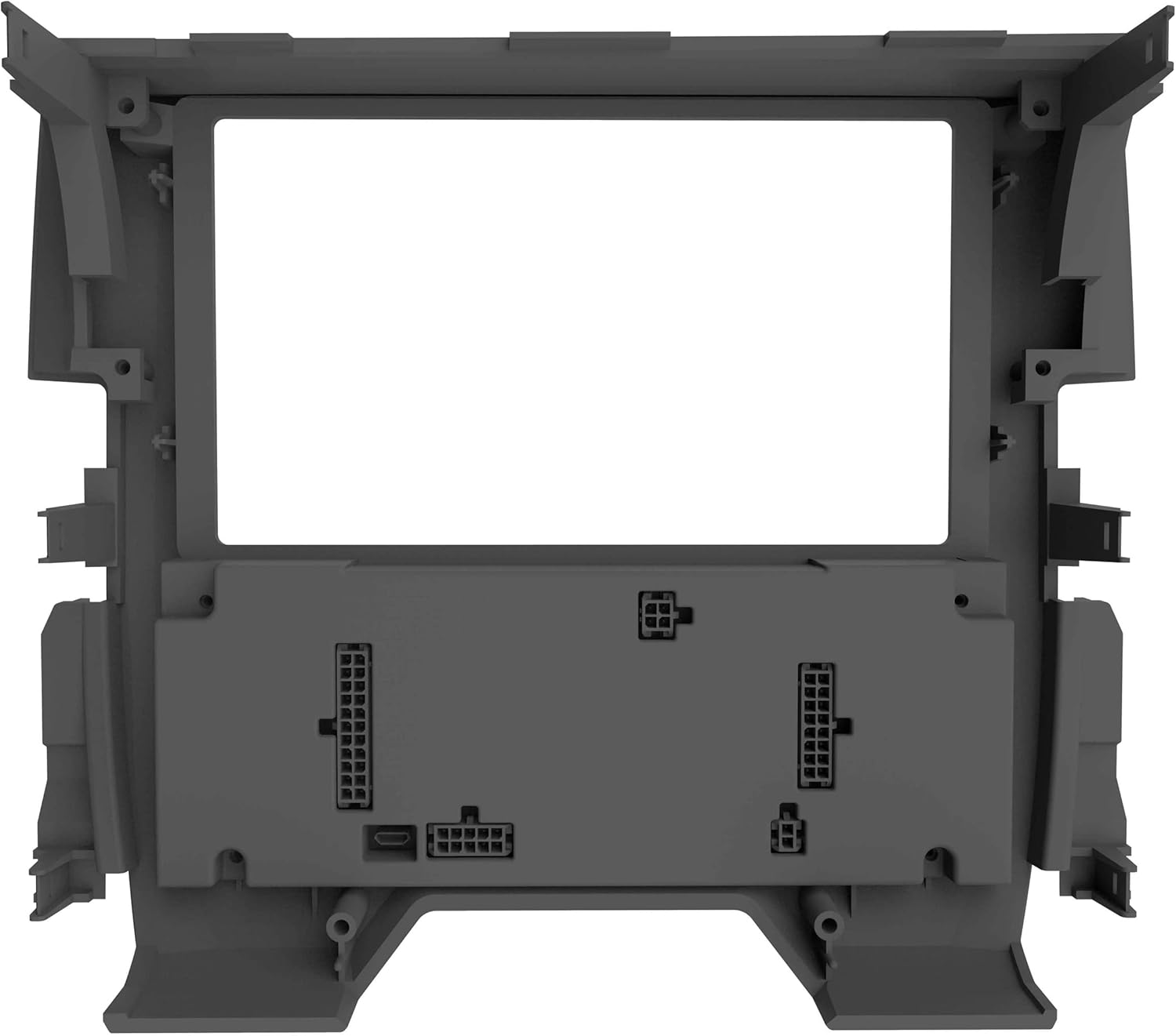
Image 4.2: Rear view of the Metra 99-7821B dash kit, illustrating the various connectors for power, data, and the integrated touchscreen display.

Image 4.3: The Metra 99-7821B dash kit shown installed in a Honda Civic dashboard, featuring an aftermarket double-DIN radio. This image demonstrates the integrated appearance of the kit within the vehicle's interior.
5. Operating Instructions
The integrated touchscreen and physical buttons on the Metra 99-7821B dash kit provide control over climate settings and vehicle personalization features that were originally managed by the factory radio.
5.1. Climate Control
Use the touchscreen and dedicated buttons to adjust temperature, fan speed, air direction, A/C, recirculation, and defrost functions. The display will show current settings such as temperature and outside temperature.
5.2. Vehicle Personalization
Access vehicle settings and personalization options through the integrated touchscreen. These settings may include door lock behavior, lighting, and other vehicle-specific preferences, depending on the original factory features.
5.3. Steering Wheel Controls
The included interface retains the functionality of your factory steering wheel audio controls. These buttons will operate the connected aftermarket radio for functions such as volume, track change, and mode selection.
5.4. Camera Retention
The kit ensures that the factory backup camera and Honda LaneWatch camera systems remain functional and display on the aftermarket radio's screen when engaged.
6. Maintenance
The Metra 99-7821B dash kit requires minimal maintenance. Keep the touchscreen and surrounding surfaces clean using a soft, dry, lint-free cloth. Avoid abrasive cleaners or solvents that could damage the finish or screen.
7. Troubleshooting
If you encounter issues with your Metra 99-7821B dash kit, refer to the following common troubleshooting steps:
- No Power to Radio/Screen: Check all wiring connections, especially the main power and ground wires. Ensure the vehicle's battery is properly connected and charged.
- Steering Wheel Controls Not Functioning: Verify that the Axxess interface is correctly wired and programmed according to the detailed installation instructions. Some aftermarket radios may require specific settings for steering wheel control compatibility.
- Climate Controls Not Responding: Ensure all data connections between the dash kit and the vehicle's CAN-bus system are secure. A factory reset of the integrated screen (if available) might resolve minor software glitches.
- Camera Not Displaying: Confirm that the factory camera input is correctly connected to the aftermarket radio and that the radio is configured to display camera feeds.
For persistent issues, consult a professional car audio installer or contact Metra customer support.
8. Specifications
| Model Number | 99-7821B |
| Compatible Vehicles | Honda Civic (2016-2021, Excluding LX models) |
| Radio Compatibility | Single-DIN (2-inch tall) or Double-DIN (4-inch tall) aftermarket radios |
| Integrated Screen Size | 4.3 inches |
| Material | High-grade ABS plastic with matte black finish |
| Retained Features | Climate controls, vehicle personalization, steering wheel controls, factory backup camera, Honda LaneWatch camera |
| Manufacturer | Metra Electronic Corp |
| Item Weight | 1 pound (approx.) |
| Package Dimensions | 13.66 x 11.06 x 6.3 inches (approx.) |
9. Warranty and Support
For warranty information, please refer to the documentation included with your purchase or visit the official Metra Electronics website. Technical support can be obtained by contacting Metra customer service directly. Keep your proof of purchase for warranty claims.


