
Introduction
This manual provides essential information for the proper setup, operation, and maintenance of your CITIZEN CAMPANOLA Complication Minute Repeater Quartz Watch, model AH7061-00E. Please read these instructions carefully to ensure optimal performance and longevity of your timepiece. Keep this manual for future reference.
Setup
1. Setting the Time
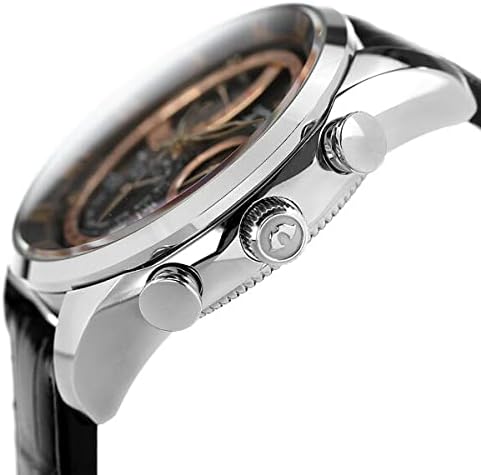
- Pull the crown (located on the right side of the watch case) out to the second click position. The second hand will stop.
- Rotate the crown to set the hour and minute hands to the desired time. Ensure AM/PM is correctly set if your watch features a 24-hour indicator or date change mechanism.
- Push the crown back in to the normal position. The second hand will resume movement.
2. Setting the Date and Other Complications
Your watch features multiple complications, including a date display and potentially month/day sub-dials. Specific setting procedures for these complications may vary. Generally, the date can be adjusted by pulling the crown out to the first click position and rotating it. For detailed instructions on setting the minute repeater, perpetual calendar, or other sub-dials, please refer to the comprehensive manufacturer's manual or contact CITIZEN customer support.
3. Strap Adjustment
The watch is equipped with a buckle clasp. For initial fitting or adjustment, it is recommended to have the strap adjusted by a professional jeweler to ensure a comfortable and secure fit.
Operating the Watch
1. Reading the Time
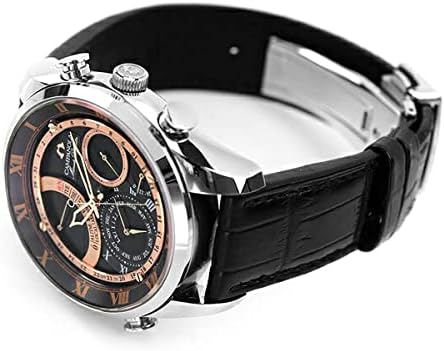
The watch displays time using traditional hour, minute, and second hands on an analog dial.
2. Using the Minute Repeater Function
The minute repeater is a sophisticated complication that audibly chimes the time on demand. Typically, this function is activated by pressing a dedicated pusher on the side of the watch case. The watch will then chime the hours, quarter hours, and minutes. Due to the complexity of this mechanism, refer to the full manufacturer's guide for precise activation and usage instructions.
3. Understanding Dial Complications
Your watch features a multi-layered dial with various sub-dials and indicators. These may include:
- Date Indicator: Shows the current day of the month.
- Month Indicator: Displays the current month.
- Day of the Week Indicator: Shows the current day of the week.
- Alarm/Local Time Indicator: May indicate alarm status or a second time zone.
Consult the detailed manual for specific functions and how to read each complication.

Maintenance
1. Cleaning
Wipe the watch case and crystal regularly with a soft, dry cloth. For stubborn dirt, a slightly damp cloth with mild soap can be used, followed by a dry cloth. Avoid using harsh chemicals or abrasive materials.
2. Battery Replacement
As a quartz watch, it is powered by a battery. When the battery runs low, the second hand may move in two-second intervals (End-of-Life indicator) or stop completely. Battery replacement should be performed by an authorized CITIZEN service center or a qualified watchmaker to ensure proper sealing and function.
3. Water Resistance
While your watch may have some level of water resistance, it is crucial to avoid exposing it to hot water, steam, or chemicals. Always ensure the crown is fully pushed in before any contact with water. Water resistance ratings are not permanent and may decrease over time due to wear and tear or impacts. Have the water resistance seals checked periodically by a professional.
4. Storage
When not wearing your watch, store it in a cool, dry place away from direct sunlight, extreme temperatures, and strong magnetic fields. A watch box or pouch is ideal for protection.

Troubleshooting
- Watch Not Running: Check if the crown is fully pushed in. If it is, the battery may need replacement.
- Incorrect Time/Date: Refer to the 'Setup' section to reset the time and date. Ensure the crown is fully pushed in after setting.
- Minute Repeater Not Chiming: Ensure the watch has sufficient power. If the issue persists, professional inspection is recommended.
- Condensation Under Crystal: This indicates a loss of water resistance. Seek immediate professional service to prevent damage to the movement.
For issues not covered here, please contact an authorized CITIZEN service center.
Specifications
| Feature | Specification |
|---|---|
| Brand | CITIZEN |
| Model Number | AH7061-00E |
| Display Type | Analog |
| Movement | Quartz |
| Special Features | Second hand, Minute Repeater, Complications |
| Clasp | Buckle |
| Case Shape | Round |
| Band Color | Black |
| Dial Color | Black |
| Windshield Material | Mineral Glass |
| Case Diameter | 35 mm |
| Case Thickness | 15.5 mm |
| Target Age Group | Adult |
| First Available Date on Amazon.co.jp | 2022/06/21 |
Warranty and Support
Your CITIZEN watch is covered by a manufacturer's warranty. Please refer to the warranty card included with your purchase for specific terms, conditions, and duration. For technical support, service, or warranty claims, please contact an authorized CITIZEN service center or visit the official CITIZEN website for contact information.
