
Abestorm Guardian SN55S
Abestorm Guardian SN55S Commercial Crawl Space Dehumidifier User Manual
Model: Guardian SN55S | Brand: Abestorm
1. Important Safety Instructions
Please read all instructions carefully before operating the dehumidifier. Failure to follow these instructions may result in electric shock, fire, or serious injury.
- Always connect the unit to a grounded power outlet.
- Do not operate the unit with a damaged power cord or plug.
- Ensure the unit is placed on a stable, level surface to prevent tipping.
- Do not block air intake or exhaust vents.
- Keep children and pets away from the operating unit.
- Unplug the unit before cleaning or performing any maintenance.
- Do not use the unit in areas where flammable liquids or gases are stored.
2. Product Overview
The Abestorm Guardian SN55S is a high-capacity commercial-grade dehumidifier designed for effective moisture removal in large spaces such as crawl spaces, basements, and industrial areas. It features automatic defrost, continuous drainage, and a robust construction for durability.
Key Features:
- High Capacity: Removes up to 55 PPD (AHAM) / 120 Pints (saturation) of moisture per day.
- Wide Coverage: Effective for areas up to 1300 sq. ft.
- Automatic Defrost: Prevents ice buildup on coils in low temperatures.
- Continuous Drainage: Includes a 6.56 ft drain hose for gravity drainage.
- Durable Construction: Features a metal casing and sturdy handles for portability.
- Internal Corrosion Protection: Rare Earth Alloy Tube Evaporators extend unit lifespan.
- Optional Remote Control: Allows for convenient monitoring and adjustment (sold separately).
3. Package Contents
- Abestorm Guardian SN55S Crawl Space Dehumidifier
- 6.56 ft Drain Hose
- User Manual
4. Setup and Installation
4.1 Placement
Place the dehumidifier on a level, stable surface in the desired area. Ensure adequate clearance around the unit for proper airflow. The unit can be placed on the floor or suspended using optional hanging kits (sold separately).
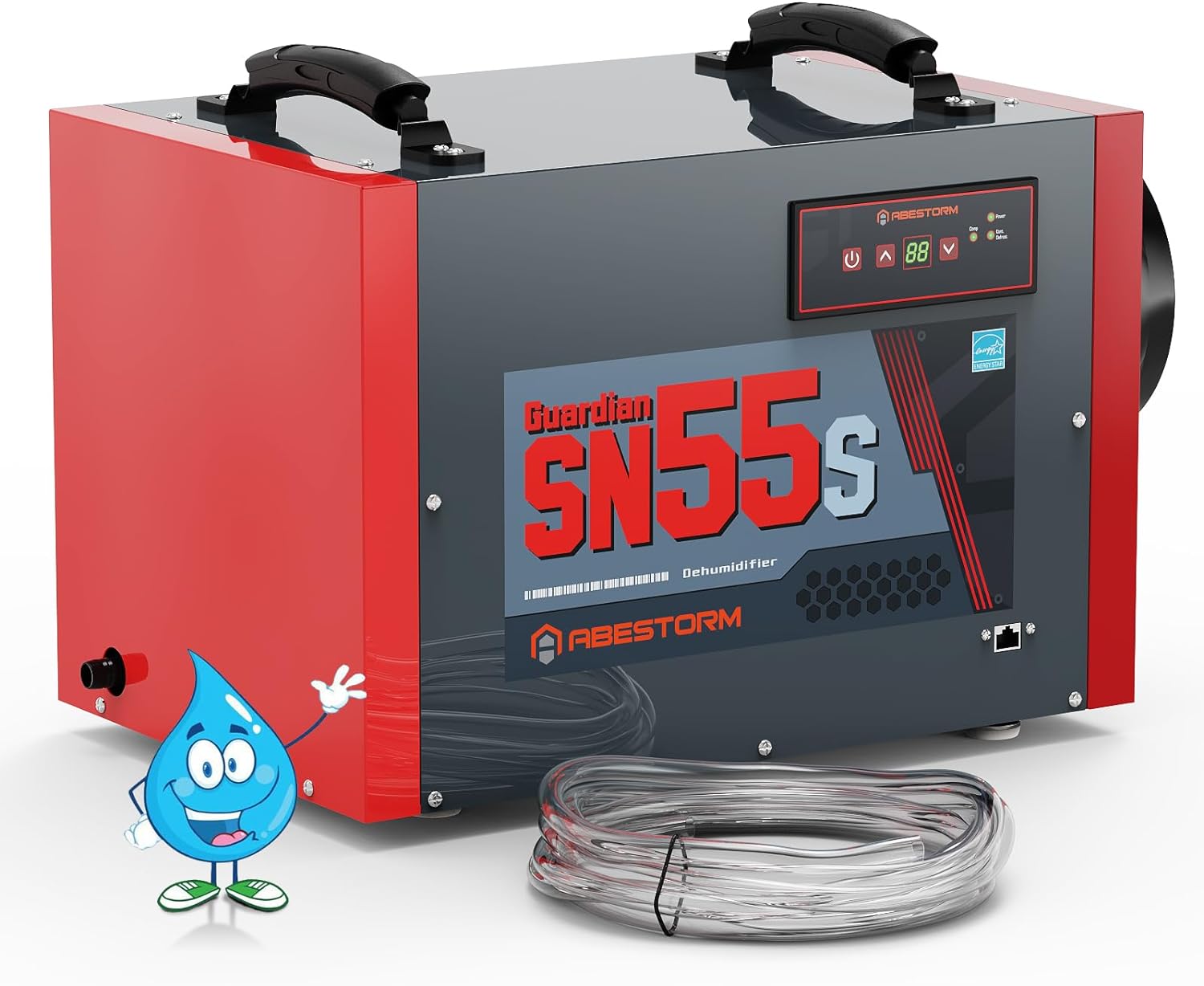
Image: Abestorm Guardian SN55S Dehumidifier with included drain hose. This image shows the compact design and the drain hose connection point.

Image: The Abestorm SN55S Dehumidifier installed on the floor of a crawl space, demonstrating typical placement.

Image: The Abestorm SN55S Dehumidifier shown with an optional hanging installation, suitable for elevated placement in crawl spaces.
4.2 Drain Hose Connection
The unit is equipped for continuous gravity drainage. Connect the provided 6.56 ft drain hose to the drain outlet on the side of the unit. Ensure the hose is routed downwards to a suitable drain point, allowing water to flow freely by gravity.
Video: This video demonstrates the drain hose connection and the continuous drainage feature of the Abestorm Crawl Space Dehumidifier. It shows water flowing through the clear hose from the unit.
4.3 Power Connection
Plug the power cord into a grounded 110/120V AC, 60Hz, 4.1 Amps electrical outlet.
5. Operating Instructions
5.1 Control Panel Overview

Image: A close-up of the Abestorm SN55S control panel, highlighting the Power Key, Humidity Display Screen, Arrow Buttons, Power Indicator Light, Compressor Indicator Light, and Continuous/Defrost Light.
- Power Key: Turns the unit ON/OFF.
- Arrow Buttons (Up/Down): Adjust the desired humidity level.
- Humidity Display Screen: Shows the current and set humidity levels.
- Power Indicator Light: Illuminates when the unit is powered on.
- Compressor Indicator Light: Illuminates when the compressor is active.
- Cont./Defrost Light: Indicates continuous operation or active defrost cycle.
5.2 Setting Desired Humidity
- Press the Power Key to turn on the unit.
- Use the Up/Down Arrow Buttons to set your desired relative humidity (RH) level. The recommended range for most applications is between 45% and 55% RH.
- The unit will automatically operate to maintain the set humidity level.
Video: This video provides a detailed look at the control panel and demonstrates how to set the desired humidity level on the Abestorm Dehumidifier.
5.3 Continuous Operation
For continuous operation, set the humidity level to the lowest possible setting (e.g., "CO" or "00" if available, or the lowest numerical value). The unit will run continuously, removing moisture until manually turned off or the drain hose is disconnected.
5.4 Automatic Defrost
The unit features an automatic defrost system. When the ambient temperature is low, the unit will automatically initiate a defrost cycle to prevent ice buildup on the coils. During this cycle, the compressor temporarily stops, but the fan continues to operate. The defrost light will illuminate. Once defrosting is complete, the dehumidifier resumes normal operation.

Image: Illustration of the auto-defrost function, showing ice on coils before defrost and clear coils after, indicating the temperature range for operation.
6. Maintenance
6.1 Filter Cleaning
The Abestorm Guardian SN55S is equipped with a removable MERV-1 filter. Regular cleaning of the filter is essential for optimal performance and to prevent dust from damaging internal components. It is recommended to clean the filter every 3 months or more frequently depending on air quality.
- Turn off and unplug the dehumidifier.
- Locate the filter access panel on the side of the unit.
- Remove the filter by gently pulling it out.
- Wash the filter with warm, soapy water. Rinse thoroughly and allow it to air dry completely before reinserting.
- Reinsert the dry filter into the unit and close the access panel.

Image: The removable MERV-1 filter being accessed and removed from the Abestorm SN55S Dehumidifier for cleaning.
6.2 General Care
- Wipe the exterior of the unit with a soft, damp cloth.
- Do not use abrasive cleaners or solvents.
- Inspect the power cord and drain hose periodically for any signs of damage.
7. Troubleshooting
| Problem | Possible Cause | Solution |
|---|---|---|
| Dehumidifier does not turn on. | No power, power cord loose, unit is off. | Check power outlet, ensure cord is securely plugged in, press Power Key. |
| Unit is running but not removing moisture. | Humidity setting too high, air filter clogged, room temperature too low. | Lower desired humidity setting, clean air filter, ensure room temperature is within operating range (33.8°F - 104°F). |
| Water is not draining. | Drain hose kinked or blocked, hose not sloped downwards. | Check and clear drain hose, ensure continuous downward slope for gravity drainage. |
| Unit is noisy. | Unit not on a level surface, loose components. | Ensure unit is on a stable, level surface. Check for any loose parts. |
8. Specifications
| Feature | Detail |
|---|---|
| Model Name | Guardian SN55S |
| Brand | Abestorm |
| Power Supply | 110/120V AC, 60Hz, 4.1 Amps |
| Dehumidification Capacity (AHAM) | 55 Pints per Day (80°F, 60% RH) |
| Dehumidification Capacity (Saturation) | 120 Pints per Day |
| Coverage Area | Up to 1300 Square Feet |
| Air Flow Capacity | 130 Cubic Feet Per Minute (CFM) |
| Operating Temperature Range | 33.8°F - 104°F |
| Humidity Range | 36-90% |
| Drain Hose Length | 6.56 ft (Included) |
| Product Dimensions (D x W x H) | 19.3" x 11.9" x 13.7" |
| Item Weight | 44 Pounds |
| Material | Metal, Plastic |
| UPC | 735626812439 |
9. Warranty and Support
The Abestorm Guardian SN55S Dehumidifier comes with a 5-year Limited Warranty. This warranty covers defects in materials and workmanship under normal use. For warranty claims or technical assistance, please contact Abestorm customer support.
Customer Support: Our team of professionals is ready to help you. Refer to the product packaging or official Abestorm website for contact details.
Related documentsGuardian SN55S


Ask a question about this manual
Ask about setup, troubleshooting, compatibility, parts, safety, or missing instructions. Manuals+ will review the question and use this page’s manual context to help answer it.