
1. Introduction
This manual provides detailed instructions for the assembly, operation, and maintenance of the Reland Sun ICL8038 Signal Generator DIY Kit. This kit allows users to build a multifunctional signal generator capable of producing sine, triangle, square, and sawtooth waveforms with adjustable frequency, duty cycle, offset, and amplitude. It is designed for educational purposes, hobbyists, and professionals requiring a versatile signal source.
2. Product Overview and Features
The Reland Sun ICL8038 Signal Generator DIY Kit utilizes the ICL8038 integrated circuit and a high-speed operational amplifier to ensure high accuracy and stable performance. All components are through-hole, making assembly straightforward for DIY enthusiasts.
Key Features:
- Waveform Output: Generates sine, triangle, square, and forward/reverse sawtooth waveforms.
- Frequency Range: Adjustable from 5Hz to 400kHz.
- Duty Cycle: Adjustable from 2% to 95%.
- Amplitude: Adjustable output amplitude from 0.1V to 11VPP (with 12V operating voltage).
- DC Bias: Adjustable DC bias range from -7.5V to 7.5V.
- Precision: Low distortion sine wave (1%), low temperature drift (50ppm/°C), and high triangular wave linearity (0.1%).
- Adjustment: Features coarse and fine tuning for frequency adjustment.
3. Package Contents
Upon opening your kit, please verify that all components listed below are present and undamaged. If any parts are missing or damaged, contact your seller immediately.

Image 1: Complete kit contents including PCB, acrylic shell parts, potentiometers, capacitors, resistors, ICs, and connectors.
- Printed Circuit Board (PCB)
- ICL8038 Integrated Circuit
- High-speed Operational Amplifier ICs
- Resistors (various values)
- Capacitors (electrolytic and ceramic)
- Potentiometers (for frequency, duty cycle, offset, amplitude adjustment)
- Knobs for potentiometers
- Diodes
- Terminal blocks
- DC Power Jack
- Acrylic shell parts
- Screws and standoffs for assembly
4. Assembly Instructions (DIY Kit)
This kit requires soldering and basic electronics assembly skills. Please ensure you have the necessary tools (soldering iron, solder, wire cutters, multimeter) before beginning.
4.1. Component Identification and Placement
Before soldering, identify all components and match them to their designated positions on the PCB. The PCB is clearly marked with component designators (e.g., R1, C1, U1) and polarity indicators where applicable.
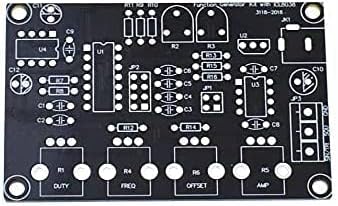
Image 2: The Printed Circuit Board (PCB) with component outlines and labels.
- Resistors: Insert resistors according to their color codes and values, then solder them in place. Resistors are non-polarized.
- Diodes: Pay attention to the polarity (band on the diode matches the band on the PCB silkscreen).
- Capacitors: Ceramic capacitors are non-polarized. Electrolytic capacitors have a polarity; the longer lead is positive (+), and the shorter lead (marked with a stripe) is negative (-). Match the negative stripe to the corresponding mark on the PCB.
- IC Sockets: It is recommended to solder IC sockets first, then insert the ICs after all soldering is complete to prevent heat damage to the ICs. Ensure the notch on the socket aligns with the notch on the PCB silkscreen.
- Potentiometers: Solder the potentiometers for FREQ, DUTY, OFFSET, and AMP into their respective positions.
- Terminal Blocks and DC Jack: Solder these connectors last.
4.2. Soldering Tips:
- Use a clean, tinned soldering iron tip.
- Heat both the component lead and the PCB pad simultaneously.
- Apply a small amount of solder to the heated joint.
- Remove the solder, then the iron.
- Ensure shiny, cone-shaped solder joints.
- Trim excess leads after soldering.
4.3. Acrylic Shell Assembly
Once the PCB assembly is complete and verified, assemble the acrylic shell to protect the circuit board.

Image 3: Acrylic shell components and fasteners.
- Remove the protective film from all acrylic pieces.
- Identify the top and bottom plates, and the side panels.
- Mount the assembled PCB onto the bottom acrylic plate using the provided standoffs and screws.
- Attach the side panels to the bottom plate.
- Carefully align the top plate, ensuring the potentiometer shafts and connectors pass through the corresponding holes.
- Secure the top plate with the remaining screws.
- Attach the plastic knobs to the potentiometer shafts.
5. Operating Instructions
After successful assembly, connect the power supply and begin operation.
5.1. Power Supply Connection
- The signal generator requires a 12V to 15V DC power supply.
- Connect the DC power adapter to the DC power jack on the unit. Ensure correct polarity if using a custom power source.
5.2. Controls and Adjustments
The front panel features several potentiometers for waveform control:
- FREQ (Frequency): Adjusts the output frequency. This control typically has both coarse and fine-tuning capabilities.
- DUTY (Duty Cycle): Adjusts the duty cycle of the square wave and the symmetry of other waveforms.
- OFFSET (DC Offset): Adds a DC voltage component to the output waveform, shifting it up or down relative to 0V.
- AMP (Amplitude): Adjusts the peak-to-peak voltage of the output waveform.
5.3. Waveform Selection
The kit outputs sine, triangle, square, and sawtooth waveforms. The specific output pins for each waveform are typically labeled on the PCB (e.g., SIN/TRI, SQU, GND). Connect your oscilloscope or target circuit to the appropriate output terminals.
6. Specifications
| Parameter | Value |
|---|---|
| Supply Voltage | 12V ~ 15V DC |
| Frequency Range | 5Hz ~ 400KHz (Adjustable) |
| Duty Cycle Range | 2% ~ 95% (Adjustable) |
| Sine Wave Distortion | 1% |
| Temperature Drift | 50ppm / °C |
| Triangular Wave Linearity | 0.1% |
| DC Bias Range | -7.5V ~ 7.5V |
| Output Amplitude Range | 0.1V ~ 11VPP (operating voltage 12V) |
7. Troubleshooting
If you encounter issues during or after assembly, consider the following common problems and solutions:
- No Power/No Output:
- Check power supply voltage and polarity.
- Inspect all solder joints for cold joints, bridges, or unsoldered pins.
- Ensure ICs are correctly inserted into their sockets and oriented properly.
- Incorrect Waveform/Distortion:
- Verify all component values (resistors, capacitors) are correct for their positions.
- Check for any short circuits on the PCB.
- Ensure potentiometers are functioning correctly.
- Frequency/Amplitude Not Adjustable:
- Check the soldering of the relevant potentiometer and surrounding components.
- Ensure the potentiometer knob is securely attached to the shaft.
For persistent issues, carefully review the assembly steps and compare your board to reference images or schematics if available.
8. Maintenance
The Reland Sun ICL8038 Signal Generator is a low-maintenance device. To ensure its longevity and reliable operation:
- Keep the unit clean and free from dust and debris. Use a soft, dry cloth for cleaning.
- Avoid exposing the unit to extreme temperatures, humidity, or direct sunlight.
- Store the unit in a dry, safe place when not in use.
- Do not attempt to modify the circuit unless you have advanced electronics knowledge, as this may damage the device.
9. Warranty and Support
Specific warranty details for this DIY kit are not provided in the product information. For any warranty claims, technical support, or inquiries regarding missing/damaged parts, please contact the seller directly through your purchase platform. Ensure you retain your proof of purchase.