
SANNCE SANNCE 3MP Wireless IP Camera
SANNCE 3MP Wireless IP Camera User Manual
Model: SANNCE 3MP Wireless IP Camera | Brand: SANNCE
1. Introduction
This manual provides detailed instructions for the installation, operation, and maintenance of your SANNCE 3MP Wireless IP Camera. This camera is designed to work exclusively with the SANNCE N48WHE NVR system, offering advanced security features such as 3MP Super HD resolution, 100ft night vision, AI human detection, and compatibility with Amazon Alexa for remote access and smart alerts. Please read this manual thoroughly before using the product to ensure proper setup and optimal performance.

Figure 1.1: SANNCE 3MP Wireless IP Camera
2. Setup Guide
2.1 Compatibility Note
This SANNCE 3MP Wireless IP Camera is designed to function exclusively with the SANNCE N48WHE NVR system. It cannot operate as a standalone camera. Ensure you have a compatible SANNCE N48WHE NVR (e.g., ASINs: B07F7N9KKD, B08Q3QJTHM, B09BMQJ878) for proper functionality.
2.2 Physical Installation
- Choose a Location: Select a suitable outdoor or indoor location for mounting. The camera has an IP66 waterproof rating, allowing it to withstand extreme weather conditions (-20°C to 60°C).
- Mounting: Securely mount the camera to a wall or desired surface using appropriate screws and anchors. Ensure the camera is positioned to cover the desired surveillance area.
- Power Connection: Connect the camera to a power source using the provided power adapter.
- Cable Management: Route the power cable neatly and securely to prevent damage or tripping hazards.
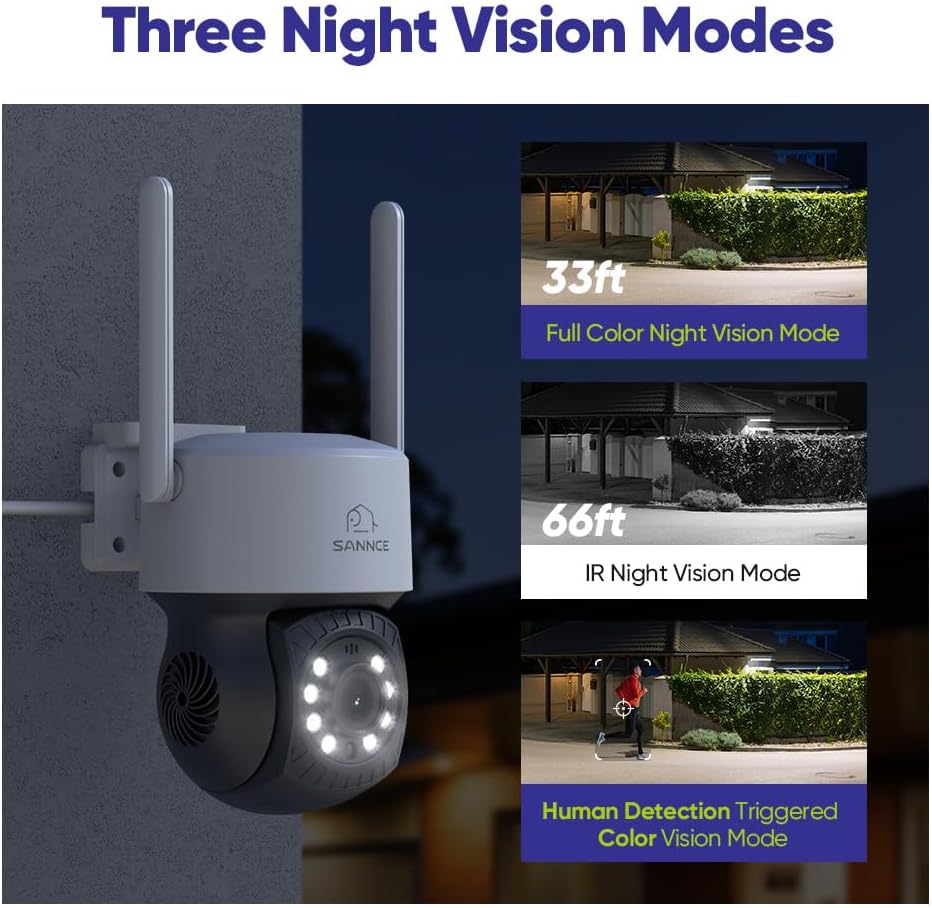
Figure 2.1: Camera Installation
2.3 Network Connection (Auto Cascading)
The SANNCE wireless surveillance system features auto cascading technology for easy WiFi connection. The camera closest to the NVR can act as a WiFi repeater, extending the network connection distance for cameras further away, up to 3,300 ft.

Figure 2.2: WiFi Connection Indicator
2.4 Initial Setup Video
Video 2.1: Overview of SANNCE Security Camera System setup and features.
3. Operating Instructions
3.1 Super HD Video Quality & Night Vision
The 3MP Super HD WiFi IP camera delivers crystal-clear images, significantly clearer than 1080p cameras. It features 18 infrared LEDs for crisp night vision footage up to 100 ft away, and supports three night vision modes: Full Color, IR Night Vision, and Human Detection Triggered Color Vision.

Figure 3.1: 2K 3MP Super HD Clarity

Figure 3.2: Three Night Vision Modes
3.2 AI Human Detection & Auto Tracking
The camera utilizes AI human detection to accurately identify human shapes, reducing false alarms. When a person is detected, you will receive instant app pushes and email alerts with snapshots. The camera also supports auto-tracking to follow detected human movement.

Figure 3.3: Smart Human Detection & Auto Tracking
3.3 Two-Way Audio Communication
Equipped with a built-in microphone, the camera supports two-way audio, allowing you to communicate with individuals on the other end. This feature is useful for deterring intruders or speaking with delivery personnel.

Figure 3.4: Two-Way Audio
3.4 Pan-Tilt Functionality
The camera features a high-precision pan-tilt electromotor, allowing for 350° horizontal pan and 90° vertical tilt. This enables comprehensive coverage of your surveillance area, controllable remotely via the associated application.
Figure 3.5: High Precision Pan-Tilt Electromotor
3.5 One-Touch Warning Tone
Activate a warning tone directly from the app to deter potential intruders or unwanted visitors, adding an active layer of security.
Figure 3.6: One-Touch Warning Tone
3.6 Dual Video Storage Options
The camera supports both local storage via a MicroSD card (up to 128GB, not included) and cloud storage options, providing flexible and secure ways to save your surveillance footage.

Figure 3.7: Dual Video Storage Ways
3.7 Alexa Integration
Access your security system remotely and control it hands-free by connecting it to an Amazon Alexa device. You can view live feeds or receive alerts through voice commands.

Figure 3.8: Integration with Alexa
4. Maintenance
- Regular Cleaning: Periodically clean the camera lens and housing with a soft, damp cloth to ensure clear image quality. Avoid abrasive cleaners.
- Firmware Updates: Check the SANNCE official website or app regularly for firmware updates. Keeping your camera's firmware updated ensures optimal performance, security, and access to new features.
- Cable Inspection: Inspect power and network cables for any signs of wear, damage, or loose connections.
- Environmental Checks: Ensure the camera's mounting remains secure and that no obstructions are blocking its field of view.
5. Troubleshooting
| Problem | Possible Cause | Solution |
|---|---|---|
| No image/video feed | No power; Loose connection; NVR compatibility issue. | Check power supply and connections. Ensure camera is connected to a compatible SANNCE N48WHE NVR. |
| Poor image quality | Dirty lens; Insufficient lighting; Network interference. | Clean the lens. Ensure adequate lighting for optimal image. Check WiFi signal strength. |
| Frequent disconnections | Weak WiFi signal; Network congestion. | Relocate camera closer to NVR or use the auto cascading feature to improve signal. Reduce network traffic. |
| False motion alerts | Sensitivity too high; Environmental factors (e.g., moving branches). | Adjust motion detection sensitivity settings in the app. Utilize AI Human Detection to filter out non-human movements. |
| Audio issues | Microphone/speaker obstruction; Software settings. | Ensure microphone and speaker are clear. Check audio settings in the app. |
6. Specifications
| Feature | Detail |
|---|---|
| Video Capture Resolution | 3 MP |
| Night Vision Range | 100 Feet |
| Connectivity Technology | Wireless (Wi-Fi) |
| Compatible NVR | SANNCE N48WHE NVR |
| Controller Type | Amazon Alexa, App |
| International Protection Rating | IP66 |
| Operating Temperature | -20°C to 60°C (-4°F to 140°F) |
| Mounting Type | Wall Mount |
| Audio | One-Way Audio (Mic included) |
| Power Source | Corded Electric (6 watts) |
| Material | Metal |
| Item Weight | 2.64 pounds |
| Dimensions | 9.76 x 8.11 x 4.09 inches (Package) |
7. Warranty and Support
For warranty information and technical support, please refer to the documentation included with your SANNCE N48WHE NVR system or visit the official SANNCE website. You may also contact SANNCE customer service directly for assistance with your SANNCE 3MP Wireless IP Camera.
SANNCE Official Website: www.sannce.com
Ask a question about this manual
Ask about setup, troubleshooting, compatibility, parts, safety, or missing instructions. Manuals+ will review the question and use this page’s manual context to help answer it.