
1. Introduction
Thank you for choosing the SHARP ES-TN09GDSP 9 Kg Top Loading Washing Machine. This manual provides essential information for the safe and efficient operation, installation, and maintenance of your appliance. Please read it thoroughly before using the washing machine and keep it for future reference.
2. Safety Instructions
To prevent injury to the user or other people and property damage, the following instructions must be followed. Incorrect operation due to ignoring instructions may cause harm or damage.
- Ensure the washing machine is properly grounded.
- Do not allow children to play on or in the appliance. Close supervision is necessary when the appliance is used near children.
- Do not wash items that are soiled with gasoline, dry-cleaning solvents, or other flammable or explosive substances.
- Unplug the appliance from the power outlet before cleaning or performing any maintenance.
- Do not install or store this appliance where it will be exposed to the weather or to temperatures below freezing.
- Always follow the fabric care instructions provided by the garment manufacturer.
3. Installation and Setup
3.1 Unpacking
Carefully remove all packaging materials. Ensure no parts are missing or damaged. Keep packaging materials out of reach of children.
3.2 Location Requirements
Install the washing machine on a firm, level surface. Avoid direct sunlight or excessive moisture. Ensure adequate space around the machine for ventilation and maintenance.
3.3 Leveling the Machine
Adjust the leveling feet at the bottom of the machine to ensure it is perfectly stable and level. An unlevel machine can cause excessive vibration and noise during operation.
3.4 Water Supply Connection
Connect the hot and cold water inlet hoses to the corresponding valves on the back of the machine and to your household water supply. Ensure connections are tight to prevent leaks.

Image: Rear view of the washing machine, illustrating the water inlet and drain hose connections.
3.5 Drain Hose Installation
Position the drain hose into a standpipe or laundry tub. Ensure the hose is securely fastened to prevent it from dislodging during the drain cycle.
3.6 Power Connection
Plug the power cord into a grounded electrical outlet. Do not use extension cords or adapters.
4. Operating Instructions
4.1 Control Panel Overview
The washing machine features a digital touch screen and push-button controls for easy program selection and setting adjustments.
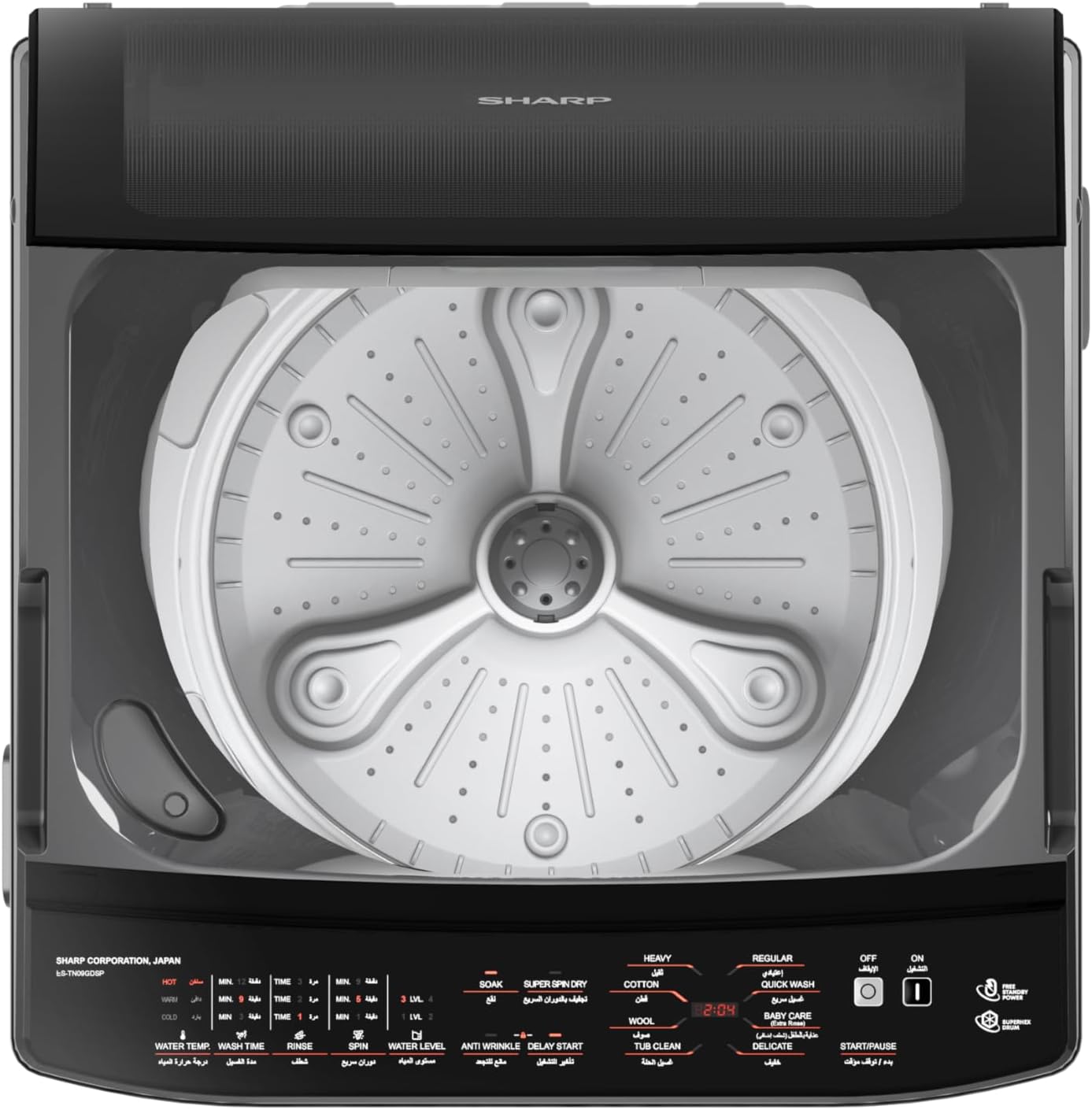
Image: Top view of the washing machine, highlighting the control panel with various program selections and settings.
4.2 Loading Laundry
Open the glass hydraulic door and load clothes loosely into the tub. Do not overload the machine. For best results, mix large and small items.

Image: View of the washing machine with the top door open, revealing the interior wash tub.
4.3 Adding Detergent and Softener
Add the appropriate amount of detergent to the detergent dispenser. If using fabric softener, add it to the designated compartment.
4.4 Selecting a Wash Program
Turn on the machine and select one of the following wash programs using the control panel:
- Regular Program: For daily laundry with normal soil levels.
- Quick Wash Program: For lightly soiled items or small loads requiring a fast cycle.
- Baby Care Program (Extra Rinse): Designed for baby clothes, providing an extra rinse for thorough cleaning.
- Delicate Program: For fragile items requiring gentle washing.
- Heavy Program: For heavily soiled and durable items.
- Cotton Program: Optimized for cotton fabrics.
- Wool Program: Gentle cycle for wool garments.
- Tub Clean Program: For cleaning the washing machine tub (see Maintenance section).
4.5 Adjusting Settings
After selecting a program, you can adjust settings such as water level, wash time, rinse cycles, and spin speed. The machine features automatic linear water level adjustment to suit the washing load.
4.6 Special Functions
- Soak Course: Allows soaking for up to 180 minutes.
- Anti-Wrinkle: Helps reduce wrinkles in clothes.
- Child Lock: Locks the control panel to prevent accidental changes.
- Delay Start: Allows you to set a delayed start time for the wash cycle.
- Super Spin Dry Function: Extracts more water from clothes, reducing drying time.
- Water Swirls Technology: Utilizes powerful swirling water action for effective cleaning while protecting fabrics.
4.7 Starting the Wash Cycle
Press the Start/Pause button to begin the selected wash cycle. The machine will automatically proceed through the wash, rinse, and spin phases.
5. Maintenance
Regular maintenance ensures optimal performance and extends the lifespan of your washing machine.
5.1 Cleaning the Lint Filter
The lint filter should be cleaned regularly to prevent lint buildup and ensure efficient drainage. Refer to the diagram in your machine for the exact location and removal instructions.
5.2 Tub Cleaning
Use the dedicated Tub Clean Program to clean the washing machine tub. This helps remove detergent residue and prevents odors. It is recommended to run this program monthly.
5.3 Exterior Cleaning
Wipe the exterior of the machine with a soft, damp cloth. Do not use abrasive cleaners or solvents.
5.4 Drain Pump Filter
Periodically check and clean the drain pump filter to remove any small objects or debris that may have accumulated.
6. Troubleshooting
Before contacting service, review the following common issues and their solutions.
| Problem | Possible Cause | Solution |
|---|---|---|
| Machine does not start | Power cord unplugged; Door not closed properly; Child lock activated. | Check power connection; Ensure door is fully closed; Deactivate child lock. |
| No water filling | Water supply turned off; Water inlet hoses kinked or blocked. | Turn on water supply; Straighten hoses; Clean inlet filters. |
| Water not draining | Drain hose kinked or blocked; Drain pump filter clogged. | Check and clear drain hose; Clean drain pump filter. |
| Excessive vibration/noise | Machine not level; Load unbalanced; Shipping bolts not removed. | Adjust leveling feet; Redistribute laundry; Ensure shipping bolts are removed (if applicable). |
7. Specifications
| Feature | Specification |
|---|---|
| Brand | Sharp |
| Model | ES-TN09GDSP |
| Capacity | 9 Kilograms |
| Dimensions (W x D x H) | 55.8 x 58 x 96.7 cm |
| Item Weight | 35 Kilograms |
| Maximum Spin Speed | 700 RPM |
| Control Console | Digital Touch Screen, Push Button |
| Access Location | Top Load |
| Special Features | Auto Restart, Drum Clean, High Efficiency, Vibration Reduction, Anti-Rust, Lint Filter, Anti-Bacterial Fan, Anti-Wrinkle, Quick Wash, Baby Care Program, Water Swirls Technology |
| Color | Dark Silver x Black |
| Material | ABS |
8. Warranty and Support
8.1 Warranty Information
This SHARP ES-TN09GDSP washing machine comes with a 5 Years Full Free Warranty. Please retain your purchase receipt as proof of purchase for warranty claims.
8.2 Customer Support
For technical assistance, service requests, or inquiries regarding your warranty, please contact Sharp customer service. Refer to your warranty card or the official Sharp website for contact details specific to your region.

