
Introduction
Thank you for purchasing the Nokia Essential E3103 Wireless Earbuds. This manual provides detailed instructions on how to set up, operate, and maintain your earbuds to ensure optimal performance and longevity. Please read this manual carefully before using the product.
Package Contents
- Nokia Essential E3103 Wireless Earbuds (Left and Right)
- Wireless Charging Case
- USB Type-C Charging Cable
- User Manual (this document)
Product Overview
The Nokia Essential E3103 earbuds feature a compact design with touch controls and come with a portable charging case.
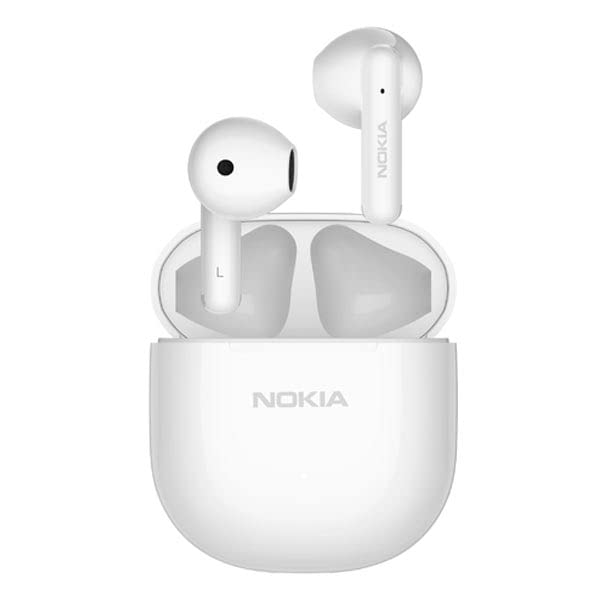
Figure 1: Nokia Essential E3103 Wireless Earbuds (White) in Charging Case. The image displays the two white earbuds resting in their open charging case, with the Nokia logo visible on the case.
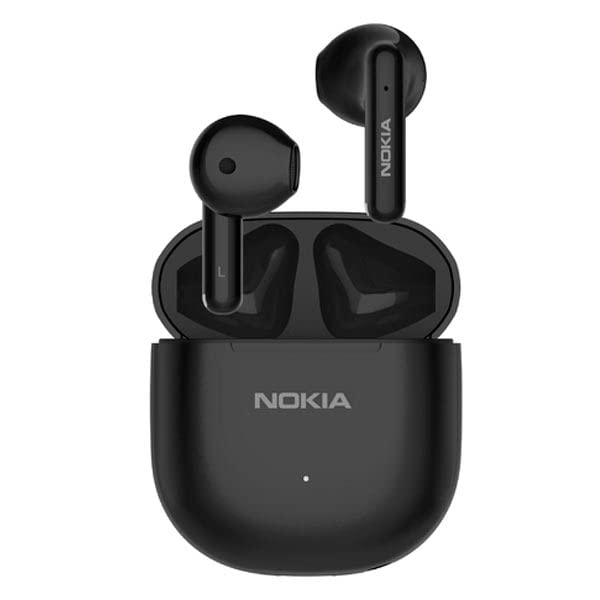
Figure 2: Nokia Essential E3103 Wireless Earbuds (Black) in Charging Case. This image shows the black version of the earbuds, also resting in their open charging case, with the Nokia logo on the case.
Components:
- Earbuds: Left and Right, each with a built-in microphone and touch sensor.
- Charging Case: Houses and charges the earbuds, with a Type-C charging port.
- LED Indicator: On the charging case (and possibly earbuds) to show charging status and connection.
Setup
1. Initial Charging
- Before first use, fully charge the charging case and earbuds.
- Connect the USB Type-C charging cable to the charging port on the case and to a power source.
- The charging case has a battery capacity of 320 mAh and takes approximately 1.5 hours to fully charge.
- Place the earbuds into the charging case. The earbuds have a 37 mAh battery each and take approximately 1.5 hours to fully charge.
- An indicator light on the case will show the charging status.
2. Bluetooth Pairing
- First-time Pairing:
- Open the charging case. The earbuds will automatically power on and enter pairing mode.
- On your device (smartphone, tablet, PC), enable Bluetooth.
- Search for "Nokia E3103" in the list of available Bluetooth devices and select it to connect.
- Once connected, you will hear a confirmation tone, and the earbuds will be ready for use.
- Automatic Reconnection: After the initial pairing, the earbuds will automatically connect to the last paired device when taken out of the charging case, provided Bluetooth is enabled on the device.
- Single Earbud Use: Either earbud can be used independently. Simply take one earbud out of the case, and it will connect.
Operating Instructions
Touch Controls
The Nokia E3103 earbuds feature intuitive touch controls on each earbud. Specific functions may vary slightly based on the number of taps or duration of touch.
- Play/Pause Music: Single tap on either earbud.
- Next Track: Double tap on the right earbud.
- Previous Track: Double tap on the left earbud.
- Volume Up: Triple tap on the right earbud.
- Volume Down: Triple tap on the left earbud.
- Answer/End Call: Single tap on either earbud.
- Reject Call: Press and hold either earbud for 2 seconds.
- Activate Voice Assistant (Siri/Google Assistant): Press and hold either earbud for 2 seconds (when not on a call).
- Reset Earbuds: Press and hold both earbuds for 5 seconds while they are outside the case and disconnected from any device.
Hands-free Calling with ENC Noise Reduction
Each earbud is equipped with a built-in microphone and Environmental Noise Cancellation (ENC) technology. This feature reduces ambient noise during calls, ensuring your voice is transmitted clearly to the other party, even in noisy environments.
Maintenance
Cleaning
- Regularly clean the earbuds and charging case with a soft, dry, lint-free cloth.
- Do not use abrasive cleaners, alcohol, or chemical solvents.
- Ensure charging contacts on both earbuds and case are clean and free of debris for proper charging.
Storage
- When not in use, store the earbuds in their charging case to protect them and keep them charged.
- Store the product in a cool, dry place, away from extreme temperatures and direct sunlight.
Water Resistance (IPX4)
The Nokia E3103 earbuds are rated IPX4 water-resistant, meaning they are protected against splashing water from any direction. This makes them suitable for workouts and light rain. However, they are not designed for submersion in water or exposure to heavy rain. Do not use them while swimming or showering.
Troubleshooting
If you encounter issues with your Nokia E3103 earbuds, please refer to the following common solutions:
- Earbuds not pairing:
- Ensure both earbuds are charged.
- Turn off Bluetooth on your device and turn it back on.
- Delete "Nokia E3103" from your device's Bluetooth list and attempt to re-pair.
- Perform a factory reset (press and hold both earbuds for 5 seconds).
- Only one earbud working:
- Place both earbuds back into the charging case, close the lid, wait a few seconds, then open the lid and take them out again.
- Ensure both earbuds are charged.
- Try re-pairing the earbuds to your device.
- No sound or low volume:
- Check the volume level on both your device and the earbuds.
- Ensure the earbuds are properly connected to your device.
- Clean any debris from the earbud speaker mesh.
- Charging issues:
- Ensure the charging cable is securely connected to both the case and the power source.
- Verify that the charging contacts on the earbuds and inside the case are clean.
- Try a different USB Type-C cable and power adapter.
Specifications
| Model | E3103 |
| Bluetooth Standard | Bluetooth 5.1 |
| Bluetooth Profiles | HSP1.2, HFP1.7, AVRCP1.6, A2DP1.3 |
| Wireless Connection Distance | Up to 10 meters (32.8 feet) (Actual distance may vary) |
| Frequency Response | 20Hz - 20KHz |
| Driver Unit | 13 mm |
| Earbud Battery Capacity | 37 mAh (per earbud) |
| Charging Case Battery Capacity | 320 mAh |
| Earbud Play Time | Approximately 7 hours |
| Total Play Time (with Charging Case) | Up to 25 hours |
| Earbud Charging Time | Approximately 1.5 hours |
| Case Charging Time | Approximately 1.5 hours |
| Charging Port | Type-C |
| Earbud Weight | Approximately 3.3 g (per ear) |
| Charging Case Weight | Approximately 31.4 g |
| Total Weight (with case) | Approximately 38 g |
| Water Resistance | IPX4 |
| Control Method | Touch |
| Microphone | Built-in, with ENC Noise Reduction |
| Compatible Platforms | iOS & Android smartphones, tablets, PC |
Warranty and Support
Nokia products are designed for reliability and performance. For warranty information, technical support, or service inquiries, please refer to the warranty card included with your product or visit the official Nokia support website. Keep your proof of purchase for warranty claims.
For further assistance, you may contact Nokia customer support through their official channels.


