
1. Introduction
This manual provides detailed instructions for the installation and operation of your LocoLee LED Lighting Kit, specifically designed for the LEGO 21330 Home Alone building set. This kit is intended to bring your LEGO model to life with dynamic lighting effects. Please note that this product includes only the LED lighting components; the LEGO model is sold separately.
2. Package Contents
Your LocoLee LED Lighting Kit package should contain all necessary LED components and connection wires for illuminating your LEGO 21330 Home Alone set. Please verify all parts are present before beginning installation.
- Assorted LED lights and light pellets
- Connection cables and connectors
- Battery box (for 3x AAA batteries, batteries not included)
- USB power cable
- Remote control (if applicable, for adjusting light settings)
Important: The LEGO 21330 Home Alone model is not included with this lighting kit.
3. Safety Information
Please read and follow these safety guidelines to ensure safe operation and prevent damage to the product or injury.
- Handle with Care: LED components and wires are delicate. Avoid excessive force, bending, or shaking during installation.
- Power Source: Use either 3x AAA batteries (not included) or the provided USB cable. Ensure the voltage is below 1A 5V to prevent damage to the lighting kit.
- Choking Hazard: Small parts are included. Keep out of reach of small children.
- Material Safety: All components are made from original, safety-compliant materials. The LED surfaces are smooth and free from burrs or odors.
4. Setup and Installation
Follow these steps carefully to install the LED lighting kit into your LEGO 21330 Home Alone model. A detailed photo guide is typically provided with the product to assist with each step.
- Preparation: Ensure your LEGO 21330 Home Alone model is fully assembled and stable. Gather all lighting kit components.
- Wire Routing: Carefully route the LED wires through and around your LEGO bricks. Avoid pinching or sharply bending the wires. The detailed photo guide will show optimal routing paths.
- Connecting Lights: Attach the LED lights to the designated areas of your LEGO model as indicated in the instructions. Ensure connectors fit snugly.
- Power Connection: Connect the main power cable from the lighting kit to either the battery box (insert 3x AAA batteries) or a USB power source. For a brighter effect, USB power is recommended.
- Testing: Before fully securing all components, briefly connect the power to test if all lights are functioning correctly.
- Securing Components: Once tested, carefully secure any loose wires or components to maintain the aesthetic and integrity of your model.

Image 1: The LEGO Home Alone set illuminated by the LocoLee LED lighting kit, demonstrating the overall effect with a remote control for operation.
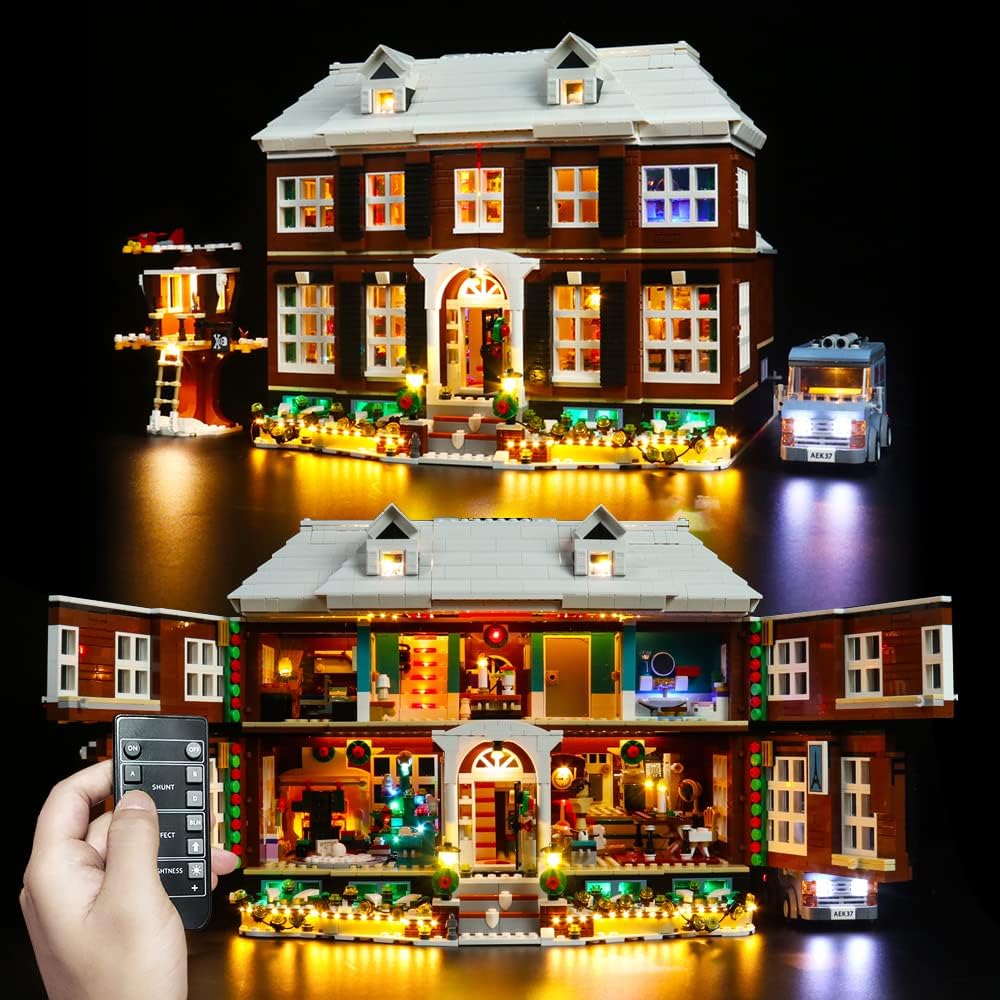
Image 2: The LEGO Home Alone set with its interior exposed, showcasing the detailed lighting within each room, controlled by a remote.

Image 3: Detailed views of specific illuminated sections of the LEGO Home Alone model, highlighting the lighting in the bathroom, dining room, and exterior fixtures.
5. Operating Instructions
Once installed and powered, your LocoLee LED Lighting Kit is ready for use.
- Power On/Off: Use the switch on the battery box or disconnect the USB cable to turn the lights on or off.
- Remote Control: If your kit includes a remote control (as shown in product images), use it to adjust brightness, switch between lighting modes, or turn the lights on/off remotely. Refer to the remote's specific instructions for detailed functions.
- Brightness: For optimal brightness, especially for larger models, using a USB power source is recommended over batteries.
6. Maintenance
Proper care will ensure the longevity of your lighting kit.
- Cleaning: Gently dust the LED components and wires with a soft, dry cloth. Avoid using liquid cleaners directly on the lights or connections.
- Storage: If disassembling the kit for storage, carefully disconnect wires and store components in a dry, cool place away from direct sunlight.
- Battery Replacement: If using batteries, replace all three AAA batteries simultaneously when lights dim or stop working.
7. Troubleshooting
If you encounter issues with your lighting kit, consider the following common solutions:
- Lights Not Working:
- Check power source: Ensure batteries are correctly inserted and charged, or the USB cable is securely connected to a functional power adapter.
- Verify connections: Ensure all wire connectors are firmly seated. Loose connections are a common cause of non-functioning lights.
- Inspect wires: Look for any pinched, cut, or damaged wires.
- Some Lights Not Working:
- Isolate the issue: Check the connections for the specific non-working lights.
- Test individual segments: If possible, test segments of the lighting circuit to pinpoint the faulty section.
- Dim Lights:
- Replace batteries: If using batteries, they may be low.
- Use USB power: USB power generally provides a more consistent and brighter output than batteries.
If troubleshooting steps do not resolve the issue, please contact customer support.
8. Specifications
| Product Dimensions | 15 x 10 x 3 cm; 170 grams |
| Recommended Age | 3 years and up |
| Educational Value | Building skills, Imagination development, Creative thinking |
| Batteries Required | No (for the kit itself, but 3x AAA for battery box) |
| Batteries Included | No |
| Battery Type | 3x AAA (for battery box) |
| Main Material | Acrylonitrile Butadiene Styrene |
| Color | White |
| Special Feature | Rechargeable (via USB) |
9. Customer Support
LocoLee is committed to providing high-quality products and excellent customer service. If you have any questions, concerns, or require assistance with your LED lighting kit, please do not hesitate to contact us. We aim to respond to all inquiries within 12 hours to resolve any issues and ensure your satisfaction.
For support, please refer to the contact information provided with your product packaging or visit the official LocoLee website.