
ACCT AI-200
ACCT AI-200 Precision Pocket Scale User Manual
Model: AI-200
Introduction
The ACCT AI-200 Precision Pocket Scale is designed for accurate measurement of small items, providing results from 0.01 grams up to 200 grams. Its compact and durable design makes it suitable for various applications, including weighing jewelry, food ingredients, powders, coffee, and coins. This manual provides detailed instructions for setup, operation, maintenance, and troubleshooting to ensure optimal performance of your scale.

Image: The ACCT AI-200 Precision Pocket Scale in blue, showcasing its compact design and digital display.
Setup
1. Battery Installation
The scale requires AAA batteries (typically 2). To install or replace batteries:
- Open the battery compartment cover, usually located on the underside or back of the scale.
- Insert the batteries, ensuring correct polarity (+/-).
- Close the battery compartment cover securely.

Image: Battery compartment of the scale with batteries inserted.
2. Initial Placement
Place the scale on a hard, flat, and stable surface to ensure accurate readings. Avoid placing it on soft, uneven, or vibrating surfaces.
3. Calibration
The scale comes with a 50g calibration weight. Regular calibration ensures the highest accuracy. To calibrate the scale:
- Turn on the scale by pressing the ON/OFF button.
- Wait for the display to show "0.00g".
- Press and hold the MODE key until the display shows "CAL".
- Press the MODE key again. The display will flash "50.00g".
- Place the 50g calibration weight gently on the center of the weighing platform.
- The display will show "PASS" and then return to normal weighing mode, indicating successful calibration.

Image: Step-by-step visual guide for calibrating the scale with the included 50g weight.
Video: An official video demonstrating how to use and calibrate the ACCT digital pocket scale.
Operating Instructions
1. Power On/Off
- To turn on the scale, press the ON/OFF button.
- To turn off the scale, press and hold the ON/OFF button for a few seconds, or it will automatically turn off after a set period of inactivity (auto-off function).
2. Unit Conversion
The scale supports 6 different weighing units. To switch between units:
- Press the MODE button repeatedly to cycle through the available units: grams (g), ounces (oz), grains (gn), troy ounces (ozt), pennyweights (dwt), and carats (ct).

Image: The scale's display and buttons, illustrating the unit conversion options.
3. Tare Function
The Tare function allows you to subtract the weight of a container, so you only measure the net weight of its contents.
- Place an empty container on the weighing platform.
- Press the TARE button. The display will reset to "0.00g".
- Add the items you wish to weigh into the container. The display will show only the weight of the items.
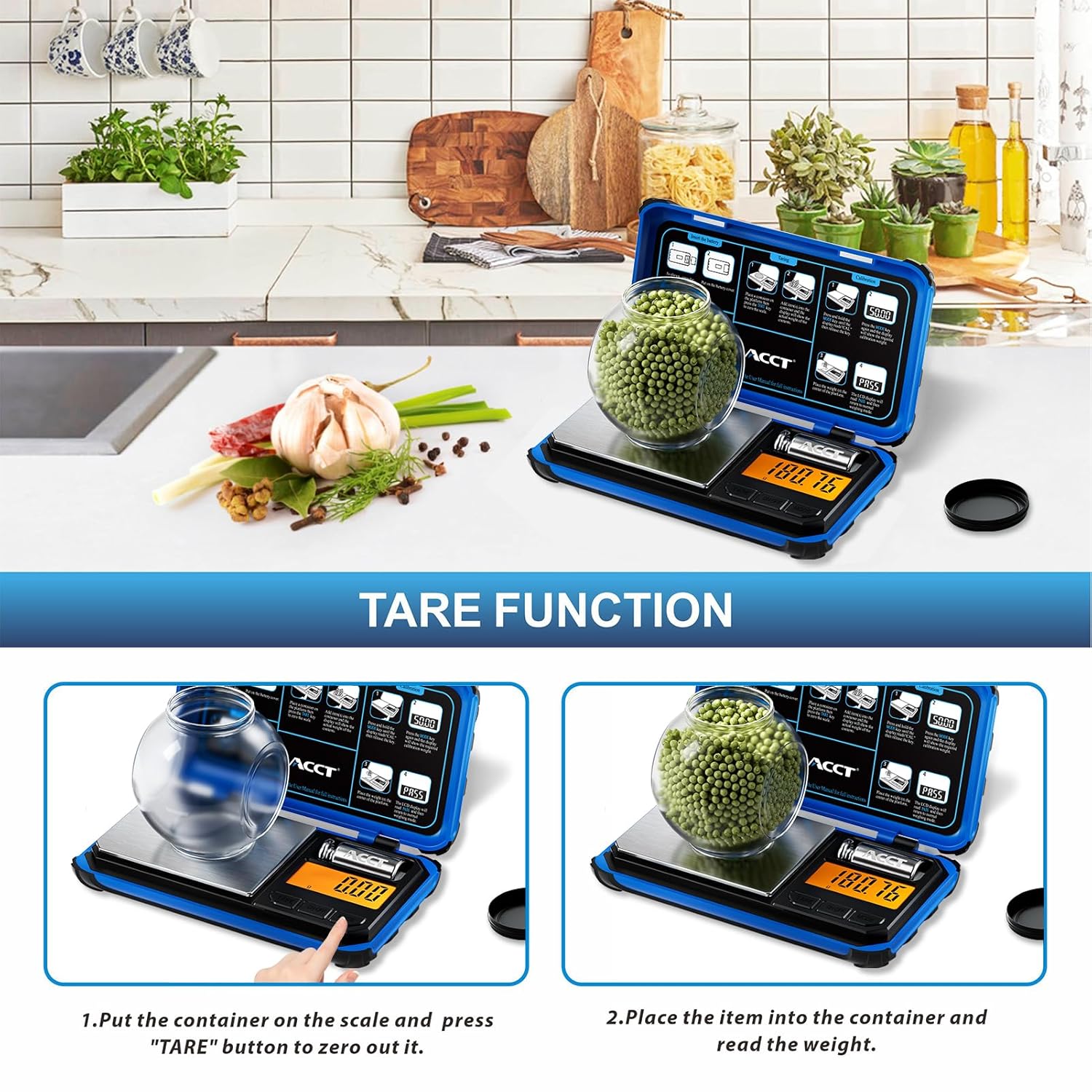
Image: Visual explanation of using the Tare function to measure net weight.
4. Auto-Off Settings
The scale features an adjustable auto-off time to conserve battery life. Refer to the full instruction manual for specific steps on how to customize this setting.
5. Display Indicators
The LCD display provides important status indicators:
- Low Battery: An icon will appear when batteries need replacement.
- Overload: "EEEE" or a similar message indicates the weight exceeds the maximum capacity (200g). Remove items immediately to prevent damage.
- Unstable: An "UNST" or similar message indicates an unstable reading, often due to movement or an uneven surface.
Maintenance
1. Cleaning
The stainless-steel weighing platform is easy to clean.
- Wipe the platform with a soft, damp cloth.
- Do not use abrasive cleaners or immerse the scale in water.
- Ensure the scale is dry before storage or next use.

Image: The stainless steel weighing pan and non-slip base of the scale.
2. Storage
Store the scale in a cool, dry place. The non-slip cover, made of ABS material, is magnetically attracted and protects the scale against impact during storage and transport.
3. Battery Replacement
Replace batteries when the low battery indicator appears on the display to maintain accuracy and functionality.
Troubleshooting
| Problem | Possible Cause | Solution |
|---|---|---|
| Inaccurate readings | Unstable surface, need for calibration, low battery, or overload. | Place on a stable surface. Perform calibration (see Setup section). Replace batteries. Ensure weight is within 200g capacity. |
| Display shows "EEEE" | Overload. The weight on the platform exceeds 200g. | Remove items from the platform immediately. Do not exceed the maximum capacity. |
| Display shows "UNST" | Unstable reading due to movement or uneven surface. | Ensure the scale is on a flat, stable surface and there is no movement during weighing. |
| Scale does not turn on | Dead or incorrectly installed batteries. | Check battery polarity. Replace batteries if necessary. |
Specifications
- Brand: ACCT
- Model: AI-200
- Weight Capacity: 200 g
- Readout Accuracy: 0.01 g
- Units: g, oz, gn, ozt, dwt, ct
- Display Type: Backlit LCD
- Material: Acrylonitrile Butadiene Styrene (ABS) casing, Stainless Steel platform
- Form Factor: Handheld
- Item Weight: 209 g
- Recommended Uses: Food, Coins, Jewelry, Medicines, Herbs, Beads
Warranty Information
The ACCT AI-200 Precision Pocket Scale typically comes with a limited manufacturer's warranty. For specific details regarding warranty coverage, duration, and terms, please refer to the warranty card included with your product packaging or visit the official ACCT website. Keep your purchase receipt as proof of purchase for any warranty claims.
Customer Support
For further assistance, technical support, or inquiries about your ACCT AI-200 Precision Pocket Scale, please contact ACCT customer service. Contact information can usually be found on the product packaging, the official ACCT website, or through your retailer.
Related documentsAI-200

Ask a question about this manual
Ask about setup, troubleshooting, compatibility, parts, safety, or missing instructions. Manuals+ will review the question and use this page’s manual context to help answer it.