
1. Introduction
Thank you for choosing the Renogy Portable Power Station 500. This device is a versatile and reliable power solution designed to provide electricity for various applications, from outdoor adventures to emergency home backup. It features a high-capacity lithium-ion battery, multiple output ports, and advanced charging technologies. Please read this manual thoroughly before operating the device to ensure safe and optimal performance.
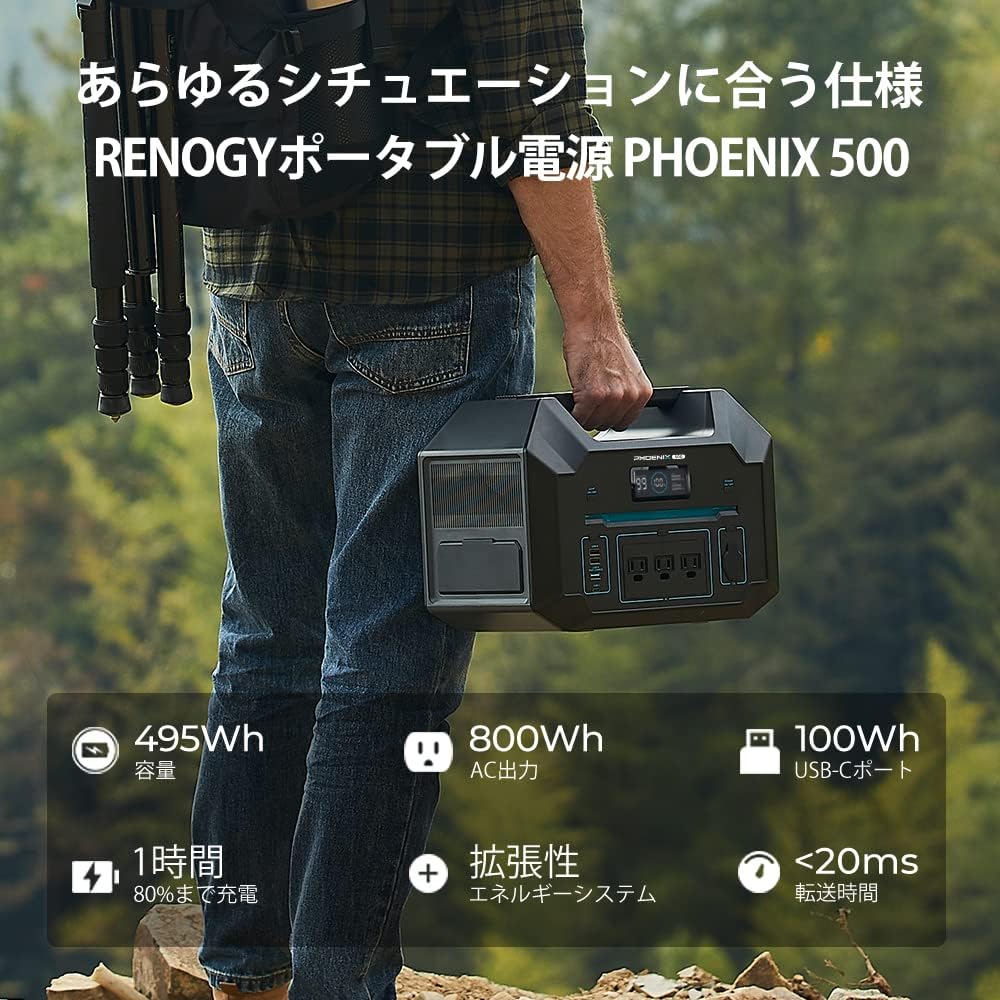
The Renogy Portable Power Station 500 is designed for portability, allowing you to carry it easily for outdoor activities or as a backup power source.
2. Safety Instructions
To ensure safe operation and prolong the lifespan of your power station, please observe the following safety precautions:
- Read all instructions before use.
- Do not disassemble, repair, or modify the unit. Incorrect reassembly may cause fire or electric shock.
- Keep the unit away from fire, heat sources, and direct sunlight.
- Do not use or store the unit in a bathroom or in areas exposed to water or moisture.
- Use only original or certified cables and accessories.
- Ensure proper ventilation during use and charging. Do not block ventilation openings.
- Keep out of reach of children and pets.
- Do not drop, puncture, or subject the unit to severe impacts.
- In case of fire, use a dry powder fire extinguisher.
3. Product Overview
The Renogy Portable Power Station 500 features a user-friendly design with various input and output ports to meet your power needs.

This image highlights the various input and output ports available on the Renogy Portable Power Station 500, including USB-A, USB-C, AC outlets, CIG port, and AC/DC input ports.
Ports and Controls:
- USB-A Output Ports (x2): Max 12W each. For charging smartphones, tablets, and other USB-powered devices.
- USB-A Fast Charge Output: Max 18W. For quicker charging of compatible devices.
- USB-C Output Port: Max 100W. For charging laptops, larger tablets, and other USB-C devices.
- AC Output Ports (x3): Rated 800W, Surge 1600W. Provides pure sine wave AC power for household appliances.
- CIG Port: Max 136W. For car accessories and 12V devices.
- Overload Protection Device: Safety feature to prevent damage from excessive current.
- AC Input Port: Max 495W. For fast charging the power station from a wall outlet.
- DC Input Port: 10-50V, Max 200W. For solar panel or car charging.
- Parallel Outlet: For connecting two power stations to double capacity and output.
LCD Display:
The integrated LCD screen provides real-time information about the power station's status, including:
- Battery remaining capacity percentage.
- Input and output power (Watts).
- ON/OFF status of each function (AC, DC, USB).
- Protection icons for temperature, voltage, or current anomalies, allowing for immediate troubleshooting.
4. Setup
Initial Charging:
Before first use, it is recommended to fully charge the power station. The unit comes with a partial charge, but a full charge ensures optimal battery calibration.
Charging Methods:
Your Renogy Portable Power Station 500 can be charged using three methods:
- AC Wall Outlet (iTurbo Fast Charging): Connect the AC charging cable to the AC input port and then to a standard wall outlet. The iTurbo technology allows for rapid charging, reaching 80% capacity in approximately 1 hour and full charge in about 1.8 hours. No external AC adapter is needed, simplifying portability.
- Solar Panels: Connect compatible solar panels (sold separately) to the DC input port. The power station supports a maximum of 200W solar input. Charging time varies depending on solar intensity and panel wattage.
- Car Charger: Connect the car charging cable to the DC input port and your vehicle's 12V cigarette lighter socket. This method is ideal for charging on the go.

Experience rapid charging with iTurbo technology. The power station can reach 80% charge in approximately one hour directly from an AC wall outlet, without the need for an external adapter.
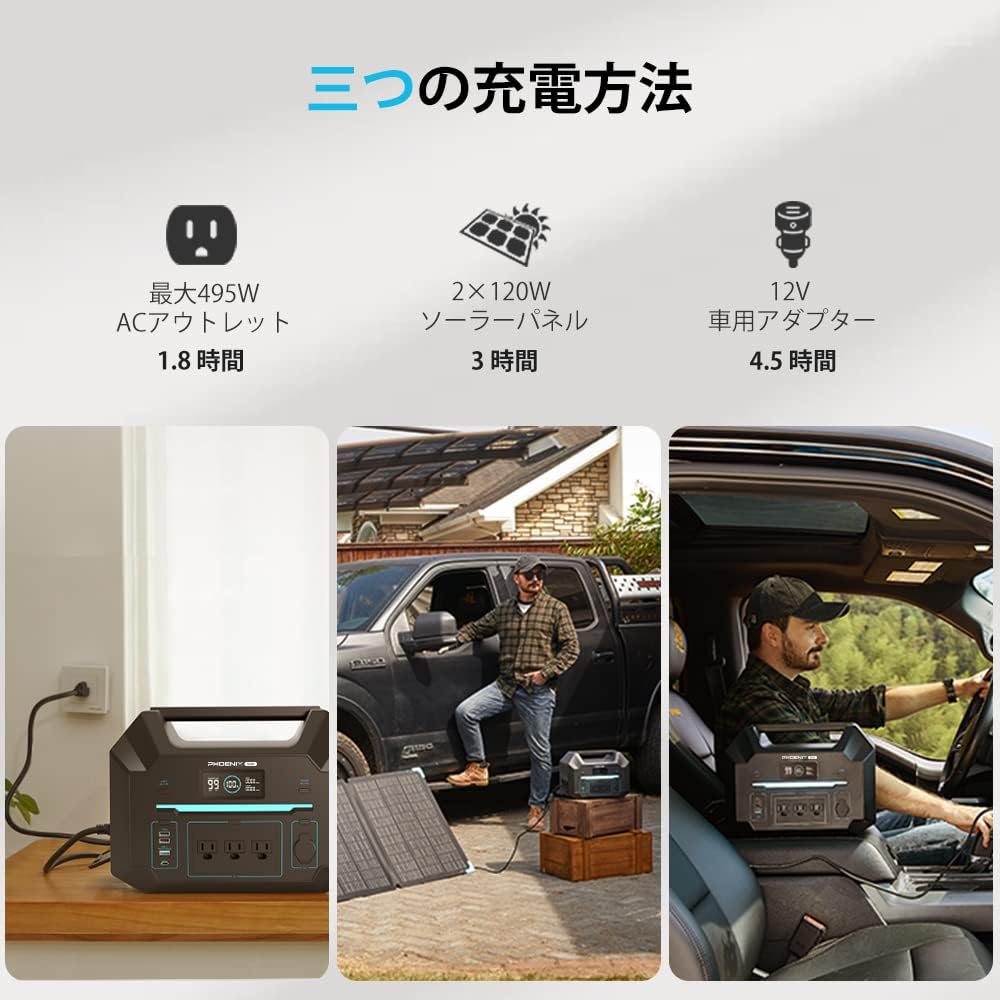
The Renogy Portable Power Station 500 offers versatile charging options: from a standard AC outlet, compatible solar panels, or a 12V car adapter, ensuring you can recharge wherever you are.
5. Operating Instructions
Turning On/Off:
Press and hold the main power button for a few seconds to turn the unit ON or OFF. The LCD screen will illuminate.
Using Output Ports:
To use the USB, AC, or CIG output ports, press the corresponding button to activate them. The icon for the activated port will appear on the LCD screen. Connect your devices to the appropriate ports.
iBoost Technology:
The power station features iBoost technology, which allows it to power appliances with a higher wattage than its rated output. In iBoost mode (default), the AC output can handle devices up to 800W continuously and surge up to 1600W, making it compatible with a wide range of household electronics.

iBoost technology allows the power station to deliver up to 800W rated power and 1600W surge power, enabling it to run a wide range of household appliances like CPAP machines, refrigerators, and laptops.
UPS (Uninterruptible Power Supply) Mode:
When the power station is connected to an AC wall outlet and devices are connected to its AC output, it can function as a UPS. In the event of a power outage, the unit will automatically switch to battery power, providing uninterrupted power to connected devices. Note: Do not use for devices requiring a transfer time of less than 0.02 seconds.
Parallel Connection:
For increased capacity and AC output, two Renogy Portable Power Station 500 units can be connected in parallel using a separately sold single-phase parallel kit (Model: RSA30SGPK-3-JP). This configuration doubles the total capacity to 990Wh and increases the rated AC output power to 1440W, allowing for the use of higher power consumption appliances.

Expand your power capabilities by connecting two Renogy Portable Power Station 500 units in parallel using an optional kit. This doubles the capacity to 990Wh and increases AC output to 1440W.
DC Home App Remote Monitoring:
The power station includes a built-in Bluetooth module, enabling remote monitoring and control via the Renogy DC Home app on your smartphone or tablet. You can view the operating status, battery level, input/output power, and manage settings. The app connection is limited to a range of 20 meters from the power station.

Monitor and control your Renogy Portable Power Station 500 remotely using the DC Home app via Bluetooth. View battery status, input/output power, and manage settings from your smartphone or tablet within a 20-meter range.
6. Maintenance
- Storage: Store the power station in a cool, dry place, away from direct sunlight and extreme temperatures. For long-term storage, charge the unit to 50-80% every 3-6 months to maintain battery health.
- Cleaning: Use a dry, soft cloth to clean the exterior of the unit. Do not use abrasive cleaners or immerse the unit in water.
- Battery Life: The lithium-ion battery is designed for a certain number of charge cycles. Proper maintenance, including regular charging and avoiding deep discharges, will help maximize its lifespan.
7. Troubleshooting
If you encounter issues with your power station, refer to the following common problems and solutions:
- Unit Not Turning On: Ensure the battery is charged. If completely depleted, connect to an AC outlet for a few minutes.
- No Output from Ports: Ensure the specific output port (USB, AC, CIG) is activated by pressing its respective button. Check if the device connected requires more power than the port can supply.
- Error Icons on LCD: The LCD screen displays specific icons if protection functions are activated (e.g., over-temperature, over-voltage, over-current). Refer to the full user manual (available online) for detailed explanations of each icon and recommended actions. Typically, disconnecting the problematic device and allowing the unit to cool down can resolve these issues.
- Slow Charging: Ensure you are using the correct charging method and cables. For solar charging, verify panel placement and sunlight intensity.
For more complex issues, please contact Renogy customer support.
8. Specifications
| Feature | Specification |
|---|---|
| Model | 500 |
| Battery Capacity | 495Wh (27500mAh) |
| AC Output (Rated) | 800W (Pure Sine Wave) |
| AC Output (Surge) | 1600W |
| USB-A Output | 2 x 12W |
| USB-A Fast Charge | 1 x 18W |
| USB-C Output | 1 x 100W |
| CIG Output | 1 x 136W |
| AC Input (Max) | 495W (iTurbo Fast Charging) |
| DC Input (Max) | 200W (10-50V) |
| AC Charging Time (80%) | Approx. 1 hour |
| AC Charging Time (100%) | Approx. 1.8 hours |
| Parallel Connection | Supported (with optional kit, 990Wh capacity, 1440W AC output) |
| Connectivity | Bluetooth (DC Home App) |
| Dimensions | 43.8 x 36.8 x 32.4 cm |
| Weight | 12 kg |
| Color | Black |
9. Package Contents
The Renogy Portable Power Station 500 package includes the following items:

The package includes the Renogy Portable Power Station 500, an AC charging cable, a solar charging cable, a car charging cable, and the user manual to get you started.
- Renogy Portable Power Station 500 (x1)
- AC Charging Cable (x1)
- Solar Charging Cable (x1)
- Car Charging Cable (x1)
- User Manual (x1)
10. Warranty and Support
Renogy products come with a limited warranty. For detailed warranty information, please refer to the warranty card included in your package or visit the official Renogy website. If you have any questions, require technical assistance, or need to claim warranty service, please contact Renogy customer support through their official channels.
Renogy Customer Support: Please visit www.renogy.com/support for contact information and FAQs.


