
Introduction
The Nitecore TINI 2 is a compact and powerful keychain flashlight, featuring dual P8 LEDs that deliver a maximum output of 500 lumens. Designed for everyday carry, it is lightweight and smaller than a car key, making it convenient for various illumination needs. This device incorporates a multifunctional OLED display, dual switch operation, and multiple user modes for enhanced functionality and control.
Package Contents
- Nitecore TINI 2 Flashlight x 1
- Key Clasp x 1

Image: Contents of the Nitecore TINI 2 package, including the flashlight and a key clasp.
Product Overview
The Nitecore TINI 2 features a durable aluminum body, dual P8 LEDs with TIR lens, and a clear OLED display. It is equipped with two control buttons for intuitive operation.

Image: Front view of the Nitecore TINI 2 flashlight, showcasing its compact design and dual LED emitters.
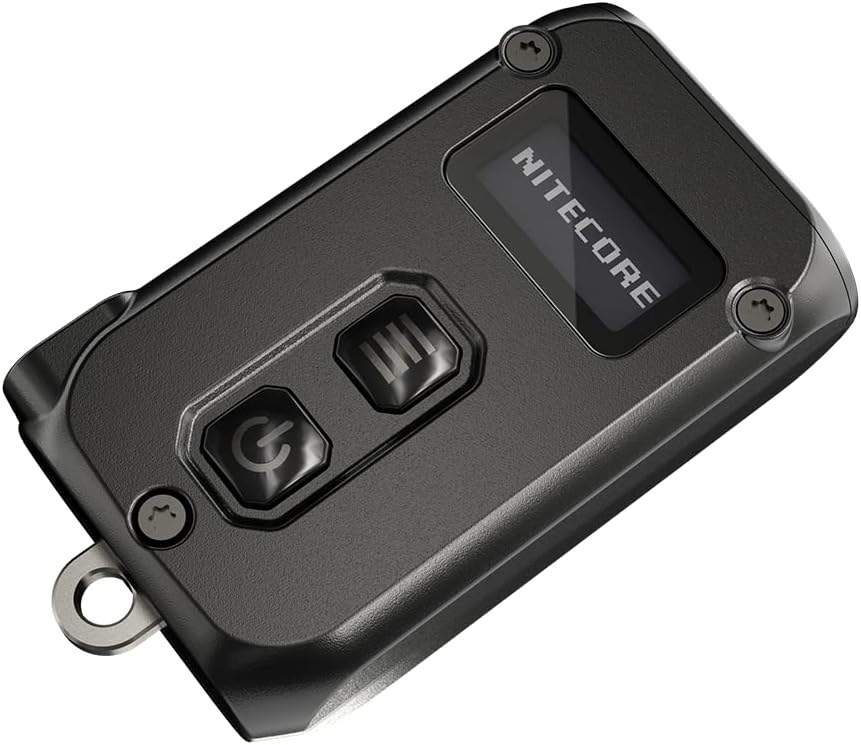
Image: Top view of the Nitecore TINI 2, highlighting the OLED display and the two control buttons (Power and Mode).

Image: Bottom view of the Nitecore TINI 2, showing the USB-C charging port and regulatory markings.
Setup: Charging the Device
The TINI 2 features a built-in Li-ion battery and a USB-C charging port. To charge the device:
- Locate the USB-C charging port on the side of the flashlight.
- Connect a USB-C cable (not included in the standard factory package) to the port.
- Connect the other end of the cable to a USB power source.
- The OLED display will indicate the charging status.
Ensure the device is fully charged before first use for optimal performance.
Operating Instructions
Power On/Off
- To Turn On: Press and hold the Power Button (⏻) for 1 second.
- To Turn Off: Press and hold the Power Button (⏻) for 1 second.
Brightness Levels
When the light is on, short press the Mode Button (☰) to cycle through the brightness levels: Ultralow → Low → Mid → High.
- Ultralow: 1 Lumen
- Low: 15 Lumens
- Mid: 65 Lumens
- High: 200 Lumens
Direct Access Modes
- Direct Access to Turbo: When the light is off, press and hold the Mode Button (☰) to instantly activate Turbo mode (500 lumens). Release to turn off.
- Direct Access to Ultralow: When the light is off, press and hold the Power Button (⏻) to instantly activate Ultralow mode (1 lumen). Release to turn off.
User Modes (Demo Mode / Daily Mode)
The TINI 2 offers two user modes:
- Demo Mode: Designed for short bursts of illumination, automatically turning off after 30 seconds of inactivity.
- Daily Mode: Optimized for longer sustained illumination, remaining on until manually turned off.
To Switch Modes: When the light is on, press and hold both the Power Button (⏻) and Mode Button (☰) simultaneously for 1 second. The OLED display will indicate the current mode.
Lockout Modes
To prevent accidental activation, the TINI 2 features two lockout modes:
- Half Lockout Mode: Prevents accidental activation of the main light, but allows direct access to Turbo and Ultralow modes.
- Full Lockout Mode: Disables all button functions, preventing any accidental activation.
To Activate Lockout: When the light is on, press and hold the Power Button (⏻) until the OLED display shows the lockout icon. Continue holding to switch between Half Lockout and Full Lockout.
To Deactivate Lockout: In any lockout mode, press and hold both the Power Button (⏻) and Mode Button (☰) simultaneously for 1 second. The light will turn on in Ultralow mode.
OLED Display Information
The integrated OLED display provides real-time information:
- Remaining runtime
- Brightness level (lumens)
- Current user mode (Demo/Daily)
- Battery voltage and level
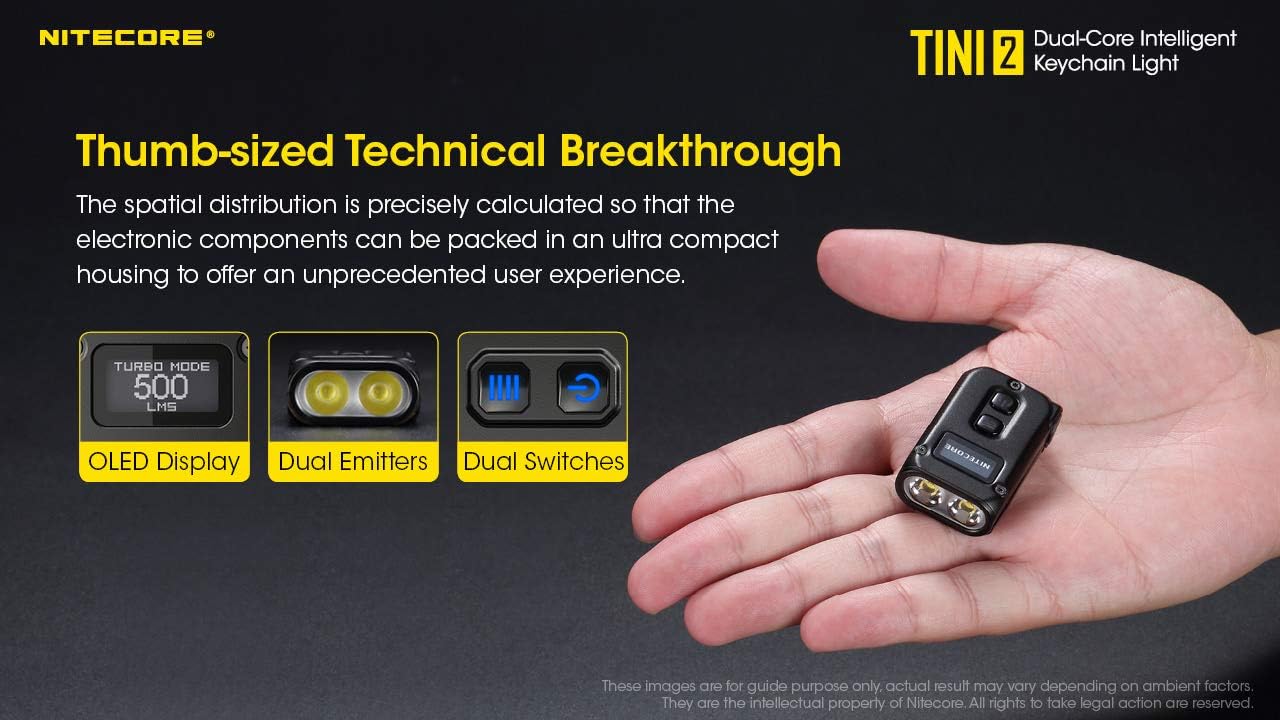
Image: Visual representation of the Nitecore TINI 2's key features: OLED Display, Dual Emitters, and Dual Switches.

Image: A hand holding the Nitecore TINI 2, demonstrating the OLED display showing 'TURBO MODE 500 LMS' and the flashlight's beam.
Maintenance
To ensure the longevity and optimal performance of your Nitecore TINI 2:
- Cleaning: Wipe the flashlight body with a soft, damp cloth. Avoid harsh chemicals.
- Charging: Recharge the battery regularly, especially if the device will not be used for an extended period, to maintain battery health.
- Storage: Store the flashlight in a cool, dry place away from direct sunlight and extreme temperatures.
Troubleshooting
If you encounter issues with your Nitecore TINI 2, consider the following:
- Light not turning on: Check if the battery is charged. Ensure the device is not in Full Lockout Mode.
- Light output is dim: The battery may be low. Recharge the device.
- Charging issue: Ensure the USB-C cable is properly connected and the power source is functional. Try a different cable or power source.
- Accidental activation: Activate Half Lockout or Full Lockout Mode as described in the Operating Instructions.
For persistent issues, contact Nitecore customer support.
Technical Specifications
| LED | 2x P8 |
| Maximum Brightness | 500 lumens |
| Peak Beam Distance | 89 meters (97 yards) |
| Peak Beam Intensity | 2000 cd |
| IP Rating | IP54 |
| Impact Resistance | 1 meter |
| Material | Aluminum |
| Power Source | Built-in Li-ion Battery |
| Dimensions (L x W x H) | 1.83" x 0.98" x 0.49" (46.6mm x 25mm x 12.5mm) |
| Weight | 0.66 oz (18.8 g) |
| Mode | Output | Runtime |
|---|---|---|
| Turbo | 500 lumens | 15 minutes* |
| High | 200 lumens | 45 minutes |
| Mid | 65 lumens | 2.5 hours |
| Low | 15 lumens | 8 hours |
| Ultralow | 1 lumen | 60 hours |
*The runtime for Turbo mode is tested without temperature regulation. Data is measured in accordance with ANSI/PLATO FL1-2019 standards using the built-in 280mAh battery under laboratory conditions. Actual data may vary due to battery usage or environmental factors.

Image: Detailed technical specifications table for the Nitecore TINI 2, including FL1 standard measurements for various modes.
Warranty and Support
Nitecore products are covered by a warranty. For specific warranty terms, duration, and support inquiries, please refer to the official Nitecore website or contact your authorized dealer. Keep your purchase receipt as proof of purchase for warranty claims.


