
WANBO T6 Max
WANBO T6 Max Projector User Manual
Model: T6 Max
1. Product Overview
The WANBO T6 Max is a versatile smart projector designed for both home and office use. It features native 1080P Full HD resolution with 4K HDR support, Android 9.0 operating system, and a brightness of 650 ANSI Lumens. Key functionalities include auto-focus, auto keystone correction, dual WiFi, Bluetooth connectivity, and a dust-proof optical engine, providing a high-quality and convenient viewing experience.

Figure 1.1: Front view of the WANBO T6 Max Projector.
2. What's in the Box
Upon opening the package, please ensure all the following items are present:
- WANBO T6 Max Projector
- Power Adaptor
- Voice Remote Control
- User Manual
- Warranty Card
3. Key Features
The WANBO T6 Max projector is equipped with advanced features to enhance your viewing experience:
- Native 1080P Full HD & 4K HDR Support: Delivers crisp, detailed visuals with vibrant colors.
- 650 ANSI Lumens Brightness: Provides clear images even in moderately lit environments.
- Android TV 9.0: Access a wide range of streaming apps and content directly.
- Auto Focus & Auto Keystone Correction: Automatically adjusts image clarity and shape for optimal projection.
- Dual WiFi (2.4G/5G) & Bluetooth: Ensures stable wireless connectivity for streaming and external audio devices.
- Dust-Proof Optical Engine: A fully sealed design protects internal components from dust, ensuring longevity and consistent performance.
- Built-in Hi-Fi Speakers: Dual 5W speakers provide immersive audio, supported by Dolby Audio and DTS Decoding.
- Versatile Connectivity: Includes USB and HDMI ports for connecting various devices like laptops, gaming consoles, and media players.
- Portable Design: Compact and lightweight, making it easy to move and set up in different locations.

Figure 3.1: Overview of the WANBO T6 Max's core features.
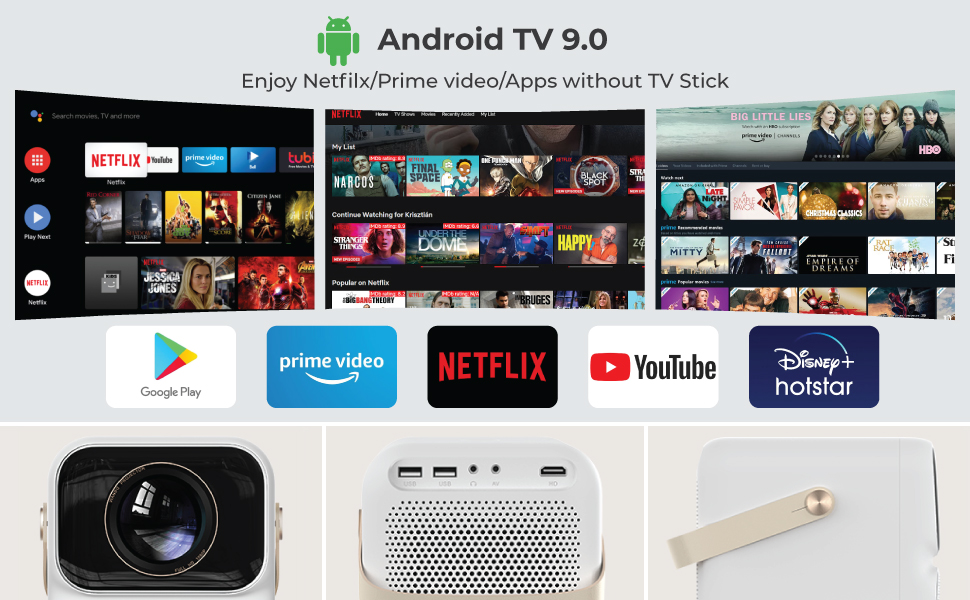
Figure 3.2: Visual representation of advanced features like auto-focus and sealed optical engine.
4. Setup Guide
4.1 Unpacking and Placement
- Carefully remove the projector and all accessories from the packaging.
- Place the projector on a stable, flat surface. Ensure adequate ventilation around the device.
- For optimal viewing, position the projector directly in front of your screen or wall. The projector supports side projection, allowing for flexible placement.

Figure 4.1: The projector supports flexible placement, including side projection.
4.2 Power Connection
- Connect the power adaptor to the DC input port on the projector.
- Plug the power adaptor into a suitable electrical outlet.
- The projector can also be powered via a 12V car charging power supply, enhancing portability for outdoor use.
4.3 Initial Setup (Android TV)
- Press the power button on the projector or remote control to turn on the device.
- Follow the on-screen instructions to complete the initial setup, including language selection and network connection.
- Connect to your Wi-Fi network (supports 2.4G and 5G bands) for internet access and smart features.
- Sign in with your Google account to access the Google Play Store and other Android TV services.
4.4 Focus and Keystone Adjustment
The WANBO T6 Max features automatic focus and keystone correction for a clear and perfectly shaped image:
- Auto Focus: The projector will automatically adjust the focus when powered on or moved.
- Auto Keystone Correction: The image will automatically correct its shape to be rectangular, even if the projector is placed at an angle.
- Manual adjustments can be made via the remote control if needed.

Figure 4.2: The projector and its voice-enabled remote control.
5. Operating Instructions
5.1 Navigating Android TV
Use the provided voice remote control to navigate the Android TV interface. The home screen provides access to installed apps, recommended content, and settings.

Figure 5.1: The Android TV 9.0 home screen with popular streaming applications.
5.2 Connecting External Devices
The projector offers multiple connectivity options:
- HDMI: Connect laptops, gaming consoles (Switch, PS5, XBOX), Blu-ray players, or other media devices using an HDMI cable.
- USB: Plug in USB drives to play media files directly.
- Bluetooth: Pair with external Bluetooth speakers or headphones for enhanced audio.
- Wi-Fi: Connect to your home network for streaming and online features.

Figure 5.2: Connectivity ports on the WANBO T6 Max.
5.3 Screen Mirroring
The projector supports wireless and wired mirror display options:
- Wireless Mirroring (Miracast): Cast content from compatible smartphones or tablets wirelessly.
- Wired Mirroring: Connect devices via USB or HDMI for a stable mirrored display.
5.4 Using Voice Assistant
The built-in Google Assistant allows for voice control. Press the dedicated voice button on the remote and speak your commands, such as searching for content, opening apps, or adjusting settings.
5.5 Adjusting Settings
Access the settings menu from the Android TV home screen to customize various aspects of the projector:
- Picture Settings: Adjust brightness, contrast, color, and aspect ratio.
- Sound Settings: Control volume, audio output mode, and equalizer settings.
- Projection Settings: Manually adjust focus, keystone, and zoom (100%-60% zoom function available).
6. Maintenance
Proper maintenance ensures the longevity and optimal performance of your projector:
- Cleaning the Lens: Use a soft, lint-free cloth specifically designed for optical lenses to gently wipe the projector lens. Avoid abrasive materials or harsh chemicals.
- Dust-Proof Engine Care: The fully sealed optical engine minimizes dust accumulation. However, regularly clean the exterior of the projector with a dry, soft cloth to prevent dust buildup on vents.
- Software Updates: Periodically check for and install software updates via the Android TV settings to ensure the latest features and performance improvements.
- Storage: When not in use for extended periods, store the projector in a cool, dry place, away from direct sunlight and extreme temperatures.
7. Troubleshooting
If you encounter any issues, refer to the following common problems and solutions:
| Problem | Possible Cause | Solution |
|---|---|---|
| No picture | Power cable disconnected; Input source incorrect; Lens cap on. | Check power connection; Select correct input source (HDMI/USB); Remove lens cap. |
| No sound | Volume too low; Muted; External audio device not connected properly. | Increase volume; Unmute; Check Bluetooth connection or audio cable. |
| Remote not working | Batteries low/dead; Obstruction between remote and projector. | Replace batteries; Ensure clear line of sight. |
| Blurred image | Out of focus; Projector moved. | Allow auto-focus to adjust or manually adjust focus via remote. |
| Image distorted (not rectangular) | Keystone not corrected. | Allow auto keystone correction to adjust or manually adjust via remote. |
| Network connection issues | Incorrect Wi-Fi password; Router too far; Network interference. | Verify password; Move closer to router; Restart router and projector. |
8. Specifications
| Feature | Detail |
|---|---|
| Brand | WANBO |
| Model | T6 Max |
| Dimensions (LxWxH) | 20.1 x 13.7 x 13.7 cm |
| Item Weight | 1.95 kg |
| Native Resolution | 1920 x 1080 (Full HD) |
| Max Display Resolution | 1920 x 1080 (Supports 4K video playback) |
| Image Brightness | 650 ANSI Lumens |
| Display Technology | LED, LCD |
| Aspect Ratio | 16:9 |
| Lamp Life | 20,000+ Hours |
| Operating System | Android TV 9.0 |
| Processor | 64-bit Amlogic T972 Quad-core |
| RAM | 2GB |
| Storage | 16GB |
| Connectivity | Bluetooth, Wi-Fi (2.4G/5G), USB, HDMI |
| Audio Output | 2 x 5W Speakers (Dolby Audio, DTS Decoding) |
| Screen Size (Projection Distance) | 50-200 inches (1.3-7.0 meters) |
| Zoom Function | 100%-60% |
| Power Source | Corded Electric (19 Volts, 120 Watts) |
| Special Features | Auto Focus, Auto Keystone Correction, Built-in Google Assistant, HDR10+ |
9. Official Product Videos
Watch these official videos for a visual guide on the WANBO T6 Max Projector's features and usage:
Video 9.1: Product Summary Video for WANBO T6 Max Projector. This video highlights the main features and benefits of the projector.
Video 9.2: WANBO T6 Max Overview. A detailed look at the projector's design and functionality.
10. Warranty and Support
The WANBO T6 Max Projector comes with a standard brand warranty. For specific details regarding the warranty period and coverage, please refer to the Warranty Card included in your product box.
For any technical assistance, troubleshooting beyond this manual, or warranty claims, please contact WANBO customer support. Contact information can typically be found on the Warranty Card or the official WANBO website.
Importer Contact: Zeblaze LLP, 731, 3rd Floor, 4th Phase, Yelahanka New Town, Bangalore KA. Customer Care: 080 7097 7097
Related documentsT6 Max


Ask a question about this manual
Ask about setup, troubleshooting, compatibility, parts, safety, or missing instructions. Manuals+ will review the question and use this page’s manual context to help answer it.