
cellularline BTKEENTWSK
Cellularline Keen TWS Earbuds User Manual
Model: BTKEENTWSK
Introduction
The Cellularline Keen True Wireless Stereo (TWS) earbuds are designed for an optimal audio experience, whether for calls or music. Featuring a soft-touch finish and intuitive touch controls, these earbuds offer convenience and high-quality sound for everyday use. The Keen earbuds provide up to 6 hours of playback on a single charge, with the included charging case extending total battery life to over 24 hours.

This image shows the Cellularline Keen True Wireless Stereo (TWS) earbuds. The earbuds are black with a soft-touch finish, and one earbud is visible resting in its open charging case. The charging case is also black with a silver interior, designed to store and charge the earbuds.
Package Contents
Before you begin, please ensure all items are present in the package:
- Cellularline Keen TWS Earbuds (Left and Right)
- Charging Case
- Charging Cable
- Eartips in 3 Sizes (Small, Medium, Large)
- User Manual
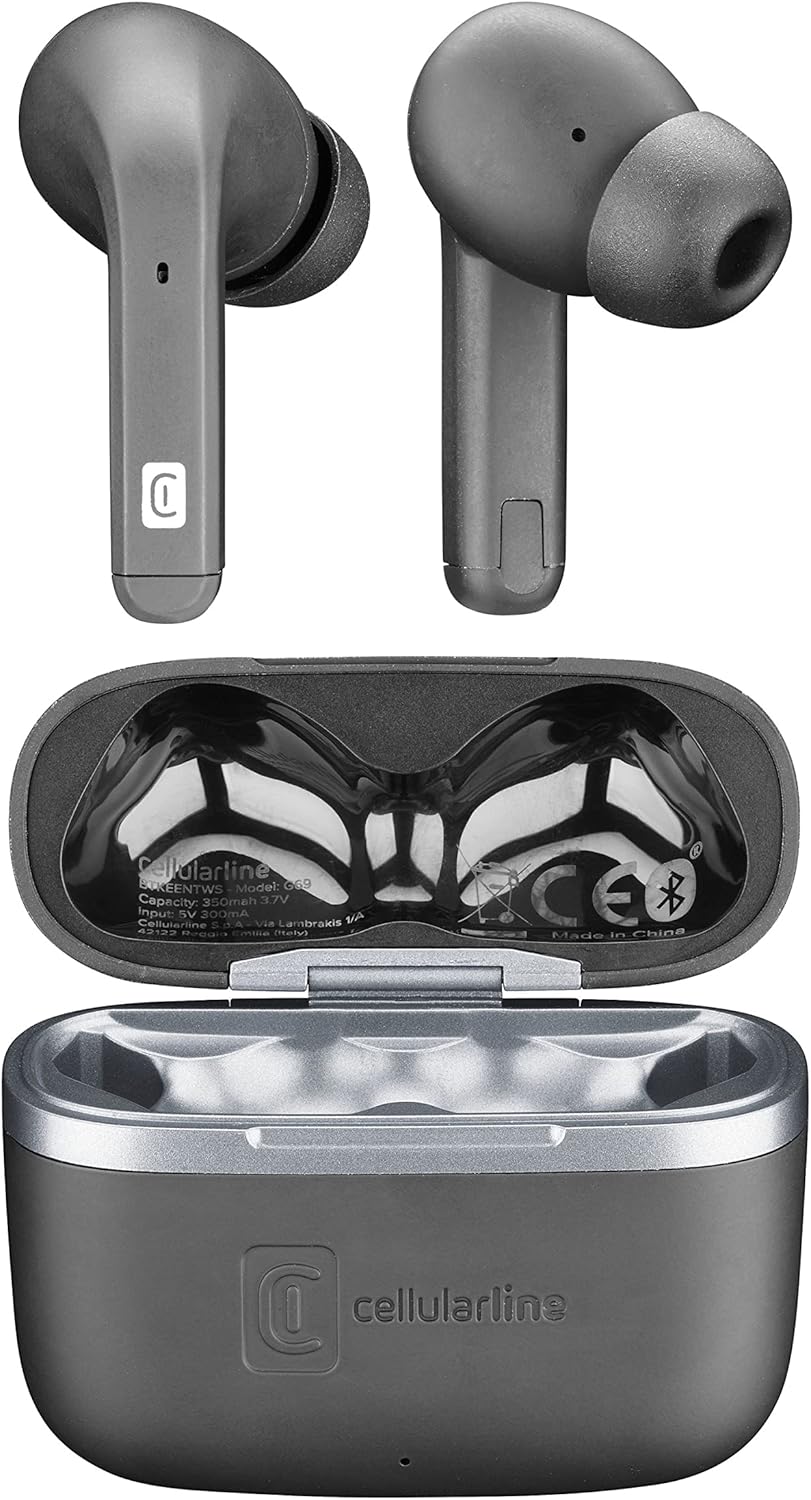
This image provides a top-down view of the Cellularline Keen earbuds and their charging case. Both earbuds are shown outside the case, highlighting their design. The open charging case reveals the charging cradles and internal markings, including the Cellularline logo and regulatory information.
Setup
1. Initial Charging
Before first use, it is recommended to fully charge the earbuds and the charging case. Connect the provided charging cable to the charging case and a compatible USB power source. The charging indicators on the case will show the charging status. A full charge provides up to 6 hours of earbud playtime, with the case offering an additional 24 hours of battery life.
2. Pairing with Your Device
The Cellularline Keen earbuds are designed for easy pairing with any Bluetooth-enabled device (smartphones, tablets, laptops, etc.).
- Ensure the earbuds are in the charging case and the case lid is open.
- On your device, navigate to the Bluetooth settings.
- Activate Bluetooth if it is not already enabled.
- Search for new devices. You should see "Cellularline Keen" or a similar name appear in the list of available devices.
- Select "Cellularline Keen" to initiate the pairing process.
- Once paired, your device will confirm the connection, and the earbuds are ready for use.
The earbuds will automatically connect to the last paired device when removed from the case, provided Bluetooth is active on the device.
Operating Instructions
The Keen earbuds feature intuitive touch controls for managing audio playback and calls.
Music Playback
- Play/Pause: Single tap on either earbud.
- Next Track: Double tap on the right earbud.
- Previous Track: Double tap on the left earbud.
- Volume Up: Triple tap on the right earbud.
- Volume Down: Triple tap on the left earbud.
Call Management
- Answer/End Call: Single tap on either earbud.
- Reject Call: Press and hold either earbud for 2 seconds.
Voice Assistant
- Activate Voice Assistant: Press and hold either earbud for 3 seconds (e.g., Siri, Google Assistant).
Maintenance
Proper maintenance ensures the longevity and optimal performance of your Cellularline Keen earbuds.
- Cleaning: Regularly clean the earbuds and charging case with a soft, dry, lint-free cloth. Do not use abrasive cleaners or solvents. For eartips, remove them and clean with a damp cloth, ensuring they are completely dry before reattaching.
- Water Resistance: The earbuds are rated as waterproof. However, this does not mean they are suitable for prolonged submersion or use during swimming. Avoid exposing them to strong jets of water or saltwater. Always ensure the charging port is dry before charging.
- Storage: When not in use, store the earbuds in their charging case to protect them from dust and damage. Store in a cool, dry place away from direct sunlight and extreme temperatures.
- Battery Care: To preserve battery life, avoid fully discharging the earbuds and case frequently. Charge them regularly, even if not in constant use.
Troubleshooting
If you encounter any issues with your Cellularline Keen earbuds, refer to the following common solutions:
| Problem | Possible Solution |
|---|---|
| Earbuds not pairing/connecting |
|
| No sound from one or both earbuds |
|
| Charging case not charging |
|
| Touch controls not responding |
|
Specifications
| Feature | Detail |
|---|---|
| Model Name | BTKEENTWSK |
| Brand | cellularline |
| Connectivity Technology | Wireless (Bluetooth) |
| Form Factor | In-Ear |
| Control Type | Touch Control |
| Earbud Playtime | Up to 6 hours |
| Total Playtime (with case) | Over 24 hours (up to 30 hours) |
| Battery Composition | Lithium-polymer (2 included) |
| Special Features | Fast Charging, Wireless |
| Water Resistance Level | Waterproof |
| Frequency Range | 20 Hz - 20,000 Hz |
| Material | Plastic |
| Item Weight | 40 Grams |
| Color | Black |
Warranty and Support
For warranty information, technical support, or service inquiries regarding your Cellularline Keen earbuds, please refer to the warranty card included in your package or visit the official Cellularline website. Information regarding spare parts availability and software updates is not provided in this manual.
You can also contact Cellularline customer support directly for assistance.
Related documentsBTKEENTWSK


Ask a question about this manual
Ask about setup, troubleshooting, compatibility, parts, safety, or missing instructions. Manuals+ will review the question and use this page’s manual context to help answer it.