
Introduction
Thank you for choosing the Mcdodo MC-7050 20W PD GoPower MagSafe 5000mAh Power Bank. This portable charger is designed to provide convenient and efficient power to your devices, featuring both wired USB-C Power Delivery and MagSafe-compatible wireless charging. Please read this manual carefully before use to ensure proper operation and to maximize the lifespan of your device.
Safety Information
- Do not expose the power bank to extreme temperatures, direct sunlight, or fire.
- Avoid dropping, impacting, or disassembling the device.
- Keep away from water and other liquids.
- Do not use if the power bank is damaged or swollen.
- Keep out of reach of children.
- Use only certified charging cables and adapters.
- Dispose of the power bank responsibly according to local regulations.
Package Contents
Please check the package for the following items:
- Mcdodo MC-7050 20W PD GoPower MagSafe 5000mAh Power Bank
- USB-C to USB-C Charging Cable
- User Manual
Product Overview
Familiarize yourself with the components of your Mcdodo MC-7050 Power Bank:

Image: Mcdodo MC-7050 Power Bank shown with its integrated kickstand extended, displaying the MagSafe charging area on the front. This view highlights the compact design and the stand feature for convenient use.
- MagSafe Wireless Charging Area: Central circular area for magnetic wireless charging.
- Power Button: Activates the power bank and checks battery level.
- LED Indicators: Display the remaining battery capacity.
- USB-C Port: Used for both charging the power bank and charging other devices.
- Integrated Kickstand: Allows the power bank to stand upright, useful for viewing content while charging wirelessly.

Image: An angled view of the Mcdodo MC-7050 Power Bank, clearly showing the USB-C input/output port on the side and the power button located near the top edge. The kickstand is also visible in this perspective.
Setup
Initial Charging of the Power Bank
- Connect the provided USB-C cable to the USB-C port on the power bank.
- Connect the other end of the USB-C cable to a compatible USB power adapter (not included). For optimal charging speed, use a Power Delivery (PD) compatible adapter.
- The LED indicators will illuminate to show the charging status. All LEDs will be solid when fully charged.
- It is recommended to fully charge the power bank before its first use.
Operating Instructions
Checking Battery Level
Press the power button once to check the remaining battery capacity. The LED indicators will light up to show the current charge level.
Wired Charging (USB-C Output)
- Connect your device's charging cable to the USB-C port on the power bank.
- Connect the other end of the cable to your device.
- The power bank will automatically begin charging your device. If not, press the power button once.
Wireless Charging (MagSafe Compatible)
- Ensure your device is compatible with MagSafe or Qi wireless charging.
- Align your MagSafe-compatible device (e.g., iPhone 12 series or newer) with the circular MagSafe charging area on the power bank. The magnets will help align it correctly.
- The power bank will automatically begin wireless charging. If not, press the power button once.
- The integrated kickstand can be used to prop up your phone while wirelessly charging.
Maintenance
- Cleaning: Use a soft, dry cloth to clean the surface of the power bank. Do not use harsh chemicals or abrasive materials.
- Storage: Store the power bank in a cool, dry place away from direct sunlight and extreme temperatures.
- Battery Health: To maintain battery health, fully charge and discharge the power bank at least once every three months if not in regular use.
Troubleshooting
- Power bank not charging:
- Ensure the charging cable is securely connected to both the power bank and the power adapter.
- Try a different USB-C cable or power adapter.
- Verify the power adapter is functioning correctly.
- Device not charging from power bank:
- Ensure the power bank has sufficient charge.
- Press the power button to activate charging.
- Try a different charging cable for your device.
- Ensure your device is properly aligned for wireless charging.
- Remove any thick phone cases that might interfere with wireless charging.
- Slow charging:
- Ensure you are using a fast-charging compatible cable and adapter for both the power bank and your device.
- Some devices may limit charging speed when using wireless charging.
Specifications
| Feature | Specification |
|---|---|
| Model Name | MC-7050 |
| Battery Capacity | 5000 mAh |
| Connector Type | USB Type-C |
| Key Features | Fast Charging, Wireless Charging (MagSafe compatible) |
| Power Output | 20W Power Delivery (PD) |
| Power Source | Battery-Powered |
| Number of Ports | 1 (USB-C for input/output, plus wireless charging) |
| Compatible Phone Models | Compatible with all phones (wired), MagSafe compatible phones (wireless) |
| Reusability | Rechargeable |
| Product Weight | 0.18 Kilogram |
| Product Dimensions (L x W x H) | 10.7 cm x 6.7 cm x 1.7 cm |
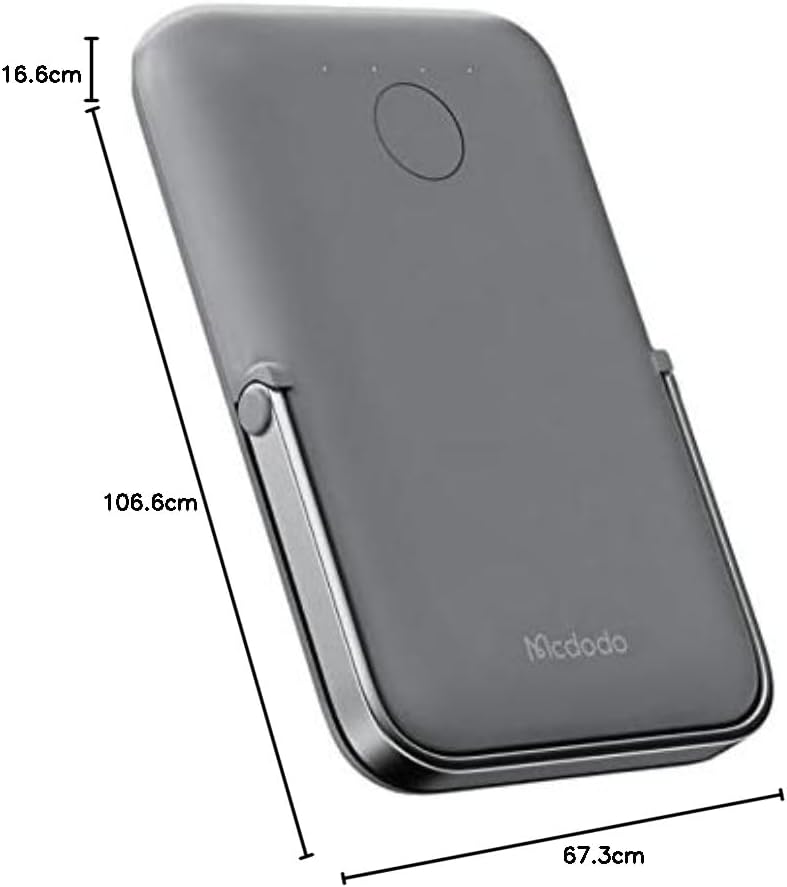
Image: Top-down view of the Mcdodo MC-7050 Power Bank illustrating its compact dimensions, approximately 10.7 cm in length, 6.7 cm in width, and 1.7 cm in thickness.
Warranty and Support
For warranty information and technical support, please refer to the warranty card included in your product packaging or visit the official Mcdodo website. Keep your purchase receipt as proof of purchase.
Mcdodo Official Website: www.mcdodo.com


