
OFANTOP 52YFT-7068
OFANTOP 52-Inch Smart Ceiling Fan with Lights and Remote Control (Model: 52YFT-7068)
Instruction Manual
1. Safety Information
Read and understand all instructions before beginning installation. This product must be installed in accordance with the applicable installation code by a person familiar with the construction and operation of the product and the hazards involved. Failure to follow these instructions may result in electric shock, fire, or serious personal injury.
- Always disconnect power at the main circuit breaker before installation or servicing.
- Ensure all electrical connections are in accordance with local codes, ordinances, and the National Electric Code.
- The fan must be mounted with a minimum of 7 feet (2.1 meters) clearance from the floor to the trailing edge of the blades.
- The fan must be mounted to a ceiling outlet box marked "Acceptable for Fan Support of 35 lbs (15.9 kg) or less."
- Do not operate the fan with damaged blades. Replace all blades if one is damaged.
- Avoid placing objects in the path of the fan blades.
- This fan is ETL Listed for indoor and outdoor use. Ensure proper sealing for outdoor installations to prevent water damage.
2. Package Contents
Verify that all components are present before beginning installation.
- Motor Assembly
- Fan Blades (3)
- Downrod (5" and 10" included for Downrod Mount)
- Mounting Bracket
- Canopy
- Remote Control with Wall Mount
- Light Kit Assembly
- Hardware Pack (screws, wire nuts, washers)
- Instruction Manual

Image: Main components of the OFANTOP 52-Inch Smart Ceiling Fan.
3. Product Specifications
| Brand | OFANTOP |
| Model Name | 52YFT-7068 |
| Size | 52 Inch |
| Number of Blades | 3 |
| Motor Type | Brushless DC Motor |
| Air Flow Capacity | 6031 Cubic Feet Per Minute (CFM) |
| Power Source | AC/DC (120 Volts AC) |
| Wattage | 35 Watts |
| Control Method | Remote, App (Smart Life), Voice (Alexa, Google Assistant) |
| Light Features | Dimmable, 3 Color Temperature Options (3000K, 4500K, 6000K), Memory Function |
| Indoor/Outdoor Use | Yes (ETL Listed, IP44 for outdoor) |
| Mounting Type | Downrod Mount (5" and 10" downrods included) |
| Noise Level | 35dB (Quiet Operation) |
| Energy Efficiency | 75% Less Energy than AC Fan |

Image: Energy Efficiency label for the ceiling fan.
4. Installation Instructions
4.1 Pre-Installation Checklist
- Ensure power is disconnected at the circuit breaker.
- Confirm you have all necessary tools (screwdriver, wire strippers, ladder, etc.).
- Verify the mounting location can support the fan's weight (16.42 lbs).
- Choose the appropriate downrod length (5" or 10") for your ceiling height.
4.2 Mounting Options
This fan supports both standard downrod mount and angled mount (up to 20 degrees).
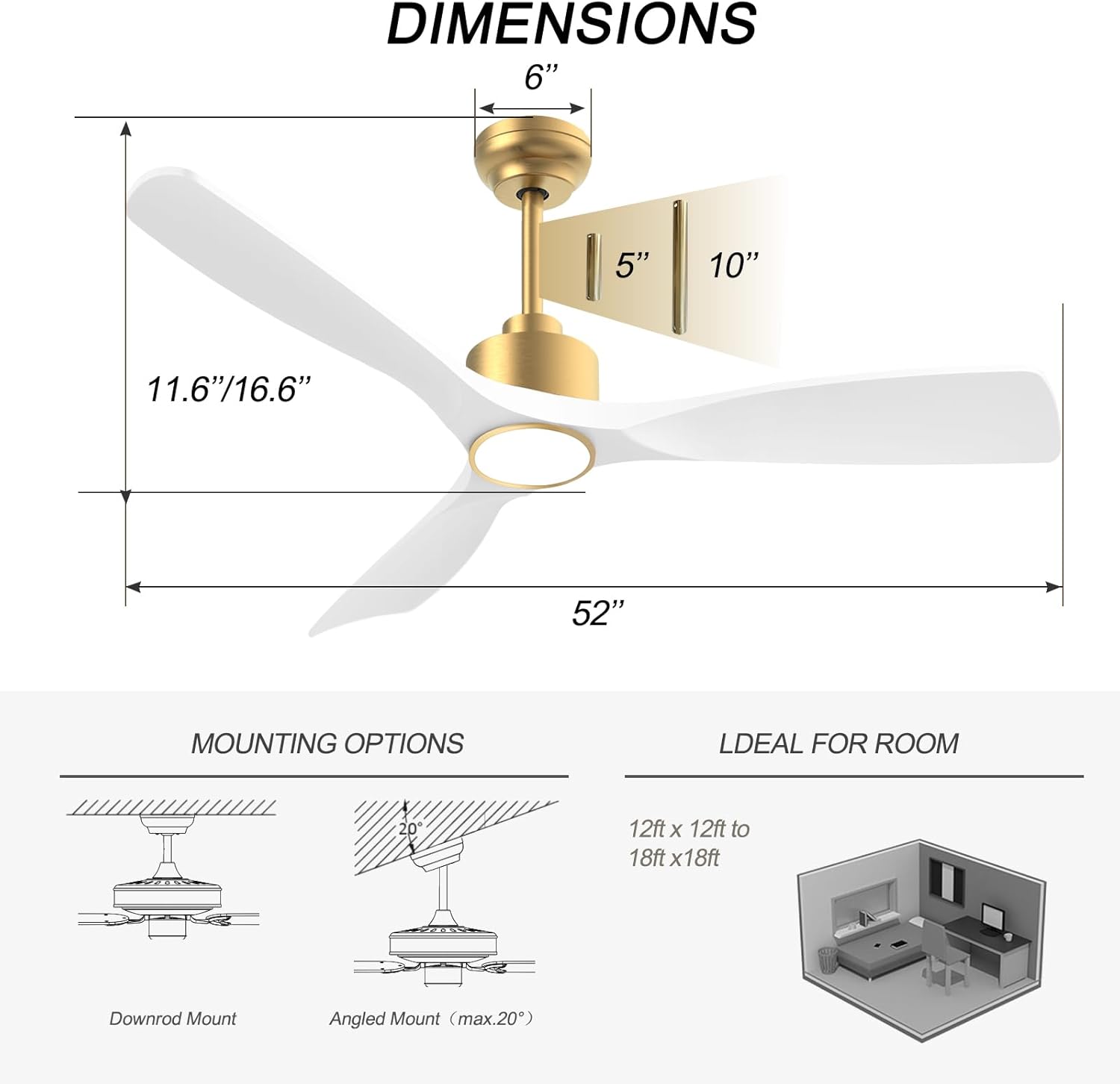
Image: Diagram showing fan dimensions and available downrod and angled mounting options.
- Attach the mounting bracket to the ceiling outlet box using the provided screws.
- Feed the electrical wires from the ceiling through the center hole of the mounting bracket.
- Assemble the downrod to the motor assembly, ensuring all screws are tightened securely.
- Carefully lift the fan assembly and hang it from the mounting bracket.
4.3 Wiring
The fan features quick connectors for simplified wiring.
- Connect the fan's wires to the household wiring according to the color codes (typically black to black, white to white, green/bare copper to ground).
- Ensure all connections are secure using wire nuts.
- Tuck all wires neatly into the outlet box.
Video: A short demonstration of the fan's appearance and operation. This video is a 7-second preview and shows the fan spinning with its light on.
4.4 Blade Attachment
- Carefully attach each of the three fan blades to the motor housing using the provided screws.
- Ensure all screws are tightened evenly to prevent wobbling.
Video: An overview of the BOOSANT White and Gold Ceiling Fan, demonstrating its features and design. This video provides a general look at the fan's aesthetics and functionality.
4.5 Light Kit Installation
- Connect the light kit wires to the corresponding wires from the fan motor.
- Secure the light kit assembly to the bottom of the fan motor housing.
5. Operating Instructions
5.1 Remote Control Functions
The included remote control allows for convenient operation of all fan and light functions.
- Power On/Off: Turns the fan and light on or off.
- Fan Speed: Select from 6 different fan speeds.
- Light On/Off: Controls the light independently.
- Color Temperature: Cycle through 3 color temperature options (3000K Warm White, 4500K Natural White, 6000K Cool White).
- Dimmer: Adjust the brightness of the light.
- Reversible Motor: Switch between summer (downward airflow) and winter (upward airflow) modes.
- Timer: Set the fan to turn off automatically after a set period (e.g., 1H, 2H, 4H, 8H).
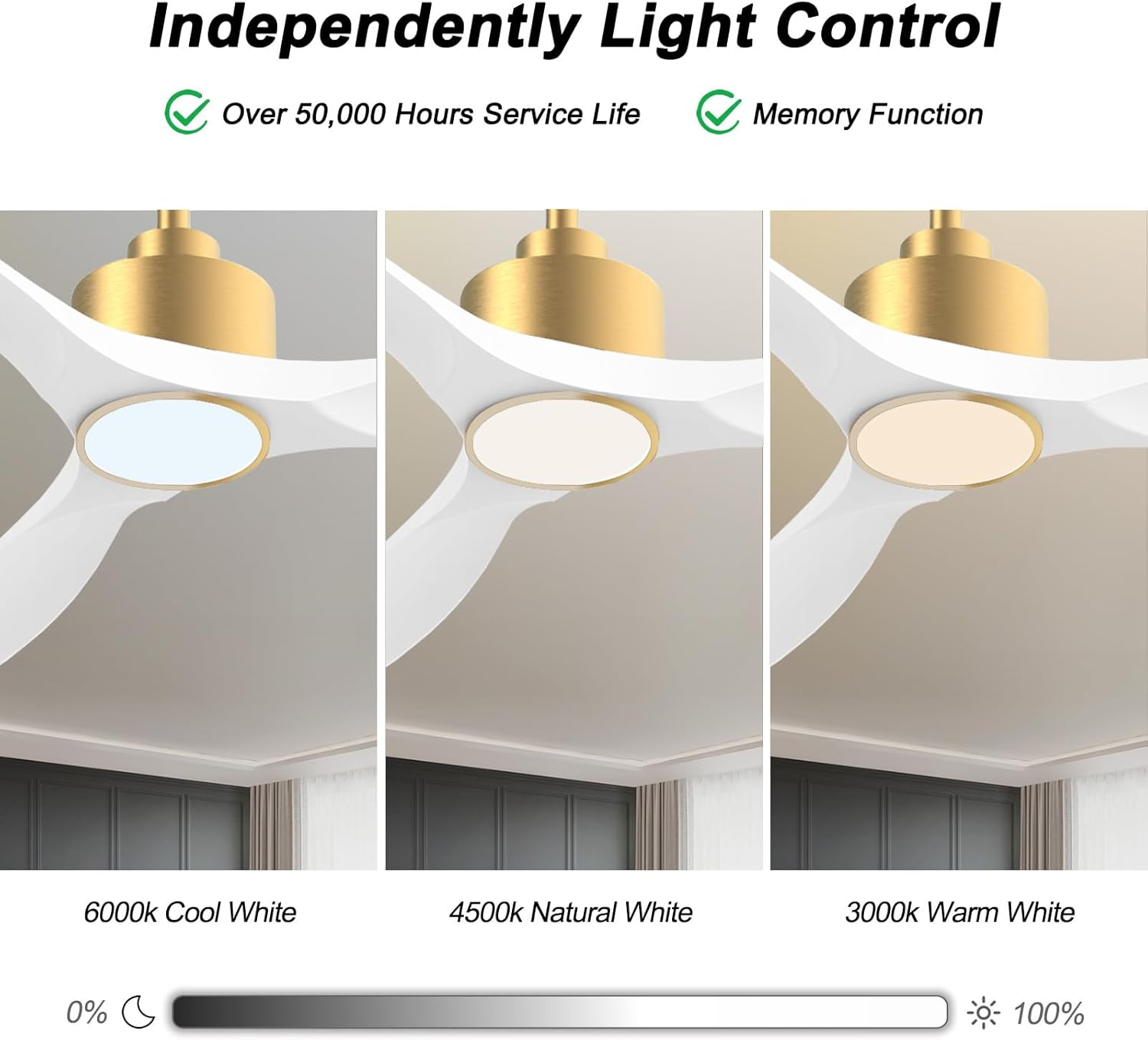
Image: Visual representation of the three adjustable light color temperatures (Warm, Natural, Cool White).

Image: Illustration of the reversible motor function for summer cooling and winter warm air circulation.
5.2 Smart Control (App/Voice)
The OFANTOP Smart Ceiling Fan can be controlled via the Smart Life app or voice assistants like Amazon Alexa and Google Assistant.
- App Download: Download the "Smart Life" app from your device's app store.
- Wi-Fi Pairing:
- Ensure your Wi-Fi network is 2.4GHz.
- Turn the fan power off and back on at the switch.
- Within 10 seconds, press the "8H Fan Timer & Wi-Fi Pairing" button on the remote for 3 seconds to enter pairing mode.
- Open the Smart Life app, select "Add Device" or click the "+" in the upper right corner.
- Find the fan device and click "ADD".
- Fill in your 2.4GHz Wi-Fi name and password.
- Wait for the connection to complete. A beep from the fan indicates successful pairing.
- Voice Control: Once paired with the Smart Life app, enable the Smart Life skill/action in your Amazon Alexa or Google Assistant app to control the fan with voice commands.

Image: Depiction of smart control features, including compatibility with Google Assistant and Amazon Alexa.
Video: Instructions on how to connect the BOOSANT 102 Series Smart Ceiling Fan to the Smart Life app for mobile control. This video details the Wi-Fi pairing process.
6. Maintenance
- Cleaning: To clean the fan, wipe with a soft, damp cloth. Do not use abrasive cleaners or solvents.
- Blade Care: Periodically check blade screws for tightness. Loose blades can cause wobbling and noise.
- Light Source: The integrated LED light source is designed for long life (over 50,000 hours) and is not user-replaceable.
- Motor: The DC motor is maintenance-free and does not require lubrication.
7. Troubleshooting
| Problem | Possible Cause | Solution |
|---|---|---|
| Fan does not start | No power to the fan; Loose wire connections; Remote control battery low. | Check circuit breaker; Verify all wire connections; Replace remote control battery. |
| Fan wobbles | Loose blade screws; Improperly balanced blades; Loose mounting bracket. | Tighten all blade screws; Use a balancing kit (not included) if necessary; Ensure mounting bracket is securely fastened. |
| Light does not work | Loose wire connection to light kit; LED driver failure; Remote control issue. | Check light kit wiring; Contact customer support if LED driver is suspected; Check remote battery/functionality. |
| Remote control not working | Battery depleted; Remote not paired with fan; Obstruction between remote and receiver. | Replace battery (23A 12V); Re-pair remote with fan (refer to pairing instructions); Ensure clear line of sight. |
| Wi-Fi connection issues | Incorrect Wi-Fi password; 5GHz Wi-Fi network; Fan not in pairing mode. | Verify password; Ensure 2.4GHz network is used; Follow app pairing instructions carefully. |
8. Warranty and Support
OFANTOP products are manufactured to the highest quality standards. For specific warranty details and customer support, please refer to the warranty card included with your purchase or contact OFANTOP customer service directly. Keep your proof of purchase for warranty claims.
Contact Information: Refer to your product packaging or the official OFANTOP website for the most up-to-date contact details.
Related documents52YFT-7068

Ask a question about this manual
Ask about setup, troubleshooting, compatibility, parts, safety, or missing instructions. Manuals+ will review the question and use this page’s manual context to help answer it.