
Dremel MM20V-02
Dremel MM20V-02 Cordless Oscillating Multi-Tool User Manual
Model: MM20V-02
1. Product Overview
The Dremel MM20V-02 Cordless Oscillating Multi-Tool is a versatile power tool designed for a wide range of applications, including cutting, sanding, grinding, scraping, and grout removal. Its cordless design provides freedom of movement, while the 20V MAX Lithium-Ion power ensures efficient performance for both novice and professional users. The kit includes essential accessories to get started right out of the box.

Image 1.1: Dremel MM20V-02 Multi-Tool Kit contents.
2. What's Included
Your Dremel MM20V-02 kit comes with the following components:
- 1x MM20V Multi-Max Tool
- 2x 20V Lithium-Ion Batteries (B20V20)
- 1x Hour Charger (C20V20)
- 1x Swiss-made MM485 High Performance Carbide Cutting Blade
- 1x MM482 Bi-Metal Cutting Blade
- 1x MM480 Wood and Drywall Cutting Blade
- 1x Dust Extraction Adapter
- 1x Tool Storage Bag
Image 2.1: All items included in the Dremel MM20V-02 kit.
3. Key Features
The Dremel MM20V-02 is engineered with features to enhance performance, comfort, and ease of use:
- Versatile Multi-Tool: Capable of cutting, sanding, grinding, scraping, and removing grout from various materials including woods, metals, plastics, adhesives, and grout.
- Angled-Body Design: Exclusive angled body for continuous comfort, reduced hand drag, and improved control during operation.
- Compact Front End: Allows for applications in tight, hard-to-reach spaces.
- Variable Speed Control: Separate ON/OFF switch retains speed setting, with OPM (Oscillations Per Minute) ranging from 10,000 to 20,000 for optimal control across different tasks.
- Tool-Less Accessory Change: Wrench-free design for quick and simple accessory changes.
- Soft Start: Gradually increases tool speed for added control and safety upon startup.
- 20V MAX Lithium-Ion Power: Provides robust power for demanding applications, with two batteries included for extended use.
3.1. Visual Demonstration of Features
Video 3.1: This video demonstrates the unboxing and various product features of the Dremel MM20V Cordless Oscillating Tool, including the tool-less accessory change, variable speed control, and its ability to cut through different materials.

Image 3.2: The angled body design of the Dremel MM20V-02 for enhanced ergonomics.

Image 3.3: The compact front end allows access to confined spaces.
4. Setup
4.1. Battery Charging
Before initial use, fully charge both 20V Lithium-Ion batteries. The charger is designed for quick and efficient charging.
- Connect the charger (C20V20) to a standard electrical outlet.
- Slide a 20V Lithium-Ion battery (B20V20) onto the charger until it clicks into place.
- The charger's indicator light will show the charging status. Refer to the charger's specific instructions for light indications.
- Once fully charged, remove the battery from the charger.

Image 4.1: Dremel 20V Lithium-Ion Battery.

Image 4.2: Dremel Battery Charger.
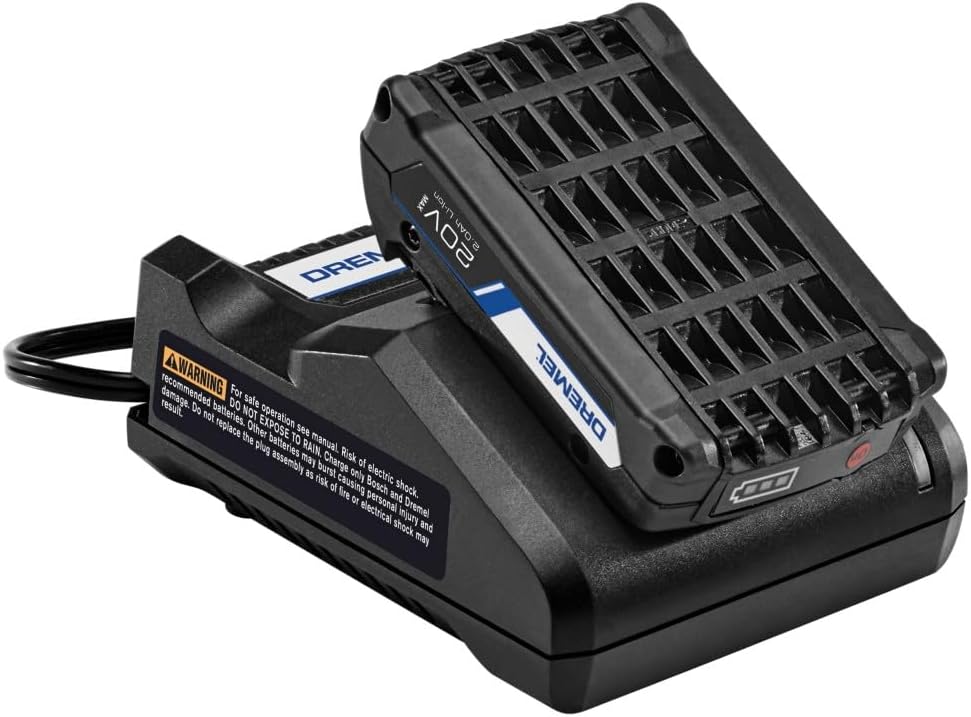
Image 4.3: Battery properly seated in the charger.
4.2. Attaching Accessories
The MM20V-02 features a tool-less accessory change system for quick and easy blade or attachment swaps.
- Ensure the tool is OFF and the battery is removed for safety.
- Locate the accessory release lever/knob on the tool head.
- Open the lever/loosen the knob to release the accessory clamp.
- Align the desired accessory (e.g., cutting blade, sanding pad) with the tool's accessory interface.
- Close the lever/tighten the knob firmly to secure the accessory in place. Ensure it is fully seated and cannot be easily pulled off.
4.3. Attaching Dust Extraction Adapter
For cleaner work environments, attach the included dust extraction adapter.
- Ensure the tool is OFF and the battery is removed.
- Locate the dust port on the tool.
- Slide the dust extraction adapter onto the dust port until it is securely attached.
- Connect a vacuum hose to the adapter for dust collection.
5. Operating Instructions
5.1. Powering On and Off
- Insert a charged battery into the tool until it clicks securely.
- To turn the tool ON, slide the ON/OFF switch to the 'ON' position. The tool will gradually increase to the previously set speed (soft start feature).
- To turn the tool OFF, slide the ON/OFF switch to the 'OFF' position.
5.2. Adjusting Speed
The variable speed control allows you to match the oscillation rate to the material and application.
- With the tool ON, rotate the speed dial located on the tool body.
- Increase the speed for faster material removal or harder materials.
- Decrease the speed for more precise work, softer materials, or when less aggressive action is desired.
5.3. General Usage Tips
Always wear appropriate personal protective equipment (PPE) such as safety glasses, gloves, and hearing protection when operating the tool.
- Cutting: Apply light, consistent pressure. Allow the tool to do the work. For plunge cuts, angle the blade slightly and slowly bring it upright as it enters the material.

Image 5.1: Using the Dremel Multi-Tool for cutting drywall.
- Sanding: Use the appropriate grit sandpaper for your material. Move the tool in a consistent pattern to avoid uneven sanding.

Image 5.2: The Dremel Multi-Tool being used for sanding wood.
- Scraping/Grout Removal: Position the accessory flat against the surface and apply steady pressure.
- Material Compatibility: Ensure the accessory chosen is suitable for the material you are working with.
6. Maintenance
Regular maintenance ensures the longevity and optimal performance of your Dremel MM20V-02 Multi-Tool.
6.1. Cleaning
- Always disconnect the battery before cleaning.
- Wipe down the tool's exterior with a clean, damp cloth. Do not use harsh chemicals or abrasive cleaners.
- Clear any dust or debris from the ventilation openings to prevent overheating.
- Clean the accessory interface regularly to ensure proper accessory seating.
6.2. Battery Care
- Store batteries in a cool, dry place away from direct sunlight and extreme temperatures.
- Do not store fully discharged batteries for extended periods. Charge them periodically if not in use.
- Avoid dropping or physically damaging batteries.
6.3. Accessory Replacement
Replace accessories when they become dull, worn, or damaged to maintain cutting efficiency and safety. Follow the accessory attachment instructions in Section 4.2.
7. Troubleshooting
If you encounter issues with your Dremel MM20V-02, refer to the following common troubleshooting steps:
| Problem | Possible Cause | Solution |
|---|---|---|
| Tool does not turn on. | Battery not charged or not inserted correctly. | Ensure battery is fully charged and properly seated. |
| Tool loses power during operation. | Battery is low or tool is overloaded. | Recharge battery. Reduce pressure on the tool. |
| Excessive vibration or noise. | Accessory not properly secured or damaged. | Check accessory attachment. Replace damaged accessories. |
| Poor cutting/sanding performance. | Dull or incorrect accessory for the material. | Replace accessory. Ensure correct accessory type and grit for the task. |
| Tool overheats. | Blocked ventilation or continuous heavy use. | Clear ventilation openings. Allow tool to cool down. Avoid excessive pressure. |
If the problem persists after trying these solutions, contact Dremel customer support.
8. Specifications
Key technical specifications for the Dremel MM20V-02 Cordless Oscillating Multi-Tool:
| Specification | Value |
|---|---|
| Model Number | MM20V-02 |
| Voltage | 20 Volts MAX |
| Oscillations Per Minute (OPM) | 10,000 - 20,000 |
| Power Source | Battery Powered (Lithium Ion) |
| Item Weight | 2.6 pounds |
| Product Dimensions | 13.15 x 2.75 x 2.8 inches |
| Included Components | 1-MM20V Multi-Max Tool, 3-Flush Cut Blades (MM480, MM482, MM485), 1 -Dust Extraction Adapter, 2-20V Batteries (B20V20), 1-Hour Charger (C20V20), 1-Storage Bag |
8.1. Product Comparison

Image 8.1: Comparison of Dremel Multi-Max models.
9. Warranty & Support
9.1. Warranty Information
The Dremel MM20V-02 Multi-Tool comes with a 2 Year Limited Warranty from the manufacturer. Please retain your proof of purchase for warranty claims.
9.2. Customer Support
For further assistance, technical support, or warranty inquiries, please visit the official Dremel website or contact their customer service department. You can also refer to the official User Manual PDF available online for more detailed information.
Related documentsMM20V-02


Ask a question about this manual
Ask about setup, troubleshooting, compatibility, parts, safety, or missing instructions. Manuals+ will review the question and use this page’s manual context to help answer it.