Introduction
Thank you for choosing the Aiwa BST-650 Bluetooth Speaker. This manual provides essential information for setting up, operating, and maintaining your speaker. Please read it carefully before use to ensure optimal performance and longevity of your device.
The Aiwa BST-650 is a compact, durable, and powerful TWS Bluetooth speaker featuring Hyper Bass technology, 20W RMS audio output, RGB LED lighting with 9 modes, a Micro-SD card reader, and an IPX6 waterproof rating. It is designed for superior sound quality and robust performance in various environments.
Package Contents
Please check the box for the following items:
- Aiwa BST-650 Bluetooth Speaker
- 3.5mm to 3.5mm Stereo AUX Cable
- Braided Nylon USB Type-C Charging Cable with Leather Belt
- Wrist Strap
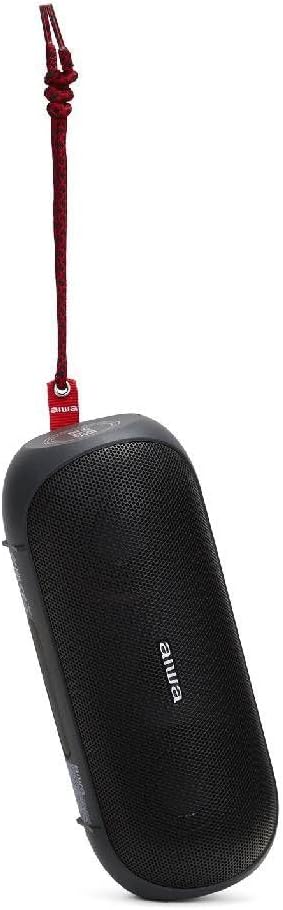
Image: Aiwa BST-650 speaker shown with the included wrist strap.
Product Overview
The Aiwa BST-650 features a robust rubber casing with twin metallic grilles, housing two 45mm high-performance speakers and a passive HyperBASS radiator. It includes intuitive controls for power, volume, playback, and LED lighting.
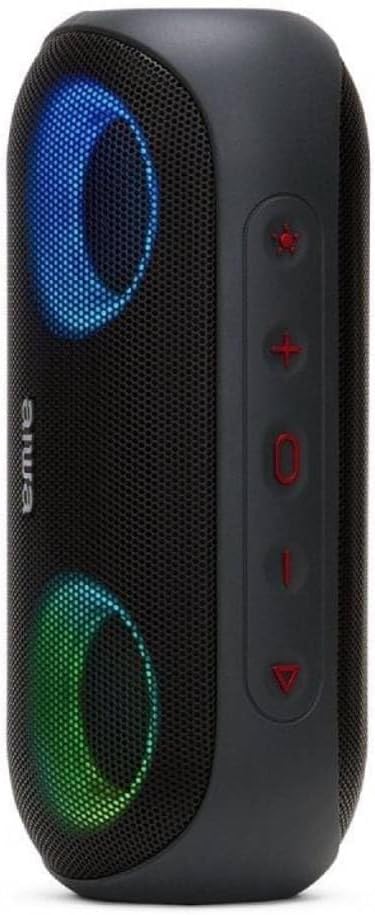
Image: Side view of the Aiwa BST-650 speaker, highlighting the control buttons.
Controls and Ports
- Power Button: Press and hold to turn the speaker on or off.
- Volume Up (+): Increase volume.
- Volume Down (-): Decrease volume.
- Play/Pause Button: Play or pause music, answer or end calls.
- LED Light Button: Cycle through 9 RGB lighting modes or turn off lights.
- Micro-SD (TF) Card Slot: For MP3 playback from a memory card.
- AUX-IN Port (3.5mm): For wired connection to external audio devices.
- USB Type-C Charging Port: For charging the speaker's internal battery.
Setup
1. Charging the Speaker
- Connect the supplied USB Type-C charging cable to the speaker's charging port.
- Connect the other end of the cable to a compatible USB power adapter (not included) or a computer's USB port.
- The LED indicator will show charging status. A full charge takes approximately 4 hours.
- The speaker provides approximately 8.5 hours of music playback on a full charge.
2. Powering On/Off
- To power on, press and hold the Power button until you hear an audible prompt and the LED lights activate.
- To power off, press and hold the Power button again until the speaker powers down.
3. Bluetooth Pairing
- Ensure the speaker is powered on and in Bluetooth pairing mode (indicated by a flashing LED).
- On your mobile device (smartphone, tablet, etc.), enable Bluetooth and search for available devices.
- Select "Aiwa BST-650" from the list of devices.
- Once paired, the speaker will emit an audible confirmation, and the LED will stop flashing.
- The speaker supports Bluetooth V5.0 with a wireless range of up to 10 meters (30 feet).
4. TWS (True Wireless Stereo) Pairing
The BST-650 supports TWS, allowing two BST-650 speakers to connect wirelessly for a stereo sound experience.
- Ensure both Aiwa BST-650 speakers are powered on and not connected to any Bluetooth device.
- On one speaker, press and hold the Play/Pause button for 2-3 seconds. The speaker will enter TWS pairing mode.
- The two speakers will automatically connect to each other. You will hear a confirmation tone once connected.
- Once TWS is established, connect your mobile device to one of the speakers via Bluetooth as described in step 3. Both speakers will then play audio in stereo.
5. Using Micro-SD Card
- Insert a Micro-SD (TF) card containing MP3 audio files into the card slot.
- The speaker will automatically switch to Micro-SD mode and begin playing music.
- Use the Play/Pause, Volume Up, and Volume Down buttons to control playback.
6. Using AUX-IN
- Connect one end of the 3.5mm AUX cable to the speaker's AUX-IN port.
- Connect the other end of the cable to the headphone jack or audio output of your external device.
- The speaker will automatically switch to AUX mode.
- Control playback and volume from your external device.
Operating
1. Music Playback
- Play/Pause: Press the Play/Pause button.
- Next Track: Press and hold the Volume Up (+) button.
- Previous Track: Press and hold the Volume Down (-) button.
- Volume Control: Short press Volume Up (+) or Volume Down (-) buttons.
2. Call Management (Hands-free Function)
When connected via Bluetooth, the speaker's built-in microphone allows for hands-free calling.
- Answer Call: Press the Play/Pause button once.
- End Call: Press the Play/Pause button once during a call.
- Reject Call: Press and hold the Play/Pause button for 2 seconds.
3. RGB LED Lighting Modes
The speaker features dual RGB LED lighting with 9 dynamic effects.

Image: Aiwa BST-650 speaker with its RGB LED lights active, displaying blue and green colors.
- Press the LED Light button to cycle through the 9 different lighting modes.
- Continue pressing to turn the lights off.
4. Waterproof Information (IPX6)
The Aiwa BST-650 has an IPX6 water protection rating, meaning it is protected against high-pressure water jets from any direction. This makes it suitable for outdoor use and resistant to splashes and rain.
- Do not submerge the speaker in water.
- Ensure all port covers are securely closed before exposing the speaker to water.
- After exposure to water, wipe the speaker dry before charging.
Maintenance
Cleaning
- Wipe the speaker with a soft, damp cloth.
- Do not use abrasive cleaners, alcohol, or chemical solvents.
Storage
- Store the speaker in a cool, dry place away from direct sunlight and extreme temperatures.
- If storing for an extended period, charge the battery periodically to maintain its lifespan.
Troubleshooting
| Problem | Possible Cause | Solution |
|---|---|---|
| Speaker does not turn on. | Low battery. | Charge the speaker for at least 30 minutes. |
| Cannot pair via Bluetooth. | Speaker not in pairing mode; device Bluetooth off; too far from speaker. | Ensure speaker is in pairing mode. Turn Bluetooth on/off on your device. Move device closer to speaker (within 10m). |
| No sound. | Volume too low; incorrect input mode; device not playing. | Increase speaker and device volume. Check if correct mode (Bluetooth, AUX, SD) is active. Ensure audio is playing on the connected device. |
| TWS pairing fails. | Speakers already paired to another device; too far apart. | Disconnect speakers from any other Bluetooth devices. Ensure both speakers are BST-650 models. Place speakers closer together. |
Specifications
| Feature | Specification |
|---|---|
| Audio Output Power | 20W RMS |
| Speaker Size | 2 x 45mm |
| Bluetooth Version | V5.0 |
| Wireless Range | Up to 10 meters (30 feet) |
| Frequency Response | 60 Hz - 20,000 Hz |
| Water Protection Rating | IPX6 |
| Battery Type | Rechargeable Lithium Battery |
| Battery Capacity | 7.4V, 2000mAh |
| Charging Time | Approx. 4 hours |
| Music Playback Time | Approx. 8.5 hours |
| Charging Port | USB Type-C |
| Dimensions (L x W x H) | 200 x 85 x 83 mm |
| Weight | 613g |
| Compatible Devices | Smartphones, Tablets (Android, iOS, Windows) |
| Special Features | DSP for superior sound, HyperBASS passive radiator, TWS function, Hands-free with microphone, Micro-SD (TF) card reader, 3.5mm AUX-IN, RGB LED lighting (9 modes) |
Warranty and Support
The Aiwa BST-650 Bluetooth Speaker comes with a limited warranty. For specific warranty terms and conditions, please refer to the warranty card included in your package or contact Aiwa customer support.
For technical assistance or support, please visit the official Aiwa website or contact their customer service department.


