
HOUHUI HH-24KEY-10
HOUHUI RGB LED Strip Lights User Manual
Model: HH-24KEY-10
1. Introduction
This user manual provides comprehensive instructions for the HOUHUI RGB LED Strip Lights (Model: HH-24KEY-10). This 65.6ft addressable LED strip features IC chips for dynamic color chasing effects, multiple control methods including app, RF remote, and a 3-button controller, and music synchronization. Designed for indoor use, it offers versatile lighting solutions for various environments.
2. Package Contents
Please verify that all items listed below are included in your package:
- 1 x 65.6ft Multi-color LED Light Strip with 3-buttons Control Box
- 1 x RF Remote Control
- 1 x 24V Power Adapter
- 8 x Strip Light Mounting Clips
- 1 x User Manual (this document)

Image: All components included in the HOUHUI RGB LED Strip Lights kit.
3. Key Features
- Extended Length & High Density: One 65.6ft (20m) roll of LED strip with 400 high-brightness 5050 LED beads, providing ample coverage for large rooms.
- Addressable IC Chip Technology: Built-in IC chips enable multi-color display and dynamic color chasing effects along a single strip.
- Versatile Color & Mode Options: Access to 16 million static colors and 213 dynamic lighting modes via the control app.
- Multiple Control Methods:
- "duoCo StripX" App Control: Full control over colors, modes, brightness, speed, and DIY lighting effects via Bluetooth.
- RF Remote Control: Provides 360° responsive control up to 50 feet, even through walls and doors, without needing direct line-of-sight.
- 3-Button Control Box: Integrated physical buttons for basic control (power, mode, music mode).
- Music Synchronization: Features a sensitive built-in microphone that allows the LED lights to change color and pattern in rhythm with music or sound.
- Timing Function: Schedule automatic turn on/off times for convenience.
- Memory Function: The lights retain the last mode settings when powered off and on.
- Easy Installation: Equipped with strong self-adhesive tape for secure mounting on dry, flat surfaces.
- 24V Power Supply: Ensures brighter illumination compared to standard 12V LED strips.

Image: Overview of the 65.6ft LED strip and its key functionalities.

Image: Visual representation of the three ways to control the LED strip lights.
4. Setup and Installation
Follow these steps for proper installation of your HOUHUI RGB LED Strip Lights:
- Preparation:
- Ensure the installation surface is clean, dry, and flat. Dust, oil, or moisture can affect adhesive performance.
- Unroll the LED strip completely before powering it on to prevent overheating.
- Plan your desired layout. While the strip is cuttable, it is not waterproof, so avoid cutting if outdoor use is intended (though this product is for indoor use only).
- Connecting Components:
- Connect the 3-button control box to the LED strip. Ensure the arrows on the connectors align.
- Connect the 24V power adapter to the 3-button control box.
- Plug the 24V power adapter into a standard electrical outlet.
- Adhering the Strip:
- Peel off a small section of the adhesive backing from the LED strip.
- Carefully press the exposed adhesive portion onto your desired surface, starting from one end.
- Gradually peel off more backing while pressing the strip firmly along the path. Avoid stretching the strip during installation.
- Use the included strip light mounting clips for additional security, especially around corners or on textured surfaces.
- Initial Power On:
- Once installed, press the power button on the 3-button control box or the RF remote to turn on the lights.
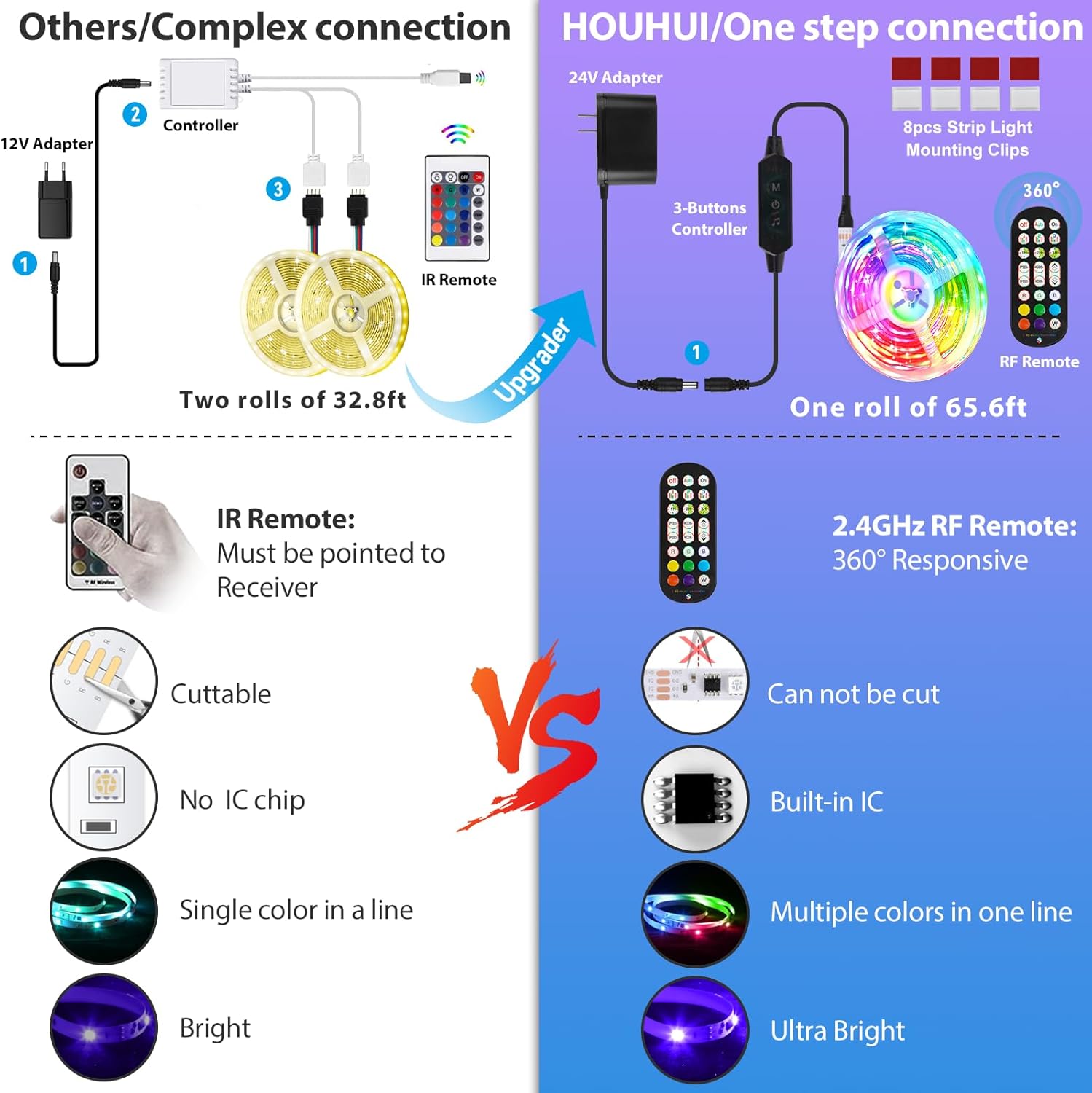
Image: Simplified one-step connection for HOUHUI LED strip lights compared to other systems.
5. Operating Instructions
5.1. 3-Button Control Box
The inline 3-button control box provides basic functionality:
- Power Button: Press to turn the lights On or Off.
- Mode Button: Cycle through various dynamic lighting modes.
- Music Mode Button: Activate or deactivate the music synchronization feature.
5.2. RF Remote Control
The included RF remote offers comprehensive control without line-of-sight requirements:
- Power On/Off: Dedicated buttons for power control.
- Brightness Adjustment: Increase or decrease light intensity.
- Color Selection: Direct access to various static colors.
- Mode Selection: Choose from a variety of dynamic effects.
- Speed Adjustment: Control the speed of dynamic modes.
- DIY Modes: Some remotes allow for custom color or mode programming. Refer to the remote's specific button functions.
Video: Demonstration of the 65.6ft RGBIC LED Strip Lights controlled by the RF Remote, showcasing various colors and effects. This video highlights the 360-degree responsive nature of the RF remote, allowing control without direct line of sight and through obstacles.
5.3. "duoCo StripX" App Control
For full control and advanced features, download the "duoCo StripX" app:
- Download App: Search for "duoCo StripX" in your smartphone's app store (iOS App Store or Google Play Store) and install it.
- Enable Bluetooth: Ensure Bluetooth is enabled on your smartphone.
- Pairing: Open the "duoCo StripX" app. The app should automatically detect and connect to your LED strip lights. If not, follow the in-app instructions for manual pairing.
- App Features:
- Color Palette: Select from 16 million static colors.
- Dynamic Modes: Choose from 213 pre-set dynamic lighting effects.
- DIY Customization: Create and save your own unique color combinations and lighting patterns.
- Brightness & Speed: Fine-tune the brightness level and the speed of dynamic modes.
- Music Mode: Activate the music sync feature. The app allows you to select music from your device or use the phone's microphone to react to ambient sound.
- Timing Function: Set schedules for the lights to turn on or off automatically at specific times.
Video: Demonstration of the 65.6ft App Control Dream Color LED Strip Lights, showcasing the app's interface for selecting colors, dynamic modes, and music synchronization. This video illustrates the extensive customization options available through the "duoCo StripX" app.
Video: A short preview video demonstrating the dream color light strip in action, highlighting its vibrant color display and smooth transitions. This video is a brief visual overview of the product's lighting capabilities.

Image: The LED strip lights syncing with music, demonstrating the built-in sensitive microphone feature.
6. Maintenance
To ensure the longevity and optimal performance of your LED strip lights, follow these maintenance guidelines:
- Cleaning: Gently wipe the LED strip with a dry, soft cloth to remove dust. Do not use liquid cleaners or immerse the strip in water, as it is not waterproof.
- Adhesive Care: Avoid frequently repositioning the strip, as this can weaken the adhesive. If re-adhesion is necessary, ensure the surface is clean and dry.
- Power Supply: Always use the provided 24V power adapter. Using an incorrect power supply can damage the lights and void the warranty.
- Storage: If storing the lights for an extended period, gently roll them back into their original spool or a similar circular shape to prevent kinking or damage. Store in a cool, dry place.
7. Troubleshooting
If you encounter issues with your HOUHUI RGB LED Strip Lights, please refer to the following common problems and solutions:
| Problem | Possible Cause | Solution |
|---|---|---|
| Lights do not turn on. |
|
|
| Lights flicker or show incorrect colors. |
|
|
| Remote control not responding. |
|
|
| App cannot connect to the lights. |
|
|
| Lights are too hot to touch. |
|
|
8. Specifications
| Attribute | Detail |
|---|---|
| Brand | HOUHUI |
| Model Number | HH-24KEY-10 |
| Light Source Type | LED (5050 beads) |
| Number of LEDs | 400 |
| Strip Length | 65.6 feet (20 meters) |
| Color | Multicolor (RGBIC) |
| Voltage | 24 Volts |
| Wattage | 24 watts |
| Power Source | AC/DC Adapter |
| Control Methods | App (duoCo StripX), RF Remote, 3-Button Controller |
| Connectivity Protocol | Bluetooth |
| Indoor/Outdoor Usage | Indoor Use Only |
| Water Resistance Level | Not Water Resistant |
| Average Life | 50,000 Hours |
| Item Weight | 13.7 ounces |
| Package Dimensions | 7.68 x 6.77 x 2.05 inches |
9. Warranty and Support
HOUHUI provides a 12-month warranty for this product from the date of purchase. This warranty covers manufacturing defects and issues arising from normal use.
For any questions, technical assistance, or warranty claims, please contact HOUHUI Customer Service. Our team is available 24 hours a day to assist you.
Contact Information:
- Email: Refer to product packaging for direct email support.
- Website: Visit the HOUHUI Store on Amazon
Please retain your purchase receipt as proof of purchase for warranty purposes.
Ask a question about this manual
Ask about setup, troubleshooting, compatibility, parts, safety, or missing instructions. Manuals+ will review the question and use this page’s manual context to help answer it.