
WTTHAI Replacement Remote Control
User Manual
Replacement Remote Control for Pyle Home Audio Amplifiers
Introduction
This manual provides instructions for the WTTHAI Replacement Remote Control, designed for use with various Pyle Home Audio Amplifiers. This remote offers full access to all necessary functions without requiring complex setup.
Compatible Pyle Home Audio Amplifier Models:
- PDA8BUWM
- PDA6BU
- PTA66BT
- PFA600BU
- PDA7BU
- PPRE70BT
- PTA44BT
- PDA65BU
Package Contents
- 1 x WTTHAI Replacement Remote Control
- Note: AAA Alkaline Batteries are not included.
Setup
- Battery Installation: Locate the battery compartment on the back of the remote control. Open the compartment cover. Insert two (2) 1.5V AAA alkaline batteries, ensuring correct polarity (+ and -) as indicated inside the compartment. Close the battery compartment cover securely.
- Initial Use: No programming or pairing is required. Once batteries are installed, the remote control is ready for immediate use with compatible Pyle Home Audio Amplifiers.

Image: Angled view of the WTTHAI Replacement Remote Control, showing its black casing and grey buttons. This image illustrates the overall design and button layout.
Operating Instructions
The remote control provides direct access to all functions of your compatible Pyle Home Audio Amplifier. Simply point the remote at the amplifier and press the desired button.
Key Functions:
| Button | Function |
|---|---|
| Power (Red Button) | Turns the amplifier On or Off. |
| CH- / CH+ | Adjusts channel selection (if applicable) or navigates menus. |
| Rewind / Fast Forward | Controls media playback (e.g., USB, SD card). |
| Previous / Next Track | Skips to the previous or next audio track. |
| Play / Pause | Starts or pauses audio playback. |
| Stop | Stops audio playback. |
| MODE | Cycles through input modes (e.g., Bluetooth, FM, USB, AUX). |
| EQ | Adjusts equalizer presets. |
| Numeric Keypad (0-9) | Direct input for track numbers, radio frequencies, or menu selections. |
| Return/Back Arrow | Navigates back in menus or previous function. |
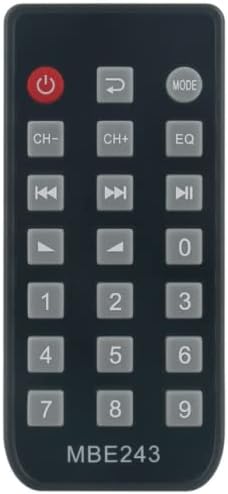
Image: Top-down view of the WTTHAI Replacement Remote Control, clearly showing the layout of all buttons including power, mode, EQ, navigation, playback controls, and the numeric keypad.
Maintenance
- Cleaning: Use a soft, dry cloth to clean the remote control. Do not use liquid cleaners or abrasive materials.
- Battery Replacement: Replace batteries when the remote's range decreases or it becomes unresponsive. Always replace both batteries at the same time with new 1.5V AAA alkaline batteries.
- Storage: If the remote control will not be used for an extended period, remove the batteries to prevent leakage and potential damage. Store in a cool, dry place.
Troubleshooting
| Problem | Possible Cause / Solution |
|---|---|
| Remote is unresponsive. |
|
| Some buttons do not work. |
|
| Remote does not control my Pyle amplifier. |
|
If the issue persists after trying these solutions, please contact customer support for further assistance.
Specifications
- Power Supply: 2 x 1.5V AAA Alkaline Batteries (not included)
- Material: ABS
- Color: Black
- Item Weight: 1.59 ounces (approximately 45 grams)
- Compatible Devices: Pyle Home Audio Amplifiers (specific models listed in Introduction)
Warranty and Support
This product is covered by a standard manufacturer's warranty. For specific warranty details or technical support, please refer to the documentation provided with your purchase or contact the seller directly.
Contact Information:
- For issues with the remote control, please contact the seller (LWJD) through the Amazon platform.
- For support regarding your Pyle Home Audio Amplifier, please refer to the amplifier's user manual or Pyle's official support channels.
Ask a question about this manual
Ask about setup, troubleshooting, compatibility, parts, safety, or missing instructions. Manuals+ will review the question and use this page’s manual context to help answer it.