
Introduction
This user manual provides comprehensive instructions for the ATTACK SHARK Full-Sized 104 Keys Mechanical Gaming Keyboard. It covers setup, operation, maintenance, and troubleshooting to ensure optimal performance and longevity of your device. Please read this manual carefully before using the keyboard.
Setup
Connecting the Keyboard
The ATTACK SHARK Wired Gaming Keyboard is designed for simple plug-and-play functionality. To connect your keyboard:
- Locate an available USB port on your computer (Windows PC, Mac OS) or gaming console (Xbox).
- Insert the USB cable from the keyboard firmly into the USB port.
- The keyboard will be automatically recognized by your system, and no additional drivers are typically required.

Image: The ATTACK SHARK Full-Sized 104 Keys Mechanical Gaming Keyboard, showcasing its full layout and vibrant backlighting. This is the primary view of the product.
System Compatibility
This keyboard is compatible with a wide range of operating systems and devices, including:
- Windows (all major versions)
- Mac OS
- Xbox consoles
One-click switching between Apple and Windows dual systems is supported via multi-function combination keys.
Operating Instructions
Key Functions
The keyboard features a standard 104-key layout, including F-keys (function keys) and a dedicated number pad, providing a complete typing and gaming experience.
Backlight Control
The keyboard offers a mixed-color backlight with 19 distinct cool light effects. These effects can be cycled through and the keyboard retains the last selected light effect in its memory.
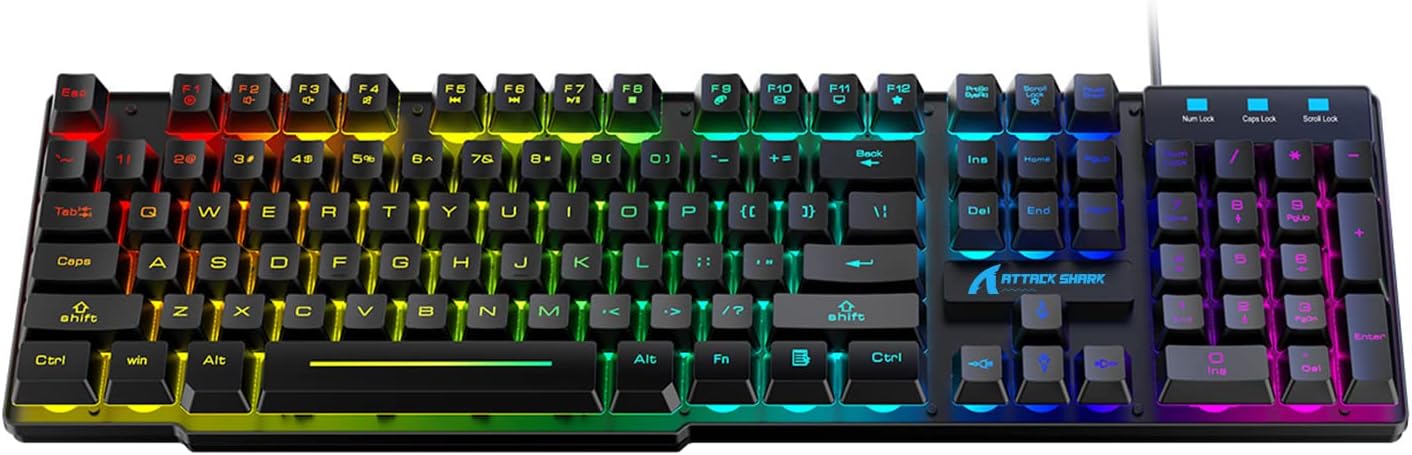
Image: A top-down perspective of the ATTACK SHARK Gaming Keyboard, highlighting the full 104-key layout and the vibrant, multi-color backlighting across all keys.
Multimedia Keys
The keyboard includes 12 multifunctional buttons that allow for easy multimedia control, such as volume adjustment, play/pause, and track skipping. Refer to the keycap legends for specific functions.
Anti-Ghosting Technology
Equipped with full-key anti-ghosting technology, this keyboard ensures that every keystroke is registered accurately, even when multiple keys are pressed simultaneously. This feature is crucial for fast-paced gaming, preventing missed inputs and enhancing responsiveness.
Maintenance
Cleaning
To maintain the keyboard's appearance and functionality:
- Disconnect the keyboard from your device before cleaning.
- Use a soft, dry cloth to wipe down the surface of the keyboard.
- For dust and debris between keys, use compressed air or a small brush.
- Avoid using harsh chemicals or abrasive cleaners.
Keycap Removal
The floating keycaps are designed to be removable for easier cleaning or customization. Gently pull the keycaps upwards to remove them. Ensure proper alignment when reattaching them.
Troubleshooting
Common Issues and Solutions
- Keyboard Not Responding:
Ensure the USB cable is securely connected to both the keyboard and the device. Try plugging the keyboard into a different USB port. Restart your computer or console. - Backlight Not Working:
Check if the backlight function is enabled using the designated key combinations (refer to keycap legends). Ensure the keyboard is properly powered via the USB connection. - Keys Not Registering Input:
Clean around the affected keys to remove any debris. If a specific key is consistently failing, it may indicate a hardware issue. - Unexpected Behavior:
If the keyboard exhibits unusual behavior, disconnect it and reconnect it. Ensure your operating system is up to date.
If problems persist, please refer to the Warranty and Support section for further assistance.
Specifications
| Feature | Detail |
|---|---|
| Package Dimensions | 17.72 x 6.3 x 1.97 inches |
| Item Weight | 2.2 pounds |
| ASIN | B09MQZS5ZS |
| Date First Available | June 13, 2024 |
| Manufacturer | ATTACK SHARK |
| Country of Origin | China |
| Brand | ATTACK SHARK |
| Compatible Devices | Laptop, PC, Mac OS, Xbox |
| Connectivity Technology | USB (Wired) |
| Keyboard Description | Gaming, Mechanical |
| Special Feature | Ergonomic, Backlit |
| Number of Keys | 104 |
| Style | Modern |
| Material | Plastic |
| Included Components | USB Cable |
| Power Source | Corded Electric |
Warranty and Support
For warranty information, technical support, or any inquiries regarding your ATTACK SHARK keyboard, please contact the seller or manufacturer directly. Keep your purchase receipt as proof of purchase.
You can also visit the official ATTACK SHARK Store for more information and product updates: ATTACK SHARK Store on Amazon


