

Introduction
Thank you for choosing a Citizen watch. This manual provides essential information for the proper use and care of your Citizen AN8194-51L Analog Quartz Watch. This elegant chronograph features a durable stainless steel case and bracelet, a clear blue dial, and a reliable quartz movement with a day calendar function. It is designed for everyday wear and is water-resistant.
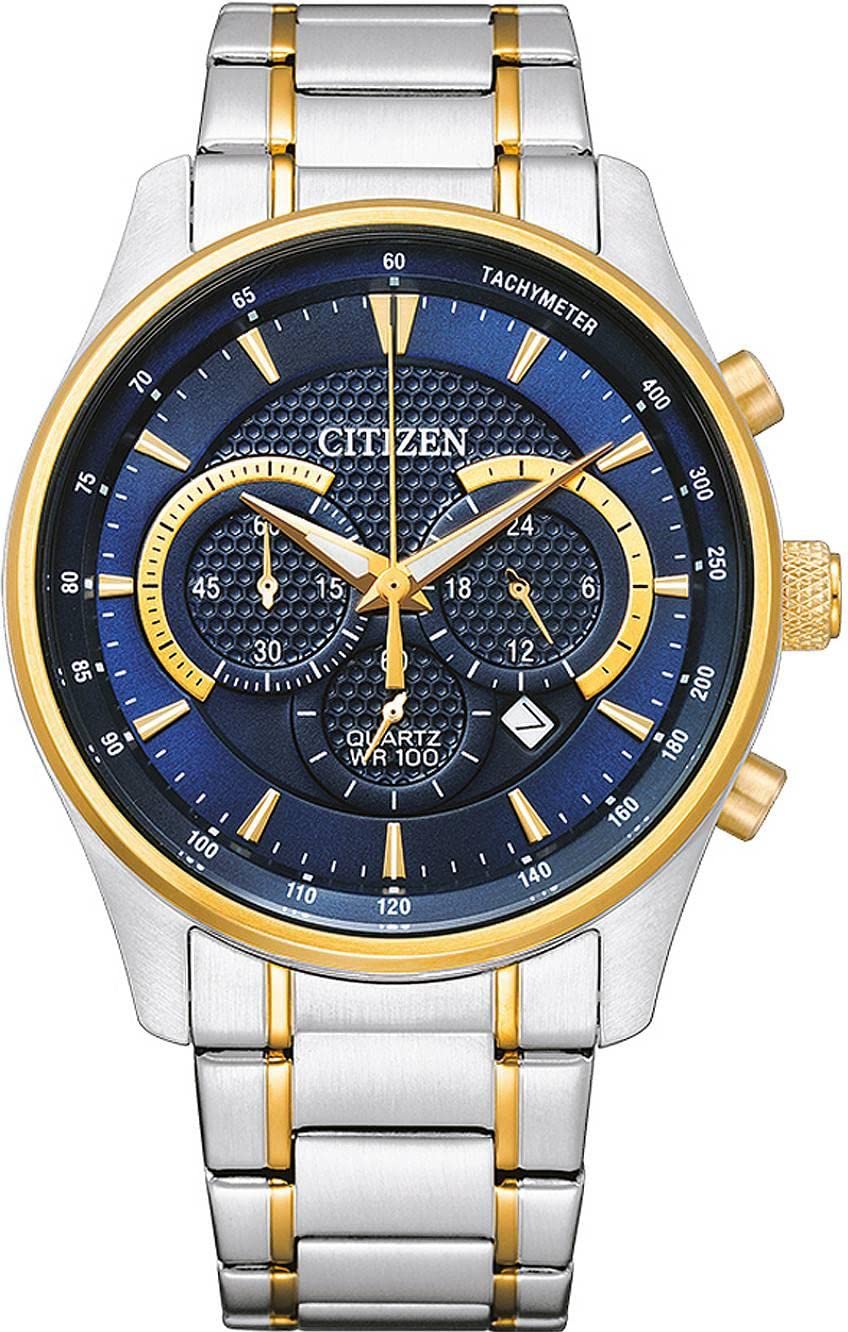
Figure 1: Front view of the Citizen AN8194-51L watch, showcasing its blue dial and stainless steel bracelet.
Setup
1. Initial Battery Installation/Activation
Your watch is powered by a quartz movement and requires one LR44 battery (included). The battery is typically pre-installed. If the watch is not running, gently pull out the crown to the time-setting position (position 2) and push it back in to activate the movement. If it still does not run, the battery may need replacement.
2. Setting the Time
- Pull the crown out to position 2 (the furthest position). The second hand will stop.
- Turn the crown to move the hour and minute hands clockwise until the desired time is set. Ensure the AM/PM is correctly set if your watch has a 24-hour indicator or if setting the date.
- Push the crown back into position 0 (normal position) to start the watch.
3. Setting the Date
- Pull the crown out to position 1 (the first click).
- Turn the crown clockwise or counter-clockwise (depending on the movement) until the correct date appears.
- Push the crown back into position 0.
- Note: Avoid setting the date between 9 PM and 3 AM, as this can interfere with the automatic date change mechanism. If the date needs to be set during this period, first set the time outside this range, adjust the date, then reset the time.
Operating the Chronograph
Your Citizen AN8194-51L watch features a chronograph function for measuring elapsed time. The chronograph is operated using the two push-buttons located on the side of the watch case, typically at the 2 o'clock and 4 o'clock positions.
1. Starting and Stopping the Chronograph
- Press the upper push-button (A) to start the chronograph. The chronograph second hand will begin to move.
- Press the upper push-button (A) again to stop the chronograph. The elapsed time will be indicated by the chronograph hands.
2. Resetting the Chronograph
- After stopping the chronograph, press the lower push-button (B) to reset all chronograph hands to their zero positions.
- Note: The chronograph must be stopped before it can be reset.
Maintenance
1. Cleaning Your Watch
Wipe the watch case and bracelet regularly with a soft, dry cloth to remove dust and dirt. For water-resistant models, you can use a slightly damp cloth and mild soap, then rinse thoroughly with fresh water and dry completely. Avoid using harsh chemicals or abrasive materials.
2. Water Resistance
Your watch is water-resistant to 10 Bar (100 meters). This means it is suitable for swimming, showering, and snorkeling. However, it is not suitable for scuba diving. Always ensure the crown is fully pushed in before exposing the watch to water. Do not operate the crown or push-buttons while the watch is wet or submerged.

Figure 2: Case back of the Citizen AN8194-51L, indicating "W.R. 10 BAR" for water resistance.
3. Battery Replacement
When the battery is depleted, the watch will stop running. Battery replacement should be performed by a qualified watch technician to ensure proper sealing and maintain water resistance. The required battery type is LR44.
4. Bracelet Adjustment
The stainless steel bracelet can be adjusted for a comfortable fit. This typically involves removing or adding links. It is recommended to have this adjustment performed by a professional jeweler or watch repair service to prevent damage to the bracelet or clasp.
Troubleshooting
| Problem | Possible Cause | Solution |
|---|---|---|
| Watch not running | Depleted battery. | Replace the battery. Consult a professional watch technician. |
| Incorrect time/date | Time/date not set correctly or crown is not fully pushed in. | Refer to the "Setting the Time" and "Setting the Date" sections. Ensure the crown is in position 0. |
| Chronograph hands not resetting to zero | Chronograph was not stopped before resetting, or a calibration issue. | Ensure the chronograph is stopped before pressing the reset button. If the issue persists, consult a service center for calibration. |
| Condensation inside the crystal | Temperature change or water ingress. | This indicates a potential breach in water resistance. Seek immediate professional service to prevent damage to the movement. |
Specifications
- Model Number: AN8194-51L
- Movement: Quartz
- Display Type: Analog
- Case Material: Stainless Steel
- Band Material: Stainless Steel
- Case Diameter: 42 mm
- Case Thickness: 11.7 mm
- Band Width: 15 mm
- Band Length: 210 mm
- Water Resistance: 10 Bar (100 meters)
- Special Features: Chronograph, Bezel Markings
- Battery Type: 1 x LR44 (included)
- Item Weight: 151 grams
- Dial Color: Blue
- Band Color: Silver
- Clasp Type: Fold-over clasp
Warranty and Support
Your Citizen watch is covered by a manufacturer's warranty. Please refer to the warranty card included with your purchase for specific terms and conditions, including the warranty period and coverage details.
For service, repairs, or further assistance, please contact an authorized Citizen service center or the retailer where you purchased the watch. You can find contact information for Citizen service centers on the official Citizen website.
Website: www.citizenwatch.com


