
1. Introduction
Thank you for choosing the FLEXTAILGEAR MAX Pump MP2020. This portable air pump is designed for quick inflation and deflation of various inflatable products, offering convenience and efficiency for your outdoor and indoor activities. Please read this manual carefully before use to ensure proper operation and maintenance.
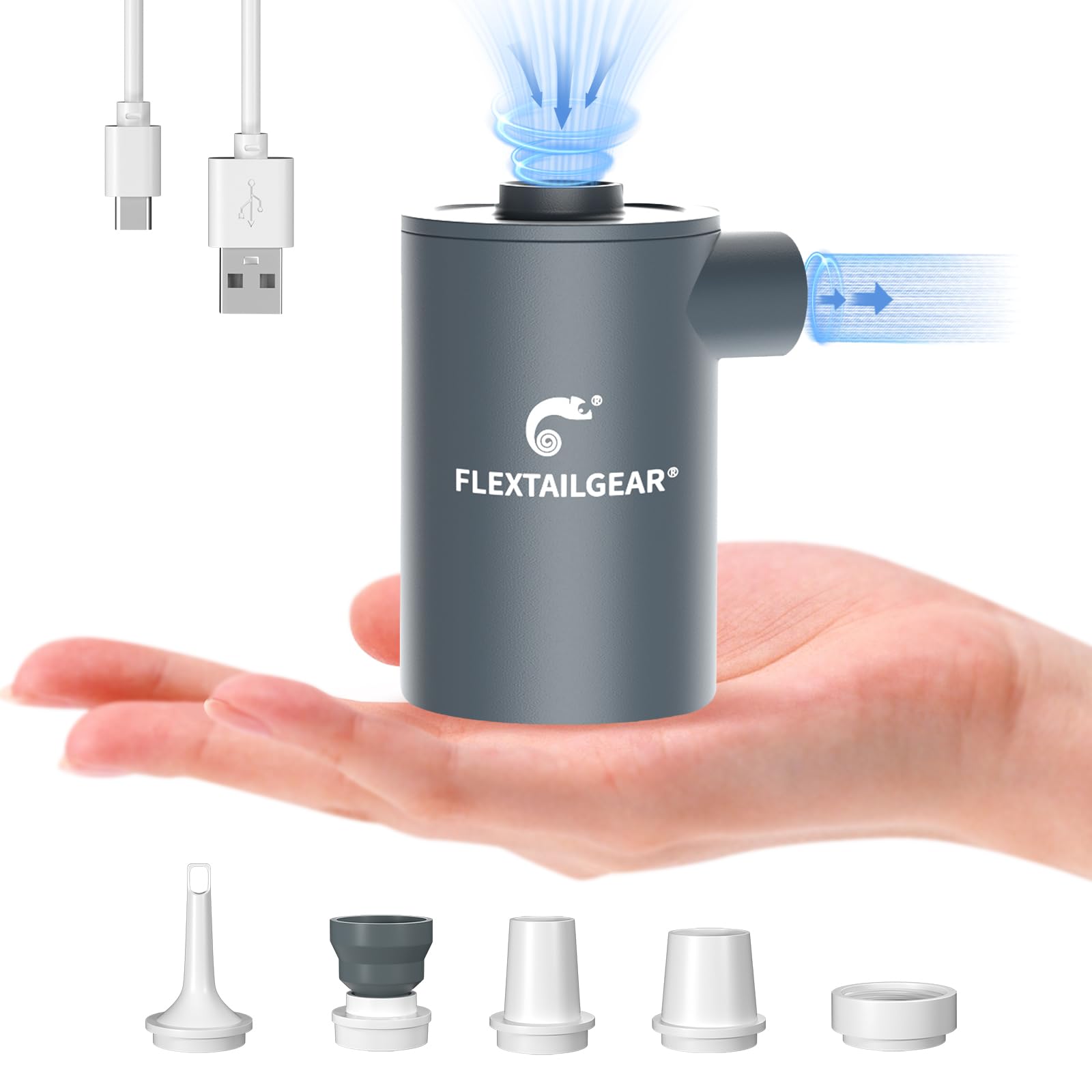
Figure 1: FLEXTAILGEAR MAX Pump MP2020
2. Package Contents
Your FLEXTAILGEAR MAX Pump MP2020 package should include the following items:
- MAX Pump MP2020 Portable Air Pump
- USB Charging Cable
- 5 Different Nozzles
- Storage Bag
- Instruction Manual (this document)

Figure 2: MAX Pump MP2020 with included nozzles and accessories.
3. Product Features
- Portable & Light-Weight: Compact design (3.2 x 2.2 x 2 inches) weighing only 5.29 oz, smaller than a standard soda can for easy portability.
- Powerful & Quick Inflation: Delivers 2.2kPa air pressure and 300L/min wind speed, inflating air products within minutes. Can also be used to assist in starting fires.
- Rechargeable Lithium Battery: Built-in 3600mAh battery provides up to 45 minutes of operation on a single charge. Easily rechargeable via power bank, laptop, car USB port, or home power adapter.
- 5 Nozzles & Extensive Applicability: Equipped with 5 different nozzles to fit most inflatable products, including air sleeping pads, air beds, air mattresses, air toys, swimming rings, pool floats, and air sofas.
- Safety & Easy to Use: Constructed with a sturdy, well-sealed ABS plastic shell. Simple push-button operation.

Figure 3: MAX Pump MP2020 highlighting key features.
4. Specifications
| Specification | Detail |
|---|---|
| Model | MP2020 |
| Color | Space Gray |
| Brand | FLEXTAILGEAR |
| Material | Plastic (ABS Shell) |
| Item Weight | 5.29 ounces |
| Product Dimensions | 2.2"L x 2"W x 3.2"H |
| Power Source | Battery Powered (3600mAh Lithium Polymer) |
| Air Flow Capacity | 300 Liters Per Minute |
| Maximum Pressure | 2.2 Kilopascal |
| Operation Mode | Automatic |
5. Safety Instructions
- The MAX Pump MP2020 is not suitable for inflating high-pressure products such as balloons, sports balls, or tires.
- Do not use the pump continuously for more than 15 minutes. Allow it to cool down before resuming operation to prevent overheating.
- Keep the switch off while charging the device.
- Charge the pump at least every 3 months to maintain optimal battery performance.
- Keep out of reach of children.
- Do not block the inflation/deflation ports during operation.
6. Setup
Before operating your MAX Pump MP2020, ensure you have selected the correct nozzle for your inflatable item.
- Identify the appropriate nozzle from the 5 provided adapters that best fits the valve of your inflatable product.
- For inflation, firmly attach the chosen nozzle to the inflation port (side port) of the pump.
- For deflation, firmly attach the chosen nozzle to the deflation port (top port) of the pump.

Figure 4: Attaching the nozzle to the inflation port for a sleeping pad.

Figure 5: Attaching the nozzle to the inflation port for an air mattress.
7. Operating Instructions
7.1 Inflation
- Attach the appropriate nozzle to the inflation port (side port) of the pump.
- Insert the nozzle firmly into the valve of your inflatable item.
- Press the power button twice to turn on the pump.
- Allow the item to inflate to your desired firmness. Inflation time varies depending on the size of the product.
- Press the power button once to turn off the pump.
- Remove the pump and close the inflatable item's valve.
7.2 Deflation
- Attach the appropriate nozzle to the deflation port (top port) of the pump.
- Insert the nozzle firmly into the valve of your inflatable item.
- Press the power button twice to turn on the pump.
- Allow the pump to extract air until the item is fully deflated.
- Press the power button once to turn off the pump.
- Remove the pump and close the inflatable item's valve.

Figure 6: Examples of items that can be inflated/deflated with the MAX Pump MP2020.
8. Charging
The MAX Pump MP2020 features a built-in 3600mAh lithium battery. To charge the pump:
- Ensure the pump is turned off.
- Connect the provided USB charging cable to the charging port on the pump.
- Connect the other end of the USB cable to a power source (e.g., power bank, laptop, car USB port, or power adapter).
- The charging indicator light will show the charging status: red for charging, green for fully charged.

Figure 7: Charging the MAX Pump MP2020 and indicator lights.
9. Maintenance
- Clean the pump's exterior with a soft, dry cloth. Do not use harsh chemicals or abrasive materials.
- Store the pump and its accessories in the provided storage bag in a cool, dry place when not in use.
- Charge the pump at least once every 3 months to prolong battery life, even if not in active use.
- Avoid exposing the pump to extreme temperatures or direct sunlight for extended periods.
10. Troubleshooting
- Pump not turning on: Ensure the battery is charged. Connect to a power source and check the charging indicator.
- Weak airflow/slow inflation: Check that the correct nozzle is securely attached and fully inserted into the inflatable item's valve. Ensure the pump's ports are not obstructed.
- Pump overheating: If the pump feels excessively warm, turn it off immediately and allow it to cool down for at least 15 minutes before resuming use. Avoid continuous operation beyond 15 minutes.
- Nozzles not fitting: Try different nozzle sizes provided. Ensure the nozzle is compatible with your inflatable item's valve type.
11. Warranty and Support
For warranty information or technical support, please refer to the product packaging or contact FLEXTAILGEAR customer service directly. Keep your purchase receipt as proof of purchase.
If you have any problems with our products, please feel free to let us know.

