
Introduction
The Daytech Emergency Call System is designed to provide peace of mind for caregivers and individuals requiring assistance, such as the elderly, patients, or those with disabilities. This wireless system allows users to easily alert their caregiver with a simple press of a button, ensuring timely help without the need for shouting or direct proximity. It features a long operating range, adjustable volume, and multiple alert tones, making it a versatile and essential tool for home care.
Package Contents
Please check the package to ensure all components are present:
- 2 x Wireless Receivers
- 2 x Emergency Call Transmitters (with call buttons)
- 2 x Lanyards (for wearing transmitters)
- Adhesive stickers (for mounting transmitters)
- User Manual

Image: Overview of the Daytech Emergency Call System components, including two receivers and two call buttons, with an inset showing the battery compartment of a call button.
Product Overview
The system consists of two main parts: the Receiver and the Transmitter (call button).
Receiver
- Plugs into a standard wall outlet.
- Emits audible alerts and can vibrate when a call button is pressed.
- Features buttons for volume adjustment and melody selection.
Transmitter (Call Button)
- Battery-powered for portability.
- Equipped with a large, easy-to-press call button.
- Can be worn around the neck with a lanyard, attached to a wheelchair, or mounted on a wall.
- Designed with IP55 water resistance for use in various environments, including bathrooms (do not submerge).
Setup
1. Install Batteries in Transmitters
Each transmitter requires batteries (3 x CR123A, included). Open the back cover of the transmitter and insert the batteries, ensuring correct polarity. Close the cover securely.
2. Power On Receivers
Plug each receiver into a standard electrical outlet in a location where the alert can be easily heard by the caregiver. Ensure the outlets are not controlled by a wall switch that could accidentally turn off the power.
3. Placement of Transmitters
The transmitters are versatile and can be placed in several convenient locations:
- Wearable: Use the included lanyard to wear the transmitter around the neck, allowing for easy access at all times.
- Adhesive Mounting: Use the provided adhesive stickers to fix the transmitter to a flat surface, such as a bedside table, wheelchair armrest, or bathroom wall.
- Portable: The compact size allows the transmitter to be carried in a pocket.

Image: Demonstrates various placement options for the emergency call button, including wearing it, mounting it in a shower (IP55 waterproof), and attaching it to a wheelchair.
4. Pairing (Pre-paired)
The system is pre-paired at the factory for immediate use. If you need to re-pair or add new transmitters/receivers, please refer to the detailed pairing instructions in the full manual or contact customer support.
Operating Instructions
Making an Emergency Call
To alert your caregiver, simply press the large red "CALL" button on the transmitter. The transmitter will send a wireless signal to the paired receivers.

Image: Illustrates the process of an elderly person pressing the emergency button and the caregiver receiving the alert from the receiver.
Receiver Alerts
Upon receiving a signal, the receiver will:
- Emit an audible alert tone.
- Flash its indicator lights.
- (Optional) Vibrate if the volume is set to 0dB (mute mode).
Adjusting Volume and Melodies
The receiver offers customizable alert options:
- Volume Levels: There are 5 adjustable volume levels, ranging from 0dB (mute/vibration only) to 110dB. Use the volume buttons on the side of the receiver to cycle through the levels.
- Melodies: Choose from 52 different melodies. Use the melody selection button on the receiver to change the alert sound.
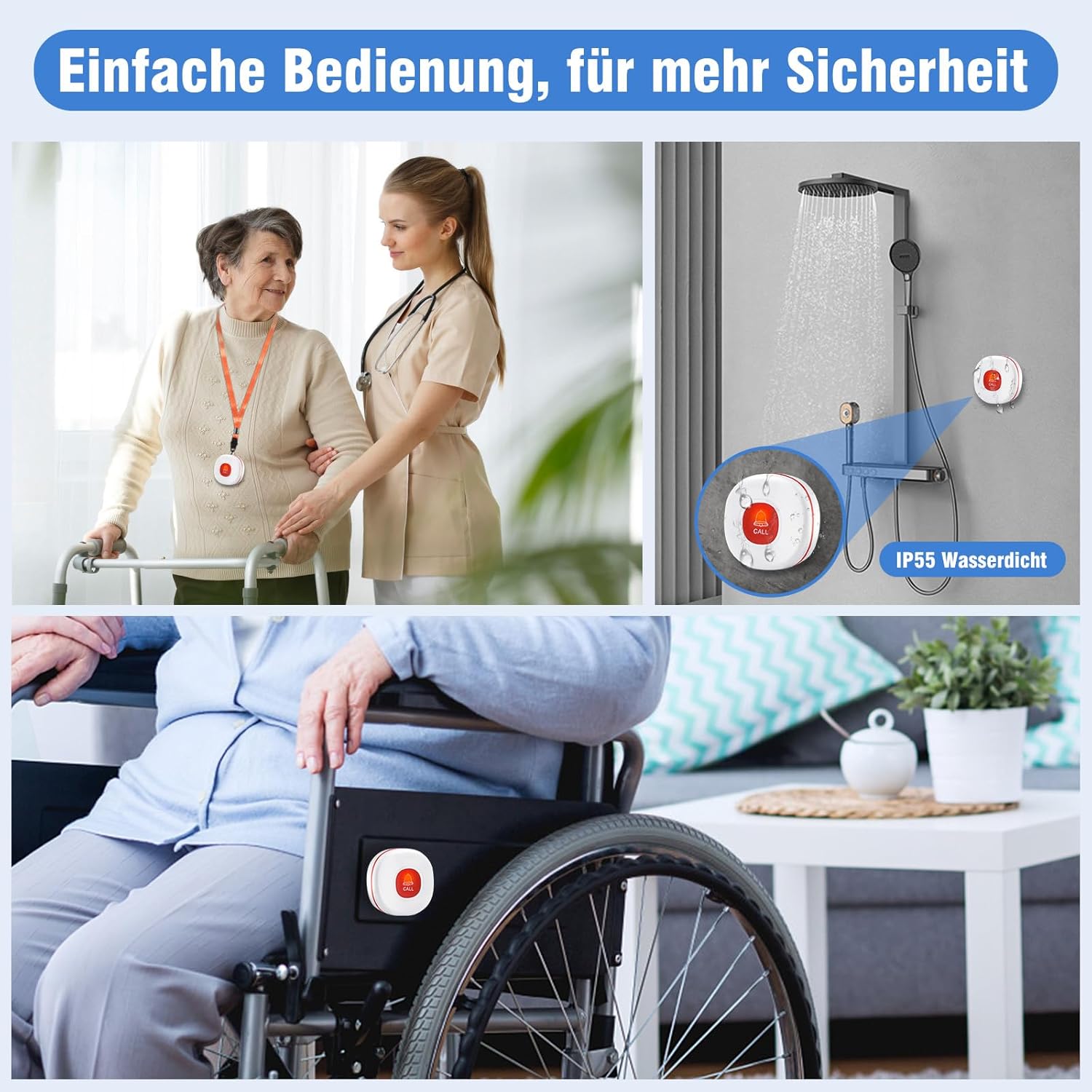
Image: Details the 55 ringtones and 5 adjustable volume levels available on the receiver, showing how different tones can be set for different locations.
Key Features
- Extended Range: The system boasts a wireless range of up to 150 meters (approximately 490 feet) in open areas, ensuring reliable communication throughout most homes. Walls and obstacles may reduce the effective range.
- Waterproof Transmitter: The call button is IP55 water-resistant, making it suitable for use in bathrooms or near water sources. It is protected against splashes but should not be submerged.
- Low Battery Reminder: The receiver will emit a "Low Battery" tone to warn you when the transmitter's battery is running low, ensuring you replace them before the system becomes inoperable.
- Versatile Application: Ideal for elderly care, patient monitoring, assisting individuals with disabilities, and general home safety.

Image: Depicts the 150-meter wireless range of the system within a multi-story home, highlighting its ability to cover different rooms and floors.

Image: Illustrates the low battery reminder feature, showing visual cues for when the transmitter batteries are low.

Image: Showcases various applications for the emergency call system, including senior care, assistance for disabled individuals, patient care, and for those who are bedridden.
Maintenance
- Cleaning: Wipe the receivers and transmitters with a soft, dry cloth. Do not use abrasive cleaners or immerse any part of the system in water.
- Battery Replacement: Replace the batteries in the transmitters promptly when the low battery indicator is activated. Use only the specified battery type (CR123A).
- Storage: If storing the system for an extended period, remove batteries from the transmitters to prevent leakage. Store in a cool, dry place.
Troubleshooting
| Problem | Possible Cause | Solution |
|---|---|---|
| Receiver does not sound when button is pressed. |
|
|
| Short operating range. |
|
|
| Receiver sounds continuously or randomly. |
|
|
Specifications
| Feature | Detail |
|---|---|
| Model Number | CC02 |
| Brand | DAYTEE |
| Power Source (Transmitter) | 3 x CR123A Batteries (Included) |
| Power Source (Receiver) | AC Powered (Plug-in) |
| Maximum Range | 150 Meters (open area) |
| Sound Level | 0 dB to 110 dB (5 levels) |
| Melody Options | 52 |
| Water Resistance (Transmitter) | IP55 |
| Control Method | Tactile Button |
| Product Dimensions | 10 x 5 x 10 cm; 380 grams (overall package) |
Warranty and Support
Daytech products are designed for reliability and performance. If you encounter any issues or have questions regarding your Emergency Call System, please do not hesitate to contact our customer support team. We are committed to providing excellent service and assistance.
Please refer to your purchase documentation for specific warranty details and contact information.


