
1. Introduction
Thank you for choosing the Energizer Rechargeable AAA Batteries and AA Battery Charger Kit. This kit provides a convenient and environmentally friendly solution for powering your electronic devices. Please read this manual thoroughly before using the product to ensure safe and optimal performance.
2. Safety Information
- Use only Energizer NiMH rechargeable batteries with this charger. Do not attempt to charge non-rechargeable batteries.
- Do not open, disassemble, or short-circuit the batteries or charger.
- Do not expose batteries or charger to water, fire, or extreme temperatures.
- Keep batteries and charger out of reach of children.
- Ensure proper polarity (+/-) when inserting batteries into the charger.
- Unplug the charger from the power outlet when not in use.
- If a battery leaks, swells, or becomes hot, discontinue use immediately.
3. Package Contents
Your Energizer Rechargeable AAA Batteries and AA Battery Charger Kit includes:
- 1x Energizer Recharge Value Charger (charges 2 or 4 AA/AAA NiMH rechargeable batteries)
- 8x Energizer Recharge Universal Rechargeable AAA Batteries
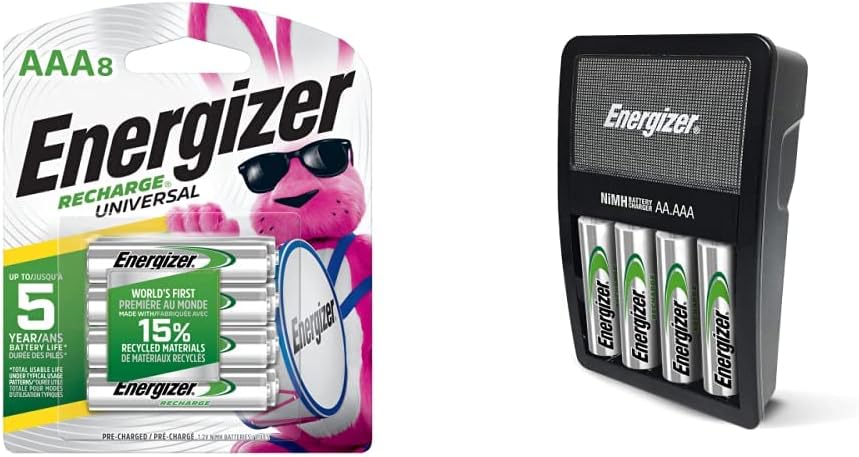
Figure 1: Energizer Recharge Universal AAA Batteries and Charger Kit in its original packaging.
4. Setup
- Unpack the Kit: Carefully remove all components from the packaging.
- Insert Batteries: Open the battery compartment on the charger. Insert 2 or 4 AA or AAA NiMH rechargeable batteries, ensuring the positive (+) and negative (-) terminals align correctly with the markings inside the charger.
- Plug in the Charger: Plug the charger directly into a standard AC wall outlet.

Figure 2: The Energizer Recharge Value Charger with AAA batteries correctly inserted, illustrating the charging status indicators.
5. Operating Instructions
5.1 Charging Batteries
- Once plugged in with batteries inserted, the charger's indicator lights will illuminate.
- A red light indicates that the batteries are currently charging.
- A green light indicates that charging is complete. The charger features an automatic safety shut-off.
- If a pulsing red light is observed, it may indicate a bad or non-rechargeable battery. Remove and replace the battery.
- Charging time for 4 AA batteries is approximately 5 to 11 hours. AAA battery charging times may vary.

Figure 3: Detailed view of the charger's LED indicators, showing red for charging and green for fully charged batteries.
5.2 Using Batteries
- Once fully charged (green light), remove the batteries from the charger.
- Insert the charged batteries into your compatible electronic devices, ensuring correct polarity.
- Energizer rechargeable batteries offer up to a 5-year battery life under typical usage conditions.

Figure 4: Examples of common household devices that can be powered by Energizer rechargeable batteries, including game controllers, computer mice, and digital cameras.
6. Maintenance
- Keep the charger and batteries clean and dry. Wipe with a soft, dry cloth if necessary.
- Store batteries in a cool, dry place away from direct sunlight and metal objects.
- Properly dispose of old or damaged batteries according to local regulations.
7. Troubleshooting
- Charger not working: Ensure the charger is securely plugged into a working AC outlet. Verify that batteries are inserted with correct polarity.
- Bad battery detected (pulsing red light): This indicates a battery that cannot be charged or is damaged. Remove the battery and try a different one.
- Batteries not holding charge: Over time, rechargeable batteries may lose capacity. If batteries consistently fail to hold a charge, they may need to be replaced.
8. Specifications
| Feature | Specification |
|---|---|
| Brand | Energizer |
| Model | B09MLQL7Y3 |
| Battery Type | NiMH (Nickel-Metal Hydride) |
| Battery Sizes Supported | AA, AAA |
| Output Voltage | 1.2 Volts (for batteries) |
| Charging Capacity | 2 or 4 AA/AAA batteries simultaneously |
| Safety Features | Automatic safety shut-off, designed to prevent leaks |
| Recycled Materials | NiMH AAA batteries made with 15% recycled materials |
| Item Weight | 5.3 ounces |
| Specification Met | UL |
9. Warranty and Support
For warranty information and customer support, please refer to the official Energizer website or contact their customer service directly. Keep your purchase receipt for any warranty claims.