
UPBRIGHT Sharper Image 2437599 Power Charger
UpBright 27V AC/DC Adapter Instruction Manual
Model: Sharper Image 2437599 Power Charger
1. Introduction
This manual provides essential information for the safe and effective use of your UpBright 27V AC/DC Adapter. This power supply is designed to provide reliable power and charging capabilities for compatible devices. Please read this manual thoroughly before use and retain it for future reference.

Figure 1.1: UpBright 27V AC/DC Adapter with power cord and barrel connector.
2. Compatibility
The UpBright 27V AC/DC Adapter is specifically designed for use with Sharper Image Powerboost Deep Tissue Cordless Massagers that require a 27V power supply. It is compatible with the following Sharper Image models:
- Sharper Image ITM./ART. 2437599
- Sharper Image ITM./ART. 1014747
- Sharper Image ITM./ART. 1014392
- Sharper Image 1011666
- Sharper Image 1013002
- Sharper Image 1012667
- Sharper Image 1013983
- Sharper Image 1013985
Important Note:
This adapter is ONLY compatible with 27V versions of the Sharper Image Powerboost Deep Tissue Cordless Massager. It is NOT compatible with 18V versions. Please verify the voltage requirement of your device before connecting the adapter to prevent damage.

Figure 2.1: Visual guide for identifying 27V (left) versus 18V (right) massager models. Ensure your device is 27V.
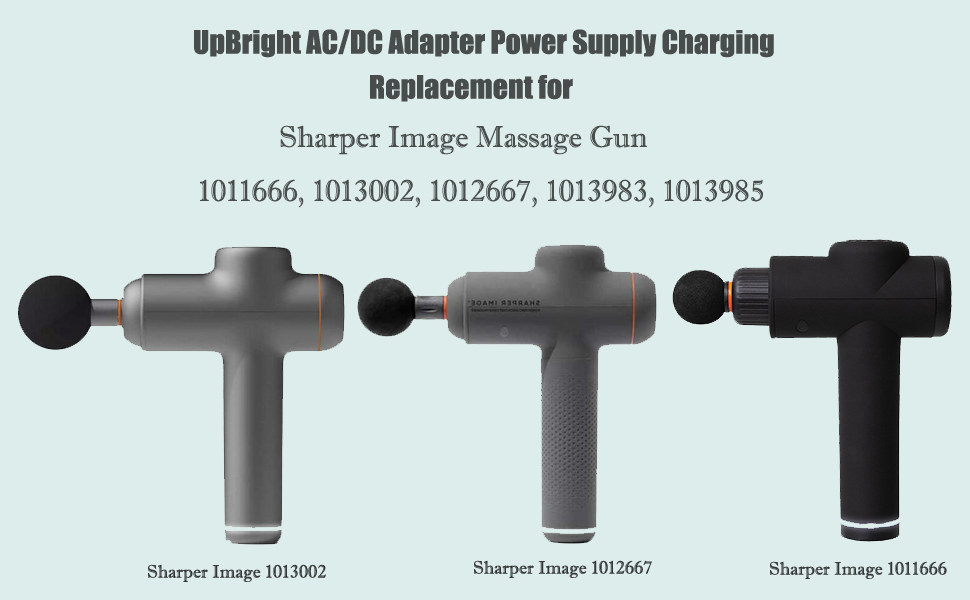
Figure 2.2: Examples of Sharper Image massage gun models compatible with this adapter.
3. Setup and Connection
Follow these steps to properly set up and connect your UpBright AC/DC Adapter:
- Verify Device Voltage: Before connecting, confirm that your Sharper Image massager requires a 27V power supply. This information is typically found on the device itself or in its original manual.
- Connect to Device: Insert the barrel connector of the UpBright adapter firmly into the charging port of your Sharper Image massager.
- Connect to Power Outlet: Plug the AC prongs of the adapter into a standard 100-240VAC 50/60Hz wall outlet.
- Charging Indication: Your device should indicate that it is charging (refer to your massager's manual for specific charging indicators).
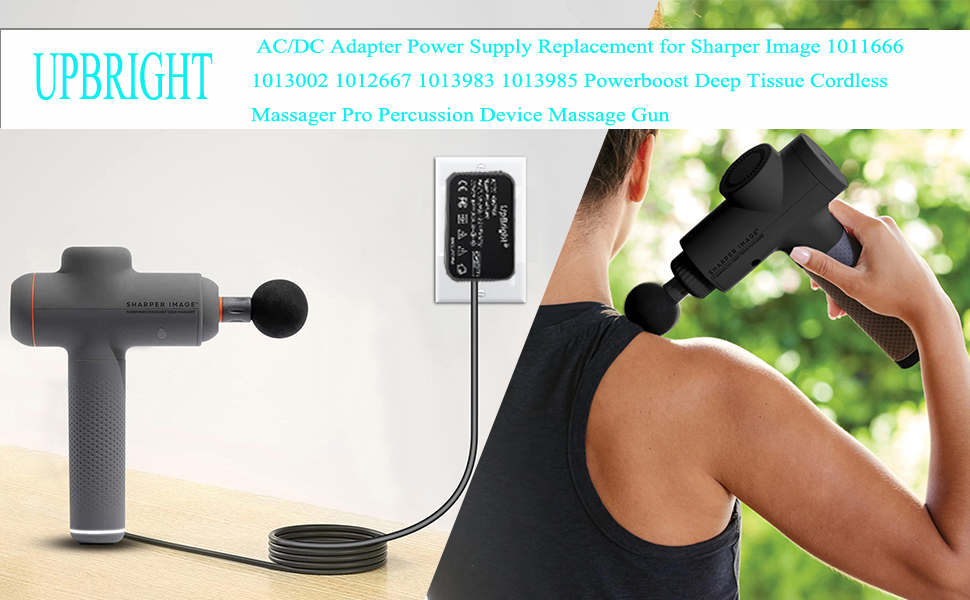
Figure 3.1: The UpBright adapter connected to a Sharper Image massage gun for charging.
4. Operation and Safety Features
The UpBright AC/DC Adapter is designed for straightforward operation and incorporates multiple safety features to protect your device and the adapter itself:
- Over Voltage Output Protection (OVP): Prevents damage from excessive voltage output.
- Over Current Output Protection (OCP): Safeguards against damage from excessive current flow.
- Short Circuit Output Protection (SCP): Protects against damage caused by short circuits.
- Overcharge Protection: Helps prevent battery damage from prolonged charging.
- Overheat Protection: Designed to prevent the adapter from overheating during operation.
Always ensure the adapter is used in a well-ventilated area and avoid covering it during operation.

Figure 4.1: The adapter features a pure copper plate for efficient heat dissipation, preventing overheating.

Figure 4.2: Overview of built-in safety circuits including overcharge, overcurrent, shortage, lightning, overvoltage, and temperature protection.
5. Care and Maintenance
To ensure the longevity and optimal performance of your UpBright AC/DC Adapter, follow these maintenance guidelines:
- Cleaning: Disconnect the adapter from the power outlet and your device before cleaning. Wipe the adapter with a soft, dry cloth. Do not use liquid cleaners or abrasive materials.
- Storage: Store the adapter in a cool, dry place away from direct sunlight and extreme temperatures.
- Cable Care: Avoid sharp bends, kinks, or excessive pulling on the power cord. The cable is designed with high-quality TPE material for durability and resistance to wear and tear.
- Inspection: Periodically inspect the adapter and cable for any signs of damage, such as frayed wires or cracked casing. If damage is found, discontinue use immediately.

Figure 5.1: The adapter's flexible wire is made from high-quality, environmentally friendly TPE material for enhanced durability and resistance to breakage.
6. Troubleshooting
If you encounter issues with your UpBright AC/DC Adapter, refer to the following common problems and solutions:
| Problem | Possible Cause | Solution |
|---|---|---|
| Device is not charging. | Incorrect voltage adapter; loose connection; faulty power outlet; device battery issue. | Ensure your device requires 27V. Check that the adapter is securely plugged into both the device and the wall outlet. Test the wall outlet with another device. If the device's rechargeable battery is old (1-3 years average lifespan), it may no longer accept a charge. |
| Adapter feels hot during use. | Normal operation; poor ventilation; excessive load. | A slight warmth is normal. Ensure the adapter is in a well-ventilated area and not covered. If it becomes excessively hot, disconnect it immediately and contact support. |
| Adapter makes unusual noises. | Internal component issue. | Immediately disconnect the adapter from power and device. Do not use it again. Contact customer support for assistance. |
If the problem persists after trying these solutions, please contact customer support.
7. Product Specifications
| Feature | Detail |
|---|---|
| Input Voltage | 100-240VAC, 50/60Hz |
| Output Voltage | 27VDC |
| Output Amperage | 0.5A (500mA) |
| Product Dimensions | 4 x 3 x 2 inches |
| Item Weight | 2.89 ounces |
| Connector Type | Barrel Round Connector |
| Special Features | OVP, OCP, SCP Protection, Overcharge Protection, Overheat Protection |
| Color | Black |
8. Warranty Information
Your UpBright AC/DC Adapter comes with the following warranty:
- 30 Days Refund: A full refund is available within 30 days of purchase.
- 24 Months Exchange: The product is eligible for exchange for up to 24 months from the date of purchase for manufacturing defects.
Please retain your proof of purchase for warranty claims.
9. Customer Support
For further assistance, technical support, or warranty claims, please contact the seller or manufacturer directly. You can also visit the official UPBRIGHT store on Amazon for more information and products:
Related documentsSharper Image 2437599 Power Charger

Ask a question about this manual
Ask about setup, troubleshooting, compatibility, parts, safety, or missing instructions. Manuals+ will review the question and use this page’s manual context to help answer it.