
Candy CSOE C10DG-S
Candy Smart Pro Condensation Dryer User Manual
Model: CSOE C10DG-S
Brand: Candy
1. Introduction
Welcome to the user manual for your new Candy Smart Pro Condensation Dryer. This appliance is designed to provide efficient and convenient drying for your laundry, featuring smart connectivity and a range of programs to suit various fabric types. Please read this manual carefully before using the appliance to ensure safe and optimal operation. Keep this manual for future reference.

Front view of the Candy Smart Pro Condensation Dryer, showcasing its modern design and control panel.
2. Safety Information
For your safety and to ensure proper use, always adhere to the following precautions:
- Ensure the appliance is properly grounded and connected to a suitable power supply.
- Do not install the dryer in a damp environment or where it may be exposed to water.
- Keep the area around the dryer clear of obstructions to ensure proper ventilation.
- Do not dry unwashed items in the tumble dryer.
- Items that have been soiled with substances such as cooking oil, acetone, alcohol, petrol, kerosene, spot removers, turpentine, waxes and wax removers should be washed in hot water with an extra amount of detergent before being dried in the tumble dryer.
- Remove all objects from pockets, such as lighters and matches.
- Supervise children to ensure they do not play with the appliance.
3. Product Features
The Candy Smart Pro Dryer offers a range of innovative features for an enhanced drying experience:
- Smart Pro Dryer: Versatile and fast, with quick cycles ranging from 30 to 90 minutes for daily needs. The door is positioned 3.5 cm higher than standard models, improving comfort during loading and unloading.
- Programmable Start (Smart Start Delay): Delay the start of a cycle by up to 24 hours. This allows you to run the dryer during off-peak hours or have laundry ready upon your return.
- Wool Program: Specifically designed to protect wool garments by controlling temperature and drum movement, preventing felting and friction. Ensures delicate and accurate care for your valuable items.
- Super Easy Iron Function: Utilizes a Smart sensor and alternating drum movement to reduce creases and tangles, significantly cutting down ironing time and simplifying laundry management.
- App Control (Wi-Fi & hOn App): Manage your dryer remotely via Wi-Fi and the hOn App. Access drying and maintenance tips, real-time statistics, consumption reports, and over 40 additional drying cycles through Smart Touch.

Quick Cycles for daily needs.

Remote control via hOn App.

Super Easy Iron function for less wrinkles.

Programmable Start Delay.
4. Setup and Installation
Proper installation is crucial for the performance and safety of your dryer.
4.1 Unpacking
Carefully remove all packaging materials. Inspect the dryer for any transit damage. Report any damage to your retailer immediately.
4.2 Placement
Place the dryer on a firm, level floor. Ensure there is adequate ventilation around the appliance. Do not block the air intake or exhaust vents. The dryer can be placed next to a washing machine or stacked on top of a compatible washing machine using a stacking kit (sold separately).
4.3 Electrical Connection
Connect the dryer to a properly grounded electrical outlet. Ensure the voltage and frequency match the specifications on the rating plate of the appliance.
4.4 Dimensions
The dimensions of the dryer are approximately 59.6 cm (width) x 58.5 cm (depth) x 85 cm (height).

Approximate dimensions of the dryer: 59.6 cm (W) x 58.5 cm (D) x 85 cm (H).
5. Operating Instructions
Follow these steps for effective and efficient drying:
5.1 Preparing Laundry
- Sort laundry by fabric type and desired dryness level.
- Close zippers, hooks, and fastenings to prevent damage.
- Do not overload the dryer. Refer to the program guide for maximum load capacities.
5.2 Loading the Dryer
Open the dryer door and place the sorted laundry inside the drum. Close the door firmly.
5.3 Selecting a Program
Turn the program selector knob to choose the desired drying program. The display will show the estimated drying time. You can also use the hOn App for additional programs and smart suggestions.
5.4 Adjusting Options
Depending on the selected program, you may be able to adjust options such as dryness level, anti-crease, or delay start. Refer to the control panel symbols and the hOn App for available options.
5.5 Starting the Cycle
Press the Start/Pause button to begin the drying cycle.
5.6 End of Cycle
Once the cycle is complete, the dryer will signal. Remove the laundry promptly to minimize creasing.
6. Maintenance
Regular maintenance ensures the longevity and efficiency of your dryer.
6.1 Cleaning the Lint Filter
The lint filter should be cleaned after every drying cycle. A clogged filter can reduce drying efficiency and increase energy consumption.
- Open the dryer door.
- Pull out the lint filter located inside the door opening.
- Remove any accumulated lint by hand or with a soft brush.
- Reinsert the filter firmly into its position.
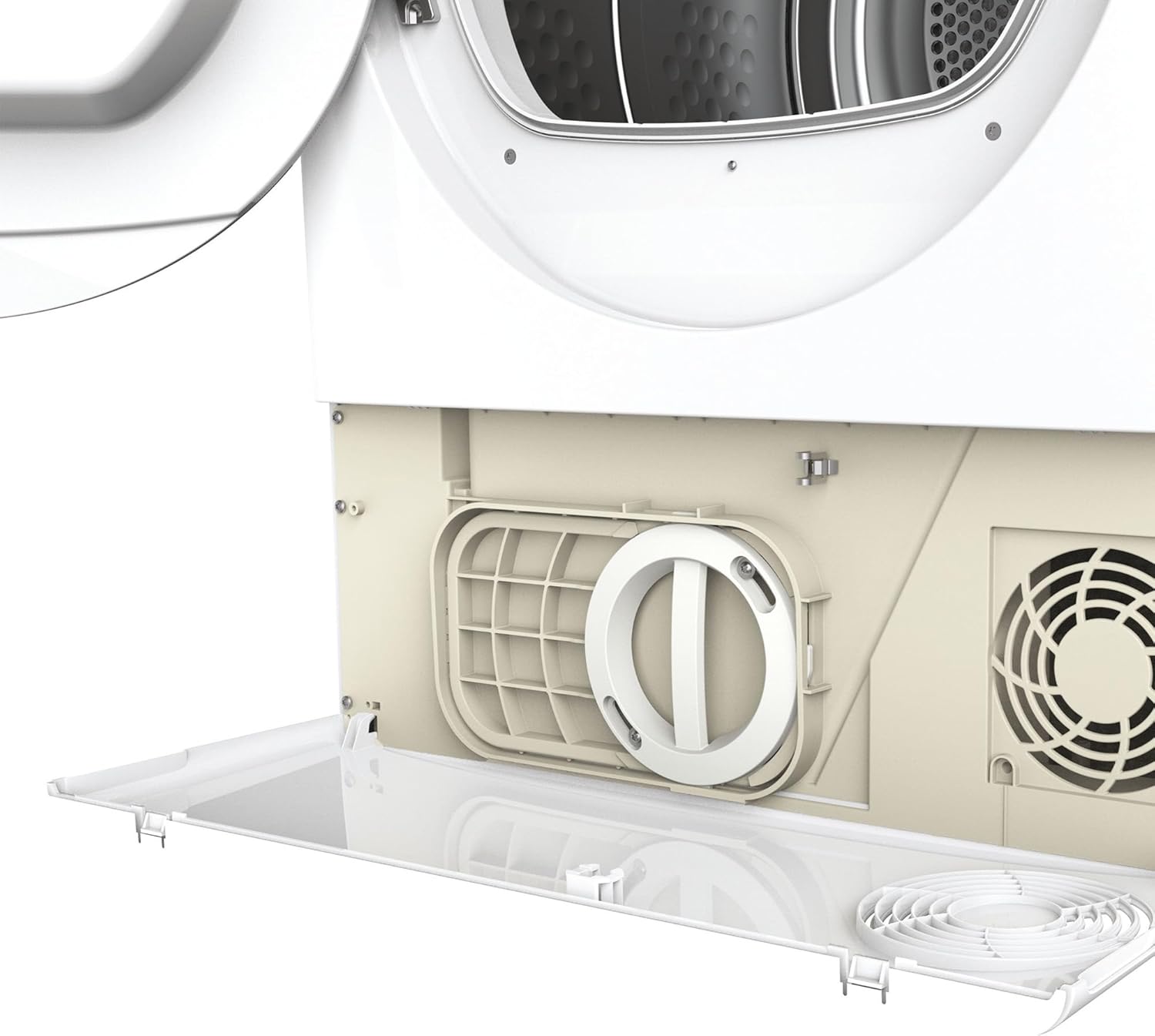
Locate and open the filter compartment at the bottom of the dryer.

Carefully remove the filter for cleaning.
6.2 Emptying the Water Container
As a condensation dryer, water extracted from the laundry is collected in a container. This container must be emptied after each cycle.
- Pull out the water container (usually located at the top left or bottom of the appliance).
- Pour the collected water into a sink or drain.
- Push the container back into its position until it clicks.
6.3 Cleaning the Condenser
The condenser should be cleaned periodically (e.g., every few months) to maintain drying efficiency. Refer to your appliance's specific instructions for condenser access and cleaning.
7. Troubleshooting
If you encounter issues with your dryer, consult the following common problems and solutions:
| Problem | Possible Cause | Solution |
|---|---|---|
| Dryer does not start | No power; Door not closed; Program not selected. | Check power supply; Ensure door is firmly closed; Select a program and press Start. |
| Laundry not drying properly | Lint filter clogged; Water container full; Overloaded; Incorrect program. | Clean lint filter; Empty water container; Reduce load size; Select appropriate program. |
| Excessive noise | Foreign objects in drum; Dryer not level. | Check drum for objects; Ensure dryer is on a level surface. |
| Error code on display | Specific malfunction. | Refer to the full user manual or hOn App for specific error code meanings and solutions. Contact customer support if the issue persists. |
8. Specifications
- Brand: Candy
- Model Number: CSOE C10DG-S
- Type: Condensation Dryer
- Capacity: 10 Kilograms
- Color: White
- Dimensions (WxDxH): 59.6 x 58.5 x 85 cm
- Weight: 34.2 kg
- Energy Efficiency Class: B
- Connectivity: Wi-Fi + BLE (Bluetooth Low Energy)
- Country of Origin: China
9. Warranty and Support
Your Candy Smart Pro Dryer is covered by a manufacturer's warranty. For specific warranty terms and conditions, please refer to the documentation provided with your purchase or visit the official Candy website.
9.1 Customer Support
If you require technical assistance, have questions about your appliance, or need to report a fault, please contact Candy customer support. Have your model number (CSOE C10DG-S) and serial number ready when contacting support.
For returns or issues related to your purchase, please refer to the retailer's return policy. For purchases made on Amazon, products are generally returnable within 14 days of receipt. Specialized customer support is also available through Amazon.
You can also visit the official Candy Store on Amazon for more information and product updates.
Related documentsCSOE C10DG-S


Ask a question about this manual
Ask about setup, troubleshooting, compatibility, parts, safety, or missing instructions. Manuals+ will review the question and use this page’s manual context to help answer it.