
3Plus Vibe Pro
3Plus Vibe Pro Smart Watch User Manual
Model: 3PL-VIBEPPRO-BK
1. Introduction
The 3Plus Vibe Pro Smart Watch is designed to assist you in monitoring your health and fitness activities. It features a large AMOLED touch screen display, comprehensive health tracking capabilities, and smart notifications. This manual provides instructions for setting up, operating, and maintaining your device.
Key Features
- 1.78-inch Large AMOLED Touch Screen Display
- 21-Day Battery Life (typical usage)
- Heart Rate Monitoring
- Blood Oxygen (SpO2) Tracking
- Sleep Tracking
- Built-in GPS for outdoor activities
- 5 ATM Water Resistance
- Smart Notifications (calls, texts, calendar, app alerts)
- Multiple Sports Modes
What's in the Box
- 3Plus Vibe Pro Smart Watch
- Charging Cable
- User Manual
2. Setup
2.1 Charging the Device
Before initial use, fully charge your 3Plus Vibe Pro Smart Watch. Connect the charging cable to the charging contacts on the back of the watch and to a USB power source. The watch display will indicate charging status.

Figure 2.1: Front view of the 3Plus Vibe Pro Watch display.
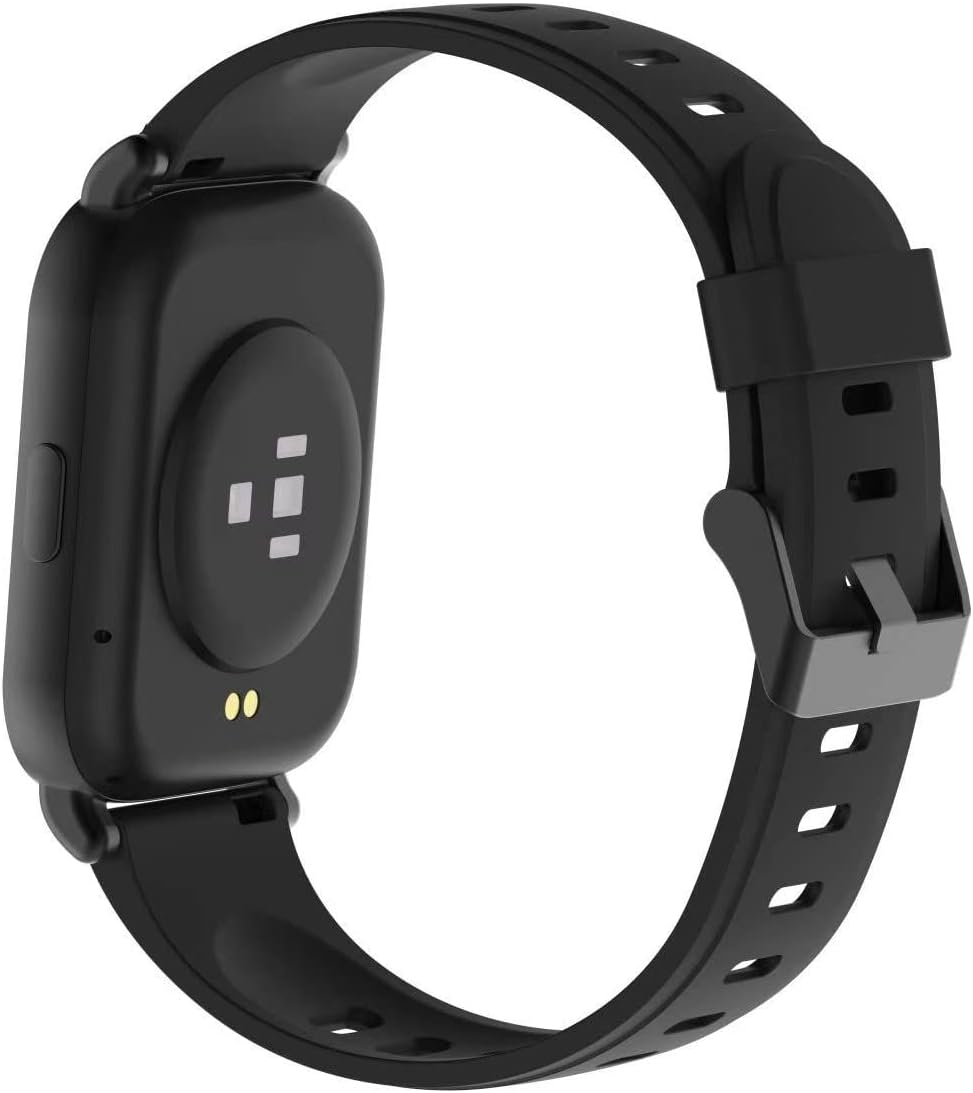
Figure 2.2: Rear view of the 3Plus Vibe Pro Watch with charging contacts and sensors.
2.2 App Installation and Pairing
- Download the 3Plus App: Search for the "3Plus" app on your smartphone's app store (iOS or Android) and install it.
- Create an Account: Open the app and follow the on-screen instructions to create a new user account or log in if you already have one.
- Pair Your Watch:
- Ensure Bluetooth is enabled on your smartphone.
- Open the 3Plus app and navigate to the device pairing section.
- Select your 3Plus Vibe Pro from the list of available devices.
- Confirm the pairing request on both your watch and smartphone.
2.3 Customizing the Watch Face
You can customize the watch face directly on the device by swiping or through the 3Plus app. The app offers a wider selection of watch faces to personalize your device.

Figure 2.3: The 1.78" AMOLED display of the 3Plus Vibe Pro Watch.
3. Operating Instructions
3.1 Basic Navigation
- Touch Screen: Swipe left, right, up, or down to navigate through menus and features. Tap to select.
- Side Button: Typically used to return to the home screen or activate specific functions.
3.2 Health and Fitness Tracking
The 3Plus Vibe Pro tracks various health and fitness metrics automatically throughout the day. You can view detailed data on the watch or through the connected 3Plus app.
- Steps, Calories, Distance: Automatically recorded.
- Heart Rate: Continuous monitoring. For accurate readings, ensure the watch is snug on your wrist.
- Blood Oxygen (SpO2): Track your oxygen levels. For best results, remain still during measurement.
- Sleep Tracking: Monitors deep sleep, light sleep, and awake times.
- Built-in GPS: Provides real-time route tracking during outdoor exercises.

Figure 3.1: Activity tracking screen on the 3Plus Vibe Pro Watch.

Figure 3.2: Blood oxygen and heart rate measurement screen.

Figure 3.3: Sleep data display on the 3Plus Vibe Pro Watch.
3.3 Sports Modes
The watch includes multiple sports modes to track specific workouts. Select the appropriate mode before starting an activity for more accurate data collection.
Video 3.1: Official product video demonstrating various features including sports modes, GPS, and notifications. This video highlights the watch's capabilities for active lifestyles.
3.4 Smart Notifications
Receive call, text, calendar, and smartphone app notifications directly on your watch when your phone is nearby and connected via Bluetooth. Quick replies and voice replies are available on Android devices only.

Figure 3.4: Notifications displayed on the 3Plus Vibe Pro Watch screen.
3.5 Water Resistance
The 3Plus Vibe Pro has a 5 ATM water resistance rating, making it suitable for swimming, showering, snorkeling, and exposure to rain. It is not recommended for high-speed water sports or diving.

Figure 3.5: The 3Plus Vibe Pro Watch demonstrating its water resistance.
4. Maintenance
4.1 Cleaning Your Watch
- Regularly clean your watch and band with a soft, damp cloth.
- Avoid using harsh chemicals or abrasive materials, as these can damage the device.
- Ensure the watch is completely dry before charging.
4.2 Battery Care
- To prolong battery life, avoid exposing the watch to extreme temperatures.
- Charge the watch fully before long periods of inactivity.
- While the watch boasts a long battery life, individual usage patterns and settings can affect actual duration.
4.3 Water Resistance Precautions
- Although rated 5 ATM, avoid pressing buttons underwater.
- Do not expose the watch to hot water, steam, or detergents, as this may compromise the water seal.
- If the watch gets wet, dry it thoroughly before charging or using the side button.
5. Troubleshooting
5.1 Common Issues and Solutions
| Issue | Possible Cause / Solution |
|---|---|
| Watch not pairing with phone |
|
| Inaccurate heart rate/blood oxygen readings |
|
| Short battery life |
|
| Watch not responding / Screen blank |
|
| Alarm/Timer functionality issues |
|
If you encounter issues not listed here or if the suggested solutions do not resolve the problem, please contact 3Plus customer support.
6. Specifications
| Feature | Detail |
|---|---|
| Model Number | 3PL-VIBEPPRO-BK |
| Display Size | 1.78 Inches AMOLED |
| Product Dimensions | 0.39 x 10.63 x 1.57 inches |
| Item Weight | 2.4 ounces |
| Battery | 1 CR5 battery (included), 280 mAh Lithium Ion |
| Operating System | Android, Apple iOS compatible |
| Connectivity | Bluetooth, GPS (True) |
| Water Resistance | 5 ATM |
| Memory Storage Capacity | 16 MB |
| RAM Memory Installed Size | 32 MB |
7. Warranty and Support
For warranty information and customer support, please refer to the documentation included with your purchase or visit the official 3Plus website. You can also visit the 3Plus Store on Amazon for additional resources.
If you require technical assistance or have questions about your 3Plus Vibe Pro Smart Watch, please contact 3Plus customer service directly.
Related documentsVibe Pro


Ask a question about this manual
Ask about setup, troubleshooting, compatibility, parts, safety, or missing instructions. Manuals+ will review the question and use this page’s manual context to help answer it.