
tectake 404232
tectake® Corner Desk with 2 Shelves - Industrial Design Computer Desk
Model: 404232
Introduction
This manual provides essential instructions for the assembly, operation, and maintenance of your tectake® Corner Desk, Model 404232. Please read this manual thoroughly before assembly and use to ensure safe and correct operation.
Safety Instructions
- Weight Limits: Do not overload the desk surface or the shelves. The desk surface has a maximum load capacity of 200 kg. Each side compartment has a maximum load capacity of 25 kg.
- Stability: Ensure the desk is placed on a level surface. Adjust the plastic feet to compensate for uneven floors and maintain stability.
- Assembly: Follow all assembly instructions carefully. Do not skip steps or use incorrect parts.
- Children: Keep small parts away from children during assembly.
- Tools: Use appropriate tools for assembly as specified in the instructions.
Package Contents
Before beginning assembly, verify that all components are present and undamaged. Refer to the included parts list in the assembly instructions.
- Corner Desk components
- Assembly hardware
- Assembly instructions manual
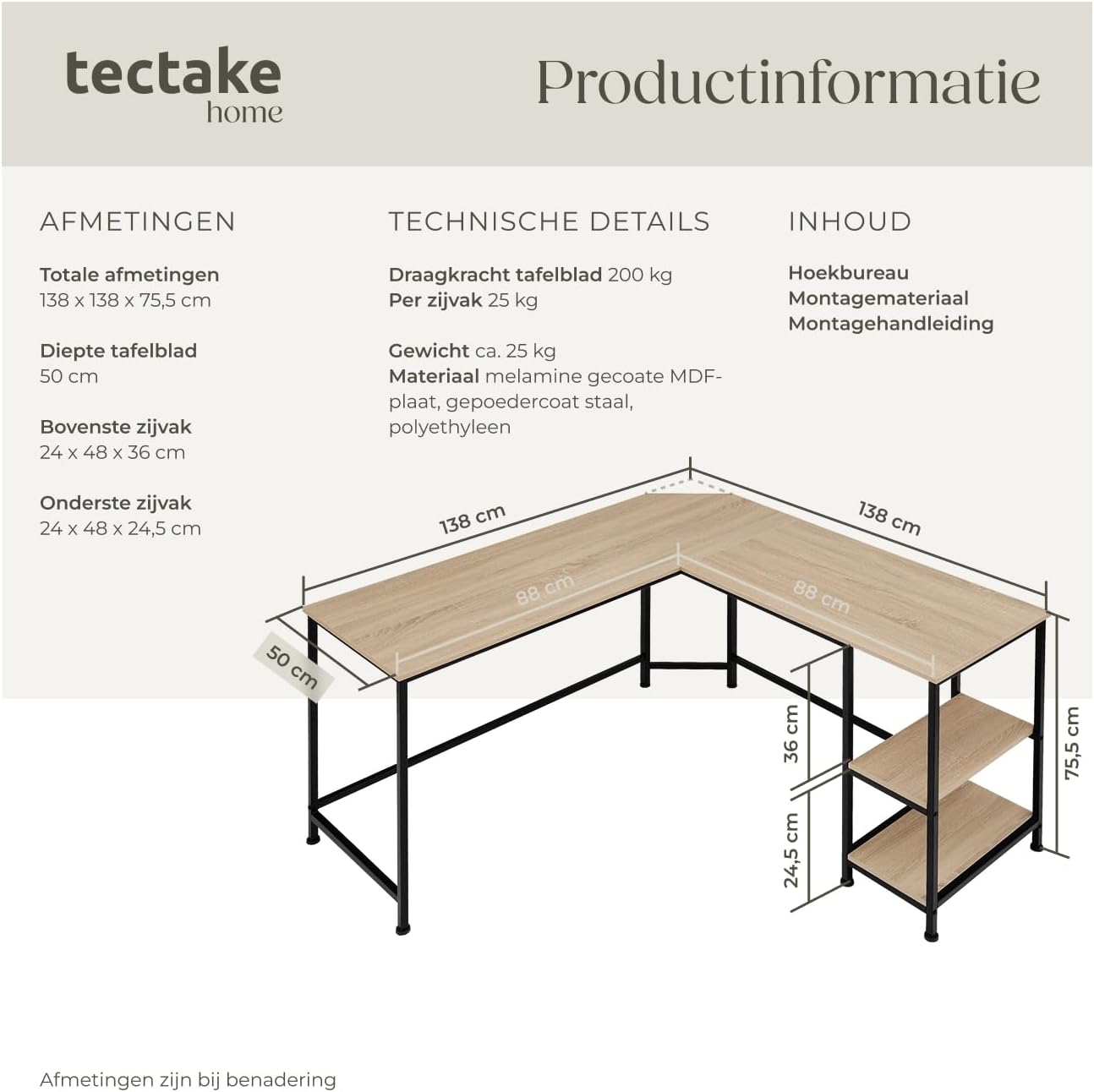
Image: Product information diagram showing overall dimensions, table top depth, and side compartment dimensions. It also lists technical details like load capacity, weight, and materials.
Setup and Assembly
Assembly of the tectake Corner Desk is designed to be straightforward. It is recommended to have two people for assembly. Please follow the detailed assembly instructions provided in the package.
- Unpack Components: Carefully remove all parts from the packaging and lay them out on a clean, soft surface to prevent scratches.
- Identify Parts: Match all components with the parts list in the assembly manual.
- Assemble Frame: Connect the metal frame sections using the provided hardware. Ensure all screws are tightened securely but do not overtighten.
- Attach Desk Panels: Secure the MDF desk panels to the assembled frame. Pay attention to the orientation of the corner section with the cable recess.
- Install Shelves: Insert the side shelves into their designated slots. Note that the top shelf in the side compartment can be removed to accommodate a larger item like a PC tower.
- Adjust Feet: Once assembled, place the desk in its desired location. Adjust the height-adjustable plastic feet to ensure the desk is stable and level on the floor.

Image: An assembled tectake Corner Desk in an office environment, showcasing its L-shape and integrated shelves. The desk is set up with a laptop, office chair, and decorative items.
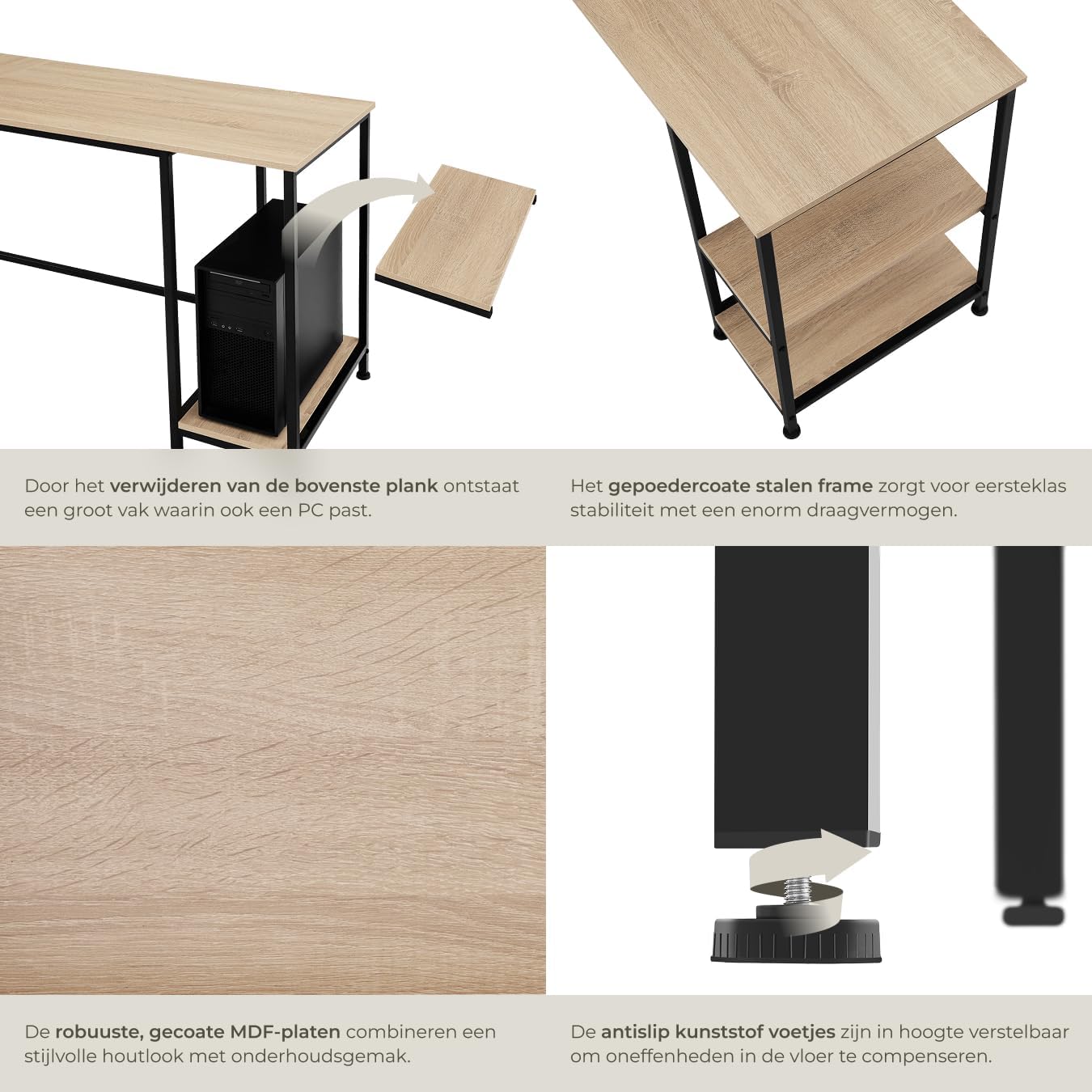
Image: Detailed views of key features: the removable top shelf in the side compartment to fit a PC, the robust powder-coated steel frame, the durable MDF panels, and the adjustable plastic feet for stability on uneven floors.
Operating Instructions
The tectake Corner Desk is designed for use as a computer desk, workstation, or gaming desk. Its L-shape provides ample surface area for multiple monitors, a laptop, and other peripherals.
- Cable Management: Utilize the beveled edge in the corner for discreet cable routing, keeping your workspace tidy.
- Storage: The two integrated side shelves offer convenient storage for books, office supplies, or a computer tower. The top shelf can be removed to accommodate taller items.
- Adjustable Feet: Periodically check the stability of the desk. If the desk wobbles, adjust the plastic feet by rotating them clockwise or counter-clockwise until the desk is stable.
Maintenance and Care
To ensure the longevity and appearance of your tectake Corner Desk, follow these maintenance guidelines:
- Cleaning: The melamine-coated surface of the desk is easy to clean. Use a soft, damp cloth and mild detergent if necessary. Avoid abrasive cleaners or harsh chemicals that could damage the finish.
- Frame Care: The powder-coated steel frame can be wiped clean with a damp cloth.
- Tighten Fasteners: Periodically check all screws and fasteners and tighten them if they have become loose.
- Avoid Direct Sunlight: Prolonged exposure to direct sunlight can cause fading or damage to the wood-look finish.
- Protect Surfaces: Use coasters for drinks and mouse pads to protect the desk surface from scratches and spills.
Troubleshooting
| Problem | Possible Cause | Solution |
|---|---|---|
| Desk is wobbly or unstable. | Uneven floor surface or loose adjustable feet. | Adjust the plastic feet at the bottom of the desk legs until the desk is stable and level. Ensure all assembly screws are tightened. |
| Parts do not fit during assembly. | Incorrect orientation of parts or missing hardware. | Refer to the assembly instructions and diagrams to ensure correct part orientation. Verify all hardware is present and used correctly. Do not force parts. |
| Scratches or damage to the surface. | Improper handling during assembly or use. | While the melamine finish is scratch-resistant, avoid dragging sharp objects across the surface. Use protective mats for heavy or abrasive items. |
Specifications
- Model: 404232
- Brand: tectake
- Overall Dimensions (L x W x H): 138 x 138 x 75.5 cm
- Desk Panel Depth: 50 cm
- Upper Side Compartment (L x W x H): 24 x 48 x 36 cm
- Lower Side Compartment (L x W x H): 24 x 48 x 24.5 cm
- MDF Panel Thickness: 1.5 cm
- Steel Frame (L x W): 2 x 2 cm
- Plastic Feet Adjustment: Approx. 1.5 cm
- Desk Panel Load Capacity: 200 kg
- Side Compartment Load Capacity: 25 kg per compartment
- Weight: Approx. 25.2 kg
- Materials: MDF panel, powder-coated steel, polyethylene
- Color: Industrial Light Wood (Sonoma Oak) with Black Metal Frame
- Features: Adjustable feet, L-shape design, 2 integrated shelves, cable management recess.
Warranty and Support
For warranty information or technical support, please contact tectake customer service. Refer to the contact details provided with your purchase documentation or visit the official tectake website.
Note: Spare parts availability information is not available at this time.
Official tectake website: www.tectake.com
Ask a question about this manual
Ask about setup, troubleshooting, compatibility, parts, safety, or missing instructions. Manuals+ will review the question and use this page’s manual context to help answer it.