1. Introduction
Thank you for choosing the DORTALA Rolling Foot Massager. This electric massage machine is designed to provide a relaxing and therapeutic experience for your feet, calves, and arms. It features multiple massage options, easy operation with a remote control, and a portable design. Please read this manual thoroughly before use to ensure proper operation and maintenance.
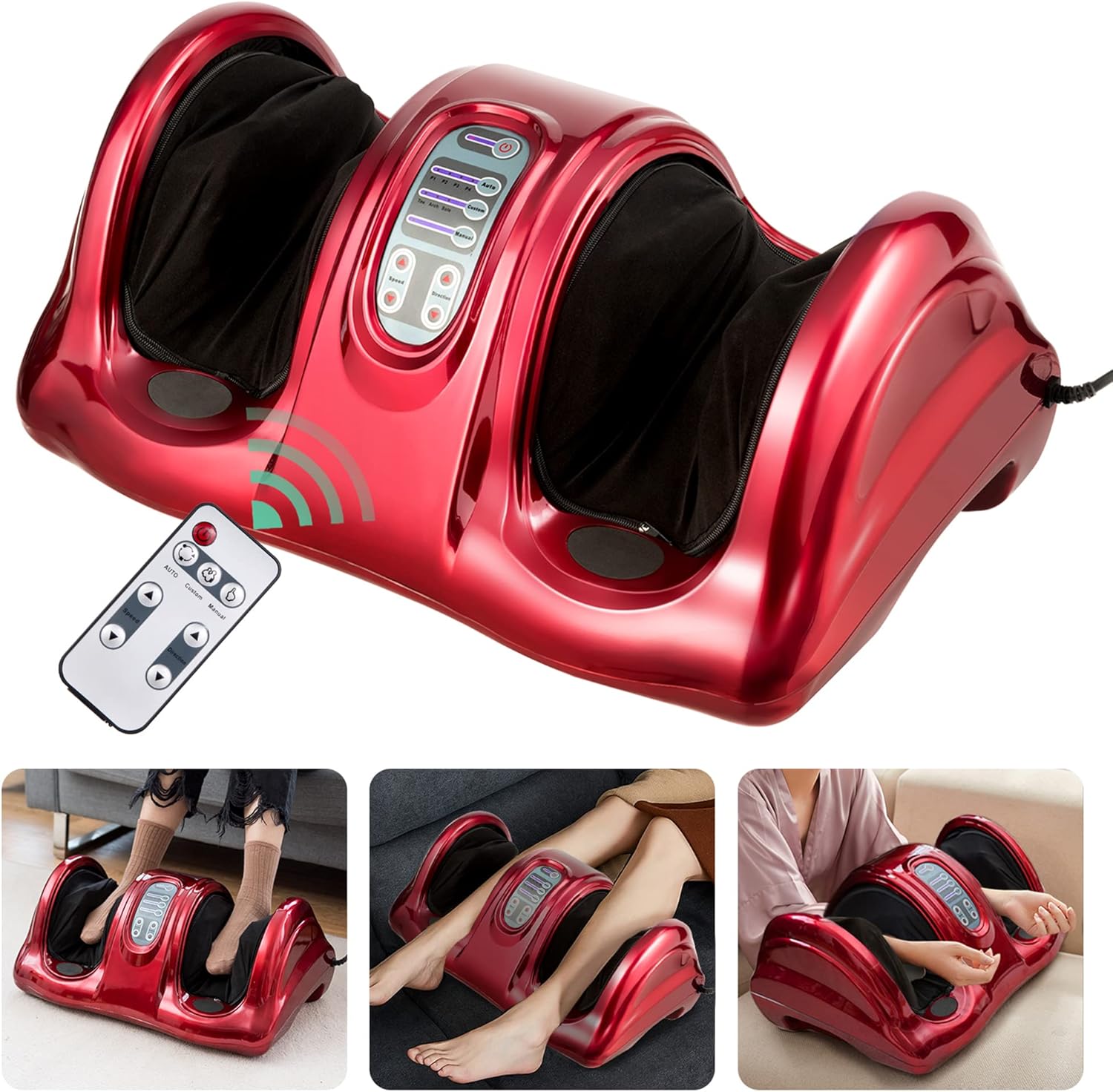
Image 1.1: DORTALA Rolling Foot Massager with its remote control.
2. Safety Information
To reduce the risk of electric shock, burns, fire, or injury, please observe the following safety precautions:
- Always unplug the massager from the electrical outlet immediately after using and before cleaning.
- Do not use while bathing or in a shower.
- Do not place or store the massager where it can fall or be pulled into a tub or sink.
- Do not place in or drop into water or other liquid.
- Never use pins or other metallic fasteners with this appliance.
- Close supervision is necessary when this appliance is used by, on, or near children, invalids, or disabled persons.
- Use this appliance only for its intended use as described in this manual. Do not use attachments not recommended by the manufacturer.
- Never operate this appliance if it has a damaged cord or plug, if it is not working properly, if it has been dropped or damaged, or dropped into water.
- Keep the cord away from heated surfaces.
- Do not use outdoors.
- Do not operate where aerosol (spray) products are being used or where oxygen is being administered.
- To disconnect, turn all controls to the OFF position, then remove plug from outlet.
- This appliance is designed for household use only.
3. Package Contents
Please check the package contents upon unboxing:
- 1 x DORTALA Rolling Foot Massager
- 1 x Remote Control
- 1 x Instruction Manual (this document)
4. Product Features
The DORTALA Rolling Foot Massager offers a range of features for an optimal massage experience:
- Multiple Massage Options: Features automatic programs with 4 modes and a personalized program for customized massage.
- Versatile Use: Designed for foot, calf, and arm massage.
- Easy Operation: Equipped with a smart touch panel and a wireless remote control for convenient mode selection and adjustments.
- Durable and Comfortable Design: Constructed from ABS material, foam, and fabric for longevity and user comfort.
- Removable and Washable Sleeves: Foot sleeves with smooth zippers can be easily removed for cleaning.
- Stable Base: Four foot mats at the bottom ensure stability during use.
- Portable: Lightweight design with built-in handles for easy carrying and storage.
5. Specifications
| Attribute | Detail |
|---|---|
| Model | DO-HW50807OS-CA |
| Color | Red (also available in Grey, Black, Burgundy) |
| Material | ABS, Foam, Fabric |
| Overall Dimensions (L x W x H) | 25'' x 15'' x 12'' |
| Rated Voltage | 110V |
| Power | 40W |
| Net Weight | 15 lbs (approx. 8.16 kg) |
| Max Foot Size | US Men's Size 10, US Women's Size 12 |
| Max Calf Circumference | 15 inch |

Image 5.1: Product dimensions and material specifications.
6. Setup
Setting up your DORTALA Rolling Foot Massager is simple:
- Unpack: Carefully remove the massager and all accessories from the packaging.
- Placement: Place the massager on a flat, stable surface. Ensure the four foot mats at the bottom are securely positioned to prevent movement during use.
- Power Connection: Plug the power cord into a standard 110V electrical outlet.
- Remote Control: Ensure the remote control has working batteries. If not, replace them according to the remote's instructions (usually located on the back).
7. Operating Instructions
The DORTALA Rolling Foot Massager can be operated using the integrated touch panel or the remote control.
7.1 Control Panel Overview

Image 7.1: Detailed view of the control panel and its functions.
- Power On/Off: Press to turn the unit on or off.
- Auto Mode (A): Selects one of the 4 pre-programmed automatic massage modes (P1, P2, P3, P4). Each mode offers a different combination of massage techniques and intensities.
- Custom Mode: Allows you to select specific massage areas: Toe, Arch, or Sole.
- Manual Program: Activates manual control over speed and direction.
- Speed Adjustment: Increases or decreases the massage speed in manual mode.
- Direction Adjustment: Changes the direction of the massage rollers in manual mode.
7.2 Basic Operation
- Power On: Press the Power On/Off button on the control panel or remote control. The unit will typically start in a default automatic mode.
- Select Mode:
- For automatic programs, press the 'Auto Mode' button repeatedly to cycle through P1, P2, P3, P4.
- For custom massage, press the 'Custom Mode' button to select 'Toe', 'Arch', or 'Sole'.
- Adjust Settings (Manual Mode): If you are in Manual Program mode, use the 'Speed Adjustment' and 'Direction Adjustment' buttons to fine-tune your massage experience.
- Enjoy Massage: Place your feet, calves, or arms into the designated massage areas.
- Power Off: Press the Power On/Off button again to turn off the massager when finished.
7.3 Versatile Usage
The massager is designed for use on different body parts:
- Foot Massage: Sit comfortably and place both feet into the foot sleeves.
- Calf Massage: Position the massager to allow your calves to rest within the sleeves.
- Arm Massage: Carefully place your forearms into the sleeves for an arm massage.

Image 7.2: Demonstrating the 3-in-1 usage for foot, calf, and arm massage.
8. Maintenance
Proper maintenance ensures the longevity and hygiene of your massager.
8.1 Cleaning
- Unplug Before Cleaning: Always ensure the massager is unplugged from the power outlet before cleaning.
- Exterior Cleaning: Wipe the exterior surface of the massager with a soft, damp cloth. Do not use abrasive cleaners, solvents, or strong detergents.
- Removable Sleeves: The foot sleeves are removable and washable. Unzip the sleeves, remove them from the unit, and wash them by hand or machine wash on a gentle cycle with mild detergent. Air dry completely before reattaching.
- Storage: Store the massager in a cool, dry place when not in use. Avoid direct sunlight and extreme temperatures.
9. Troubleshooting
If you encounter issues with your DORTALA Rolling Foot Massager, please refer to the following common problems and solutions:
| Problem | Possible Cause | Solution |
|---|---|---|
| Massager does not turn on. | Not plugged in; Power outlet issue; Unit malfunction. | Ensure the power cord is securely plugged into a working electrical outlet. Try a different outlet. If the issue persists, contact customer support. |
| Remote control is not working. | Dead batteries; Obstruction between remote and unit; Remote malfunction. | Replace the batteries in the remote control. Ensure there is no obstruction between the remote and the massager's sensor. Try operating the unit using the control panel directly. |
| Massage feels too weak or too strong. | Incorrect mode selected; Personal preference. | Cycle through the automatic modes (P1-P4) or adjust speed/direction in manual mode to find a comfortable intensity. |
| Unusual noise during operation. | Internal component issue; Obstruction. | Turn off and unplug the unit. Check for any visible obstructions. If the noise persists, discontinue use and contact customer support. |
10. Warranty and Support
For warranty information or technical support, please contact DORTALA customer service. Refer to the contact information provided with your purchase or visit the official DORTALA website for assistance.
Please retain your proof of purchase for any warranty claims.


