
Introduction
This manual provides detailed instructions for the safe and efficient use of your LDNIO Bluetooth FM Transmitter for Car, Model C705Q. This device allows you to stream audio from your smartphone to your car's FM radio, make hands-free calls, and charge multiple devices simultaneously.

Image: The LDNIO Bluetooth FM Transmitter, Model C705Q, plugged into a car's cigarette lighter socket, displaying an FM frequency.
Product Overview
The LDNIO C705Q is a versatile car accessory designed to enhance your in-car audio and charging experience. It features Bluetooth 5.0 for stable connections, an FM transmitter for audio streaming, and multiple fast-charging ports.
Key Features:
- Bluetooth 5.0: Provides a stable and fast wireless connection for audio streaming and hands-free calls.
- FM Transmitter: Broadcasts audio to your car's radio on a selected FM frequency.
- Multiple Charging Ports: Includes a USB-C port with PD (Power Delivery) and two USB-A ports with QC 3.0 (Quick Charge) for rapid charging of compatible devices.
- Hands-Free Calling: Built-in microphone with CVC noise suppression technology for clear calls.
- LED Display: Shows FM frequency and car battery voltage.
- U-Disk Playback: Supports music playback directly from a USB flash drive.
- Universal Compatibility: Works with 12V-24V vehicles and a wide range of smartphones and audio players.
- Safety Protections: Built-in over-current, over-voltage, over-temperature, and short-circuit protection.
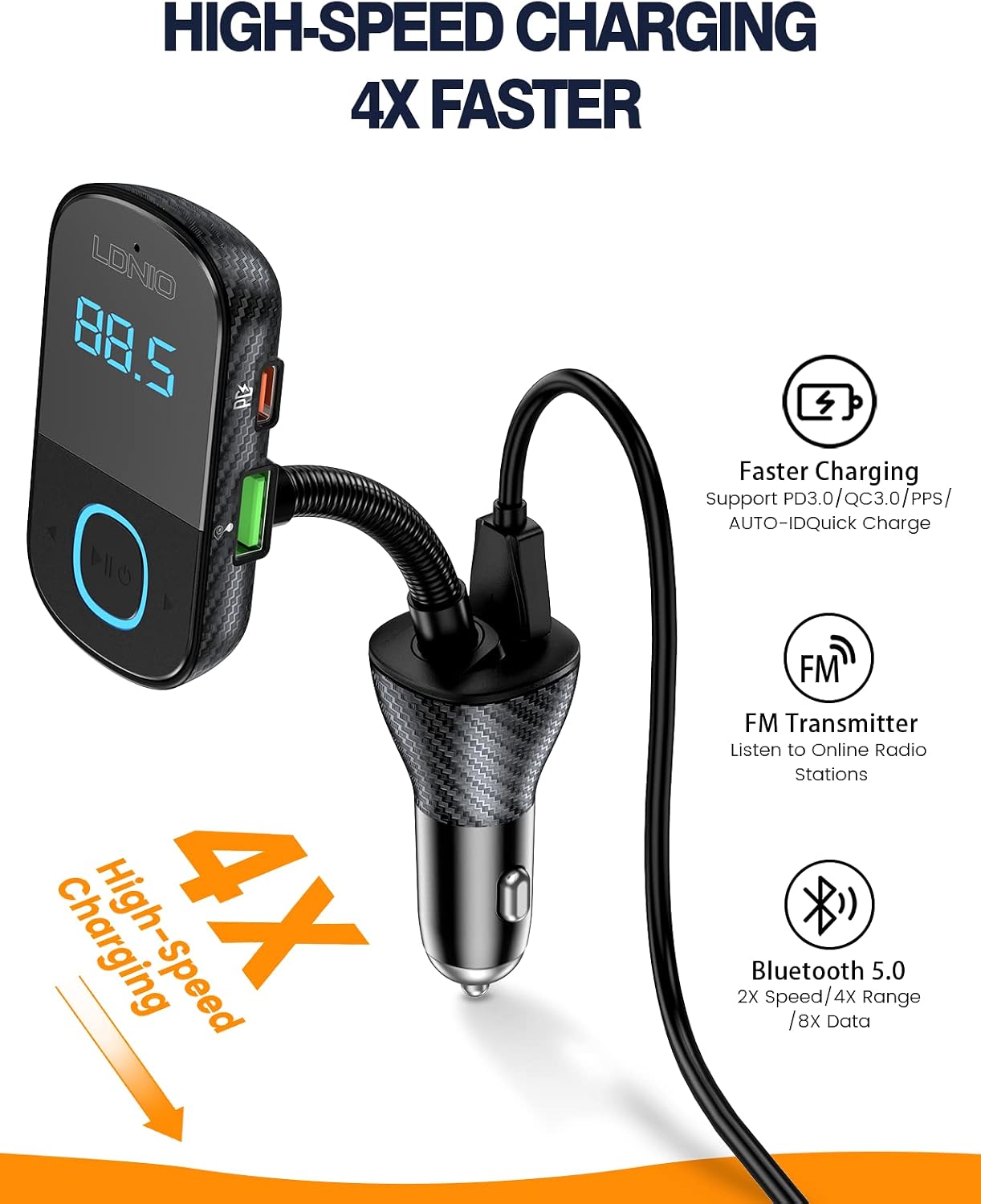
Image: The LDNIO C705Q device highlighting its USB-C (PD), USB-1 (QC3.0), and USB-2 (QC3.0) charging ports.

Image: An illustration depicting the integrated Bluetooth 5.0 chip within the device, ensuring enhanced connectivity.
Setup Instructions
- Insert into Car Socket: Plug the LDNIO C705Q into your car's 12V-24V cigarette lighter socket. The LED display will light up, showing the current car battery voltage for a few seconds, then switch to display the FM frequency.
- Tune Car Radio: Tune your car's FM radio to an empty frequency (one with no strong broadcast signal).
- Set Transmitter Frequency: Adjust the FM frequency on the LDNIO C705Q to match the empty frequency on your car radio. Use the frequency adjustment buttons on the device.
- Pair Bluetooth: On your smartphone, enable Bluetooth and search for available devices. Select "LDNIO C705Q" (or similar name) from the list to pair. Once paired, a voice prompt will confirm the connection.

Image: The LDNIO C705Q plugged into a car's power outlet, displaying an FM frequency of 87.5, ready for setup.
Operating Instructions
Audio Playback:
- Bluetooth Streaming: After successful Bluetooth pairing, open your phone's music player or audio app. Audio will be transmitted wirelessly to the C705Q and then to your car's speakers via the selected FM frequency.
- U-Disk Playback: Insert a USB flash drive containing MP3/WAV/FLAC/APE/WMA audio files into the designated USB port. The device will automatically detect and play music from the U-Disk.
Hands-Free Calling:
- Answering Calls: When an incoming call is received, the device will automatically switch to hands-free mode. Press the multi-function button (usually marked with a phone icon or play/pause) once to answer the call.
- Ending Calls: Press the multi-function button once to end an ongoing call.
- Rejecting Calls: Long-press the multi-function button to reject an incoming call.
- Redialing: Double-press the multi-function button to redial the last number.

Image: The LDNIO C705Q demonstrating its hands-free calling feature, with a smartphone screen showing an incoming call.
Charging Devices:
Connect your devices using appropriate USB cables to the available charging ports:
- USB-C (PD) Port: For fast charging PD-compatible devices.
- USB-A (QC 3.0) Ports: For fast charging QC 3.0 compatible devices.
- The device supports simultaneous charging of multiple devices.
Car Battery Voltage Display:
Upon plugging in, the device displays your car's battery voltage. This feature helps monitor your car battery's health:
- Below 12V: Indicates low voltage, suggesting a potential battery issue.
- 12V-14.8V: Normal operating voltage.
- Above 14.8V: Indicates high voltage, which may suggest an alternator issue.

Image: The LED display showing car battery voltage, with visual indicators for low, normal, and high voltage levels.
Maintenance
- Cleaning: Use a soft, dry cloth to clean the device. Do not use liquids or abrasive cleaners.
- Storage: When not in use for extended periods, unplug the device from the car socket and store it in a cool, dry place.
- Avoid Extreme Conditions: Do not expose the device to extreme temperatures, direct sunlight, or excessive moisture.
Troubleshooting
- No Power:
- Ensure the device is securely plugged into the car's cigarette lighter socket.
- Check if the car's cigarette lighter fuse is intact.
- Static or Poor Audio Quality:
- Find a clearer, unused FM frequency on your car radio and match the transmitter's frequency to it.
- Ensure the volume on your phone and car stereo is set appropriately.
- Move away from areas with strong radio interference.
- Bluetooth Disconnection:
- Ensure your phone's Bluetooth is enabled and within range.
- Try unpairing and re-pairing the device with your phone.
- Restart both the device (by unplugging and replugging) and your phone.
- Charging Not Working:
- Verify that the charging cable is properly connected to both the device and your phone.
- Ensure your cable is not damaged and supports charging.
- Check if your device requires a specific charging protocol (PD/QC 3.0) and use the corresponding port.
- Hands-Free Call Issues:
- Ensure the microphone is not obstructed.
- Adjust the volume on your car stereo and phone during a call.
Specifications
| Model | C705Q |
| Input Voltage | DC 12V-24V |
| Bluetooth Version | 5.0 |
| FM Transmission Distance | 0-16.4 Ft (0-5 meters) |
| Bluetooth Connection Distance | 0-32.8 Ft (0-10 meters) |
| Audio Format Support | MP3/WAV/FLAC/APE/WMA |
| Charging Ports | 1x USB-C (PD), 2x USB-A (QC 3.0) |
| Total Output Power | 43W (Max) |
| Special Features | Built-In Microphone, Fast Charging, Noise Cancellation, LED Display |
| Material | Plastic |

Image: Visual representation of the multi-protection features integrated into the LDNIO C705Q for safe operation.
Warranty and Support
Specific warranty information for the LDNIO Bluetooth FM Transmitter Model C705Q is typically provided at the point of purchase or within the product packaging. Please refer to your purchase receipt or contact the retailer for details regarding warranty coverage.
For technical support or further assistance, please contact LDNIO customer service through their official website or the contact information provided with your product.