
1. Important Safety Instructions
Please read all instructions carefully before using this fan heater. Failure to follow these instructions may result in electric shock, fire, or serious injury.
- Always plug heaters directly into a wall outlet. Never use with an extension cord or relocatable power tap.
- Do not use this heater in bathrooms, laundry areas, or similar indoor locations where water is present.
- Do not cover the heater. Covering the heater can cause overheating and fire. Keep flammable materials at least 1 meter (3 feet) away from the heater.
- Unplug the heater when not in use.
- Do not insert or allow foreign objects to enter any ventilation or exhaust opening as this may cause an electric shock or fire, or damage the heater.
- This heater is hot when in use. To avoid burns, do not let bare skin touch hot surfaces.
- Ensure the voltage indicated on the rating label corresponds to the mains voltage in your home.
- This appliance is not intended for use by persons (including children) with reduced physical, sensory or mental capabilities, or lack of experience and knowledge, unless they have been given supervision or instruction concerning use of the appliance by a person responsible for their safety.
2. Product Overview
The SATURN ST-HT7645K is a floor-standing fan heater designed for indoor use, providing efficient heating with a metal heating element and multiple power settings. It features a built-in thermostat and overheat protection for safety.
Components:
- Main Unit (Fan Heater)
- Power Cord
- Control Knobs (Thermostat, Power/Mode Selector)
- Air Inlet/Outlet Grilles
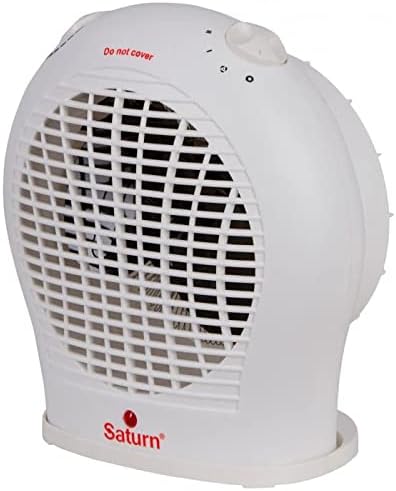
Figure 2.1: Front view of the SATURN ST-HT7645K fan heater, displaying the main body, front grille, and the 'Saturn' logo at the base.

Figure 2.2: Top view of the fan heater, highlighting the two rotary control knobs for temperature and power settings, along with a visible 'Do not cover' safety warning.

Figure 2.3: Rear view of the fan heater, illustrating the back air intake grille and the attached power cord extending from the lower right side.
3. Setup
- Unpacking: Carefully remove the heater from its packaging. Retain the packaging for future storage or transport.
- Placement: Place the heater on a firm, level surface. Ensure there is at least 1 meter (3 feet) of clear space around the heater from walls, furniture, curtains, and other flammable materials. Do not place it directly under a power outlet.
- Power Connection: Ensure the heater is switched off (mode selector set to '0'). Plug the power cord directly into a suitable 220-240V AC, 50Hz wall outlet. Do not use extension cords or multi-plugs.
4. Operating Instructions
The SATURN ST-HT7645K fan heater features two control knobs: one for the thermostat and one for power/mode selection.
Power/Mode Selector Knob:
- 0 (Off): Turns the heater off.
- Fan Only: Activates the fan without heat, providing cool air circulation.
- I (Low Heat): Provides low heat output (e.g., 1000W).
- II (High Heat): Provides high heat output (e.g., 2000W).
Thermostat Control Knob:
This knob allows you to set the desired room temperature. The heater will cycle on and off to maintain this temperature.
- Turn the thermostat knob to its maximum setting.
- Select the desired heat setting (I or II) using the power/mode selector knob.
- Once the room reaches your desired temperature, slowly turn the thermostat knob counter-clockwise until the heater switches off. The heater will now automatically maintain this temperature.
5. Maintenance
Regular maintenance ensures optimal performance and extends the life of your heater.
Cleaning:
- Always unplug the heater and allow it to cool completely before cleaning.
- Wipe the exterior surfaces with a soft, damp cloth. Do not use abrasive cleaners or solvents.
- Use a vacuum cleaner with a brush attachment to remove dust from the air inlet and outlet grilles.
- Never immerse the heater in water or any other liquid.
Storage:
- If storing the heater for an extended period, clean it thoroughly.
- Store the heater in its original packaging in a cool, dry place.
6. Troubleshooting
| Problem | Possible Cause | Solution |
|---|---|---|
| Heater does not turn on. | No power supply. Thermostat set too low. Overheat protection activated. |
Check power outlet and plug. Turn thermostat knob to a higher setting. Unplug, let cool for 10-15 minutes, then plug back in. |
| Heater produces insufficient heat. | Low heat setting selected. Room too large for heater. Air inlets/outlets blocked. |
Select 'II' (High Heat) setting. Ensure heater is appropriate for room size (up to 20m²). Clean grilles and ensure no obstructions. |
| Heater cycles on and off frequently. | Thermostat setting is too close to room temperature. Overheat protection activating. |
Adjust thermostat to a slightly higher or lower setting. Ensure proper ventilation and no obstructions. |
If the problem persists after trying these solutions, please contact customer support.
7. Specifications
- Model: ST-HT7645K
- Brand: SATURN (Generic)
- Type: Fan Heater
- Location Type: Floor Mount
- Heating Element: Metal
- Power: 2000 Watts (Max)
- Power Regulation: 3 Modes (Fan Only, Low Heat, High Heat)
- Heating Coverage: Up to 20m²
- Special Features: Thermostat, Overheat Protection
- Color: White
- Form Factor: Pedestal
- Indoor/Outdoor Usage: Indoor
- Power Source: Corded Electric
- Item Weight: Approximately 2 Kilograms
- Package Dimensions: Approximately 30 x 30 x 30 cm
8. Warranty and Support
This product is covered by a standard manufacturer's warranty against defects in materials and workmanship. Please refer to the warranty card included with your purchase for specific terms and conditions, including the warranty period and claim procedures.
For technical support, troubleshooting assistance, or warranty claims, please contact the retailer where the product was purchased or refer to the contact information provided in your product documentation.
Please retain your proof of purchase for warranty purposes.

