
1. Important Safety Information
Read all instructions carefully before using this treadmill. Keep this manual for future reference.
- Always place the treadmill on a flat, stable surface.
- Ensure adequate clear space (at least 2 meters behind and 0.6 meters on each side) around the treadmill during operation.
- Keep children and pets away from the treadmill during operation.
- Do not operate the treadmill if it has a damaged cord or plug, or if it is not working properly.
- Wear appropriate athletic footwear and clothing.
- Use the safety key at all times. Attach the clip to your clothing before starting your workout.
- Consult a physician before starting any exercise program.
- The maximum user weight capacity is 130 kg (286 lbs).
2. Product Overview
The JOROTO F20PRO Folding Treadmill is designed for home and office use, offering a compact and efficient cardio workout solution. It features a powerful motor, adjustable incline, and smart app connectivity.
Components Included:
- JOROTO F20PRO Treadmill Unit
- Power Cord
- Safety Key
- User Manual (this document)

Figure 2.1: Overall view of the JOROTO F20PRO Folding Treadmill. This image displays the treadmill in its unfolded, ready-to-use state, highlighting its compact design and main components like the console, handrails, and running deck.
3. Setup and Initial Use
The JOROTO F20PRO treadmill comes largely pre-assembled. Follow these steps for initial setup:
- Unpacking: Carefully remove the treadmill from its packaging. Retain packaging materials for potential future transport or storage.
- Placement: Position the treadmill on a firm, level surface, ensuring sufficient clearance around the unit as described in the safety section.
- Unfolding (if folded): If the treadmill is in its folded position, gently lower the running deck until it locks into place. Ensure all locking mechanisms are secure.
- Connecting Power: Plug the power cord into the treadmill's power input, then into a grounded electrical outlet.
- Attaching Safety Key: Place the safety key into its designated slot on the console. The treadmill will not operate without the safety key in place.

Figure 3.1: Product dimensions of the JOROTO F20PRO Treadmill. This image illustrates the treadmill's measurements (length, width, height) in both unfolded and folded states, aiding in proper placement and storage planning.
4. Operating Instructions
4.1 Power On/Off
- To power on, ensure the safety key is in place and press the 'Start' button on the console.
- To power off, press the 'Stop' button or remove the safety key.
4.2 Console Functions
The LED display shows time, distance, calories, and speed. Use the console buttons to adjust settings.
4.3 Speed Adjustment
The treadmill offers speeds up to 12 km/h. Use the '+' and '-' buttons on the console or handrails to increase or decrease speed. Quick speed buttons may also be available for preset speeds.

Figure 4.1: Treadmill speed ranges for various activities. This image illustrates different speed settings (1-3 km/h for leisure walking, 4-6 km/h for fat burning, 7-9 km/h for cardio training, and 10-12 km/h for intensive training) to guide users in selecting appropriate workout intensities.
4.4 Manual Incline Adjustment
The treadmill features a manual incline adjustment. To change the incline, stop the treadmill, lift the running deck, and adjust the support feet to the desired incline level (e.g., 0% or 10%). Ensure both sides are adjusted equally and securely before resuming your workout.
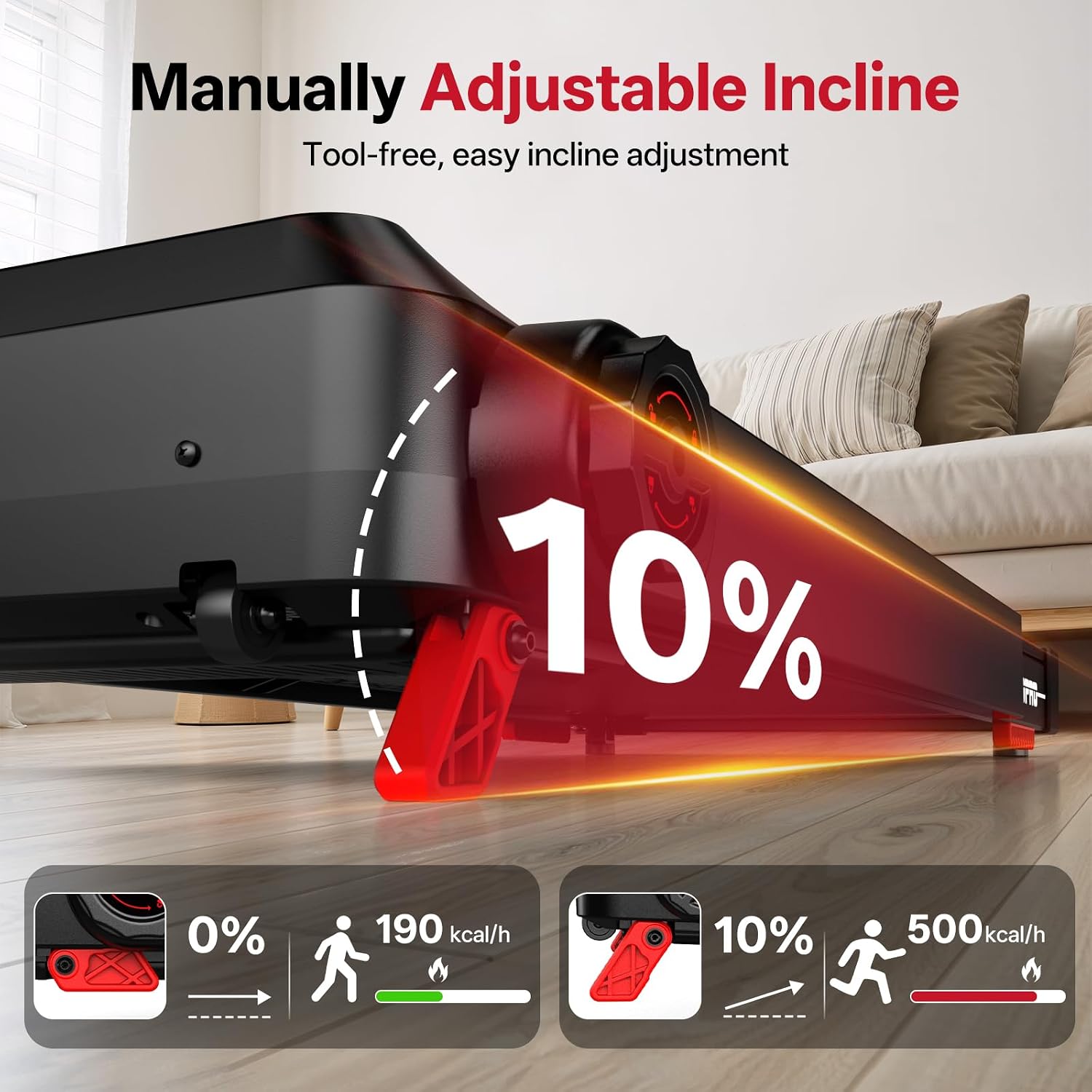
Figure 4.2: Manual incline adjustment mechanism. This image demonstrates how to manually adjust the treadmill's incline, showing the difference between a flat (0%) and an inclined (10%) running surface and the corresponding calorie burn.
4.5 Pre-set Programs
The treadmill includes 15 pre-set workout programs. Select a program from the console to automatically adjust speed and incline (if applicable) throughout your workout.
4.6 Smart App Connectivity
Connect your treadmill to a compatible fitness app via Bluetooth for enhanced tracking and control. Refer to the app's instructions for pairing and usage.

Figure 4.3: Smart app connectivity feature. This image shows a user exercising on the treadmill while connected to a fitness app, demonstrating how the app displays workout data and enhances the training experience.
4.7 Emergency Stop
In case of an emergency, pull the safety key from its slot. The treadmill will immediately stop. The safety key also acts as an automatic shut-off if you accidentally step off the running belt.
5. Folding and Storage
The JOROTO F20PRO treadmill features a foldable design for convenient storage.
- Stop the Treadmill: Ensure the treadmill is completely stopped and powered off.
- Fold Handrails: Turn the knob on the handrail support to release and fold the handrails downwards.
- Lift Running Deck: Carefully lift the running deck upwards until it locks into its vertical storage position.
- Move for Storage: Use the integrated transport wheels to move the folded treadmill to a suitable storage location.

Figure 5.1: Foldable handrail design and storage. This image demonstrates the process of folding the treadmill's handrails and then the entire unit for compact storage, highlighting its space-saving feature.
6. Maintenance
Regular maintenance ensures the longevity and safe operation of your treadmill.
6.1 Cleaning
- Wipe down the console and exterior surfaces with a damp cloth after each use. Avoid abrasive cleaners.
- Periodically vacuum underneath the treadmill to prevent dust buildup.
6.2 Running Belt Lubrication
The running belt requires periodic lubrication to reduce friction and extend its lifespan. Refer to the specific lubrication instructions provided with your treadmill or contact customer support for guidance on the correct lubricant and application frequency.
6.3 Running Belt Adjustment
If the running belt starts to slip or drift to one side, it may need adjustment. Consult the detailed instructions in the full manual or contact customer support for proper belt tensioning and centering procedures.
7. Troubleshooting
If you encounter issues with your treadmill, refer to the following common problems and solutions:
| Problem | Possible Cause | Solution |
|---|---|---|
| Treadmill does not power on | Power cord not connected; Safety key not in place; Power switch off | Ensure power cord is securely plugged in; Insert safety key; Turn on power switch |
| Running belt slips | Belt too loose; Belt needs lubrication | Adjust belt tension (refer to maintenance); Lubricate running belt |
| Unusual noise during operation | Loose components; Belt friction; Motor issue | Check for loose screws; Lubricate belt; Contact customer support if noise persists |
| Console display not working | Loose cable connection; Console malfunction | Check console cable connections; Contact customer support |
For issues not listed here or if solutions do not resolve the problem, please contact JOROTO customer support.
8. Specifications
| Feature | Detail |
|---|---|
| Brand | JOROTO |
| Model Number | F20PRO |
| Motor Horsepower | 2.5 HP |
| Maximum Speed | 12 Kilometers per Hour |
| Maximum Weight Capacity | 130 Kilograms |
| Product Dimensions (D x W x H) | 47.24"D x 24.02"W x 40.94"H (120cm x 61cm x 104cm) |
| Folded Size | 114cm x 61cm x 130cm (approx. 44.9" x 24" x 51.2") |
| Item Weight | 25 Kilograms |
| Material | Carbon Steel |
| Number of Programs | 15 |
| Assembly Required | No (minimal setup) |
9. Warranty and Support
Your JOROTO F20PRO Treadmill is covered by a manufacturer's warranty. Please refer to the warranty card included with your product for specific terms and conditions. For technical support, parts, or warranty claims, please contact JOROTO customer service through the retailer where the product was purchased or visit the official JOROTO website.
Customer Support: For assistance, please visit the JOROTO Store on Amazon or consult your purchase documentation.
