1. Introduction
Thank you for choosing the Mesqool CR1009Pro DAB/FM Portable Emergency Radio. This device is designed to provide reliable communication and essential features in various situations, from daily use to outdoor adventures and emergencies. It combines DAB+ and FM radio reception with multiple power sources, including a hand crank, solar panel, and a 5000mAh internal battery, which also functions as a power bank. Additional features include an LED flashlight, a reading lamp, and an SOS alarm.
Please read this manual thoroughly before operating the device to ensure proper use and to maximize its lifespan.
2. Safety Information
- Do not expose the device to extreme temperatures, direct sunlight for prolonged periods (beyond charging), or high humidity.
- The device has an IPX4 water resistance rating, meaning it is protected against splashing water from any direction. Do not immerse the device in water.
- Keep the device away from strong magnetic fields.
- Do not attempt to disassemble or modify the device. This will void the warranty and may cause damage or injury.
- Use only specified charging cables and power adapters.
- Keep out of reach of children.
3. Product Overview
Familiarize yourself with the components and controls of your Mesqool CR1009Pro radio.

Figure 3.1: Front view of the radio with display and controls.
Controls and Ports:
- Power Button: Turns the radio on/off.
- MODE Button: Switches between DAB, FM, and other modes.
- SCAN Button: Initiates automatic station scanning.
- ENTER Button: Confirms selections.
- MENU Button: Accesses settings menu.
- INFO Button: Displays station information (RDS/DAB data).
- PRESET/RECALL/STORE Buttons: Manages preset radio stations.
- Volume Buttons (+/-): Adjusts audio volume.
- Tune Buttons (Up/Down): Manually tunes frequencies or navigates menus.
- Telescopic Antenna: For improved radio reception.
- LED Flashlight: Located on the side.
- Reading Lamp: Foldable lamp located on top.
- SOS Alarm Button: Activates emergency alarm.
- Hand Crank: For manual power generation.
- Solar Panel: For solar charging.
- Micro USB Input: For charging the internal battery.
- USB Output: For charging external devices (power bank function).
- 3.5mm Headphone Jack: For private listening.
- AAA Battery Compartment: For optional AAA battery power.
4. Setup
4.1 Initial Charging
Before first use, fully charge the internal 5000mAh battery using the provided Micro USB cable and a 5V/2A power adapter (not included). The battery indicator on the display will show charging status.
4.2 Inserting AAA Batteries (Optional)
For an additional power source, open the battery compartment and insert 3 AAA batteries (not included), ensuring correct polarity. The radio can automatically switch to AAA battery power if the internal Li-ion battery is low.
4.3 Antenna Extension
For optimal radio reception, fully extend the telescopic antenna.
5. Operating Instructions
5.1 Power On/Off
Press the POWER button to turn the radio on or off.
5.2 Radio Operation (DAB/FM)

Figure 5.1: Headphone jack for private listening.
- Select Mode: Press the MODE button to switch between DAB and FM radio modes.
- Automatic Scan: In DAB or FM mode, press the SCAN button to automatically search for available stations. The radio will store them.
- Manual Tuning: Use the TUNE Up/Down buttons to manually adjust the frequency.
- Saving Presets: After finding a station, press the PRESET/STORE button, select a preset number using the TUNE Up/Down buttons, and press ENTER to save. The radio supports up to 30 preset stations.
- Recalling Presets: Press the PRESET/RECALL button and use the TUNE Up/Down buttons to select a saved station.
- DRC Function (DAB): In DAB mode, access the menu to adjust the Dynamic Range Control (DRC) compression rate, which helps balance volume levels.
- RDS Function (FM): In FM mode, the RDS (Radio Data System) function displays station information on the screen, such as program name or song title.
- Headphone Use: Plug 3.5mm headphones into the headphone jack for private listening.
5.3 Charging the Radio

Figure 5.2: Hand crank charging.

Figure 5.3: Five ways to charge the radio.
- USB Charging: Connect the Micro USB cable to the radio's input port and a power source.
- Solar Charging: Place the radio with the solar panel facing direct sunlight. This method is primarily for maintaining charge or slow charging.
- Hand Crank Charging: Rotate the hand crank clockwise or counter-clockwise at a steady pace for manual power generation. A few minutes of cranking can provide power for basic functions.
- AAA Batteries: If inserted, the radio can draw power from AAA batteries when the internal rechargeable battery is low.
5.4 Using as a Power Bank
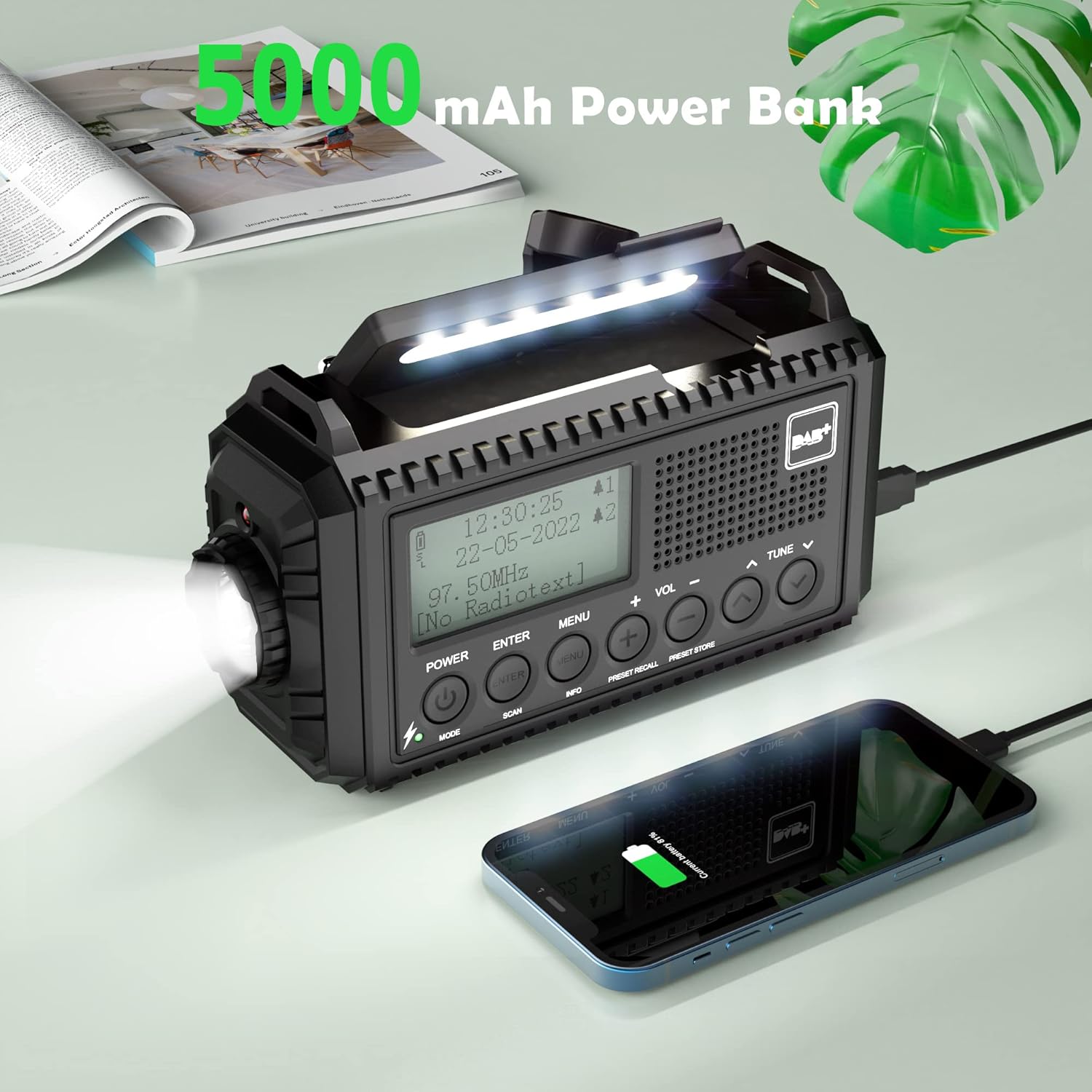
Figure 5.4: Charging a smartphone using the radio's power bank function.
Connect your smartphone or other USB-powered device to the radio's USB output port using a compatible charging cable. The radio's internal 5000mAh battery will begin charging the external device.
5.5 Lighting Functions

Figure 5.5: Reading with the integrated lamp.

Figure 5.6: Using the flashlight for navigation.
- Flashlight: Press the dedicated flashlight button (usually on the side) to turn it on. Press again to cycle through brightness levels (High/Normal) or turn off.
- Reading Lamp: Fold out the reading lamp from the top of the radio. Press its button to turn it on and cycle through brightness levels (High/Normal) or turn off.
5.6 SOS Alarm
In an emergency, press and hold the SOS button. The radio will emit a loud siren sound and flash a red light to attract attention. Press the SOS button again to deactivate it.
5.7 Alarm Clock and Sleep Timer
- Dual Alarm Clock: Access the menu to set up to two independent alarms. You can configure alarm duration (e.g., 15, 30, 45, 60, 90, 120 minutes) and volume.
- Sleep Timer: Access the menu to set a sleep timer (e.g., 15, 30, 45, 60, 90 minutes). The radio will automatically turn off after the set time.
5.8 Language and Backlight Settings
- Language: Navigate to the system settings in the menu to select your preferred language (English, Portuguese, French, Italian, German).
- Backlight: Adjust the display backlight brightness (High, Medium, Low) and duration (10s, 20s, 30s, 45s, 60s, 90s, 120s, 180s) via the menu settings.
6. Maintenance

Figure 6.1: IPX4 water resistance for outdoor use.
- Cleaning: Wipe the radio with a soft, damp cloth. Do not use abrasive cleaners or solvents.
- Battery Care: For optimal battery life, fully charge the internal battery at least once every three months if not in regular use.
- Storage: Store the radio in a cool, dry place away from direct sunlight and extreme temperatures.
- Water Resistance: While IPX4 rated, avoid prolonged exposure to heavy rain or submersion in water. Ensure all port covers are securely closed.
7. Troubleshooting
| Problem | Possible Cause | Solution |
|---|---|---|
| Radio does not turn on. | Low battery or no power source. | Charge the internal battery via USB, solar, or hand crank. Check if AAA batteries are inserted correctly and have charge. |
| Poor radio reception. | Antenna not extended, weak signal, or interference. | Fully extend the telescopic antenna. Try repositioning the radio. Perform an automatic scan for stations. |
| Cannot charge external devices. | Radio's internal battery is low or cable is incompatible. | Ensure the radio's internal battery is sufficiently charged. Use a compatible USB charging cable for your device. |
| SOS alarm activates accidentally. | SOS button is highly sensitive. | Be mindful of the SOS button's location when handling the radio. Avoid placing objects that might press it. |
| Lights (flashlight/reading lamp) do not work. | Low battery or light function not activated. | Charge the radio. Ensure you are pressing the correct button for the desired light function. |
8. Specifications
- Brand: Mesqool
- Model: CR1009Pro DAB
- Color: Black
- Connectivity: USB
- Special Features: SOS Alarm, Built-in Clock, Portable, Rechargeable, LED Flashlight, Reading Lamp
- Material: Plastic
- USB Ports: 1 (Output)
- Compatible Devices: Headphones, Smartphone
- Dimensions: 17.2L x 9.4W x 6.3H cm
- Tuning Technology: DAB+
- Power Source: Solar panel, Hand crank, Micro USB input, Internal 5000mAh rechargeable battery, 3 AAA batteries (not included)
- Supported Radio Bands: FM, DAB+
- Water Resistance: IPX4
9. Warranty and Support
For warranty information or technical support, please refer to the warranty card included with your product or contact Mesqool customer service directly. You can often find support contact details on the official Mesqool website or through your retailer.
Manufacturer: Mesqool E-commerce Co.Ltd


