
1. Introduction
The Tetra EX 500 Plus external aquarium filter is designed to provide continuous and efficient water filtration for aquariums up to 100 liters. This system ensures crystal-clear, fish-friendly water by effectively removing excess nutrients and impurities. This manual provides detailed instructions for the proper installation, operation, and maintenance of your filter to ensure optimal performance and longevity.
1.1. Product Overview
The Tetra EX 500 Plus is a complete external filter kit, including all necessary filter media for immediate startup. Its multi-compartment design allows for reliable and effective cleaning using various filter materials. The filter is engineered for powerful, energy-efficient, and quiet operation.

Image: The Tetra EX 500 Plus external aquarium filter, showing its compact design and hose connections.
1.2. Key Features
- Crystal-Clear Water: Safely breaks down excess nutrients, ensuring lasting water quality.
- Complete Kit: Ready for immediate use with all filter media included.
- Aquarium Compatibility: Suitable for aquariums up to 100 liters.
- Efficient Performance: Powerful, energy-efficient, and quiet operation.
- Easy Maintenance: Features a quick-release valve for convenient cleaning of filter media.
- Quick Startup: Includes a suction aid for rapid filter priming.
- Precise Control: Valves for accurate water flow regulation.
- Reduced Effort: Pre-filter function minimizes maintenance frequency.
- Flexible Installation: Rotatable connection valves for easy hose alignment.
- Adjustable Flow: Continuous water flow adjustment (max. 910 l/h pump flow / max. 440 l/h operating flow).
2. Safety Information
Please read and understand all safety instructions before operating the Tetra EX 500 Plus filter. Failure to follow these instructions may result in injury or damage to the product.
- Always disconnect the power supply before performing any maintenance or cleaning.
- Ensure the filter is placed on a stable, level surface below the aquarium water level.
- Do not operate the filter if the power cord or plug is damaged.
- This appliance is for indoor use only.
- Keep out of reach of children.
- Ensure all connections are secure and leak-free before starting the filter.
- Never run the filter dry. Always ensure it is filled with water before connecting to power.
3. Package Contents
Verify that all components are present in the package before beginning installation. The Tetra EX 500 Plus includes the following items:
- Tetra EX 500 Plus Filter Unit
- Hoses (Inlet and Outlet)
- Inlet Pipe with Strainer
- Outlet Pipe with Spray Bar
- Hose Connectors and Clamps
- Suction Cups for Hose Securing
- Filter Media Baskets
- Filter Media: Ceramic Rings, BioFoam, Activated Carbon, Filter Floss
- Quick-Release Valve Unit
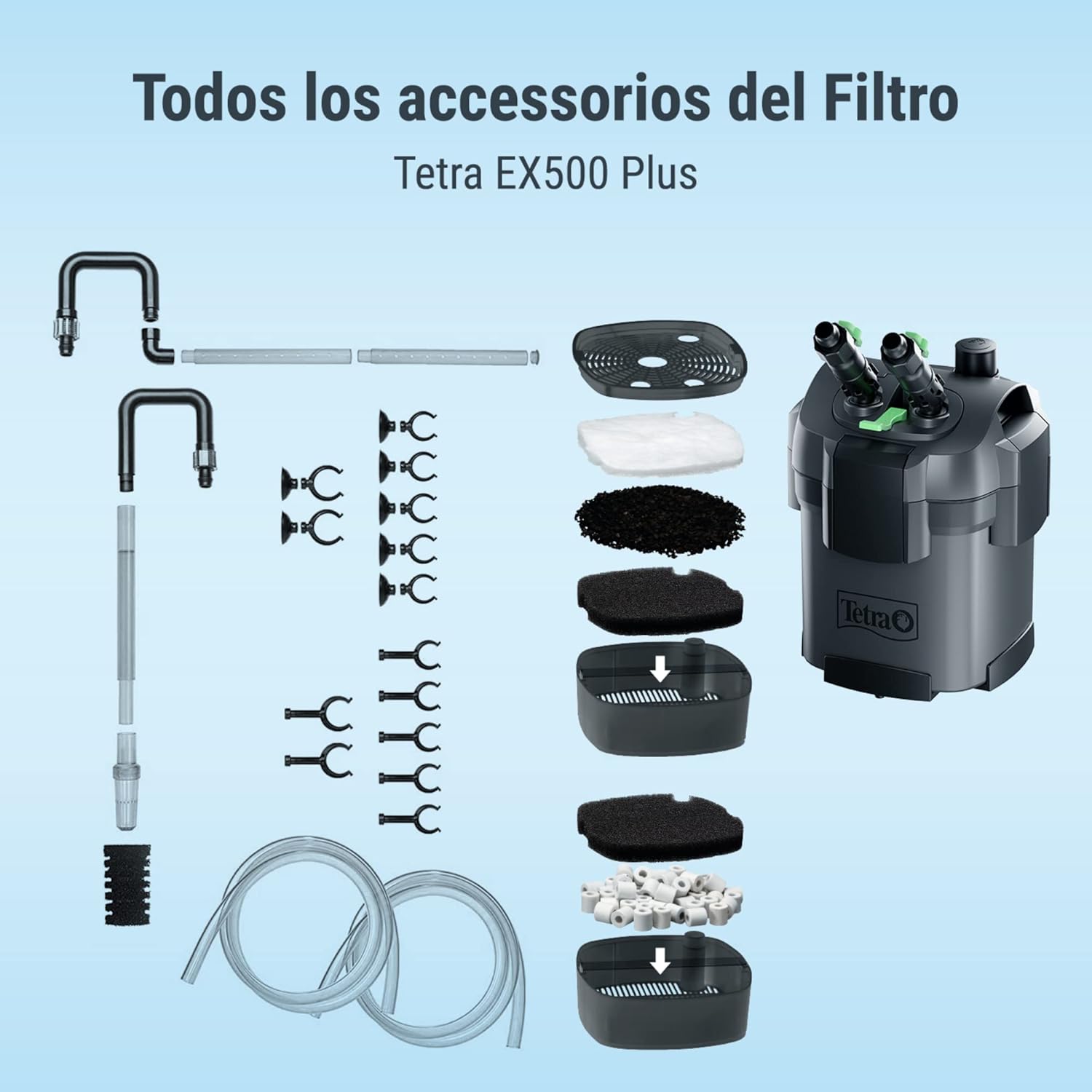
Image: An exploded diagram showing all components of the Tetra EX 500 Plus filter, including the main unit, hoses, pipes, and various filter media layers.
4. Setup
4.1. Filter Media Installation
The filter media should be arranged in the baskets as follows, from bottom to top:
- Ceramic Rings (Tetra CR Filterrings): Place in the bottom basket. These retain larger particles and ensure homogeneous water flow.
- BioFoam (Tetra BF BioFoam): Place above the ceramic rings. This biological filter sponge retains medium-sized particles and promotes beneficial bacteria colonization.
- Activated Carbon (Tetra CF Carbon): Place above the BioFoam. The carbon granules in a mesh bag remove harmful organic substances, odors, and water discoloration.
- Filter Floss (Tetra FF FilterFloss): Place in the top basket. This fine floss retains the smallest particles not captured by other filter elements.

Image: A diagram illustrating the correct layering of filter media within the Tetra EX 500 Plus filter baskets, from ceramic rings at the bottom to filter floss at the top.
4.2. Hose Connection and Placement
Connect the inlet and outlet hoses to the filter unit and secure them with the provided clamps. Position the filter unit on a stable surface below the aquarium. The rotatable connection valves allow for easy hose alignment. Secure the inlet and outlet pipes inside the aquarium using the suction cups.
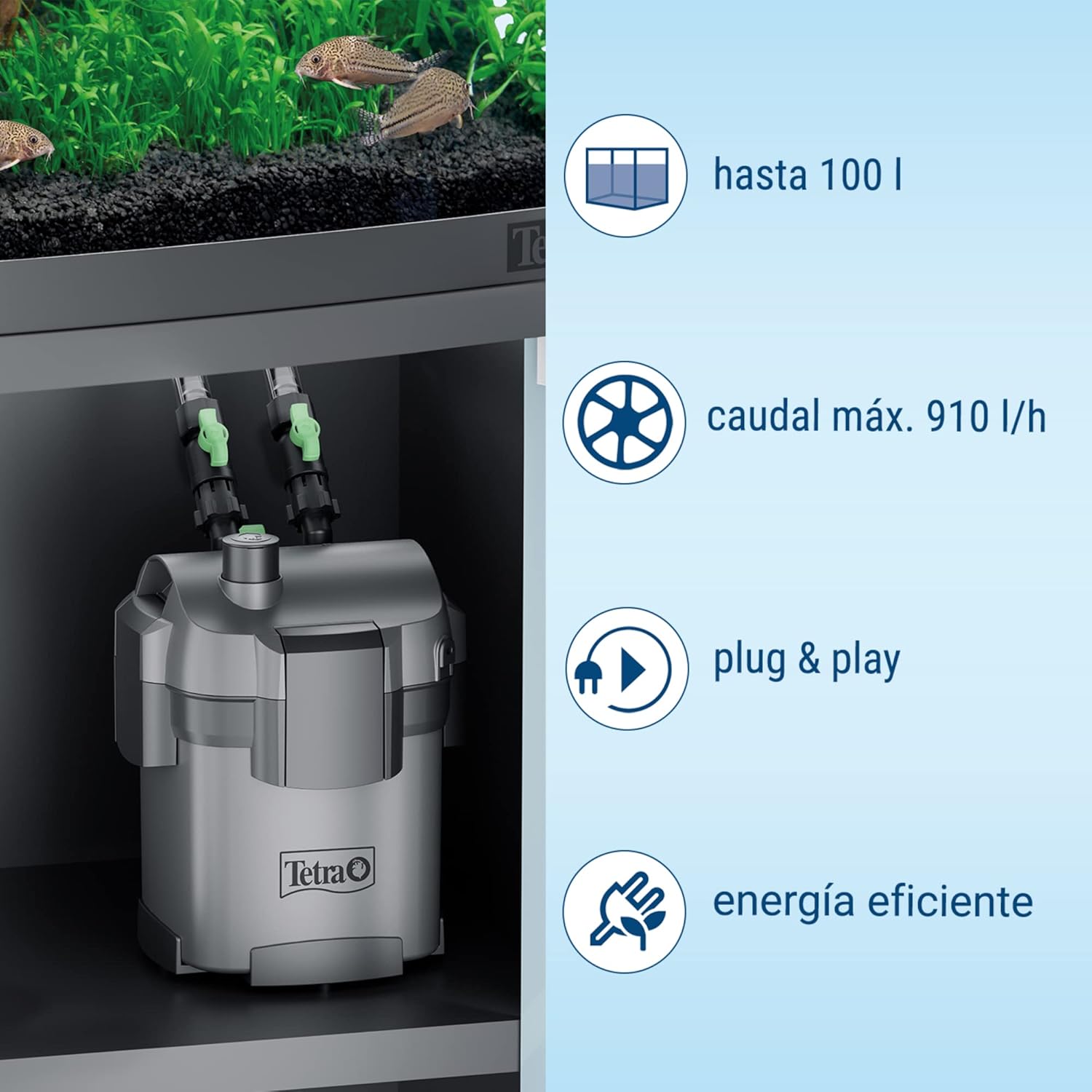
Image: The Tetra EX 500 Plus filter unit placed inside an aquarium cabinet, with hoses connected and leading up to the aquarium.
4.3. Priming and Startup
After connecting all hoses and placing the filter, ensure the quick-release valve is in the open position. Use the integrated suction aid to prime the filter by pressing it repeatedly until water flows into the filter unit and hoses. Once water fills the system, connect the power plug to an electrical outlet. The filter should start operating. Check for any leaks immediately.
5. Operating Instructions
Once the filter is set up and running, it will continuously filter your aquarium water. The flow rate can be adjusted using the valves on the quick-release unit. Turn the valves to increase or decrease the water flow as needed for your aquarium's specific requirements. Monitor the water clarity and fish behavior to ensure optimal filtration.
6. Maintenance
Regular maintenance is crucial for the efficient operation and longevity of your Tetra EX 500 Plus filter. Always disconnect the power supply before performing any maintenance.
6.1. Regular Cleaning
The frequency of cleaning depends on your aquarium's bioload. Generally, the pre-filter sponge should be rinsed every 1-2 weeks, and the main filter media cleaned every 4-6 weeks.
- Disconnect the power.
- Close the quick-release valves and detach the hose unit from the filter head.
- Carefully remove the filter head and then the filter media baskets.
- Rinse the mechanical filter media (filter floss, biofoam) with aquarium water to remove trapped debris. Do not use tap water as it can kill beneficial bacteria.
- Replace activated carbon every 4 weeks, as its adsorptive capacity diminishes over time.
- Reassemble the filter media baskets in the correct order.
- Reattach the filter head and hose unit, ensuring all seals are properly seated.
- Open the quick-release valves and prime the filter as described in the setup section.
- Reconnect power.
6.2. Impeller Cleaning
Periodically inspect and clean the impeller located in the filter head. Remove the impeller cover and clean the impeller and its chamber with a small brush to remove any debris or mineral buildup that could affect performance or cause noise.
7. Troubleshooting
If you encounter issues with your Tetra EX 500 Plus filter, refer to the following common problems and solutions:
| Problem | Possible Cause | Solution |
|---|---|---|
| Reduced Water Flow | Clogged filter media, dirty impeller, kinked hoses. | Clean or replace filter media. Clean impeller. Check and straighten hoses. |
| Filter Not Starting | Not plugged in, power outage, air in system, faulty impeller. | Check power connection. Prime the filter. Inspect/replace impeller. |
| Excessive Noise | Air trapped in filter, dirty/damaged impeller, filter not level. | Re-prime the filter to remove air. Clean or replace impeller. Ensure filter is on a level surface. |
| Leaking | Improperly sealed O-ring, loose hose connections, cracked housing. | Check and reseat O-rings. Tighten hose clamps. Inspect housing for damage. |
8. Technical Specifications
Detailed specifications for the Tetra EX 500 Plus filter:

Image: A table detailing technical specifications for various Tetra EX Plus filter models, including EX 500 Plus, EX 700 Plus, EX 1000 Plus, and EX 1500 Plus.
| Specification | Value (EX 500 Plus) |
|---|---|
| Connection Voltage | 230 V AC, 50 Hz |
| Power Consumption | 5.5 W |
| Recommended Aquarium Size | Up to 100 L |
| Max. Pump Flow Rate | 910 L/h |
| Operating Flow Rate | 440 L/h |
| Filter Volume | 3.6 L |
| Number of Baskets | 2 |
| Hose Diameter (Internal) | 16 mm |
| Dimensions (L x W x H) | 212 x 212 x 343 mm |
| Weight | 4.0 kg |
| Power Cable Length | 1650 mm |
| Protection Class | IP68 |

Image: A diagram showing the physical dimensions of the Tetra EX 500 Plus filter, indicating a height of 35 cm and a width/depth of 22 cm.
9. Warranty and Support
The Tetra EX 500 Plus filter is manufactured to high-quality standards. For warranty information, please refer to the documentation included with your purchase or visit the official Tetra website. For technical support, spare parts, or further assistance, please contact Tetra customer service. Keep your purchase receipt as proof of purchase for warranty claims.
International Article Code: 04004218302808


