
SHARP ES-NFB814CWA-DE
SHARP ES-NFB814CWA-DE Washing Machine User Manual
Model: ES-NFB814CWA-DE
1. Introduction
Thank you for choosing the SHARP ES-NFB814CWA-DE washing machine. This manual provides essential information for the safe and efficient operation, installation, and maintenance of your appliance. Please read it thoroughly before first use and keep it for future reference.

Image: Front view of the SHARP ES-NFB814CWA-DE washing machine, showcasing its sleek design and front-loading door.
2. Safety Information
Always follow basic safety precautions when using electrical appliances to reduce the risk of fire, electric shock, and injury to persons. This appliance is intended for household use only.
- Ensure the appliance is properly grounded.
- Do not allow children to play with or operate the appliance.
- Do not wash items that are soiled with flammable liquids.
- Unplug the appliance before cleaning or performing maintenance.
- Do not operate the machine if the power cord or plug is damaged.
3. Setup and Installation
3.1 Unpacking and Placement
Carefully remove all packaging materials. Ensure all transit bolts are removed from the rear of the machine before operation. Place the washing machine on a firm, level surface.

Image: A diagram illustrating the dimensions of the washing machine: 59.7 cm width, 55.7 cm depth, and 84.5 cm height.
3.2 Electrical and Water Connection
Connect the water inlet hose to a cold water tap and the drain hose to a suitable drain. Ensure all connections are secure to prevent leaks. Plug the power cord into a grounded electrical outlet. The appliance operates on 220 Volts and has a power consumption of 2200 Watts.
3.3 Leveling
Adjust the leveling feet at the bottom of the machine to ensure it is perfectly stable and does not wobble. This is crucial for quiet operation and to prevent excessive vibration during the spin cycle.
4. Operating Instructions
4.1 Control Panel Overview
The control panel features an LED display, program selection knob, and function buttons for various settings.
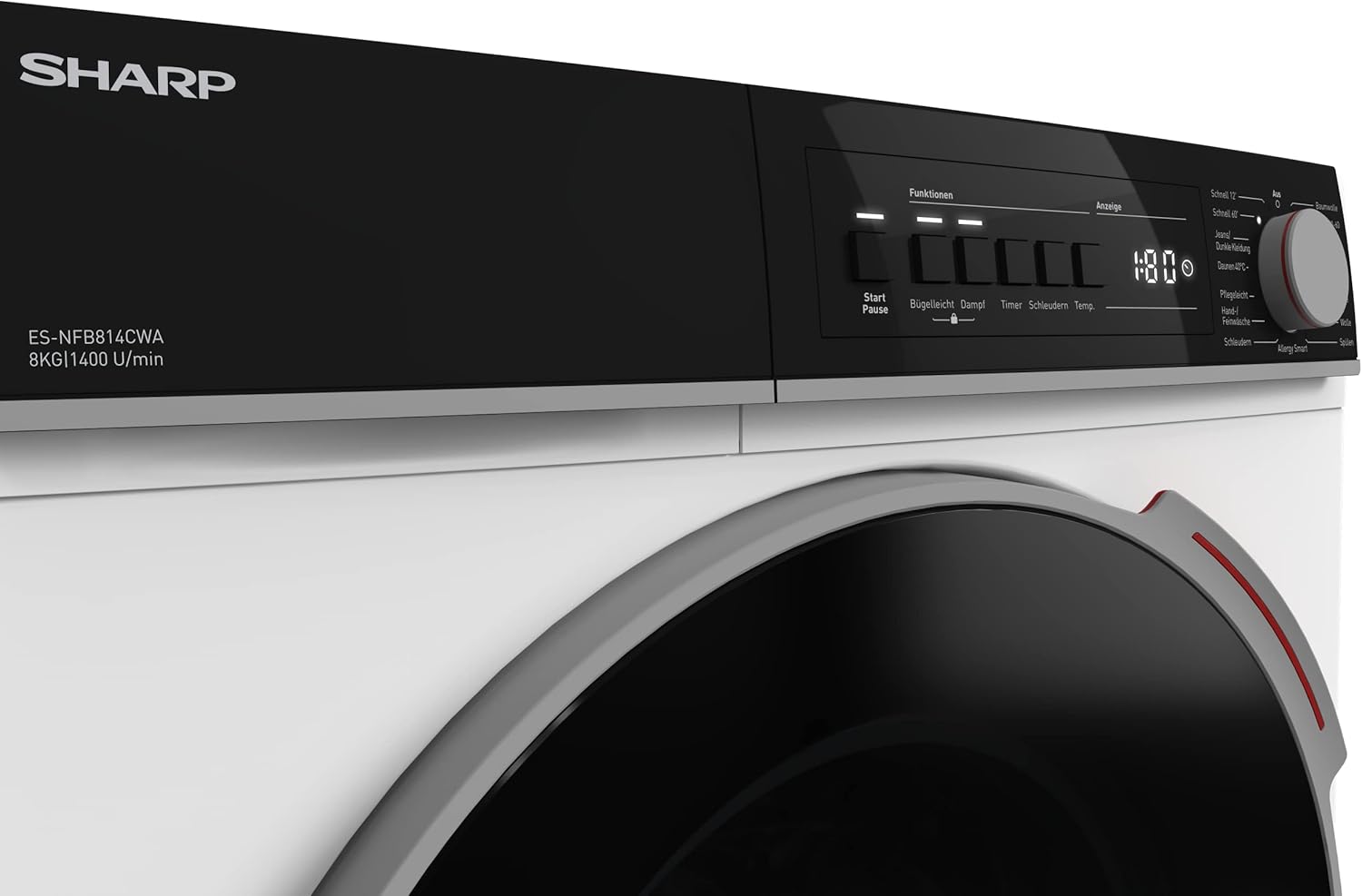
Image: Close-up view of the left side of the control panel, showing the SHARP branding, model number, and buttons for Start/Pause, Timer, Spin, and Temp.

Image: Close-up view of the right side of the control panel, highlighting the program selection knob with various wash cycles like Quick 12', Quick 60', Jeans/Dark Clothes, Duvet 40°C, Easy Care, Hand/Delicate Wash, Spin, Allergy Smart, Cotton, Eco 40-60, Cotton Prewash, Cotton 20°C, Mixed, Wool, and Rinse.
4.2 Loading Laundry
Open the door and load laundry into the drum. Do not overload the machine; the maximum capacity is 8 kg. Close the door firmly.

Image: The washing machine with its door open, revealing the spacious drum interior, ready for loading laundry.
4.3 Detergent Dispenser
Add appropriate detergent and fabric softener to the designated compartments in the dispenser drawer.
4.4 Program Selection and Special Features
Turn the program selection knob to choose your desired wash cycle. Available options include:
- Eco: Energy-efficient wash.
- Cotton: For cotton items.
- Quick Wash (12 min / 60 min): For lightly soiled items needing a fast wash.
- Active Steam: Utilizes steam for deep cleaning and hygiene.
- Allergy Smart: Designed to remove allergens.
- Temperature Control: Adjust wash temperature as needed.
- Delay Start: Postpone the start of the wash cycle.
- Child Lock: Prevents accidental changes to settings.
4.5 Starting a Wash Cycle
Press the 'Start/Pause' button to begin the selected program. The LED display will show the remaining time.
5. Maintenance
Regular maintenance ensures optimal performance and extends the lifespan of your washing machine.
5.1 Cleaning the Exterior
Wipe the exterior with a soft, damp cloth. Do not use abrasive cleaners or solvents.
5.2 Cleaning the Detergent Dispenser
Remove the dispenser drawer and rinse it under running water to remove any detergent residue. Clean the housing with a brush.
5.3 Cleaning the Drum
Periodically run a maintenance wash cycle (e.g., a hot wash with no laundry and a descaling agent) to clean the drum and remove any buildup.
5.4 Cleaning the Filter
The pump filter should be cleaned regularly to prevent blockages. Refer to the specific instructions in your detailed manual for accessing and cleaning the filter.
6. Troubleshooting
Before contacting service, check the following common issues:
| Problem | Possible Cause | Solution |
|---|---|---|
| Machine does not start | No power; Door not closed; Program not selected | Check power supply; Close door firmly; Select program and press Start |
| Water not draining | Drain hose kinked; Filter blocked | Straighten hose; Clean pump filter |
| Excessive vibration/noise | Machine not level; Transit bolts not removed; Overloaded drum | Adjust leveling feet; Remove transit bolts; Reduce laundry load |
| Laundry not spun dry enough | Imbalance in drum; Spin speed too low | Redistribute laundry; Select higher spin speed |
7. Specifications
Key technical specifications for the SHARP ES-NFB814CWA-DE washing machine:
| Feature | Value |
|---|---|
| Model Name | ES-NFB814CWA-DE |
| Capacity | 8 kg |
| Max. Spin Speed | 1400 rpm |
| Dimensions (W x D x H) | 59.7 x 55.7 x 84.5 cm |
| Weight | 74 kg |
| Energy Efficiency Class | A (New EU Label) |
| Energy Consumption (per 100 cycles) | 49 kWh |
| Water Consumption (per cycle) | 36 L |
| Noise Level (Spin) | 75 dB |
| Motor Type | Advanced Inverter Motor |
| Special Features | Steam Option, Child Lock, Delay Start |

Image: The EU Energy Label for the SHARP ES-NFB814CWA-DE, showing its A energy class, 49 kWh/100 cycles, 9.0 kg capacity, 3:48 cycle duration, 36 L water consumption, and 75 dB noise level.
For more detailed information, refer to the EPREL database: https://eprel.ec.europa.eu/qr/845073
8. Warranty and Support
This SHARP washing machine comes with a standard warranty period of 24 months from the date of purchase. Please retain your proof of purchase for warranty claims.
8.1 What's in the Box
- SHARP ES-NFB814CWA-DE Washing Machine
- User Manual (this document)
For technical support, service requests, or further inquiries, please refer to the contact information provided with your purchase documentation or visit the official SHARP website.
Related documentsES-NFB814CWA-DE


Ask a question about this manual
Ask about setup, troubleshooting, compatibility, parts, safety, or missing instructions. Manuals+ will review the question and use this page’s manual context to help answer it.