

1. Introduction
This manual provides comprehensive instructions for the safe operation, setup, and maintenance of your CHUBORY F89 WI-FI Drone System. Please read this manual thoroughly before operating the drone to ensure proper function and to prevent damage or injury. Retain this manual for future reference.
2. Safety Guidelines
- Operate the drone in open areas, away from people, animals, buildings, and power lines.
- Do not operate in strong winds or adverse weather conditions.
- Ensure all batteries are fully charged before each flight.
- Keep fingers and loose clothing away from rotating propellers.
- Adult supervision is recommended for users under 14 years of age.
- Do not modify or disassemble the drone or controller.
- Follow all local regulations and laws regarding drone operation.
3. Package Contents
Verify that all items listed below are present in your package:
- CHUBORY F89 Drone
- Remote Control
- Camera
- User Manual (this document)
- Charging Cable (not explicitly listed in JSON but implied by rechargeable battery)
4. Component Identification
Familiarize yourself with the main components of your CHUBORY F89 Drone System:
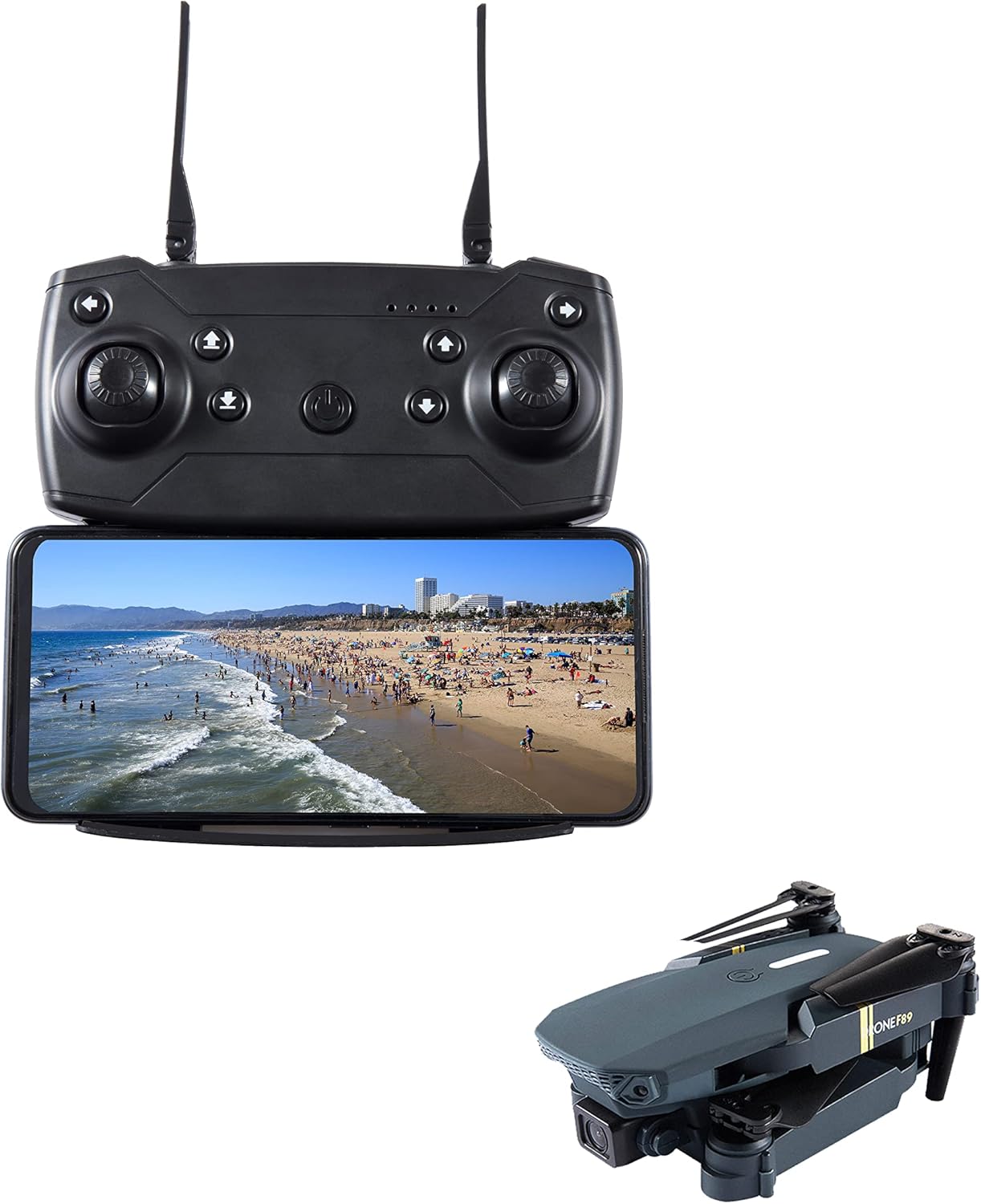
This image displays the CHUBORY F89 drone in its folded state, alongside its remote controller with a smartphone attached, showing a live feed from the drone's camera.
4.1. Drone
- Propellers: Provide lift and thrust.
- Motors: Drive the propellers.
- Camera: Captures photos and videos.
- Battery Compartment: Houses the drone's rechargeable battery.
- LED Indicators: Display drone status.
4.2. Remote Control
- Control Sticks: For flight direction and altitude.
- Power Button: Turns the controller on/off.
- Smartphone Holder: Secures your smartphone for FPV (First Person View) operation.
- Function Buttons: For various operations like takeoff/landing, photo/video capture.
5. Setup
5.1. Battery Charging and Installation

Two CHUBORY F89 drone batteries are shown next to a folded drone, with text indicating 'Battery Capacity: 2850 Milliamp Hours' and 'Charging Time: 4 Hours (5V=3A adapter)'.
- Drone Battery: Connect the drone battery to the provided charging cable. Connect the cable to a 5V=3A USB power adapter (not included). The battery capacity is 2850 Milliamp Hours, and a full charge typically takes 4 hours. The battery indicator lights will show charging status.
- Controller Batteries: The remote control requires its own batteries (type not specified, typically AA or AAA). Open the battery compartment on the back of the controller and insert the batteries, observing correct polarity.
- Installation: Once fully charged, insert the drone battery into the drone's battery compartment, ensuring it clicks securely into place.
5.2. Propeller Installation (if required)
If propellers are not pre-installed, attach them according to the markings (e.g., A and B) on the propellers and motor arms. Ensure they are securely fastened.
5.3. Smartphone Connection
- Download the official CHUBORY F89 app from your smartphone's app store.
- Turn on the drone and the remote control.
- On your smartphone, go to Wi-Fi settings and connect to the drone's Wi-Fi network (usually named something like 'F89-XXXXXX').
- Open the CHUBORY F89 app. You should see a live video feed from the drone's camera.
6. Operating Instructions
6.1. Pre-Flight Checklist
- Ensure drone and controller batteries are fully charged.
- Check propellers for damage and ensure they are securely attached.
- Verify a stable Wi-Fi connection between the drone and your smartphone.
- Choose an open, clear area for flight.
6.2. Basic Flight Controls
- Takeoff/Landing: Use the dedicated one-key takeoff/landing button on the controller or push both control sticks simultaneously outwards and downwards to arm motors, then push the left stick up to ascend.
- Altitude: Left control stick (up/down).
- Direction: Right control stick (forward/backward, left/right).
- Rotation: Left control stick (left/right) to rotate the drone horizontally.
6.3. Camera Operation
The CHUBORY F89 drone is equipped with a camera utilizing CMOS/CCD optical sensor technology, capable of capturing video in MP4 format.
- Photo Capture: Press the designated photo button on the remote control or within the app to take a still image.
- Video Recording: Press the designated video button on the remote control or within the app to start/stop video recording.
- Viewing Media: Captured photos and videos are typically saved to your smartphone via the app or to an inserted SD card (if applicable, not specified in JSON).
7. Maintenance
- Cleaning: Use a soft, dry cloth to clean the drone and controller. Avoid using liquids or solvents.
- Propeller Inspection: Regularly check propellers for cracks or damage. Replace damaged propellers immediately.
- Storage: Store the drone and controller in a cool, dry place, away from direct sunlight. Remove batteries from the controller if storing for extended periods.
- Battery Care: Do not overcharge or over-discharge batteries. Store batteries with a partial charge (around 50%) if not used for a long time.
8. Troubleshooting
| Problem | Possible Cause | Solution |
|---|---|---|
| Drone does not power on. | Low or uncharged battery. | Charge the drone battery fully. Ensure it is correctly installed. |
| Controller does not power on. | Controller batteries are dead or incorrectly installed. | Replace controller batteries, ensuring correct polarity. |
| No video feed on smartphone. | No Wi-Fi connection or app issue. | Ensure smartphone is connected to the drone's Wi-Fi. Restart the app and drone. |
| Drone drifts during flight. | Calibration needed or environmental factors. | Perform a gyroscope calibration (refer to app instructions). Avoid flying in windy conditions. |
| Propellers do not spin. | Motors not armed or obstruction. | Ensure motors are armed (push sticks outwards/downwards). Check for any obstructions to propellers. |
9. Specifications
- Brand: CHUBORY
- Model Name: F89
- Connectivity Technology: Wi-Fi
- Control Type: Remote Control
- Skill Level: Beginner
- Material: Plastic
- Drone Battery Capacity: 2850 Milliamp Hours (as per image)
- Drone Battery Charging Time: 4 Hours (with 5V=3A adapter)
- Video Capture Format: MP4
- Optical Sensor Technology: CMOS, CCD
- UPC: 797823914484
10. Warranty and Support
For warranty information and technical support, please refer to the product packaging or contact CHUBORY customer service directly. Keep your purchase receipt as proof of purchase.


