1. Introduction
Thank you for choosing the Avalla S-95 Portable Air Conditioner. This 3-in-1 unit is designed to provide efficient cooling, dehumidification, and air circulation for your living spaces. With its powerful 7000 BTU cooling capacity, it can rapidly cool rooms up to 68m³. This manual provides essential information for the safe and effective operation, maintenance, and troubleshooting of your new appliance.
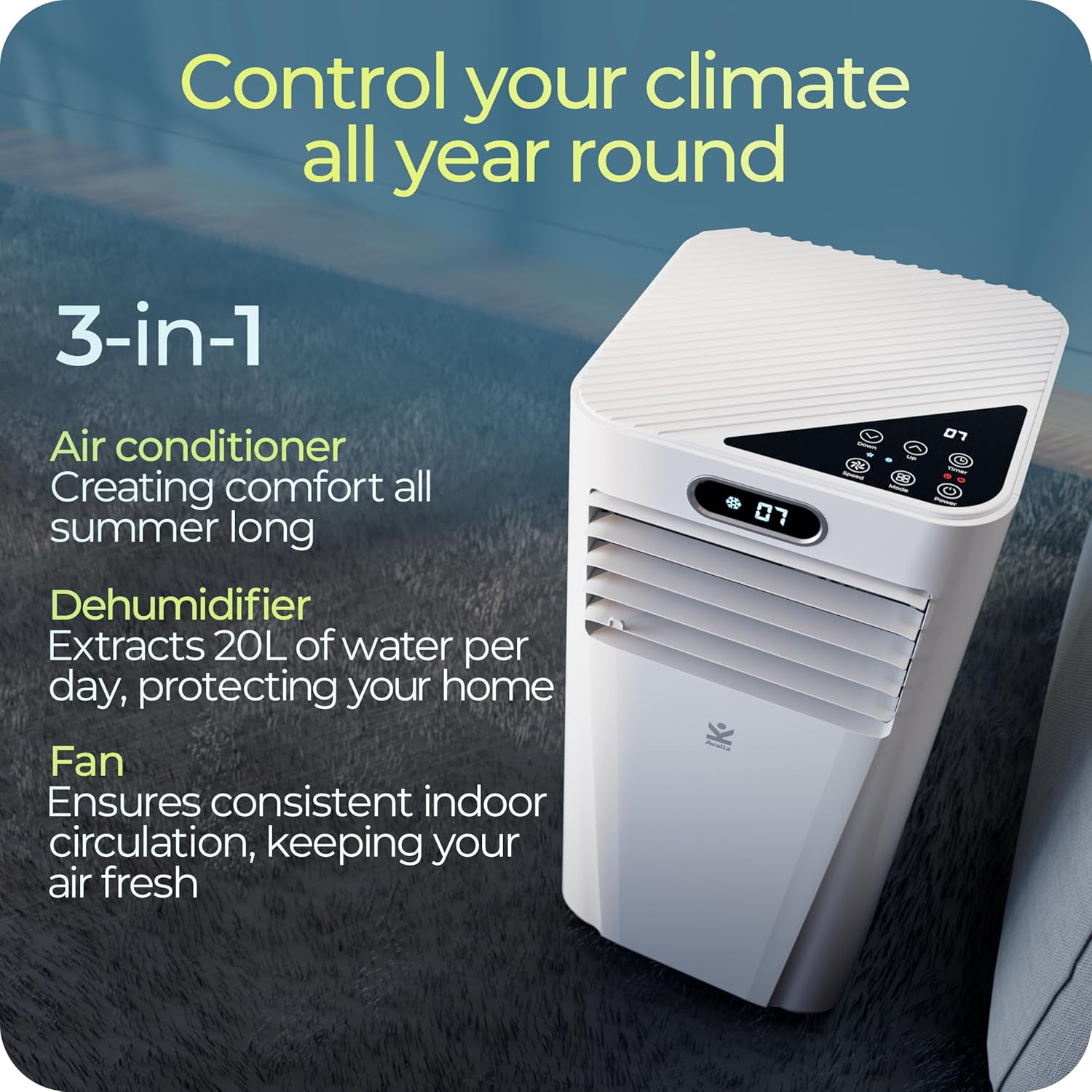
Figure 1.1: The Avalla S-95 unit showcasing its three primary functions: air conditioning, dehumidifying, and fan operation.
2. Safety Information
Please read all safety warnings and instructions carefully before using this appliance to prevent injury or damage. Keep this manual for future reference.
- Electrical Safety: Ensure the power supply matches the rating on the appliance label. Do not operate with a damaged cord or plug. Do not share the power outlet with other appliances.
- Ventilation: Always ensure proper ventilation when operating the unit in cooling mode by using the provided window vent kit. Do not block air inlets or outlets.
- Refrigerant: This unit uses R-290 refrigerant, which is flammable. Do not puncture the refrigerant circuit. Only qualified personnel should service the unit.
- Placement: Place the unit on a flat, stable surface. Maintain a minimum distance of 20cm from walls and other objects to ensure proper airflow.
- Children and Pets: Keep children and pets away from the appliance during operation. This appliance is not intended for use by persons with reduced physical, sensory or mental capabilities unless supervised.
- Cleaning: Always unplug the unit before cleaning or performing any maintenance.
- Water Drainage: Ensure the water tank is regularly drained, especially when using the dehumidifier function, to prevent overflow.
3. Product Overview
3.1 Components
The Avalla S-95 Portable Air Conditioner comes with the following main components:
- Portable Air Conditioner Unit (S-95)
- Exhaust Hose
- Window Vent Kit (includes window bracket and adapters)
- Remote Control
- Drain Hose (for continuous drainage)
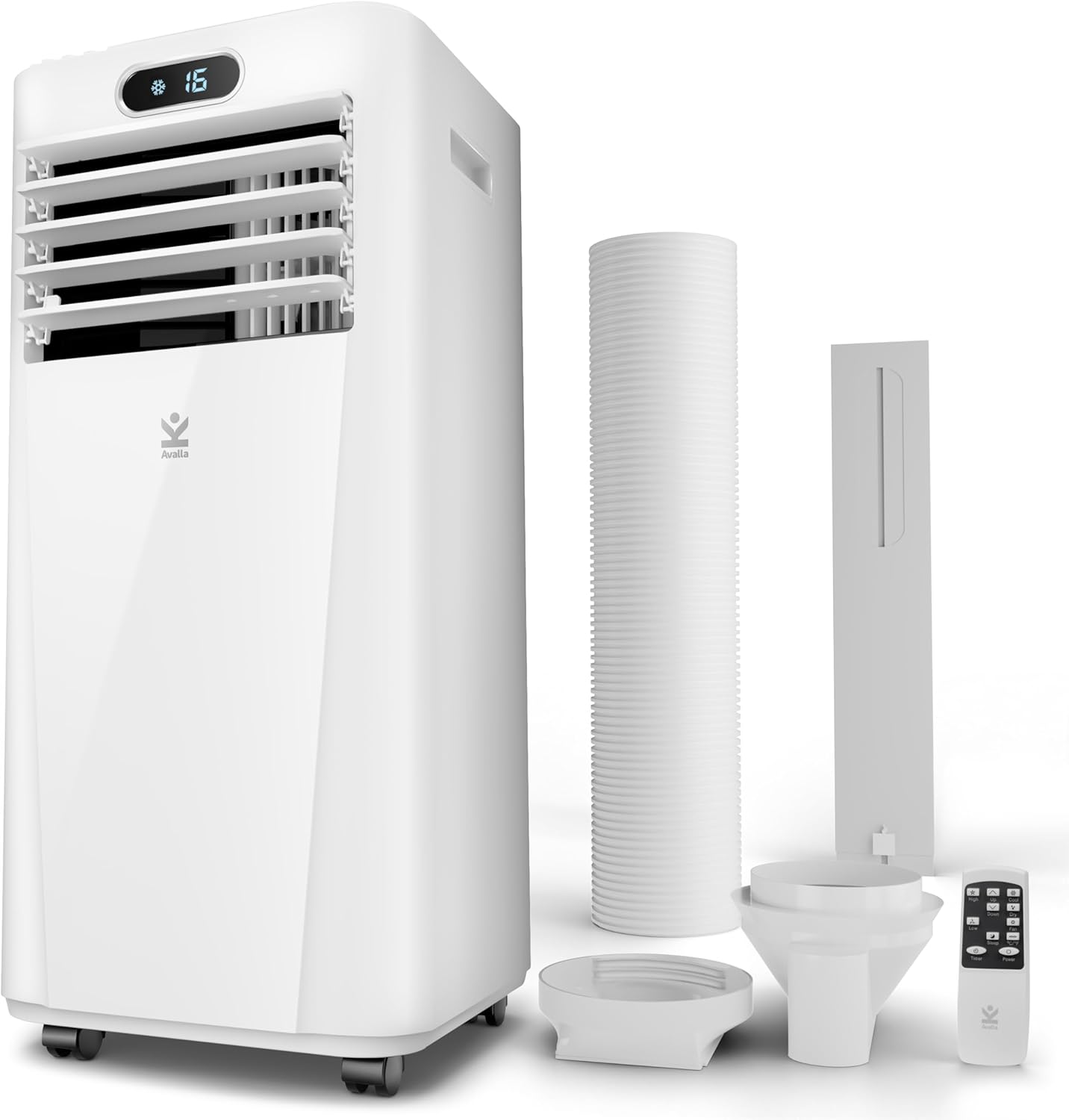
Figure 3.1: All main components included with the Avalla S-95 Portable Air Conditioner.
3.2 Control Panel and Remote Control
The unit features an intuitive digital display and touch controls on the top panel, along with a full-function remote control for convenient operation.

Figure 3.2: Top-down view of the S-95 control panel, showing the digital display and various function buttons.
Key Controls:
- Power Button: Turns the unit on/off.
- Mode Button: Cycles through Cooling, Dehumidifier, and Fan modes.
- Temperature Up/Down: Adjusts the desired temperature in Cooling mode.
- Fan Speed Button: Selects between low and high fan speeds.
- Timer Button: Sets the 24-hour on/off timer.
- Sleep Mode Button: Activates sleep mode for quieter operation and gradual temperature adjustment.
4. Setup
4.1 Unpacking
Carefully remove the unit and all accessories from the packaging. Retain the original packaging for future storage or transport.
4.2 Placement
Place the air conditioner on a firm, level surface in the room you wish to cool. Ensure there is at least 20cm of space around the unit for proper air circulation.

Figure 4.1: Proper placement of the S-95 unit in a room, demonstrating the exhaust hose connection to a window.
4.3 Window Vent Kit Installation
The window vent kit is essential for exhausting hot air outside when using the cooling mode.
- Attach the exhaust hose adapter to one end of the exhaust hose.
- Connect the other end of the exhaust hose to the exhaust outlet on the back of the air conditioner unit.
- Assemble the window slider kit according to your window type (sliding, casement, or awning windows).
- Insert the window exhaust adapter into the opening of the window slider kit.
- Secure the window slider kit in your window opening, ensuring a tight seal to prevent hot air from re-entering the room.
Video 4.1: An overview of Avalla Portable Air Conditioners, demonstrating various setup scenarios and window kit compatibility.
5. Operating Modes
The Avalla S-95 offers three primary operating modes: Cooling, Dehumidifier, and Fan.
5.1 Cooling Mode
This mode provides powerful air conditioning to lower room temperature.
- Press the Power button to turn on the unit.
- Press the Mode button until the cooling icon (snowflake) is displayed.
- Use the Temperature Up/Down buttons to set your desired temperature (range: 16°C to 32°C).
- Adjust fan speed using the Fan Speed button (Low/High).

Figure 5.1: The S-95 unit effectively cooling a large room, demonstrating its powerful performance.
5.2 Dehumidifier Mode
This mode removes excess moisture from the air, ideal for damp environments or drying clothes.
- Press the Power button to turn on the unit.
- Press the Mode button until the dehumidifier icon is displayed.
- The unit will automatically remove up to 20 litres of moisture per day.
- For continuous drainage, connect the provided drain hose to the drainage port and direct it to a suitable receptacle.

Figure 5.2: The S-95 unit used in dehumidifier mode, effectively assisting in drying laundry.
5.3 Fan Mode
This mode circulates air without cooling or dehumidifying.
- Press the Power button to turn on the unit.
- Press the Mode button until the fan icon is displayed.
- Adjust fan speed using the Fan Speed button (Low/High).
5.4 Timer Function
Set the unit to automatically turn on or off within a 24-hour period.
- With the unit on or off, press the Timer button.
- Use the Temperature Up/Down buttons to set the desired hours (1-24).
- The timer will activate after the set time.
5.5 Sleep Mode
For quiet operation and comfortable sleep, activate Sleep Mode.
- While in Cooling mode, press the Sleep Mode button.
- The unit will operate at a lower fan speed and gradually increase the set temperature by 1°C per hour for the first two hours, then maintain that temperature.
- Operating noise level is approximately 52dB in this mode.

Figure 5.3: The S-95 unit operating quietly in a bedroom, ideal for undisturbed sleep.
6. Maintenance
Regular maintenance ensures optimal performance and extends the lifespan of your Avalla S-95.
6.1 Cleaning the Air Filter
The S-95 is equipped with a washable air filter. Clean it every two weeks or more frequently depending on usage and air quality.
- Unplug the air conditioner from the power outlet.
- Locate the air filter panel (usually at the back or side of the unit).
- Remove the filter.
- Wash the filter under running water (warm, soapy water if very dirty).
- Allow the filter to air dry completely before reinserting it into the unit.
6.2 Draining Water
The unit has an internal water tank that collects condensate. It will automatically shut off when full. For continuous operation, especially in dehumidifier mode, use the continuous drainage option.
- Manual Drainage: When the internal tank is full, the unit will stop operating and display an indicator. Place a shallow pan or tray under the drainage port (located at the bottom rear of the unit) and remove the drain plug to empty the water. Replace the plug securely.
- Continuous Drainage: Attach the provided drain hose to the continuous drainage port and direct the other end into a floor drain or a larger container. Ensure the hose is sloped downwards for proper gravity drainage.
6.3 Storage
Before storing the unit for an extended period:
- Drain all water from the unit.
- Clean the air filter.
- Run the unit in fan-only mode for a few hours to dry the internal components.
- Unplug the unit and coil the power cord neatly.
- Store the unit in a cool, dry place, preferably in its original packaging.
7. Troubleshooting
Refer to this section for common issues and their solutions. If the problem persists, contact Avalla customer support.
| Problem | Possible Cause | Solution |
|---|---|---|
| Unit does not turn on. | No power, power cord unplugged, circuit breaker tripped. | Check power connection, wall outlet, and circuit breaker. |
| Unit is not cooling effectively. | Window kit not properly sealed, air filter dirty, room too large, doors/windows open. | Ensure window kit is sealed, clean air filter, close doors/windows, consider room size. |
| Unit is noisy. | Unit not on a level surface, fan speed too high. | Place on a level surface, select lower fan speed or Sleep Mode. |
| Water leakage. | Drain plug loose, continuous drain hose kinked or blocked, internal tank full. | Check drain plug, ensure hose is clear and sloped, drain internal tank. |
| Remote control not working. | Batteries dead or incorrectly inserted, obstruction between remote and unit. | Replace batteries, ensure clear line of sight to the unit's receiver. |
Video 7.1: A detailed introduction to the Avalla S-95 Air Conditioner, highlighting its features and operational aspects.
8. Specifications
| Feature | Detail |
|---|---|
| Model Number | S-95 |
| Cooling Capacity | 7000 BTU |
| Dehumidification Capacity | Up to 20 litres/day |
| Coverage Area | Up to 68m³ (50 square meters) |
| Power Source | Corded Electric |
| Voltage | 230 Volts (AC) |
| Wattage | 2100 watts (Max) |
| Energy Efficiency Rating | Class A |
| Noise Level | 52 dB |
| Refrigerant | R-290 (Eco-friendly) |
| Product Dimensions (L x W x H) | 31 x 31.5 x 70 cm |
| Item Weight | 19.4 kg |
| Included Components | Window Bracket, Remote Control |

Figure 8.1: The S-95 unit's energy efficiency and eco-friendly refrigerant contribute to low operating costs.
9. Warranty and Support
Avalla stands behind the quality of its products. The Avalla S-95 Portable Air Conditioner comes with a 2-year warranty from the date of purchase.
For any technical assistance, troubleshooting not covered in this manual, or warranty claims, please contact our UK-based customer support team. Details can be found on the official Avalla website or your purchase documentation.


