
1. Introduction
Thank you for purchasing the Mikado MD-W5 Bluetooth Speaker and Alarm Clock. This device combines a portable Bluetooth speaker with an alarm clock, offering versatile audio playback options via Bluetooth, TF card, and USB. This manual provides essential information for safe and efficient use of your new device. Please read it thoroughly before operation and retain it for future reference.
2. Safety Information
- Do not expose the device to water, moisture, or extreme temperatures.
- Avoid dropping or subjecting the device to strong impacts.
- Do not attempt to disassemble or repair the device yourself. Contact qualified service personnel.
- Keep the device away from heat sources and direct sunlight.
- Use only the specified charging cable and power adapter.
3. Package Contents
Please check the package for the following items:
- Mikado MD-W5 Bluetooth Speaker and Alarm Clock
- USB Charging Cable
- User Manual
4. Product Overview
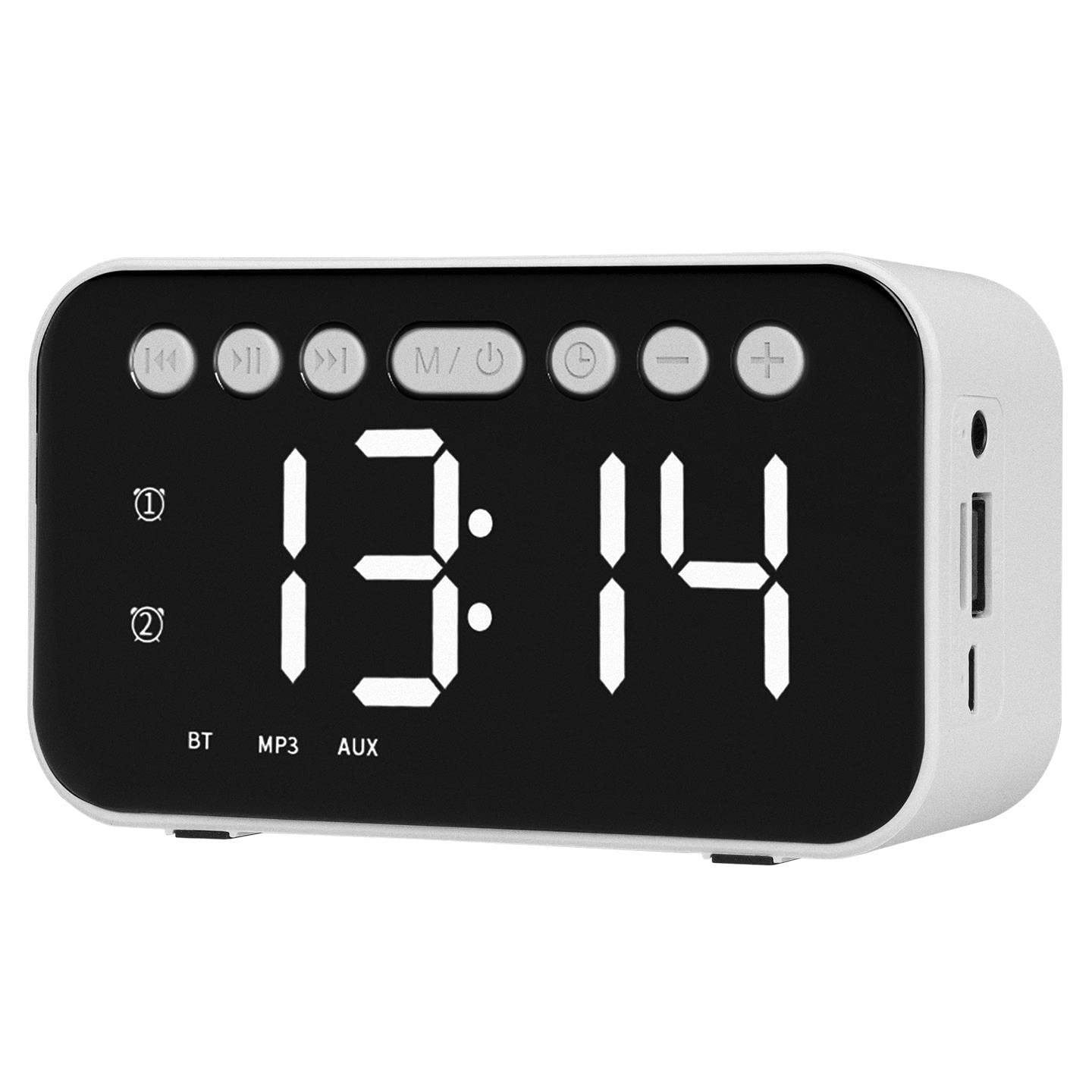
Figure 1: Front view of the Mikado MD-W5 Bluetooth Speaker.
The Mikado MD-W5 features a compact, rectangular design with a prominent circular speaker grille on the front. The device is equipped with a digital display for time and mode information, along with control buttons for various functions. Input ports for charging, TF card, and USB are located on the device's sides or rear, allowing for versatile connectivity.
5. Setup
5.1. Charging the Device
The Mikado MD-W5 is powered by a built-in 500mAh rechargeable battery. Before first use, fully charge the device.
- Connect the small end of the provided USB charging cable to the charging port on the speaker.
- Connect the larger end of the USB cable to a USB power source (e.g., computer USB port, USB wall adapter).
- The charging indicator light will illuminate, typically red, during charging. It will turn off or change color (e.g., blue) when fully charged.
5.2. Power On/Off
To turn the speaker on, press and hold the power button for a few seconds until the display lights up and you hear an audible prompt. To turn the speaker off, press and hold the power button again until the display turns off.
6. Operating Instructions
6.1. Bluetooth Pairing
To connect your device via Bluetooth:
- Ensure the speaker is powered on and in Bluetooth mode. If not, press the 'M' (Mode) button to switch to Bluetooth mode. The display will show 'BT' and a blinking Bluetooth icon, indicating it's ready for pairing.
- On your smartphone, tablet, or other Bluetooth-enabled device, go to the Bluetooth settings.
- Search for available devices and select 'Mikado MD-W5' from the list.
- Once connected, the speaker will emit a confirmation sound, and the Bluetooth icon on the display will stop blinking.
6.2. TF Card Playback
To play music from a TF (microSD) card:
- Insert a TF card (with MP3 audio files) into the designated TF card slot on the speaker.
- The speaker will automatically detect the card and switch to TF card playback mode. If not, press the 'M' (Mode) button to select TF card mode.
- Use the playback control buttons (e.g., Play/Pause, Next/Previous Track) to manage your music.
6.3. USB Playback
To play music from a USB flash drive:
- Insert a USB flash drive (with MP3 audio files) into the USB port on the speaker.
- The speaker will automatically detect the drive and switch to USB playback mode. If not, press the 'M' (Mode) button to select USB mode.
- Use the playback control buttons to manage your music.
6.4. Alarm Clock Function
The Mikado MD-W5 includes an integrated alarm clock. Specific button functions for setting the alarm may vary, but generally involve:
- Pressing an 'Alarm' or 'Set' button to enter alarm setting mode.
- Using '+' and '-' buttons to adjust the hour and minute.
- Pressing the 'Alarm' or 'Set' button again to confirm and save the alarm time.
- Ensure the alarm is activated (an alarm icon usually appears on the display).
6.5. Time Setting
To set the current time on the digital display:
- Locate the 'Time Set' or 'Clock' button. Press and hold it to enter time setting mode.
- Use the '+' and '-' buttons to adjust the hour. Press the 'Time Set' button again to move to minute adjustment.
- Use the '+' and '-' buttons to adjust the minute. Press the 'Time Set' button one more time to confirm and exit time setting mode.
7. Maintenance
- Cleaning: Use a soft, dry cloth to clean the surface of the speaker. Do not use abrasive cleaners or solvents.
- Storage: Store the device in a cool, dry place when not in use for extended periods.
- Battery Care: To prolong battery life, avoid fully discharging the battery frequently. Charge the device regularly, even if not in use.
8. Troubleshooting
| Problem | Possible Cause | Solution |
|---|---|---|
| Device does not power on. | Battery is depleted. | Charge the device using the provided USB cable. |
| No sound from the speaker. | Volume is too low; Incorrect mode selected; Device not properly connected. | Increase volume on both speaker and connected device. Press 'M' button to select correct mode (Bluetooth, TF, USB). Re-pair Bluetooth or re-insert TF/USB. |
| Bluetooth pairing fails. | Speaker not in pairing mode; Device too far; Interference. | Ensure speaker is in Bluetooth pairing mode (blinking 'BT'). Move devices closer. Turn off other Bluetooth devices. Forget 'Mikado MD-W5' on your device and try pairing again. |
| TF card/USB playback not working. | Card/drive not inserted correctly; Incompatible file format; Corrupted files. | Ensure TF card/USB drive is fully inserted. Check if audio files are in MP3 format. Try with a different TF card/USB drive. |
9. Specifications
- Brand: Mikado
- Model: MD-W5
- Color: White
- Battery Capacity: 500mAh
- Output Power: 5W
- Display Type: Digital
- Connectivity: Bluetooth, USB, TF Card
- Power Source: Battery Powered (Electric Operating Mode)
- Alarm Clock: Yes
- Usage: Indoor
- ASIN: B09M7CQPC1
10. Warranty and Support
Warranty information for the Mikado MD-W5 is not specified in the product details. For any product-related inquiries, technical support, or warranty claims, please contact the retailer from whom you purchased the device. Please retain your proof of purchase for any potential service needs.


