
GTRACING GT890MF
GTRACING Gaming Chair User Manual
Model: GT890MF
Product Overview
The GTRACING Gaming Chair is designed for comfort and functionality, suitable for gaming, office work, and relaxation. It features integrated Bluetooth speakers for an immersive audio experience, along with multiple adjustment options to customize your seating position.

Figure 1: GTRACING Gaming Chair (Pink)
Key Features:
- Integrated Bluetooth Speakers: Enjoy rich stereo sound for music, games, or movies.
- Ergonomic Design: Strong metal frame with thick padded back and seat for comfortable support.
- Multi-functional Adjustments: Adjustable armrests, seat height, recline (90 to 160 degrees), 360-degree swivel, and retractable footrest.
- High-Quality Materials: Smooth PU leather upholstery, high-density foam cushioning, and a heavy-duty base for stability.
- Removable Cushions: Includes a headrest pillow and lumbar cushion for additional support.
Safety Information
Please read and understand all safety warnings before assembly and use of the GTRACING Gaming Chair.
- Weight Capacity: Do not exceed the maximum weight capacity of 300 lbs (136 kg). Exceeding this limit may cause damage to the chair and lead to injury.
- Assembly: Ensure all components are properly assembled and tightened according to the instructions to maintain stability.
- Adjustments: When adjusting the height, seat, or tilt, do so carefully to prevent sudden movements or loss of balance. Ensure the chair is stable before sitting or reclining.
- Children and Pets: Keep children and pets away from the chair during assembly.
- Maintenance: Regularly check all bolts and screws to ensure they are tight. Retighten as necessary.
Setup and Assembly
Assembly typically takes 20-40 minutes. It is recommended to assemble the chair on a soft, clean surface to prevent damage to the chair or your floor. All necessary tools are usually included.
Parts Identification:
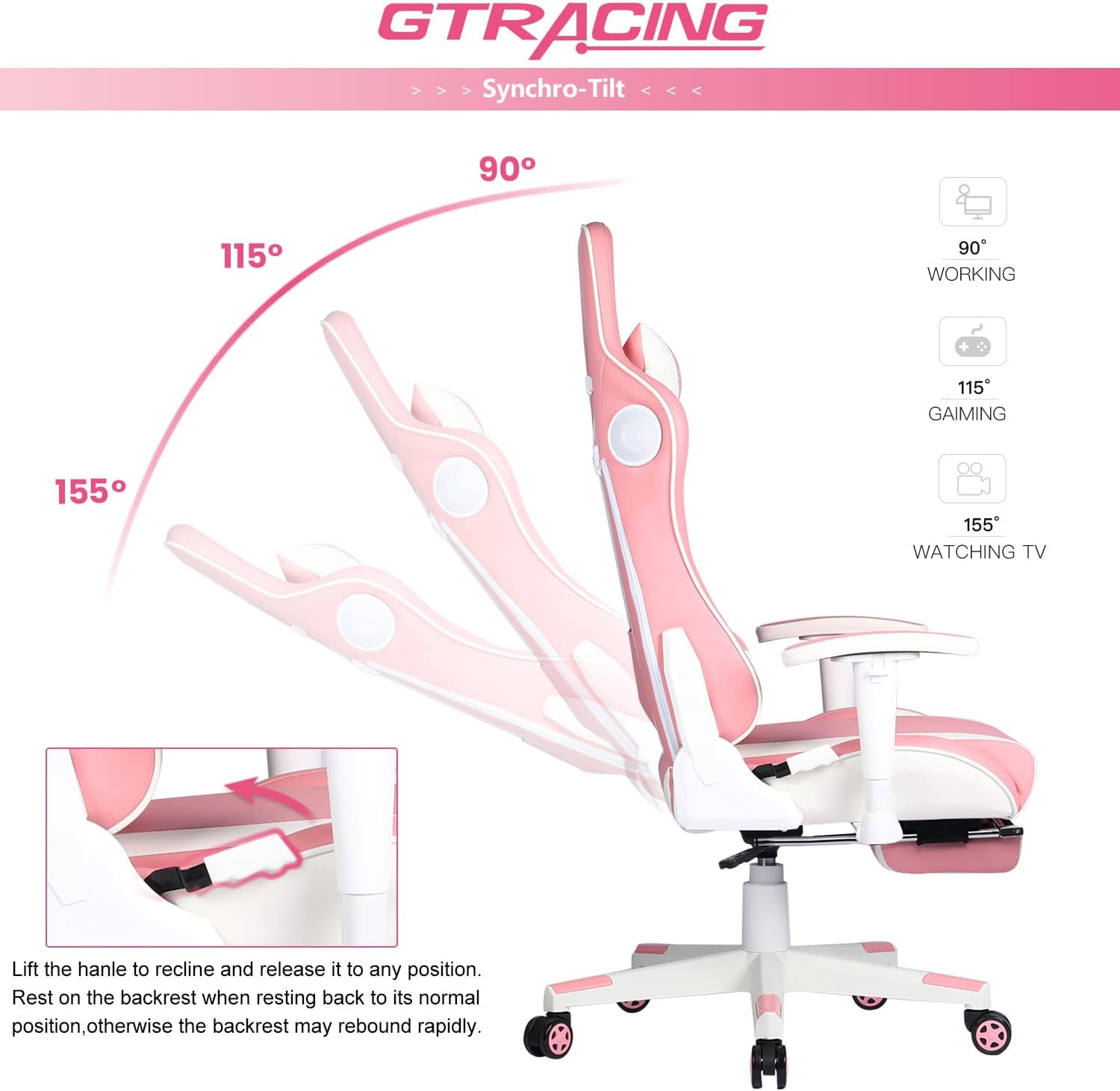
Figure 2: Key Components of the GTRACING Gaming Chair
Assembly Steps:
- Attach Casters to Base: Insert the five casters into the holes at the end of each leg of the chair base. Push firmly until they click into place.
- Install Gas Lift: Place the gas lift cylinder into the center hole of the chair base.
- Assemble Mechanism to Seat: Attach the butterfly mechanism to the underside of the seat cushion using the provided screws. Ensure the front of the mechanism faces the front of the seat.
- Connect Backrest to Seat: Secure the backrest to the seat cushion using the side brackets and screws. Do not fully tighten until both sides are aligned.
- Attach Armrests: If not pre-attached, secure the armrests to the seat and backrest using the designated screws.
- Mount Seat Assembly to Gas Lift: Carefully place the assembled seat and backrest onto the gas lift cylinder, ensuring it is centered and stable.
- Install Footrest: Slide the retractable footrest into its designated slot under the seat.
- Attach Headrest and Lumbar Cushions: Secure the headrest pillow and lumbar cushion using their straps.
- Final Tightening: Once all parts are in place and aligned, fully tighten all screws.

Figure 3: Chair Dimensions for reference during assembly.
Operating Instructions
Chair Adjustments:
- Seat Height Adjustment: Pull the lever located on the right side of the seat upwards to raise or lower the seat. Release the lever at the desired height.
- Backrest Recline: Pull the lever on the left side of the seat upwards to recline the backrest. Lean back to the desired angle (90 to 160 degrees) and release the lever to lock it in place. To return to an upright position, pull the lever and lean forward.
- Rocking Function: The chair features a rocking function. To enable or disable, use the knob located under the seat. Turn clockwise to tighten for a fixed position, counter-clockwise to loosen for rocking.
- Armrest Adjustment: Press the button on the side of the armrest to adjust its height. Release the button to lock.
- Footrest Operation: Pull the footrest out from under the seat to extend it. Push it back in to retract.

Figure 4: Synchro-Tilt Recline Functionality
Bluetooth Speaker Operation:
The GTRACING Gaming Chair includes two integrated Bluetooth speakers for an immersive audio experience.

Figure 5: Integrated Bluetooth Speaker Detail
- Power On/Off: Locate the power button (usually near the speakers or on a control panel). Press and hold to power on or off.
- Pairing: Once powered on, the speakers will enter pairing mode (indicated by a flashing LED light). On your smartphone, tablet, or other Bluetooth-enabled device, search for "GTRACING" or a similar device name in your Bluetooth settings. Select it to pair.
- Audio Playback: After successful pairing, audio from your device will play through the chair's speakers. Adjust volume directly from your connected device.
- Charging: The speakers are powered by a rechargeable battery. Connect the provided USB charging cable to the chair's charging port and a USB power source. A full charge provides approximately 6 hours of music playback.

Figure 6: 360° Immersive Sound Experience Diagram
Maintenance
Proper maintenance will extend the life and appearance of your GTRACING Gaming Chair.
- Cleaning: Wipe clean with a damp cloth. For stubborn stains on PU leather, use a mild soap solution and wipe dry immediately. Avoid harsh chemicals or abrasive cleaners.
- Hardware Check: Periodically check all screws and bolts to ensure they are tight. Retighten any loose hardware to maintain stability and prevent squeaking.
- Caster Care: Keep casters free of hair and debris to ensure smooth rolling.
- Sunlight Exposure: Avoid prolonged exposure to direct sunlight to prevent fading and material degradation.
Troubleshooting
If you encounter issues with your GTRACING Gaming Chair, refer to the following common solutions:
| Problem | Possible Cause | Solution |
|---|---|---|
| Chair Squeaks | Loose hardware; friction between parts. | Tighten all screws and bolts. Apply a small amount of silicone lubricant to moving parts if necessary. |
| Chair Does Not Adjust Height | Gas lift malfunction; lever not engaged. | Ensure the height adjustment lever is fully engaged. If the issue persists, the gas lift may need replacement. |
| Bluetooth Speakers Not Pairing | Speakers off; not in pairing mode; device too far; battery low. | Ensure speakers are powered on and in pairing mode. Charge the speakers. Move your device closer to the chair. Try unpairing and re-pairing. |
| Chair Feels Unstable/Wobbly | Loose connections; uneven floor. | Check and tighten all assembly screws. Ensure the chair is on a flat, even surface. |
If the problem persists after attempting these solutions, please contact GTRACING customer support.
Specifications
| Feature | Detail |
|---|---|
| Brand | GTRACING |
| Model Name | GT890MF |
| Color | Pink |
| Product Dimensions (D x W x H) | 20.87"D x 21.65"W x 53.15"H |
| Maximum Weight Recommendation | 300 Pounds |
| Material | PU Leather, High-Density Foam, Metal Frame |
| Reclining Angle | 90 to 160 degrees |
| Bluetooth Speaker Playtime | Approx. 6 hours (on full charge) |
| Item Weight | 47 pounds |
| Country of Origin | China |
| UPC | 810170305511 |
Warranty and Support
GTRACING is committed to providing high-quality products and customer satisfaction. Your purchase includes:
- 30-Day Satisfaction Guarantee: Free replacement or refund within 30 days of purchase if you are not satisfied.
- 1-Year Limited Warranty: Free replacement or repair for manufacturing defects within 1 year from the date of purchase.
For any questions, suggestions, or support needs, please contact GTRACING customer service. Please have your model number (GT890MF) and purchase date ready when contacting support.
You can find more information and contact details on the official GTRACING website or through your purchase platform.
Related documentsGT890MF


Ask a question about this manual
Ask about setup, troubleshooting, compatibility, parts, safety, or missing instructions. Manuals+ will review the question and use this page’s manual context to help answer it.