
Introduction
Thank you for purchasing the Puxinat P68 Mini Projector. This device is designed to provide a high-quality home theater experience with its 1080P Full HD support and portable design. Please read this manual carefully to ensure proper use and optimal performance.

Image: Visual summary of the Puxinat P68 Mini Projector's main features, including 1080P support, enhanced brightness, high contrast ratio, and large display capability.
Key Features:
- Supports up to 1080P Full HD Resolution with a 5000:1 contrast ratio.
- Portable design (7.48 x 3.78 x 2.83 inches, 3.89 pounds) for easy transport.
- Large projection size from 30 to 250 inches at distances from 3ft to 20ft.
- Equipped with multiple ports: HDMI, USB, VGA, TF, SD, AV, and Earphone.
- Built-in 2W*2 internal speakers with noise reduction technology.
- Upgraded cooling system extends LED projector life up to 60,000 hours.
Important Safety Information
- Do not look directly into the projector lens when the lamp is on.
- Ensure proper ventilation around the projector to prevent overheating.
- Use only the power adapter provided with the projector.
- Keep the projector away from water or other liquids.
- Avoid placing the projector on unstable surfaces.
- Do not attempt to open or repair the projector yourself. Contact qualified service personnel.
Package Contents
Please check that all items are present and in good condition:
- Puxinat P68 Mini Projector
- Power Adapter
- Remote Control
- AV Cable
- User Manual
- (Possible) Projector Screen

Image: Puxinat P68 Mini Projector with included accessories like remote control and cables.
Product Overview
Front View:
Image: Front view of the Puxinat P68 Mini Projector, showing the lens and ventilation.
Rear and Side Views (Ports and Controls):
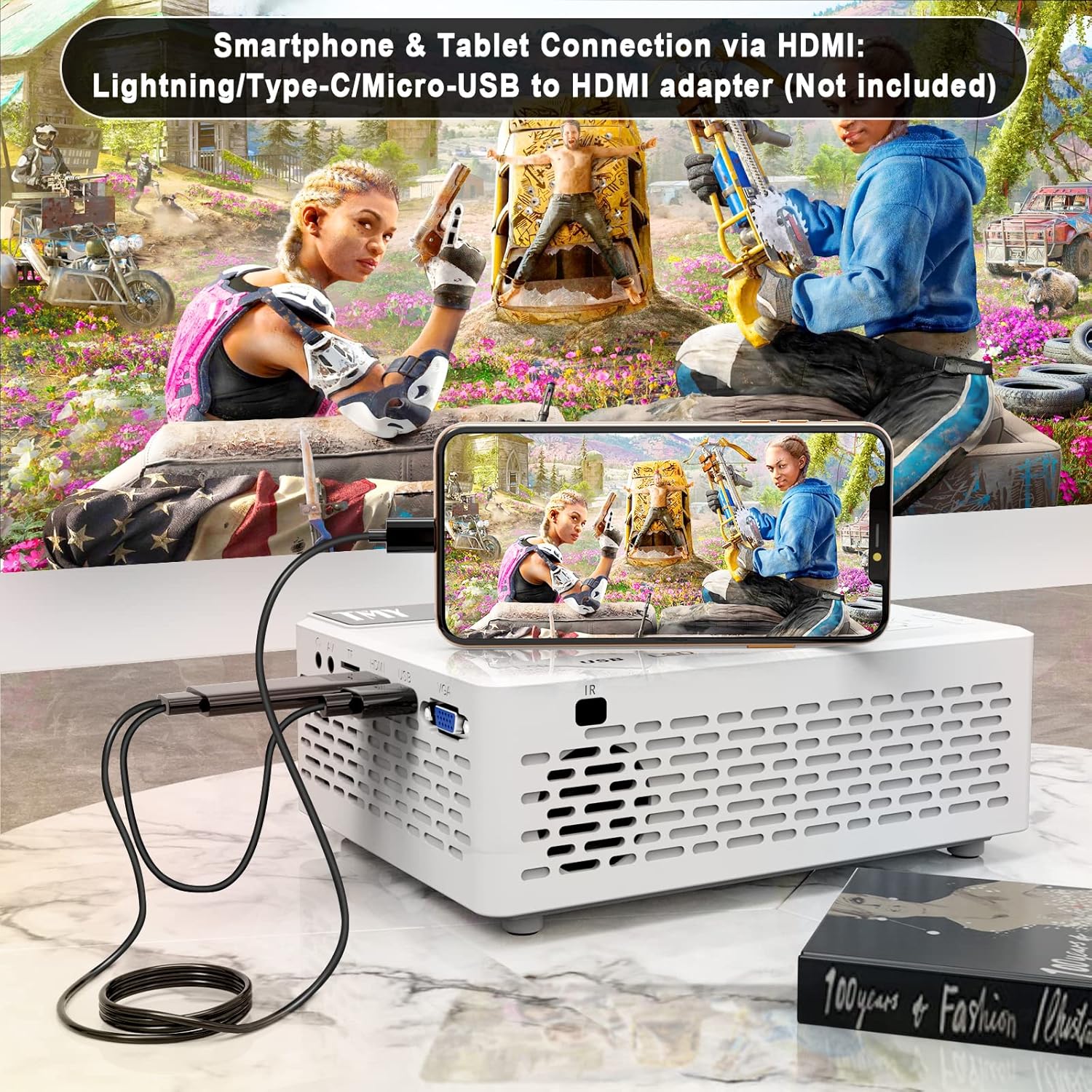
Image: Rear and side view of the Puxinat P68 Mini Projector, highlighting the various input/output ports including HDMI, USB, VGA, AV, and TF/SD card slots.
The projector features a lens on the front, control buttons on the top panel, and various input/output ports on the sides and rear for connecting external devices.
Setup
1. Placement and Projection Size
Place the projector on a stable, flat surface. The ideal projection distance ranges from 3 feet to 20 feet, allowing for a screen size between 30 inches and 250 inches. Adjust the distance to achieve your desired screen size.

Image: Diagram illustrating recommended projection distances and corresponding screen sizes for the Puxinat P68 Mini Projector.
2. Power Connection
Connect the power adapter to the projector's power input port, then plug the adapter into a power outlet. The power indicator light will illuminate.
3. Focus and Keystone Adjustment
After powering on, adjust the Focus ring on the projector until the image is clear. If the image appears trapezoidal, use the Keystone correction dial to adjust it to a rectangular shape.
Image: Close-up of the focus and keystone adjustment dials on the Puxinat P68 Mini Projector.
Operating Instructions
1. Connecting External Devices
The Puxinat P68 supports various input sources. Select the appropriate input source from the projector's menu after connecting your device.
- HDMI: Connect laptops, PCs, TV boxes, DVD players, X-Box, or TV sticks using an HDMI cable.
- USB: Insert USB sticks or hard disks for media playback.
- VGA: Connect older PCs or laptops using a VGA cable.
- AV: Use the AV cable to connect devices with AV output.
- TF/SD Card: Insert a TF or SD card into the designated slot for media playback.
- Smartphone/Tablet: For mobile devices, a separate convert adapter (Lightning/Type-C/Micro-USB to HDMI adapter) is required to connect via the HDMI port.

Image: Illustration showing the Puxinat P68 Mini Projector connected to various devices such as laptops, gaming consoles, and storage devices.

Image: The Puxinat P68 Mini Projector connected to a TV stick for streaming content.

Image: A smartphone connected to the Puxinat P68 Mini Projector using an HDMI adapter.
2. Audio Output
The projector includes built-in 2W*2 internal speakers, suitable for indoor use. For louder audio or outdoor environments, you can connect external speakers via the aux cable to the earphone port.

Image: The Puxinat P68 Mini Projector highlighting its low noise operation and the option to connect external speakers for enhanced audio.
Usage Scenarios
The Puxinat P68 Mini Projector is versatile for various entertainment settings, both indoors and outdoors.

Image: The Puxinat P68 Mini Projector set up for an outdoor movie night, demonstrating its portability and suitability for open-air entertainment.

Image: The Puxinat P68 Mini Projector used in an indoor setting, creating a home theater experience in a living room.
Maintenance
1. Cleaning the Lens
Use a soft, lint-free cloth specifically designed for optical lenses to gently clean the projector lens. Avoid using abrasive cleaners or excessive force.
2. Cooling System
The projector features an upgraded cooling system designed for longevity. Ensure that the ventilation vents are not blocked to maintain optimal performance and extend the LED lamp life up to 60,000 hours.
Troubleshooting
- No Power: Check if the power adapter is securely connected to both the projector and the power outlet. Ensure the power outlet is functional.
- No Image:
- Verify that the input source selected on the projector matches the connected device (e.g., HDMI1, USB).
- Check all cable connections for looseness or damage.
- Adjust the focus and keystone dials.
- Blurry Image: Adjust the focus ring until the image is sharp. Ensure the projection surface is flat and the projector is at an appropriate distance.
- No Sound:
- Check the volume settings on both the projector and the connected device.
- If using external speakers, ensure they are properly connected and powered on.
- Remote Control Not Working: Check the batteries in the remote control. Ensure there are no obstructions between the remote and the projector's IR receiver.
Specifications
| Feature | Detail |
|---|---|
| Brand | Puxinat |
| Model Number | P68 |
| Display Resolution | 1920 x 1080 (1080P Full HD Supported) |
| Connectivity Technology | HDMI, USB, VGA, AV, TF/SD Card, Earphone |
| Special Feature | Built-in Speakers, Noise Reduction, Upgraded Cooling System |
| Recommended Uses | Home Theater, Outdoor Entertainment |
| Item Weight | 10.6 ounces |
| Product Dimensions | 7 x 4.72 x 3.54 inches |
| LED Lamp Life | Up to 60,000 hours |
| Contrast Ratio | 5000:1 |
Warranty and Support
Warranty Information:
The Puxinat P68 Mini Projector typically comes with a 12-month warranty. Please refer to your purchase documentation for specific warranty terms and conditions. Protection plans may also be available for extended coverage.
Customer Support:
For technical assistance, troubleshooting, or warranty claims, please contact Puxinat customer support. Refer to the contact information provided with your product packaging or visit the official Puxinat website.
You can also visit the Puxinat Store on Amazon for more product information and support resources.