
Introduction
Welcome to the user manual for your MOZOTER Bluetooth 5.3 Wireless Earbuds. This guide provides comprehensive instructions on setting up, operating, maintaining, and troubleshooting your earbuds to ensure optimal performance and a seamless audio experience. Please read this manual carefully before using your earbuds.
The MOZOTER DBK02 earbuds feature advanced Bluetooth 5.3 technology, delivering stable connectivity and high-fidelity stereo sound with deep bass. Designed for comfort and convenience, they offer a long battery life, intuitive controls, and a real-time LED power display.
Product Overview
Your MOZOTER Wireless Earbuds come with a compact charging case and various ear tip sizes for a customized fit. Key features include:
- Bluetooth 5.3 Technology: Ensures stable, high-speed transmission with low power consumption.
- Hi-Fi Stereo Sound: Powerful deep bass, clear vocals, and excellent treble from 8mm speaker drivers.
- Clear Call Quality: Equipped with 4 microphones and call noise cancellation for clear conversations.
- Real-Time LED Power Display: Digital display on the charging case shows battery percentage.
- Ultra-Long Battery Life: Up to 6 hours of listening on a single charge, extended to 36 hours with the charging case.
- Lightweight & Comfortable Fit: Ergonomic design with multiple ear tip sizes for secure and comfortable wear.
- One-Step Pairing: Automatic pairing upon opening the charging case.

Image: MOZOTER Bluetooth 5.3 Wireless Earbuds and Charging Case. The earbuds are black with blue indicator lights, and the charging case features a digital LED display showing battery levels.
Setup
1. Initial Charging
Before first use, ensure the plastic film cover on the charging points of the earbuds is removed. Place the earbuds into the charging case and fully recharge them. The LED display on the case will indicate the charging status.

Image: Diagram showing the MOZOTER earbuds in their charging case, connected via a Type-C cable for charging. The image highlights 6 hours of single charge playtime and 36 hours total with the charging case.
2. Pairing with Your Device
- Open the lid of the charging case. The earbuds will automatically turn on and enter pairing mode.
- On your device (smartphone, tablet, etc.), go to the Bluetooth settings.
- Search for "DBK02" in the list of available devices and select it to connect.
- Once connected, you will hear a confirmation tone, and the earbuds will be ready for use.
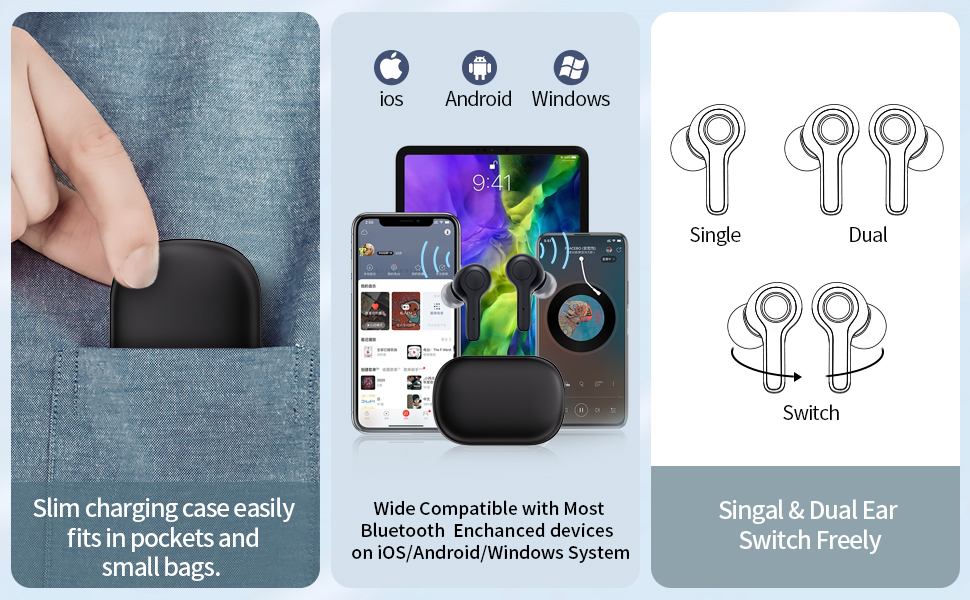
Image: Illustrates the earbuds' compatibility with iOS, Android, and Windows devices, and shows options for single or dual earbud use, and seamless switching between them.
3. Achieving the Perfect Fit
The earbuds come with three different sizes of soft ear caps (S/M/L). Choose the size that provides the most comfortable and secure fit for your ears. Gently rotate the earbud to lock it into place in your ear canal.

Image: A 3D rendering showing how the earbud fits ergonomically into the ear, alongside different ear tip sizes (S, M, L) for customizable comfort.
Operating Instructions
The MOZOTER earbuds feature intuitive touch controls for easy management of your audio and calls.
| Function | Action |
|---|---|
| Play/Pause | Tap L/R Earbud 2 times |
| Next Track | Tap R Earbud 2 times |
| Previous Track | Tap L Earbud 2 times |
| Volume + | Hold R Earbud |
| Volume - | Hold L Earbud |
| Answer Call | Tap L/R Earbud 1 time |
| Hang up/Reject Call | Hold L/R Earbud |
| Voice Assistant | Tap L/R Earbud 3 times |
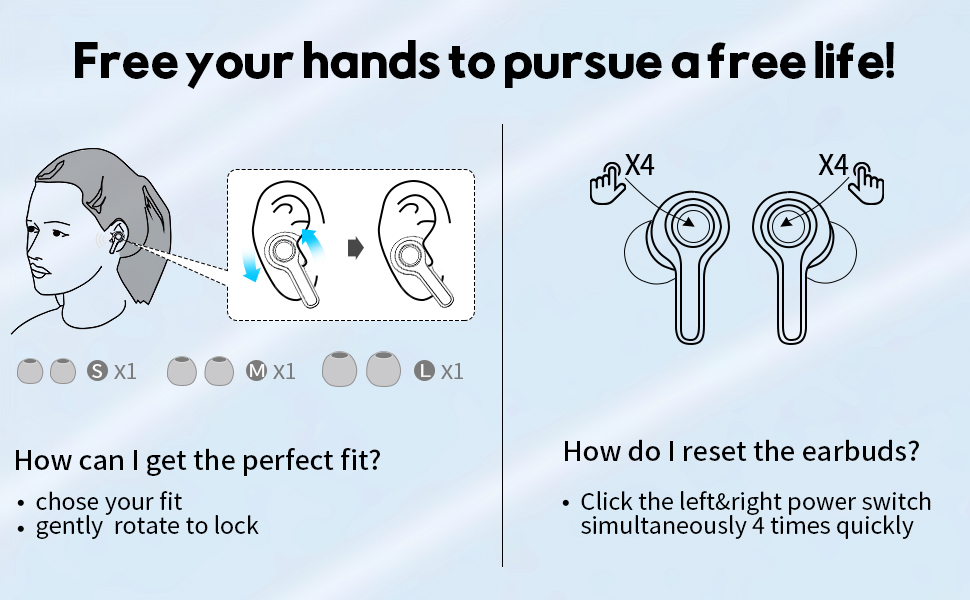
Image: Visual guide detailing the touch controls for various functions like play/pause, track skipping, volume adjustment, call handling, and voice assistant activation. Also includes instructions for resetting the earbuds.
Maintenance
Cleaning Your Earbuds
To maintain sound quality and hygiene, regularly clean your earbuds and charging case. Use a soft, dry, lint-free cloth to wipe the earbuds and charging contacts. For ear tips, you can gently remove them and clean with a mild soap solution, then rinse and dry thoroughly before reattaching.
Storage
When not in use, store your earbuds in their charging case to protect them from dust and damage. Store the case in a cool, dry place away from extreme temperatures.
Troubleshooting
Common Issues and Solutions:
- Earbuds not pairing with each other or device:
Try resetting your earbuds. Click the left and right power switch simultaneously 4 times quickly. Then attempt to pair again.
- Earbuds not charging:
Ensure the plastic film on the charging points is removed. Check if the charging case has power. If the case has no power, the earbuds will not charge automatically when placed inside. Charge the case using the provided Type-C cable.
- Low volume or poor sound quality:
Ensure the earbuds are properly seated in your ears and that the correct size ear tips are used. Clean any debris from the earbud speakers. Check your device's volume settings.
- Intermittent connection:
Ensure your device is within the Bluetooth range (approximately 35 feet without obstacles). Avoid environments with strong electromagnetic interference. Try resetting the earbuds and re-pairing.
Specifications
| Feature | Detail |
|---|---|
| Model Name | DBK02 |
| Bluetooth Version | 5.3 |
| Connectivity Technology | Wireless (Bluetooth) |
| Earbud Battery Life | Up to 6 hours |
| Total Playtime (with Charging Case) | Up to 36 hours |
| Charging Time (Case) | Approximately 1.5 hours |
| Driver Size | 8mm |
| Microphones | 4 (2 per earbud) with Call Noise Cancellation |
| Included Components | Earbuds, Charging Case, Type-C Cable, Eartips (S/M/L) |
| Product Dimensions | 2.36 x 1.57 x 1.06 inches |
| Item Weight | 1.69 ounces (48 grams) |
| Water Resistance Level | Not Water Resistant |
Warranty and Support
MOZOTER is committed to providing high-quality products and excellent customer service. Your MOZOTER Wireless Earbuds come with:
- 365 Days Worry-free Support: For any product-related issues.
- 24-Hour Standby Customer Service: Responsive assistance for your queries.
- Lifetime Support: Ongoing assistance for the lifespan of your product.
For further assistance or to claim warranty support, please contact MOZOTER customer service through the retailer's platform or visit the official MOZOTER store online.
You can also refer to the official User Manual PDF for more detailed information: MOZOTER User Manual (PDF)
